
SQL editor
The SQL tab runs any SQL you type: one statement or a batch, with paged and sortable results, inline editing of rows from a single table, EXPLAIN, bookmarks and macros. It appears at four levels — the server, a database, a schema and a table (or view) — and works the same at each, except for what the box starts with and which database the statements run in.
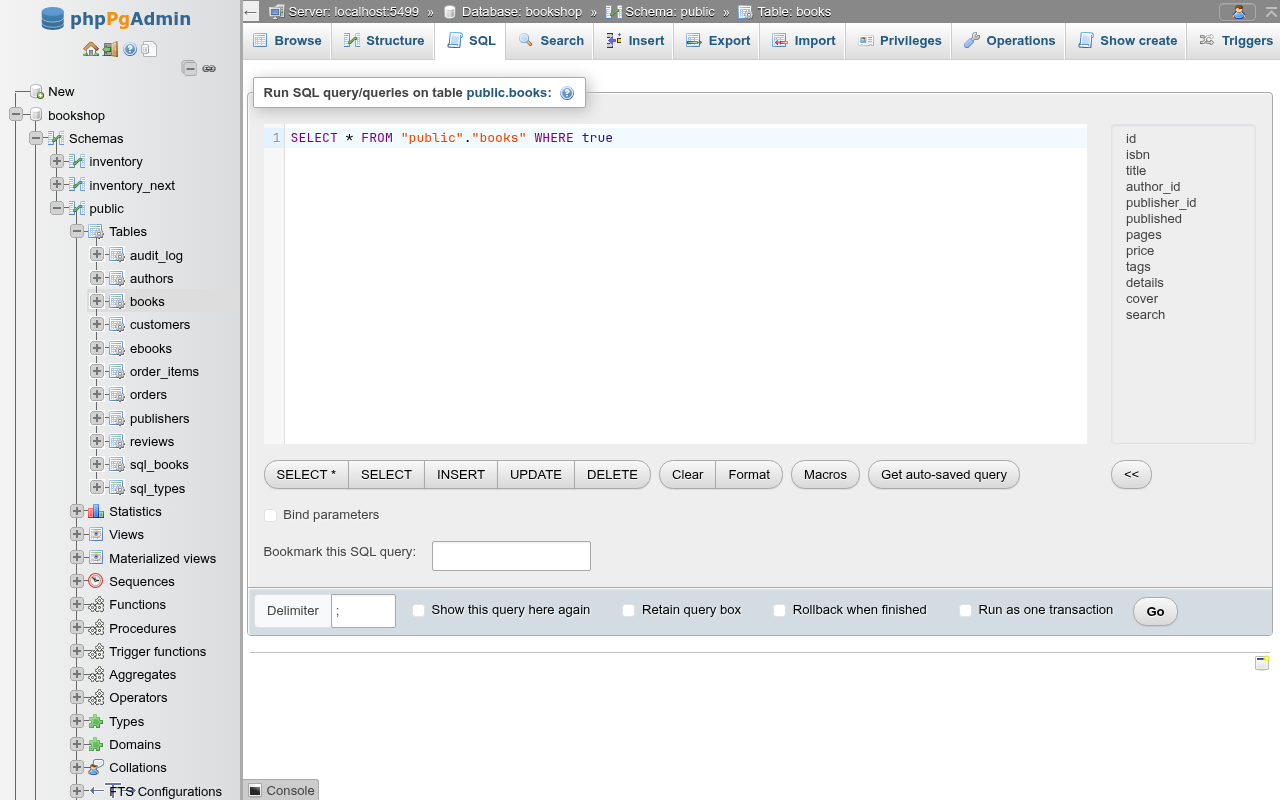
Where the statements run
| Level | URL | Runs in | The box starts with |
|---|---|---|---|
| Server | /server/sql | The database you signed in to (the maintenance database, usually postgres) | empty |
| Database | /db/<db>/sql | That database | empty |
| Schema | /db/<db>/schema/<schema>/sql | That database | empty |
| Table / view | …/<table>/sql | That database | SELECT * FROM "schema"."table" WHERE true |
A schema's SQL tab does not set the search path
The schema level only changes the heading and the default schema for completions. Statements still run with the role's normal search_path (usually "$user", public), so write inventory.stock, not stock, when you are on the inventory schema's SQL tab.
One session per database
As in pgAdmin's query tool, the SQL tab keeps one connection per database open between runs, its query tool session: SET commands, temporary tables, prepared statements and an open BEGIN carry over to the next run, also after visiting other pages and coming back. The session starts with the first run, is kept alive while the browser tab is open, and ends when the tab closes, after three minutes without the page's heartbeat, or after four hours without a run. Ending it closes the connection, which rolls back a transaction left open; the browser asks before a tab with an open transaction is closed or reloaded. See Sessions and transactions.
At the server level there is no bookmark field, no Bookmarked SQL query card, no completions for tables and columns, and Create view asks for the database to create the view in (see Create a view from a result).
The editor
The box is a CodeMirror editor with PostgreSQL syntax colouring, line numbers, bracket matching and automatic closing of brackets and quotes.
| Key | What it does |
|---|---|
| Ctrl+Enter (Cmd+Enter), F5 | Runs the query (same as Go): the selected text when there is a selection, else the whole box |
| Alt+F5 | Runs the statement the cursor is in (same as Execute query) |
| Tab | Indents; it does not leave the box |
| Ctrl+Space | Opens the completion list |
| Ctrl+Z / Ctrl+Shift+Z | Undo / redo |
| Ctrl+0…9, Alt+F1…F12 | Run the macro bound to that key (Macros) |
Completions
As you type, the editor offers SQL keywords and, at database level and below, the database's schemas, tables, views, materialized views and foreign tables, and their columns. Type a schema name and a dot for its relations; type a table name or alias and a dot for its columns. Tables in public are also offered without a schema prefix. Enter or Tab accepts the highlighted entry; Esc closes the list.
INFO
The list of tables and columns is read once when the page opens. A table you create in the editor is not offered until you reload the page. pg_catalog and information_schema are not offered.
Buttons under the editor
| Button | What it does |
|---|---|
| SELECT *, SELECT, INSERT, UPDATE, DELETE | Table level only. Replace the box with a template for the table, every column quoted. INSERT and UPDATE use '[value-1]', '[value-2]'… placeholders; DELETE ends in WHERE false so it deletes nothing until you change it. |
| Clear | Empties the box. |
| Format | Reformats the query (keywords upper case, one clause per line) with sql-formatter's PostgreSQL dialect. A query it cannot parse shows the error and stays as it was. |
| Open file | pgAdmin's Open File: a .sql (or text) file of your computer replaces the box, up to 5 MiB (a bigger one is for the Import page). Nothing is uploaded until you run it. |
| Save file | pgAdmin's Save File: downloads the box as a file, under the name of the file last opened (query.sql otherwise). |
| Macros | The macros menu. |
| Get auto-saved query | Puts back the last text typed in any SQL box of this browser. |
| << (next to the column list) | Table level only. Inserts the selected columns, quoted and comma-separated, at the cursor. Select several with Ctrl/Shift. |
The INSERT and UPDATE templates list every column
They include identity, serial and generated columns. Remove search from the books template, for example, or the statement fails with cannot insert a non-DEFAULT value into column "search".
Auto-save
Whatever you type is saved in the browser's local storage as you type, under one key shared by every SQL box (server, database, schema and table level) and every database. Get auto-saved query restores the latest text, wherever you typed it. Nothing is stored on the server, so it does not follow you to another browser.
Running a query
- Type or paste the SQL.
- Choose the options in the card's footer (below).
- Click Go or press Ctrl+Enter.
When text is selected in the box, Go runs only the selection, as pgAdmin's Execute script does. Execute query (Alt+F5) runs the statement the cursor is in: the one whose text or semicolon holds the cursor, or the one just before it when the cursor sits after a semicolon with no blank line between. Quotes, dollar quotes and comments are honoured when finding the statement, as they are when a batch is split, and the Delimiter option applies.
As in phpMyAdmin, a successful Go empties the box and folds it away; a Show query box link brings it back. Running a selection or the statement at the cursor leaves the box as it is, and so does a run that fails. Two footer options change that:
| Option | What it does |
|---|---|
| Delimiter | The statement separator, ; by default. Any string works, for example $$ or //. It is only needed for unusual scripts: dollar-quoted function bodies are already kept whole (see Batches). |
| Show this query here again | Keeps the query in the box after Go. |
| Retain query box | Keeps the box open after Go. |
| Rollback when finished | Runs the batch in a transaction and rolls it back at the end. See Transactions. |
| Run as one transaction | Runs the batch in one transaction, committed at the end, rolled back on the first error. |
Confirmation of destructive statements
With the Confirm DROP queries setting on (the default, under Settings → Features), the editor asks before it runs a batch containing DROP …, ALTER TABLE … DROP …, DELETE FROM …, TRUNCATE …, or an UPDATE without WHERE.
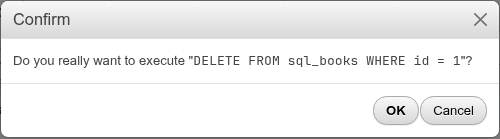
INFO
The check looks at the first word of each statement (comments are skipped). A DELETE inside a WITH query or a function that drops something are run without asking. Statements run from the console and links that open the SQL tab with a statement to run (from another page or a bookmark in the browser) are checked too. Macros and Edit inline are not, nor are statements another page has already confirmed (its own Delete or Drop dialog).
Results
Each statement of the run gets its own message: a green box with the outcome and the time it took, the statement with syntax colouring, and links under it.
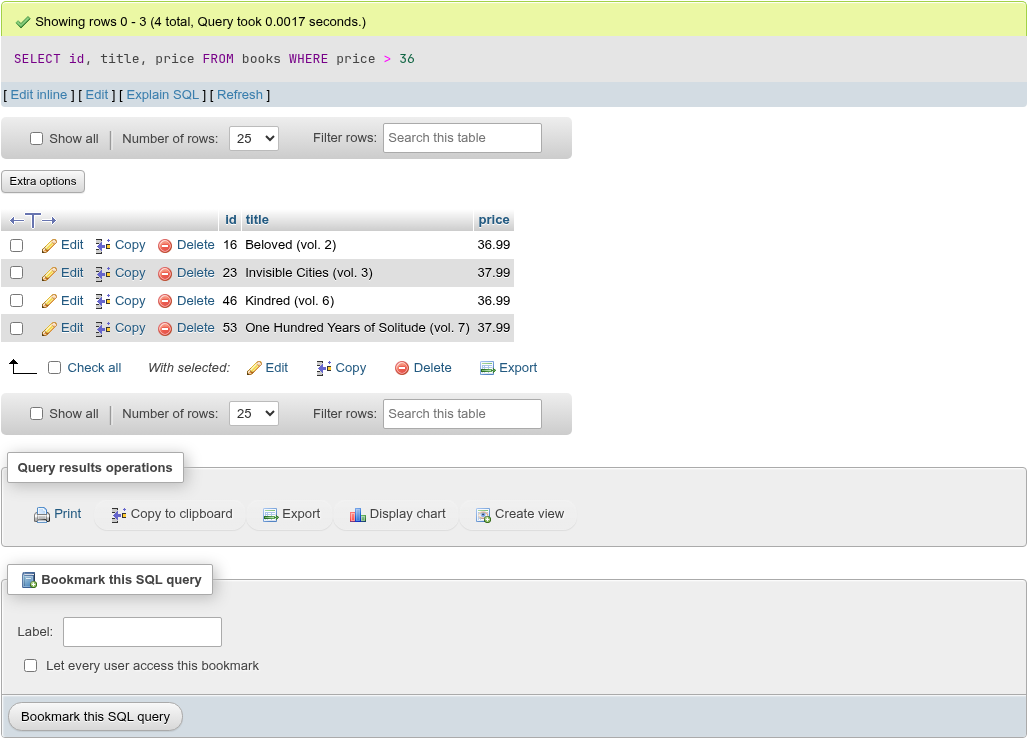
| Statement | Message |
|---|---|
| Returns rows | Showing rows 0 - 24 (65 total, Query took … seconds.) — rows are numbered from 0, as in phpMyAdmin |
| Returns no rows | PostgreSQL returned an empty result set (i.e. zero rows). |
INSERT / DELETE | 3 rows inserted. / 1 row deleted. |
UPDATE, MERGE, COPY | 2 rows affected. |
Anything else (CREATE, SET, DO, VACUUM…) | Your SQL query has been executed successfully. |
The links under a message:
| Link | What it does |
|---|---|
| Edit inline | Turns the statement into a text box with Go and Cancel; Go runs the edited text as a new query. |
| Edit | Puts the statement back in the query box and scrolls up. From the Browse page it opens the table's SQL tab with the statement. |
| Explain SQL | For SELECT, WITH, VALUES and TABLE statements: runs EXPLAIN (FORMAT JSON, …) on it and shows the query plan. On an EXPLAIN result it reads Skip Explain SQL and runs the statement without EXPLAIN. |
| Explain analyze | For the same statements, unless they write through a WITH clause: the same with ANALYZE, which executes the statement. |
| Refresh | Runs the statement again with the same page and order; under a batch, that statement alone. |
Below a row-returning statement come the results grid — the same grid as the Browse tab — the Query results operations card and the Bookmark this SQL query card.
Query results operations has Print, Copy to clipboard (the rows on this page as tab-separated text with a header line, NULL written out), Export, Display chart, Visualize GIS data (only when a column is spatial) and Create view. Export opens the Export page for the query's rows (every row, not only this page). Display chart opens the chart of them, Visualize GIS data the drawing of their spatial values.
Display chart
Display chart (/db/<database>/chart) is phpMyAdmin's chart page for the statement's rows:
- Bar (horizontal), Column, Line, Spline, Area, and Pie when one series is chosen; Stacked for bars, columns and areas.
- Chart title, the X-Axis column (the first one to begin with) and the Series (every other numeric column), and the two axis labels.
- Series names are in a column: for rows in long form, a Series column whose values name the series and a Value Column with their numbers, one series per distinct name.
- Start row and Number of rows run the statement again for that slice of its rows; Go applies them.
- Save chart as image downloads the chart as
chart.png.
Hovering a bar, point or slice shows its series, X value and value.
Visualize GIS data
Visualize GIS data (/db/<database>/gis-visualization) is phpMyAdmin's Display GIS Visualization page, and pgAdmin's Geometry Viewer in its place. It draws the values of a spatial column of the statement's rows:
- PostgreSQL's built-in geometric types:
point(a small circle),lsegandpath(lines; a closed path is closed),boxandpolygon(filled),circle(filled, at its radius).line, which is infinite, is not drawn. - PostGIS
geometryandgeography, read from the hex EWKB PostgreSQL outputs them as: points, line strings, polygons with their holes, the multi types and geometry collections; Z and M values are left out. Coordinates are drawn as they are (no map projection).
Label column (the first non-spatial column to begin with, or -- None --) names each row's shapes when the pointer is on them; Spatial column picks the column drawn; Start row and Number of rows run the statement again for that slice, as on the chart page. Each row has its own colour. The wheel zooms around the pointer and dragging pans. Save downloads the drawing as PNG or SVG, named after the column. A value that cannot be read is skipped, and a warning counts them.
Use OpenStreetMaps as Base Layer and Save › PDF are not built: the drawing is phpPgAdmin's own SVG, without a map library or tiles from the internet.
How paging and ordering work
When the query box holds one statement that returns rows (SELECT, VALUES, TABLE, or WITH … SELECT), phpPgAdmin pages it by wrapping it:
SELECT * FROM (
<your statement>
) _pga ORDER BY "title" ASC LIMIT 26 OFFSET 25
It asks for one row more than the page to know whether there is a next page, and runs SELECT count(*) FROM (<your statement>) _c for the total when there is. A click on a column heading changes the ORDER BY of the wrapper, so it overrides any ORDER BY of your own. The rows per page come from the Number of rows setting (MaxRows, 25 by default) under Settings → Main panel.
These statements are not paged or sortable; the grid shows every row they return and the headings are not links:
- a statement with its own
LIMIT,OFFSET,FETCHorFOR UPDATE/SHARE; SELECT … INTO,INSERT/UPDATE/DELETE/MERGE … RETURNING, and aWITHholding one of them;SHOW,EXPLAIN,FETCHand any other statement that returns rows.
Their grids have no page links, Show all or Number of rows, since paging would run the statement again. The statements of a batch of two or more show all their rows too, but a SELECT among them keeps its navigation: using it runs that SELECT again on its own (see Batches).
No row limit on unpaged results
An unpaged statement returns all its rows to the browser. SELECT * FROM big_table LIMIT 1000000, or SELECT * FROM big_table; as part of a batch, loads every row into the page. Give large queries a LIMIT that you can live with, or run them alone so they are paged.
The in-memory fallback
Some single SELECTs cannot be wrapped in a subquery, for example one whose result has two columns with the same name (SELECT id AS a, title AS a FROM books sorted by a). When the server rejects the wrapped statement before running it (a syntax error, or an ORDER BY column it cannot pick out), phpPgAdmin runs your statement as written, fetches every row and pages them in memory. The total is then exact, but a click on a heading does not change the order. An error while the statement runs, or a cancel, is reported as it is; the statement is not run a second time.
Paging runs the statement again
Paging runs your statement again for every page, and again for the total count. Volatile functions (nextval(), random(), functions that write) in a paged SELECT therefore run more often than you expect. Put side effects in statements that do not return rows, or add a LIMIT so the statement is not paged.
Batches
Type several statements separated by ; (or your Delimiter). phpPgAdmin splits the text the way psql does: a ; inside 'strings', E'escapes', "identifiers", $tag$ dollar quotes $tag$, -- line comments or /* nested /* block */ comments */ does not end a statement, so a CREATE FUNCTION … AS $$ … $$ body is sent whole.
The statements run one after the other. Each gets its own message and, if it returns rows, its own grid. The run stops at the first error; the statements after it are not run and get no message.
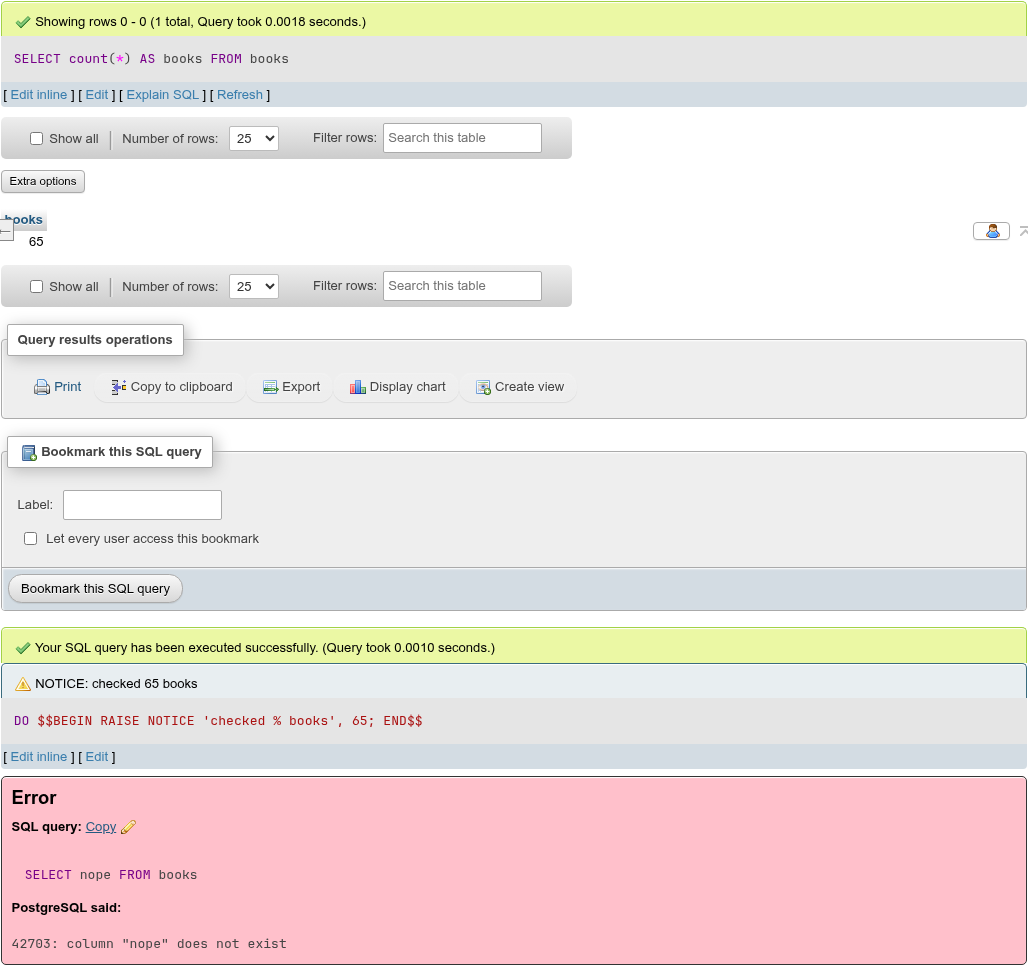
The grids of a batch show all their rows. Changing Number of rows, ticking Show all, clicking a heading or Refresh under one of them runs only that SELECT again, on its own, as phpMyAdmin does: the results of the batch are replaced by that statement's paged result, and the other statements (an INSERT before it, say) are not run again.
Notices
NOTICE, WARNING, INFO and LOG messages a statement raises (RAISE NOTICE in PL/pgSQL, DROP … IF EXISTS on something missing, VACUUM VERBOSE) appear in a blue box under that statement's message, prefixed with their level.
Errors
A failed statement gets a red Error box with the statement, a Copy link and an edit icon, and PostgreSQL said: with the SQLSTATE code, the message, and the Detail: and Hint: lines when the server sent them (see the batch above).
When PostgreSQL reports where in the statement the error is (syntax errors, unknown tables and columns), the box stays open and that place is underlined with a red dotted line, as pgAdmin marks it: from the reported character to the next space or the end of the line, with the cursor put there. For an error "at end of input" the last character is marked. The mark goes as soon as the text is edited. It is placed in the failing statement of the batch, also when only a selection or the statement at the cursor was run. It is not placed when Bind parameters replaced :name placeholders, since the server then saw different text.
Transactions
With Auto commit ticked (the default, as in pgAdmin) and neither option below, every statement commits on its own: in a batch that fails at the third statement, the first two stay done.
Auto commit, Commit and Rollback
Untick Auto commit (pgAdmin's Auto commit?) and a run outside a transaction starts one with BEGIN and leaves it open. A BEGIN you type yourself does the same with Auto commit ticked. While a transaction is open, a bar above the buttons says The session is idle in a valid transaction block. with Commit and Rollback. After an error inside the transaction it turns red and says The session is idle in a failed transaction block.: PostgreSQL then refuses every statement until Rollback (a Commit of a failed transaction rolls it back, and says so). The status is refreshed every half minute.
Inside an open transaction, Run as one transaction and Rollback when finished work on a savepoint, so they leave your transaction as it was: the batch is released into it, or rolled back to the savepoint.
When the server cannot keep sessions (PGADMIN_QUERY_SESSIONS=0, or a host without background processes), each run gets a connection of its own, as before, and Auto commit has no effect.
| Option | What happens |
|---|---|
| Run as one transaction | BEGIN before the first statement, COMMIT after the last. The first error rolls everything back: the messages of the statements before it end in [ROLLBACK occurred.], and the error box shows the real error. |
| Rollback when finished | BEGIN before the first statement, ROLLBACK after the last, so you can try a change and see its effect without keeping it. The last message ends in [ROLLBACK occurred.] |
Not in a transaction block
Statements that cannot run in a transaction block (VACUUM, CREATE DATABASE, CREATE INDEX CONCURRENTLY, ALTER SYSTEM) fail under both options.
Connection (New connection, SET ROLE)
Under Auto commit, Connected as postgres names the role the page's session runs as, after pgAdmin's query tool connection bar. New connection… (pgAdmin's New Connection) starts the session again:
- Username and Password: another role of the same server; empty for yours.
- Role: a role to become, as
SET ROLEdoes (sent as the startup option-c role=…); empty for none. A role that does not exist, or that the user cannot become, is refused (There is no role "x" on this server.).
Both are checked on a connection of their own first; a wrong password says so in the dialog without ending your sign-in. The bar then reads Connected as app_user (role reporting), with Back to postgres to return. The old session ends, so what was open in it is rolled back (the page asks first when a transaction is open), and SET, temporary tables and LISTENs go with it. The password is passed to the session's process in its environment and kept nowhere else; if that session ends (after three idle minutes without the page, for instance), the next run connects as your own role again and says so. The history of what the page runs stays under your own role.
Notifications (LISTEN and NOTIFY)
Since the page's runs share the session's connection, LISTEN channel stays in effect after the run, as in pgAdmin's query tool. A Notifications card (pgAdmin's Notifications tab) then appears under the results: Listening on: orders, audit. and a table of what NOTIFY sent to those channels, from any session, newest first: Recorded time, Event (the channel), Process ID (the backend that sent it) and Payload. While the session listens, the page asks it every two seconds; a notification sent inside a transaction arrives when that transaction commits. Clear empties the table; UNLISTEN * stops listening (the table stays until cleared). The session keeps the last 1000 notifications between two looks, and the page shows the last 1000. The channels are read only when no transaction is open, so inside one the card shows the ones from before it.
Without a query tool session each run has its own connection, and a LISTEN ends with it.
Bind parameters
Tick Bind parameters to use named placeholders. Each :name in the query (outside strings, quoted identifiers, comments and ::type casts) gets a text field; the value replaces the placeholder as a quoted literal when the query runs.
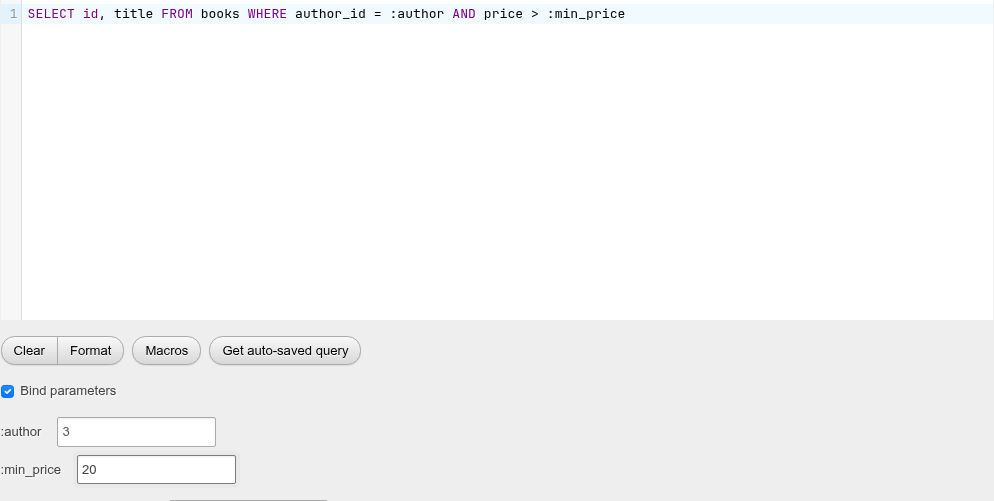
-- typed
SELECT id, title FROM books WHERE author_id = :author AND price > :min_price
-- run
SELECT id, title FROM books WHERE author_id = '3' AND price > '20'
INFO
Values are always sent as quoted literals, which PostgreSQL casts to the column's type. To bind something that is not a value (a table name, a list for IN), write it into the query instead. A placeholder whose field you never typed in is left as :name, which fails with syntax error at or near ":". The statement shown in the results is the one with the values filled in.
EXPLAIN
Explain SQL under a SELECT runs EXPLAIN (FORMAT JSON, …) on it (estimates only; the query is not executed) and shows the plan in a Query plan card under the statement's message, as pgAdmin's query tool shows it. Explain analyze does the same with ANALYZE, which executes the statement and adds the actual times, rows and loops. Both use the options last chosen on a plan card (see below); with the defaults they run
EXPLAIN (FORMAT JSON, VERBOSE, SUMMARY) SELECT …
EXPLAIN (FORMAT JSON, ANALYZE, VERBOSE, BUFFERS) SELECT …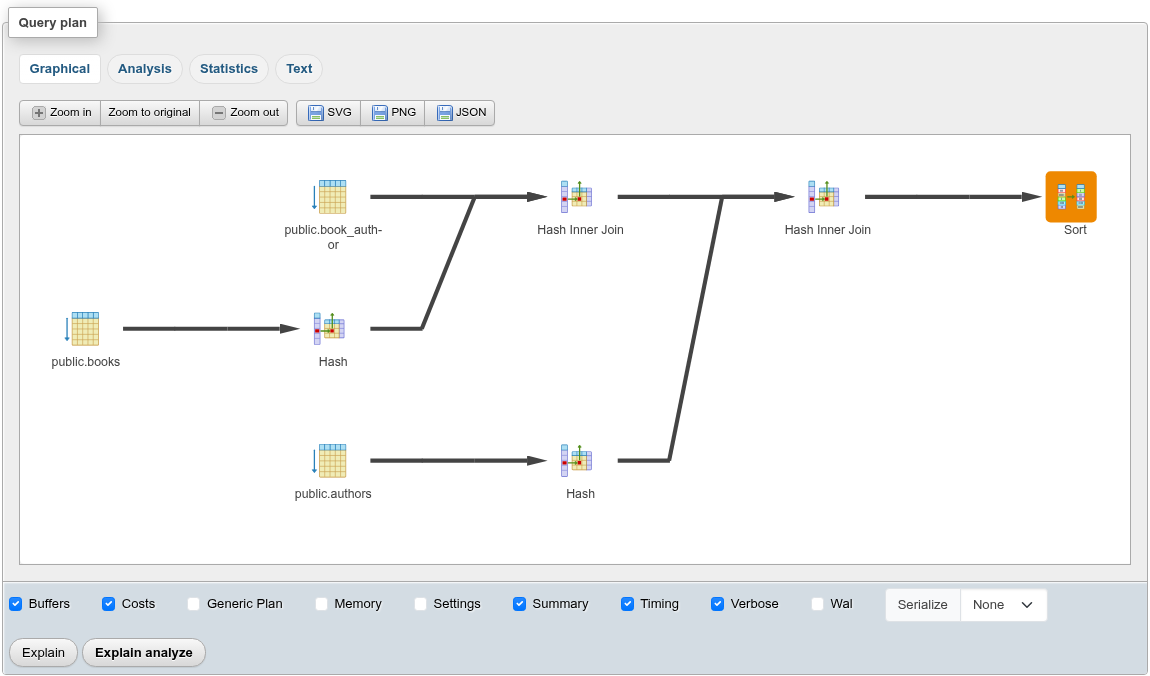
The card has four views:
| View | What it shows |
|---|---|
| Graphical | The plan drawn right to left: the top node on the right, each node's inputs a column further left, with pgAdmin's node icons and the relation or index under each. The arrows grow wider with the rows a node hands up (the actual rows of every loop after ANALYZE, the planned rows otherwise). An icon's backdrop is shaded by the node's own share of the query: of the time after ANALYZE, of the total cost otherwise; none up to 10%, yellow up to 50%, orange up to 90%, dark red above. Subplans are framed. Hovering a node lists all its properties; a click opens them in a panel on the right (× closes it). Zoom in, Zoom to original and Zoom out scale the drawing; a plan wider than the card starts scaled to fit. SVG and PNG download the drawing (explain_plan_<time>.svg / .png, icons included), JSON the plan as the server returned it. |
| Analysis | A row per node in plan order, indented by depth, with its cost and actual figures and its conditions (filter, index, hash and join conditions, rows removed, hash buckets and memory). After ANALYZE: Exclusive time (the node alone) and Inclusive time (with its inputs), Rows X (by how many times the estimate was off, ↑ over, ↓ under), Actual and Plan rows and Loops. The time and estimate cells take the same colours as the drawing: yellow, orange and dark red for over 10%, 50% and 90% of the query, or for estimates off by more than 10, 100 and 1000 times. Clicking a row with inputs folds them. |
| Statistics | Statistics per Node Type (how many of each, with their time and share of the query after ANALYZE) and Statistics per Relation (the scans of each table, and under it each kind of scan with its share of the table's time). Below them the run's own figures when the plan has them: planning buffers, Planning Time, triggers, JIT, Execution Time and the changed settings. |
| Text | The plan as PostgreSQL's text format lays it out, written from the JSON. |
The card's footer holds pgAdmin's explain options: Buffers, Costs, Generic Plan (PostgreSQL 16 and later), Memory (17 and later), Settings, Summary, Timing, Verbose, Wal and Serialize (17 and later: None, Text or Binary). As in pgAdmin, Buffers, Timing, Wal and Serialize apply to Explain analyze only and Generic Plan to Explain only. Explain and Explain analyze run the statement again with them; the browser keeps the choice for the next plan and for the links under every result. An option that PostgreSQL turns on by itself (Costs, and Timing, Summary and, from 18, Buffers under ANALYZE) is written out as COSTS false and so on when it is unticked.
An EXPLAIN (FORMAT JSON) … typed in the query box gets the same card. Below the card the result's grid still shows its one QUERY PLAN cell, with Copy to clipboard in its operations card.
ANALYZE executes the statement, writes included. Explain analyze is therefore not offered for a statement that writes through a WITH clause; for an UPDATE type EXPLAIN (FORMAT JSON, ANALYZE) UPDATE … yourself and wrap it in Rollback when finished to measure it without keeping the change. The console's Explain and Explain analyze still run the text format and show it in the console.
For PostgreSQL's own text output type EXPLAIN without FORMAT JSON, for example EXPLAIN (ANALYZE, BUFFERS) SELECT …. The plan comes back as rows of one QUERY PLAN column, as phpMyAdmin shows it; switch the grid's Extra options to Full texts to see the lines whole, with their indentation.
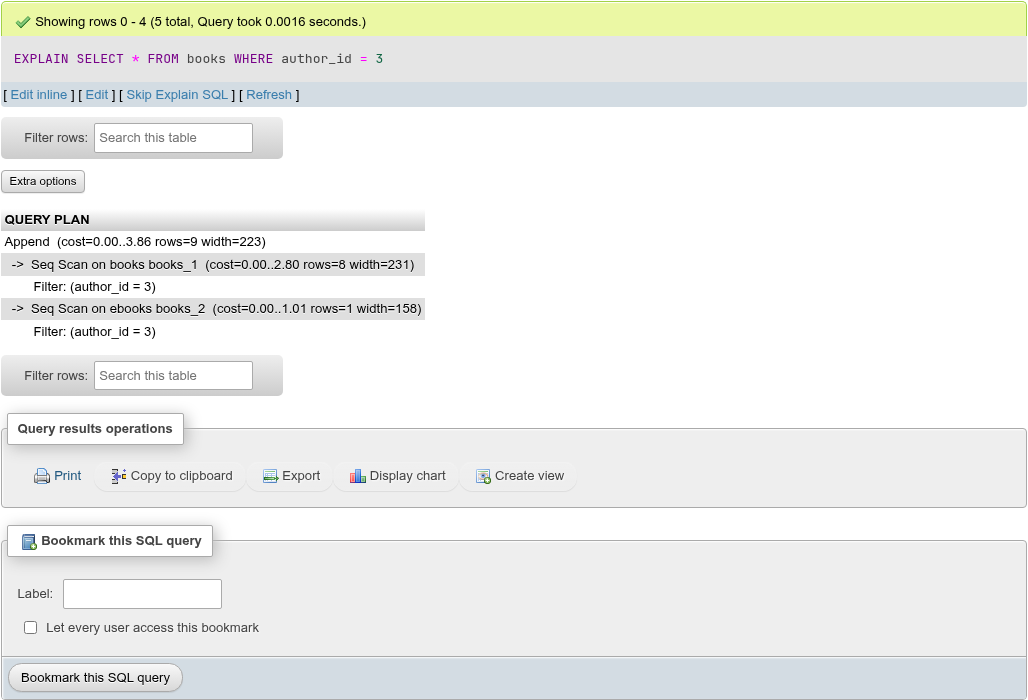
Skip Explain SQL strips EXPLAIN and its options and runs the statement itself.
For phpMyAdmin users
There is no "Profiling" checkbox. EXPLAIN (ANALYZE, BUFFERS, TIMING) is the PostgreSQL way to see where the time goes.
Cancelling a running query
While a query runs, Running the query… Cancel appears under the editor. Cancel asks the server to cancel the statement (pg_cancel_backend() from a separate connection). The statement ends with 57014: canceling statement due to user request.
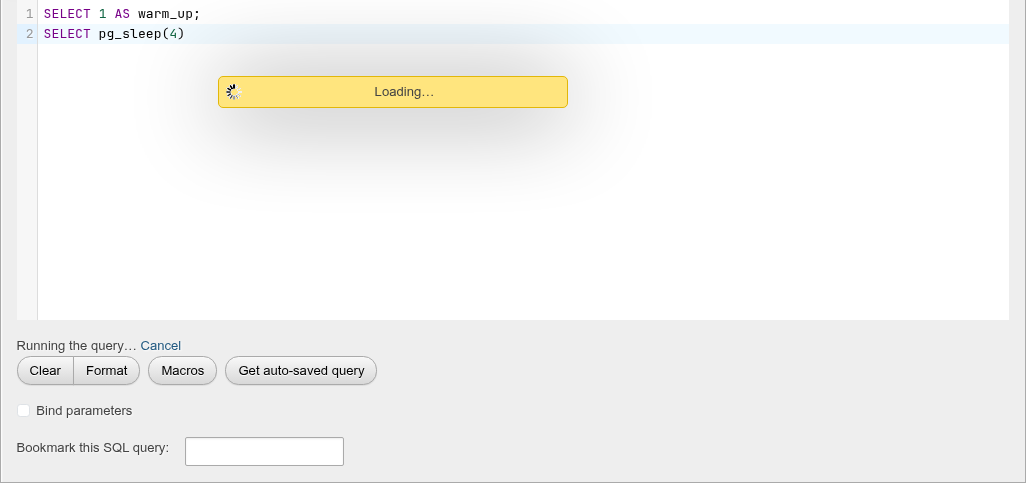
A cancelled statement is not run again, and in a batch the statements after it are not run. Under Run as one transaction the cancel rolls the batch back like any other error.
Leaving the page does not send a cancel. To stop a statement you can no longer reach, cancel its backend on Status → Processes.
Editing results
When every column of the result comes from one table with a primary key and the whole key is among the columns, the grid gets Edit, Copy and Delete links, check boxes and double-click editing, exactly as on the Browse tab. Expressions, renamed columns and columns that are not editable (generated columns, domain-typed columns) are shown but cannot be edited. Results of a join, a view, or a table without a primary key are read-only. See Which results can be edited for the full rules.
Create a view from a result
Create view under a result opens the Create view form in a dialog with your statement in the AS box. Fill in VIEW name (and optionally the schema, Materialized, OR REPLACE, column names, WITH CHECK OPTION, Security barrier) and click Go. The new view's structure page opens. See Views for the form's fields.
On the server's SQL page the query has no database, so the form starts with a Database row, set to the database the query ran in (the server's maintenance database). Pick another one to create the view there; the Schema list follows the database.
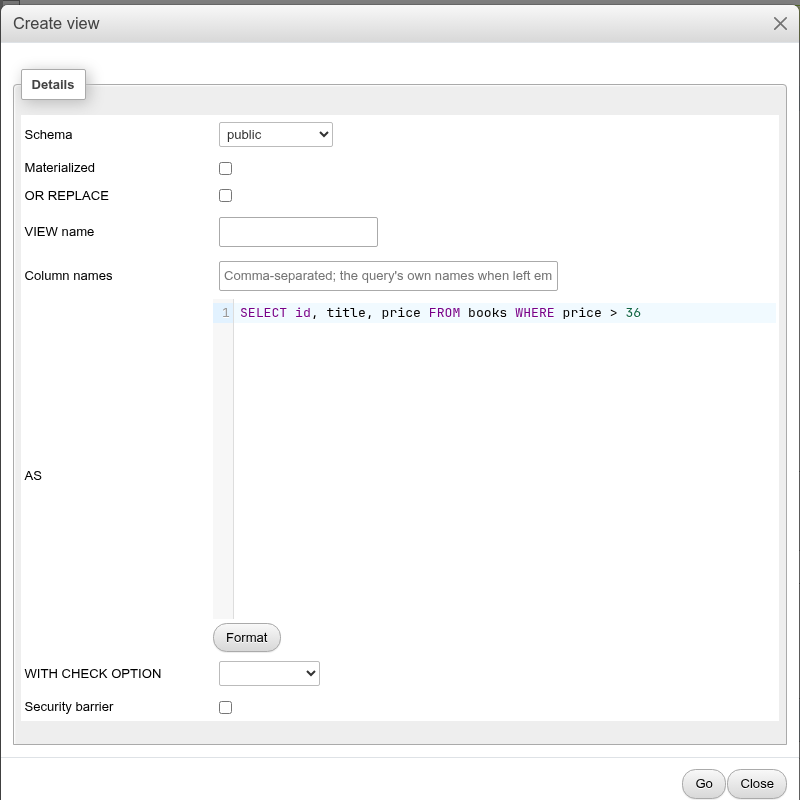
The dialog takes the statement that produced that result — in a batch, the statement under which you clicked — without the paging wrapper.
History, bookmarks and macros
Every statement you run here, on the Browse and Search tabs and from the console is kept in the query history. Save a query under a name with the Bookmark this SQL query field or card (Bookmarks), or bind it to a key (Macros).
Differences from phpMyAdmin
- PostgreSQL has no
USE db; each SQL tab runs in its database. To query another database, open its SQL tab (or usedblink/postgres_fdw). - Identifiers are folded to lower case unless double-quoted, and string literals take single quotes only:
"Title"is a column name,'Title'is a string. SHOW TABLES,DESCRIBE tandSHOW CREATE TABLEdo not exist. Queryinformation_schemaorpg_catalog, or use the Structure and Show create tabs.- Booleans are shown as
trueandfalse, not1and0. - An error inside a transaction aborts the whole transaction, not only the failing statement; see Transactions.