
Extensions and other objects
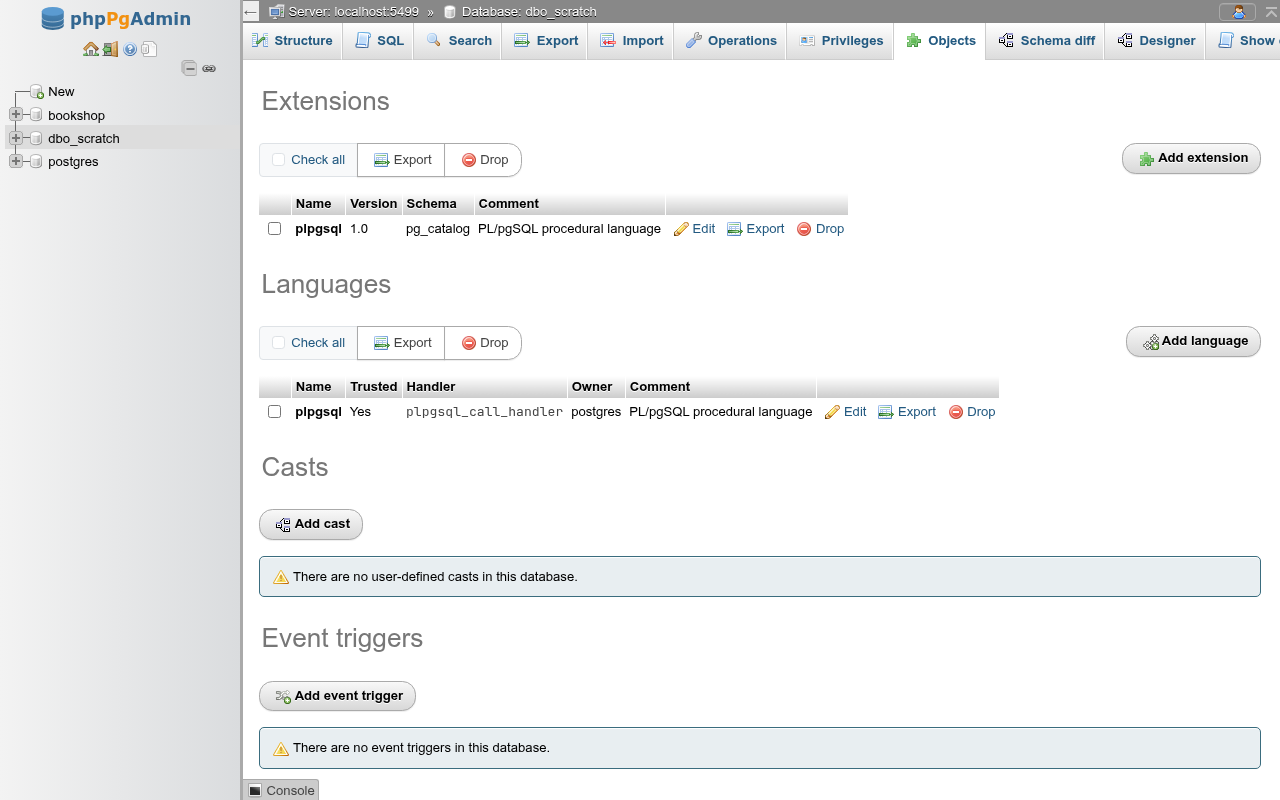
The database's Objects tab (/db/<database>/objects) lists the objects that belong to the database but to no schema, as pgAdmin's database tree shows them: Extensions, Languages, Casts and Event triggers, then Foreign data wrappers, Foreign servers and User mappings. phpMyAdmin has no equivalent; these are PostgreSQL features. The foreign data sections are described on the Foreign data page.
How the sections work
Every section works the same way:
- The Add … button opens an empty dialog.
- Each row has Edit (the same dialog, filled in), Export (the DDL that recreates the object, with Copy to clipboard) and Drop.
- Languages, foreign data wrappers and foreign servers also have Privileges: a dialog with the object's grantees of
USAGE, Edit privileges, Revoke and Add privileges for a role, as on the Privileges tabs (GRANT USAGE ON LANGUAGE plpgsql TO bookshop_staff;). - Tick rows (or Check all) and use the Export or Drop button above the table for several objects at once. With nothing ticked you get No object selected.
- Drop asks first, showing the statement, with Drop the objects that depend on it too (CASCADE).
The dialogs have Go, Preview SQL (the statements, not run) and Close. An error from PostgreSQL shows at the top of the page and leaves the dialog open.
In the navigation panel, the database's Extensions, Languages, Casts, Foreign Data Wrappers and Event Triggers folders lead here; clicking an object in them opens its Edit dialog.
Superuser territory
Most of these objects need a superuser: creating a language that is not trusted, every event trigger, every foreign data wrapper, and most extensions. As a role without superuser the dialogs still open, and PostgreSQL's permission denied message tells you what is missing.
Extensions
The list shows each installed extension's Name, Version, Schema and Comment. plpgsql is installed in every database.
Add an extension
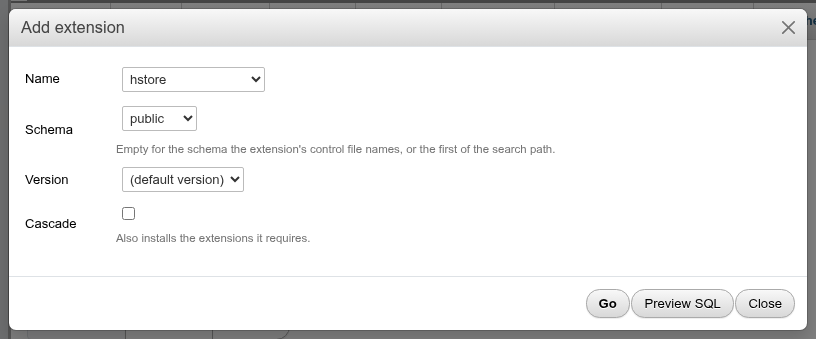
| Field | What it does |
|---|---|
| Name | The extensions the server has installed files for and that are not yet in this database (pg_available_extensions) |
| Schema | Where its objects go. Empty uses the schema the extension's control file names, or else the first schema of the search_path. For an extension whose control file fixes the schema, the hint says so. |
| Version | (default version) or any version the server can install |
| Cascade | Also installs the extensions this one requires |
CREATE EXTENSION hstore
    SCHEMA public;
Required extensions
earthdistance needs cube. Without Cascade you get required extension "cube" is not installed; with it, both are installed:
CREATE EXTENSION earthdistance
    CASCADE;
Fixed-schema extensions
Some extensions must live in one schema. plperl (and the other procedural languages packaged as extensions) must go in pg_catalog: choosing another schema fails with extension "plperl" must be installed in schema "pg_catalog". The dialog's hint names the schema; leave Schema empty.
Who may install
Extensions marked trusted (such as hstore, pg_trgm, citext, plperl) can be installed by a role with CREATE on the database. The others (postgres_fdw, file_fdw, plpython3u, pldbgapi…) need a superuser. Extensions whose files are not installed on the server don't appear: install the operating system package (often postgresql-contrib) first.
Update or move an extension
Edit an extension to change its version or schema. The name cannot change.
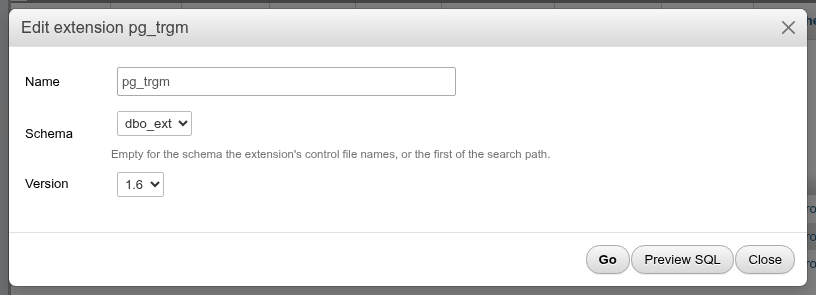
ALTER EXTENSION pg_trgm
    SET SCHEMA dbo_ext;
ALTER EXTENSION pg_trgm
    UPDATE TO "1.6";
Relocatable extensions only
Schema is read-only for an extension that is not relocatable (such as plpgsql and plperl). PostgreSQL's SET SCHEMA moves all the extension's objects; code that called them with the old schema name, or relied on the old schema in search_path, stops finding them.
Version lists every version the server has scripts for. Choose a newer one to run the update scripts. Going back to an older version only works if the extension ships a downgrade script; most don't, and PostgreSQL answers that there is no update path.
Drop an extension
DROP EXTENSION "hstore";If a table has a column of the extension's type, the drop fails with cannot drop extension hstore because other objects depend on it. With CASCADE, PostgreSQL drops those columns (the tables stay, the columns go) and any other dependent object.
Languages
The list shows each procedural language's Name, whether it is Trusted, its Handler, Owner and Comment. Languages installed as extensions (plpgsql, plperl…) appear here too.
Prefer the extension
For the languages PostgreSQL ships (PL/Perl, PL/Python, PL/Tcl), add the extension (plperl, plpython3u, pltcl) in Extensions instead of using Add language. The extension creates the handler functions and the language together, and dropping the extension removes both.
Add or edit a language
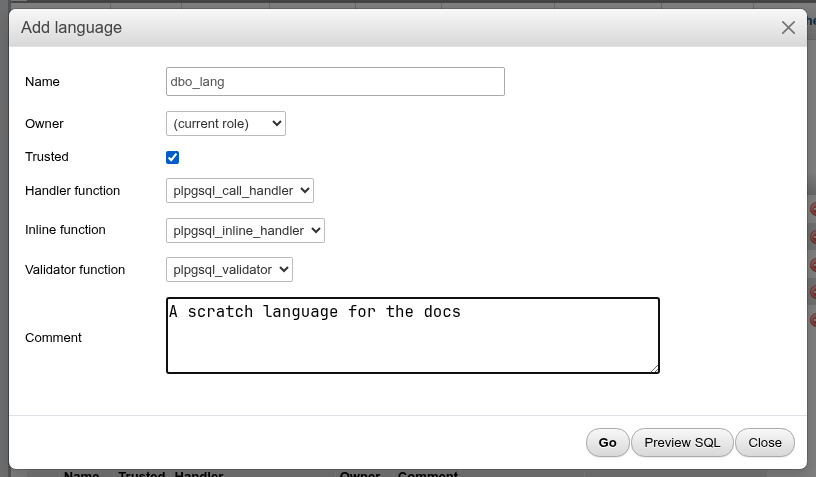
| Field | What it does | SQL |
|---|---|---|
| Name | The language name; on Edit, renames it | ALTER LANGUAGE … RENAME TO … |
| Owner | Empty for the current role | ALTER LANGUAGE … OWNER TO … |
| Trusted | Lets roles without superuser create functions in it | CREATE TRUSTED LANGUAGE |
| Handler function | The language_handler function that runs its code (required) | HANDLER |
| Inline function | Runs anonymous DO blocks | INLINE |
| Validator function | Checks a function body at CREATE FUNCTION | VALIDATOR |
| Comment | COMMENT ON LANGUAGE |
CREATE TRUSTED PROCEDURAL LANGUAGE dbo_lang
    HANDLER plpgsql_call_handler
    INLINE plpgsql_inline_handler
    VALIDATOR plpgsql_validator
;
COMMENT ON LANGUAGE dbo_lang
    IS 'A scratch language for the docs';
Each function list offers only the signatures CREATE LANGUAGE accepts: Handler function the functions returning language_handler with no arguments, Inline function those returning void from one internal argument and Validator function those returning void from one oid. Built-in functions and operator-class support functions with the same signatures are left out, so on a bare database the lists hold the …_call_handler, …_inline_handler and …_validator of the installed languages.
Changing trust or functions drops the language
ALTER LANGUAGE can only rename and change the owner. If you change Trusted or any of the three functions, the dialog's SQL starts with a warning and runs DROP LANGUAGE … CASCADE followed by CREATE LANGUAGE: every function written in the language is dropped. The new language gets the old owner, comment and (for a trusted language) USAGE grants back. Read the Preview SQL before you click Go.
Trusted and untrusted
A trusted language (plpgsql, plperl) runs in a sandbox, so any role with USAGE on it may write functions in it. An untrusted one (plpython3u, plperlu) can reach the file system and network, so only superusers can create functions in it, and only a superuser can create the language. GRANT USAGE ON LANGUAGE is not offered here: see Limitations.
Casts
The list shows user-defined casts: the name (source AS target), the Function that converts (or binary compatible), the Context and the Comment. The built-in casts are not listed.
Add a cast
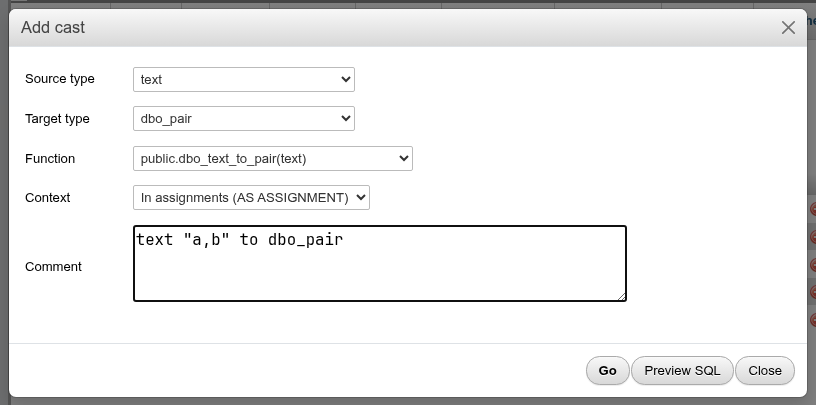
| Field | What it does | SQL |
|---|---|---|
| Source type, Target type | The types to convert between | CREATE CAST (source AS target) |
| Function | After both types are chosen, lists the functions that take the source and return the target. (binary compatible, WITHOUT FUNCTION) reuses the bytes as they are. | WITH FUNCTION f(args) / WITHOUT FUNCTION |
| Context | Explicit (only with CAST/::), In assignments (also when storing into a column), Implicit (anywhere in expressions) | (nothing) / AS ASSIGNMENT / AS IMPLICIT |
| Comment | COMMENT ON CAST |
CREATE CAST (text AS dbo_pair)
    WITH FUNCTION public.dbo_text_to_pair(text)
    AS ASSIGNMENT;
COMMENT ON CAST (text AS dbo_pair)
    IS 'text "a,b" to dbo_pair';
Only the comment can change afterwards: on Edit, the types, function and context are read-only. To change them, drop the cast and create it again.
WARNING
WITHOUT FUNCTION only works between types whose internal representation is the same (as text and varchar); otherwise PostgreSQL answers source and target data types are not physically compatible. You must own the source or the target type. Be sparing with Implicit: it can make operator and function calls ambiguous.
Event triggers
Event triggers fire on DDL commands in the database, where ordinary triggers fire on rows. The list shows each trigger's Event, Function, Tags and State.

Add an event trigger
First create a function that returns event_trigger, for example on a schema's Routines tab:
CREATE FUNCTION dbo_et_fn() RETURNS event_trigger LANGUAGE plpgsql AS $$
BEGIN
  INSERT INTO dbo_et_log(tag) VALUES (tg_tag);
END $$;
Without one, the dialog says There is no function returning event_trigger yet.
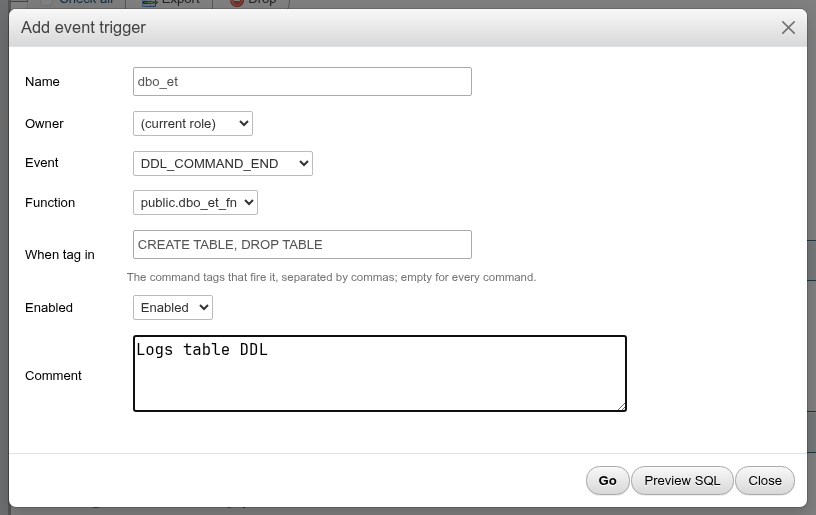
| Field | What it does |
|---|---|
| Name | The trigger's name |
| Owner | Empty for the current role. Must be a superuser. |
| Event | DDL_COMMAND_START, DDL_COMMAND_END, SQL_DROP, TABLE_REWRITE, and LOGIN on PostgreSQL 17+ |
| Function | A function returning event_trigger |
| When tag in | Command tags separated by commas, such as CREATE TABLE, DROP TABLE; empty fires on every command |
| Enabled | Enabled, Disabled, Replica or Always (below) |
| Comment |
CREATE EVENT TRIGGER dbo_et ON DDL_COMMAND_END
    WHEN TAG IN ('CREATE TABLE', 'DROP TABLE')
    EXECUTE FUNCTION public.dbo_et_fn();

COMMENT ON EVENT TRIGGER dbo_et
    IS 'Logs table DDL';

ALTER EVENT TRIGGER dbo_et
    OWNER TO postgres;
Enable, disable, replica, always
Change Enabled in the Edit dialog:
| State | SQL | Fires |
|---|---|---|
| Enabled | ALTER EVENT TRIGGER t ENABLE; | In normal sessions (session_replication_role = origin, the default) |
| Disabled | ALTER EVENT TRIGGER t DISABLE; | Never |
| Replica | ALTER EVENT TRIGGER t ENABLE REPLICA; | Only when session_replication_role = replica (logical replication apply) |
| Always | ALTER EVENT TRIGGER t ENABLE ALWAYS; | In both modes |
Changing event, function or tags recreates the trigger
Renaming and changing the owner, comment or state are ALTERs. Changing Event, Function or When tag in makes the dialog run DROP EVENT TRIGGER IF EXISTS and CREATE EVENT TRIGGER (the Preview SQL starts with a warning). The owner, comment and state (disabled, replica or always) are set again on the new trigger.
Scope and ownership
An event trigger only fires for commands in the database it was created in, never server-wide. PostgreSQL requires its owner to be a superuser: choosing another role fails with permission denied to change owner of event trigger. A faulty ddl_command_start or login trigger can block DDL or sign-ins for everyone in the database; disable it from a superuser session (or start the server with event_triggers = off, PostgreSQL 17+).
pg_cron jobs
Job scheduling, which pgAdmin does with pgAgent, is done here with the pg_cron extension. In a database where pg_cron is installed (the one cron.database_name names, postgres by default), the navigation panel shows pg_cron Jobs under the database; anywhere else it is not shown at all. Its folder opens the pg_cron jobs page (/db/<database>/cron-jobs), a job its dialog there. pg_cron 1.4 or later is needed.
The list has each job's Name, Schedule, the Database it runs in, the role it runs as (Run as), whether it is Active, and its Last run (status and start time, the message on hover), with Runs, Edit, Export and Drop, and Export / Drop for the ticked jobs. Runs lists the job's last 50 runs from cron.job_run_details: status, start, end, database, role and message.
Add job and Edit open the job dialog:
| Field | pg_cron |
|---|---|
| Name | job_name; fixed once the job exists, since pg_cron cannot rename a job. |
| Schedule | Five cron fields (0 3 * * *, in GMT unless cron.timezone says otherwise), @daily and the like, or 30 seconds. |
| Command | The SQL the job runs. |
| Database | Where it runs; empty for this database. |
| Run as | The role it runs as; empty for yours. Another role needs a superuser. |
| Active | Unticked, the job stays but does not run. |
A new job is SELECT cron.schedule_in_database(…), a change SELECT cron.alter_job(…), a drop SELECT cron.unschedule(<id>); Preview SQL and Export show them. pg_cron lists only your own jobs unless you are a superuser.
Not tried against a live pg_cron
The local test server has no pg_cron. The page was checked against a stand-in cron schema with pg_cron's cron.job, cron.job_run_details and functions of the same signatures, so the statements match pg_cron 1.4's documented API but have not been run by pg_cron itself. pgAgent is not supported.
Limitations
- Security labels and
ALTER EXTENSION … ADD/DROP memberare not offered. - A language, cast or event trigger that is part of an extension is listed like the others; drop the extension instead of the member.