
Insert and edit rows
The Insert tab of a table adds rows through phpMyAdmin's insert form: one block per row with the column's type, an optional function, a Null box and a value control that suits the type. The same form, opened from Edit or Copy on the Browse grid, changes or copies existing rows.
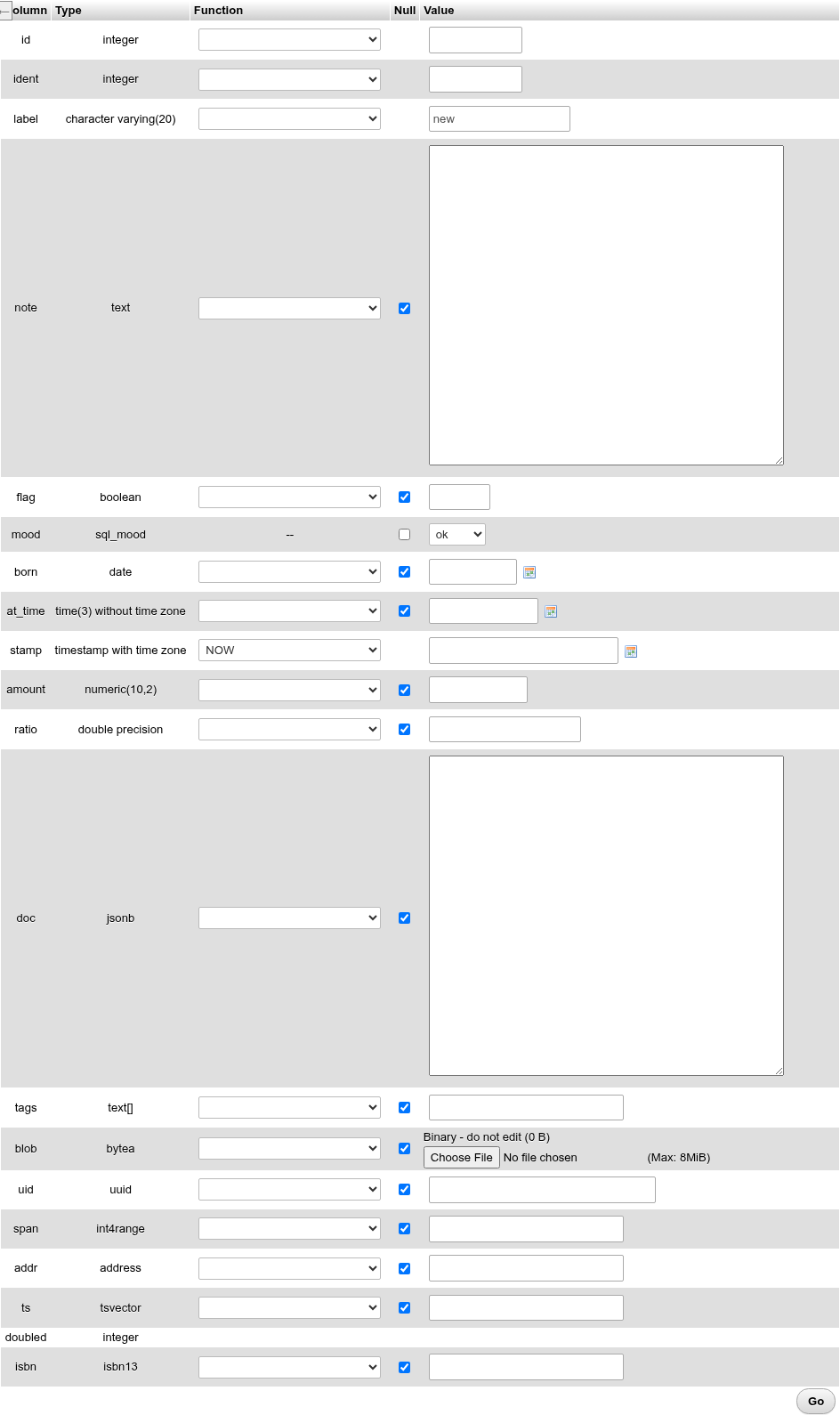
Insert rows
- Open the table's Insert tab. It offers two blank rows.
- Fill in the first row. Fields you leave alone are not sent, so the server uses the column's default (or
NULL). - To insert a second row, type in the second block: its Ignore box, ticked until then, unticks itself. A row left with Ignore ticked is skipped.
- Choose what happens after the insert under the form (see Actions) and click Go.
The rows are inserted in one transaction: if one fails, none is kept, and the server's message is shown. On success you return to Browse with 2 rows inserted. and the statements that ran.
Continue insertion with [2] rows under the form changes the number of blank blocks; press Enter in the box. What you typed stays, and the page's URL gets ?rows=4, so a reload, or a link with ?rows=N, opens that many blocks (at most 100).
The columns of the form
| Column | What it holds |
|---|---|
| Column | The name; hover for the column's comment when it has one. |
| Type | The type with its modifiers (character varying(20), numeric(10,2), time(3) without time zone). |
| Function | A function to apply to the value (below). An enum column shows --; a generated column has none. |
| Null | Ticked sends NULL. Shown for nullable columns only. Typing a value unticks it. |
| Value | The value control. |
Defaults, serial, identity and generated columns
| Column | What the form does |
|---|---|
A literal default (DEFAULT 'new', 'ok'::sql_mood, 0) | The value box starts with the literal. Leave it as it is and the column gets DEFAULT. |
An expression default (now(), gen_random_uuid()) | The box shows the expression as text, for example now(). Left as it is, the column gets DEFAULT. |
serial / nextval(…) default | Empty box; left empty, the sequence numbers the row. |
GENERATED BY DEFAULT AS IDENTITY | Empty box; left empty, the identity numbers it. A typed value is inserted as is. |
GENERATED ALWAYS AS IDENTITY | Empty box. Leave it empty: a typed value fails with cannot insert a non-DEFAULT value into column. |
GENERATED ALWAYS AS (…) STORED | No controls; the server computes it. The edit form shows the current value in grey. |
Two functions are preselected, as phpMyAdmin does: NOW for the first timestamp column that is NOT NULL without a default (stamp above), and GEN_RANDOM_UUID for a uuid primary key without a default.
Functions
The Function list wraps the value in a PostgreSQL function. Those that take no value (NOW, CURRENT_DATE, CURRENT_USER, GEN_RANDOM_UUID, RANDOM, PI, VERSION …) ignore the value box. The others apply to the value, cast to the type they need:
| Group | Functions |
|---|---|
| Date and time | CLOCK_TIMESTAMP, CURRENT_DATE, CURRENT_TIME, CURRENT_TIMESTAMP, DATE, LOCALTIME, LOCALTIMESTAMP, NOW, STATEMENT_TIMESTAMP, TIME, TO_TIMESTAMP (from Unix seconds), TRANSACTION_TIMESTAMP |
| Numbers | ABS, ACOS, ASCII, ASIN, ATAN, BIT_LENGTH, CEIL, CHAR_LENGTH, COS, DEGREES, EXP, FLOOR, LENGTH, LN, LOG, OCTET_LENGTH, PI, RADIANS, RANDOM, ROUND, SIGN, SIN, SQRT, TAN, TRUNC |
| Text and other | CURRENT_DATABASE, CURRENT_SCHEMA, CURRENT_USER, GEN_RANDOM_UUID, INITCAP, LOWER, LTRIM, MD5, QUOTE_LITERAL, REVERSE, RTRIM, SESSION_USER, SHA256, SHA512 (hex digests), TO_HEX, TRIM, UPPER, VERSION |
For example MD5 with the value secret inserts md5(('secret')::text). MySQL-only functions of phpMyAdmin's list (UNHEX, PASSWORD, AES_ENCRYPT …) are not offered.
Value controls by type
| Type | Control |
|---|---|
text, xml, json, jsonb, varchar(n) with n > 60 | A text area |
varchar(n), char(n) | A text box sized to n; more than n characters shows Please enter no more than n characters |
smallint, integer, bigint, oid | A text box; non-integers or values outside the type's range are flagged (Please enter a valid number, … greater than or equal to -2147483648) |
numeric, real, double precision, money | A text box checked for a number |
date, time, timestamp, with or without time zone | A text box with the date/time picker; impossible dates (2024-02-30) are flagged. infinity, epoch, today, now() and the like are accepted |
| Enum | Radio buttons, or a list when the labels are long |
| Foreign key | A list of the referenced values, description - key, while there are at most 100; a text box beyond that |
bytea | Binary - do not edit (n B) and a file field: the file's bytes become the value. The (Max: …) size is PHP's post_max_size/memory_limit |
boolean | A plain text box: type true/false (or t, f, yes, no, on, off, 1, 0) |
Arrays, ranges, composites, uuid, tsvector, inet, domains … | A text box for PostgreSQL's text form: {a,b}, [1,10), ("1 High St",Leeds,LS1,GB) |
The checks above run in the browser and block Go until fixed; everything else is checked by the server when the row is saved.
Browse foreign values
When a foreign key's referenced table has more than 100 values, the text box is followed by the Browse foreign values icon. It opens a window listing the values 25 to a page (the Number of rows setting): the keys sorted on the left with their descriptions, the same values sorted by description on the right. The description is the first text column of the referenced table.
- Search: with Go keeps the values whose key or description contains the text, ignoring case (
ILIKE '%text%';%and_are matched literally). - Page number: jumps to another page; Show all lists every matching value at once.
- Clicking a key or a description puts the key into the field and closes the window. The field's current value is shown in bold.
The same window opens from the foreign key fields of the Search tab.
For phpMyAdmin users
booleanhas no check box or list. phpMyAdmin'sTINYINT(1)habit of typing1works, as doestrue.- A
byteavalue cannot be typed or edited as hex in the form, only replaced by uploading a file. To set it to a literal, useUPDATE t SET col = '\xdeadbeef'on the SQL tab. - An array, a range or a composite is typed in PostgreSQL's literal syntax, not as JSON.
Actions

The first list chooses what Go does:
| Choice | What it runs |
|---|---|
| Save | Edit form only, and its default: an UPDATE … WHERE primary key for each changed row. |
| Insert as new row | An INSERT … RETURNING * per row. |
| Insert as new row and ignore errors | The same with ON CONFLICT DO NOTHING: a row that would break a unique or primary key is skipped (0 rows inserted.). Other errors (a NOT NULL or check violation, a bad value) still fail. |
| Show insert query | Shows the INSERT statements without running anything. |
The second list, after and then, chooses where you go after a successful save:
| Choice | Where you go |
|---|---|
| Go back to previous page | The Browse tab (or the page you came from), with the message and the statements. |
| Insert another new row | A fresh insert form, with as many blocks as Continue insertion asks for. |
| Go back to this page | Edit form only: stays on the form with the saved values. A primary key you changed is followed (the URL's ?keys too), so the next Go saves the same row again. |
Go works once per click: while a save is on its way, another click or Enter in a field does nothing, as phpMyAdmin holds back a second submit of the form.
Preview SQL shows the statements Go would run, values written as literals; Reset puts the form back as it was loaded.
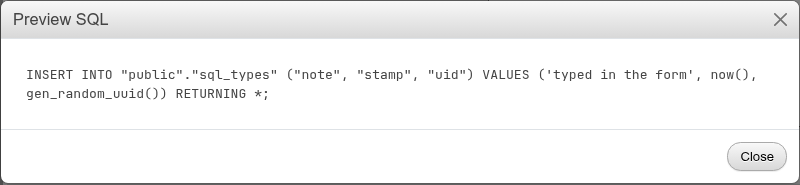
The statements use parameters ($1, $2) when they run; the preview fills them in for reading.
Edit a row
Edit on a Browse row, or several ticked rows with With selected: Edit, opens the form with the rows' current values (…/change?keys=[{"id":"1"}]). Every block is one row.
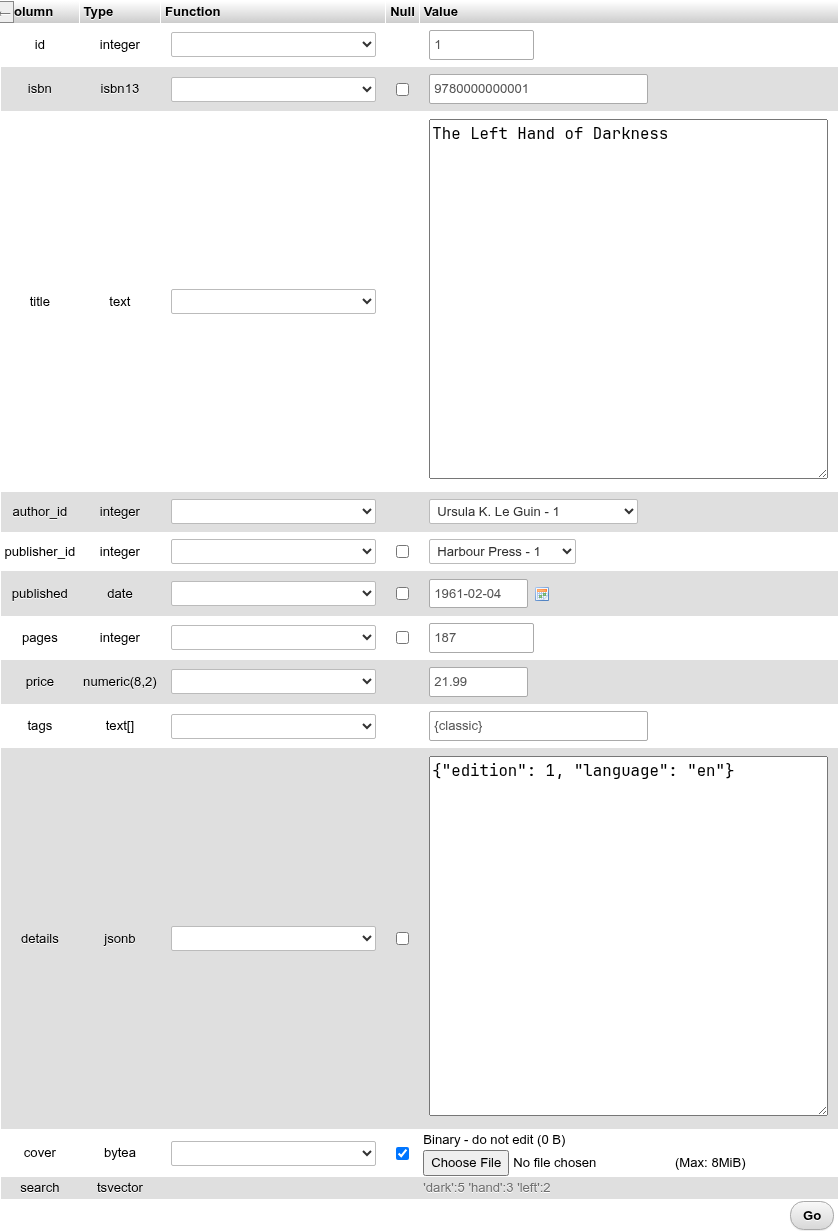
Only the fields you change are written: Save runs UPDATE "public"."books" SET "title" = $1 WHERE "id" = $2 RETURNING *. With nothing changed, Go answers No change was made. The row is found by its primary key, so the form needs a table with one; if the row was deleted in the meantime the page says so.
Insert as new row from the edit form inserts only what you changed
phpMyAdmin's "Insert as new row" on an edit form copies the whole row. Here only the fields you touched are sent; the other columns get their defaults. Changing the label of a row and choosing Insert as new row inserts INSERT INTO … ("label") VALUES ('changed'). To duplicate a row, use Copy on the Browse grid instead.
Copy a row
Copy opens the insert form filled with the row's values, every field counted as typed, so the new row repeats them. What the server numbers is left empty for it to fill in: a primary key with a default (serial, identity) and every identity column, key or not (GENERATED ALWAYS or BY DEFAULT), as pgAdmin pastes a row without its serial and identity values. Generated stored columns are computed again.
Unique columns
Unique columns (an ISBN, an email) keep the copied value and need a new one, or the insert fails with duplicate key value violates unique constraint.
Views
Views and materialized views have no Insert tab, as in phpMyAdmin. To add rows through a simple, automatically updatable view (one table, no joins or aggregates), or a view with an INSTEAD OF trigger or rule, run an INSERT on its SQL tab.