
Maintenance
VACUUM, ANALYZE, REINDEX and CLUSTER are run from two places. On the Operations tab of a database or a schema, the Maintenance card (pgAdmin's maintenance dialog) runs one of them on the whole database or schema as a background psql process. On the Operations tab of a table or a materialized view, the Table maintenance links (phpMyAdmin's) run one statement on that relation through the SQL page.
The Maintenance card
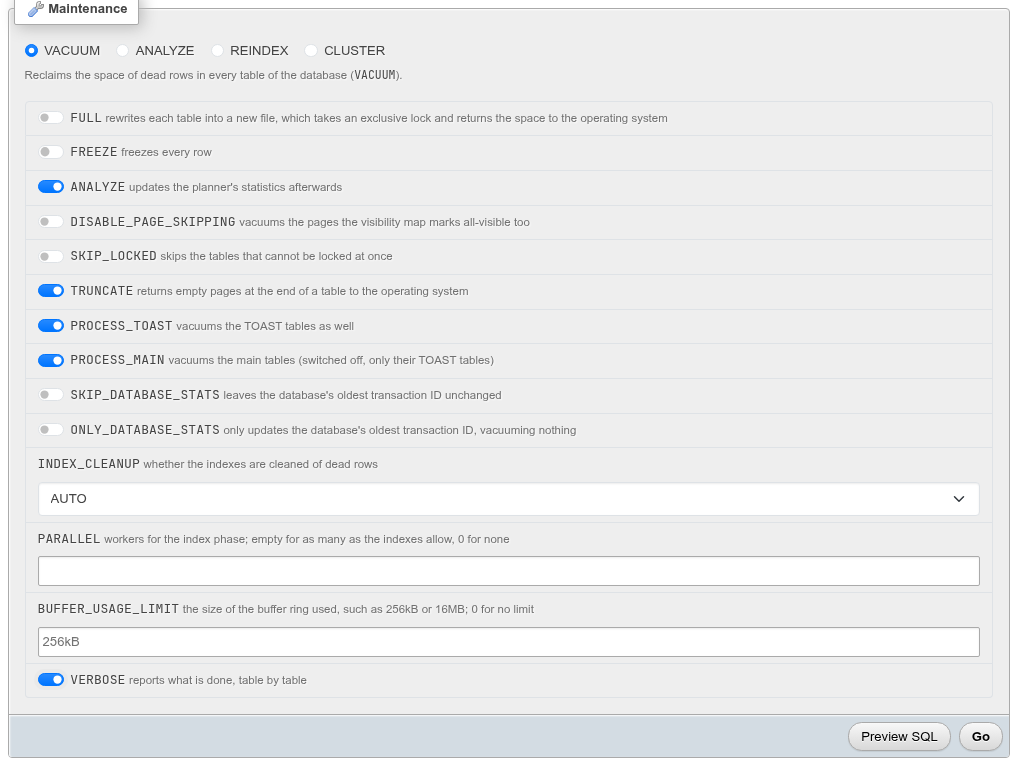
- Open the database's or the schema's Operations tab and scroll to Maintenance.
- Pick the operation: VACUUM, ANALYZE, REINDEX, or (database only) CLUSTER. The line under it says what it will do.
- Set its options. Only the options of that operation, and only those your server has, are shown.
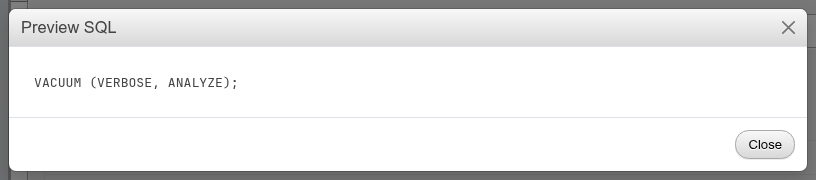
- Click Preview SQL to see the statement, or Go to run it.
VACUUM
| Option | Writes | What it does |
|---|---|---|
| FULL | FULL | rewrites each table into a new file, with an ACCESS EXCLUSIVE lock, and returns the space to the operating system |
| FREEZE | FREEZE | freezes every row |
| ANALYZE | ANALYZE | updates the planner's statistics afterwards |
| DISABLE_PAGE_SKIPPING | DISABLE_PAGE_SKIPPING | also vacuums pages the visibility map marks all-visible (hidden with FULL) |
| SKIP_LOCKED | SKIP_LOCKED | skips tables that cannot be locked at once |
| TRUNCATE | TRUNCATE false when off | returns empty pages at the end of a table (on by default; hidden with FULL) |
| PROCESS_TOAST | PROCESS_TOAST false when off | PostgreSQL 14 |
| PROCESS_MAIN | PROCESS_MAIN false when off | only the TOAST tables when off; PostgreSQL 16 |
| SKIP_DATABASE_STATS | SKIP_DATABASE_STATS | leaves datfrozenxid alone; PostgreSQL 16 |
| ONLY_DATABASE_STATS | ONLY_DATABASE_STATS | only updates datfrozenxid, vacuums nothing; database only, PostgreSQL 16 |
| INDEX_CLEANUP | INDEX_CLEANUP ON / OFF | AUTO writes nothing |
| PARALLEL | PARALLEL n | workers for the index phase; empty lets the server decide, 0 for none (hidden with FULL) |
| BUFFER_USAGE_LIMIT | BUFFER_USAGE_LIMIT '16MB' | the buffer ring's size; PostgreSQL 16 |
| VERBOSE | VERBOSE | reports each table |
Options that are on by default in PostgreSQL are written out only when you switch them off, so the plain run is just VACUUM;. A full example:
VACUUM (DISABLE_PAGE_SKIPPING, SKIP_LOCKED, TRUNCATE false, PROCESS_TOAST false,
        PROCESS_MAIN false, INDEX_CLEANUP OFF, PARALLEL 2, BUFFER_USAGE_LIMIT '16MB');
ANALYZE
SKIP_LOCKED, BUFFER_USAGE_LIMIT (PostgreSQL 16) and VERBOSE: ANALYZE (VERBOSE, SKIP_LOCKED, BUFFER_USAGE_LIMIT '256kB');
REINDEX
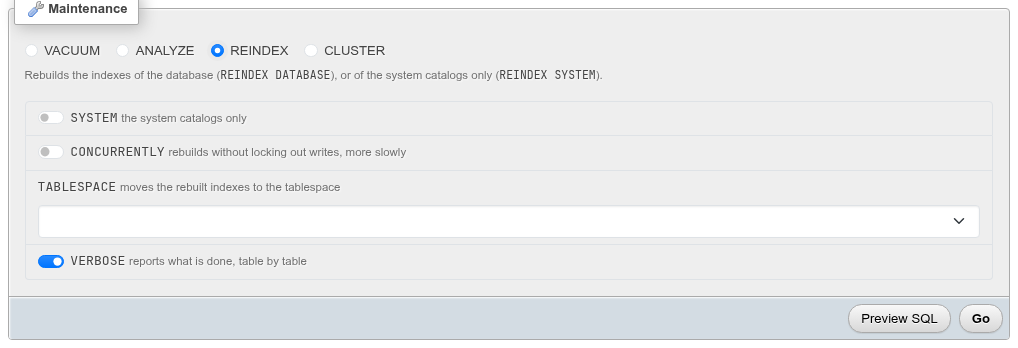
| Option | Writes |
|---|---|
| SYSTEM (database only) | REINDEX SYSTEM bookshop — the system catalogs only |
| CONCURRENTLY | REINDEX DATABASE CONCURRENTLY bookshop — rebuilds without locking out writes, more slowly |
| TABLESPACE | REINDEX (TABLESPACE pg_default) … — moves the rebuilt indexes; PostgreSQL 14 |
| VERBOSE | REINDEX (VERBOSE) … |
On a schema it is REINDEX SCHEMA [CONCURRENTLY] inventory.
The catalogs need SYSTEM
On current PostgreSQL versions REINDEX DATABASE rebuilds the user indexes only; the system catalogs are rebuilt with SYSTEM, which takes neither CONCURRENTLY nor TABLESPACE.
CLUSTER
On a database, CLUSTER with VERBOSE only: CLUSTER VERBOSE; reorders every table that was clustered before, each on the index it was clustered on (pg_index.indisclustered). It takes an ACCESS EXCLUSIVE lock on each table while it rewrites it. To cluster a table for the first time, run CLUSTER table USING index on the SQL page.
On a schema
A schema's card offers VACUUM, ANALYZE and REINDEX (no CLUSTER). VACUUM and ANALYZE take no schema, so the statement names the schema's tables and materialized views (a partitioned table stands for its partitions):
VACUUM (ANALYZE) inventory.promotions, inventory.stock, inventory.warehouses;A schema without tables is refused (The schema "…" has no tables to vacuum.).
Combinations that are refused
Preview SQL and Go both answer these with an error instead of a statement:
| Combination | Message |
|---|---|
| FULL with PARALLEL | VACUUM FULL does not run parallel workers. |
| FULL with DISABLE_PAGE_SKIPPING | VACUUM FULL rewrites every page: DISABLE_PAGE_SKIPPING does not go with it. |
| BUFFER_USAGE_LIMIT that is not a size | BUFFER_USAGE_LIMIT is a size such as 256kB or 16MB, or 0. |
| SYSTEM with CONCURRENTLY or TABLESPACE | REINDEX SYSTEM rebuilds the catalogs in place… |
| An option newer than the server | … takes PostgreSQL 16 or newer. |
The form hides most of these combinations already.
The run
Go starts psql --set=ON_ERROR_STOP=1 --command=<statement> in the background, like an import, and shows its card above the form: the state, the command, the output, Stop and Dismiss. VACUUM, REINDEX … CONCURRENTLY and CLUSTER cannot run inside a transaction, which is why they run on their own connection rather than through the SQL page. With VERBOSE the output holds the server's INFO lines:
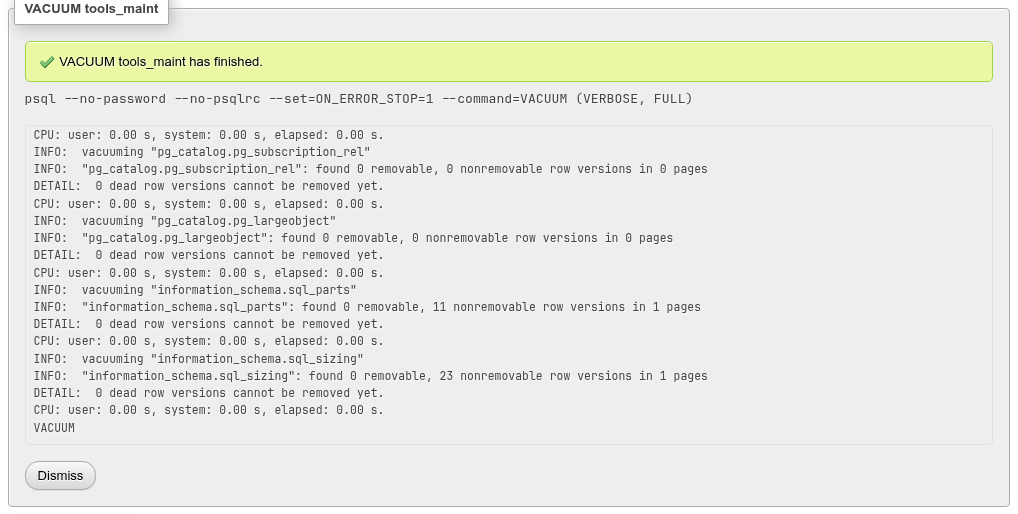
The run outlasts the page: a long VACUUM FULL goes on when you leave, and its card is back when you open the Operations tab again. Stop cancels the statement (what a VACUUM had already done on earlier tables stays done).
It needs psql on the web server
The card runs psql from the PostgreSQL client programs (see Export for where they are looked for). Without it, Go answers psql was not found on the web server…; Preview SQL still works.
Locks
VACUUM FULL, CLUSTER and a plain REINDEX take exclusive locks, table by table: queries on the table being processed wait. Prefer plain VACUUM and REINDEX … CONCURRENTLY on a database that is in use, and SKIP_LOCKED to pass over tables someone holds.
Table maintenance links
The Operations tab of a table has a Table maintenance card with phpMyAdmin's links:
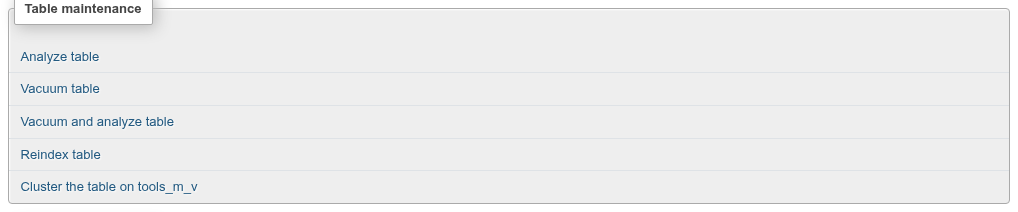
| Link | Statement |
|---|---|
| Analyze table | ANALYZE schema.table |
| Vacuum table | VACUUM schema.table |
| Vacuum and analyze table | VACUUM (ANALYZE) schema.table |
| Reindex table | REINDEX TABLE schema.table |
| Cluster the table on <index> | CLUSTER schema.table — only when the table has been clustered on an index (a plain index, or a primary key's or unique constraint's) |
A materialized view's Operations tab has the same links except Cluster. A partitioned table's Partition maintenance card runs ANALYZE or VACUUM on the partitions you tick the same way.
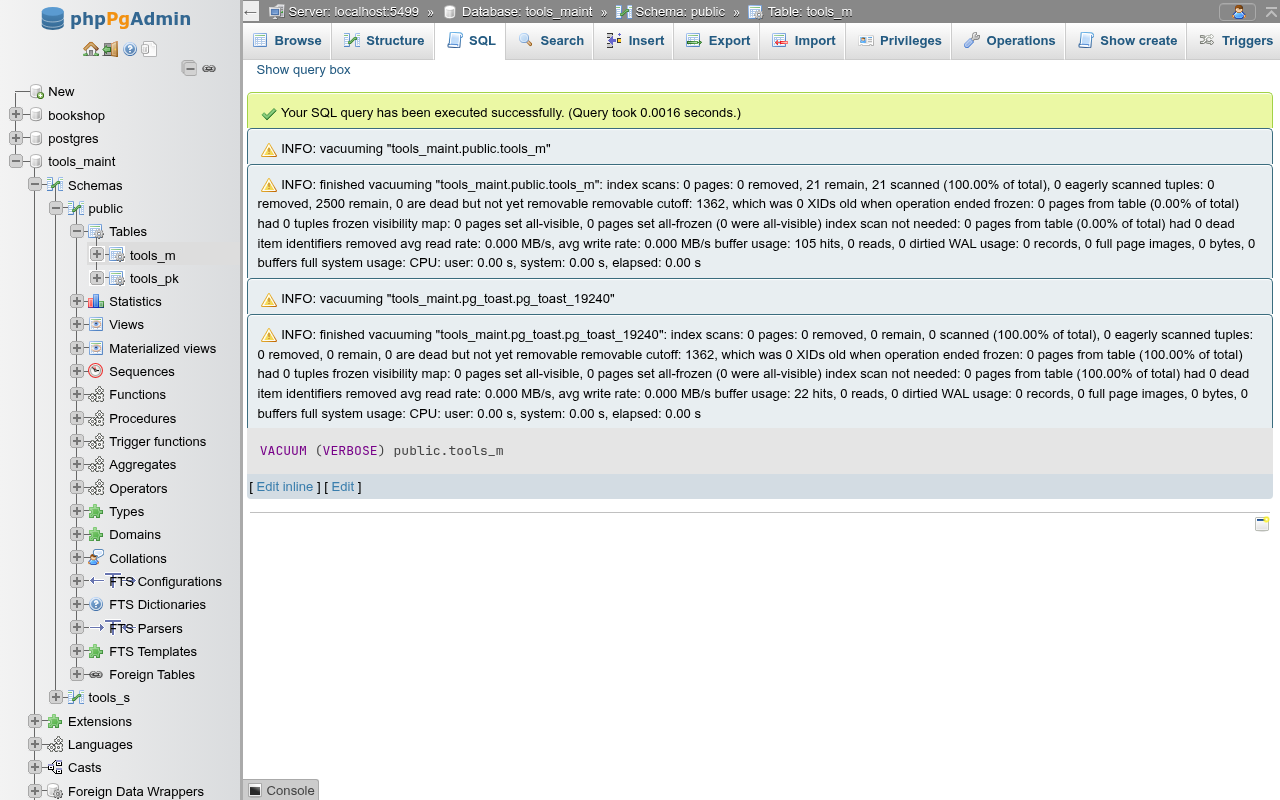
Each link opens the table's SQL tab with the statement and runs it at once. The SQL page shows any INFO messages: type VACUUM (VERBOSE) public.tools_m there to see what the vacuum did.
Differences from phpMyAdmin and pgAdmin
- phpMyAdmin's Check, Optimize, Repair and Checksum table have no PostgreSQL counterpart.
VACUUMreclaims space,ANALYZErefreshes statistics, andamcheck(an extension) checks indexes. - pgAdmin's dialog runs on a single table too; here a table's maintenance goes through its links.