
Partitions and inheritance
PostgreSQL splits a large table into partitions with declarative partitioning, and older schemas use table inheritance for the same purpose. You set a table's partitioning when you create it, manage its partitions on the Partitions card of its Structure tab and in Partition maintenance on its Operations tab, and change inheritance on the Operations tab's Inheritance card. The demo's public.orders is range-partitioned by placed_at into orders_2025 and orders_2026; public.ebooks inherits from public.books.
Creating a partitioned table
On the create form, set Partition by: to RANGE, LIST or HASH and type the partition key in the parentheses: a column (placed_at), several (region, country) or an expression ((lower(code))).
CREATE TABLE public.tbl_events
(
    id bigint,
    happened date
) PARTITION BY RANGE (happened);
The partitioned table itself holds no rows: inserting into it routes each row to the matching partition, and fails with no partition of relation … found for row when none matches. Add partitions right after creating it.
Keys on a partitioned table must include the partition key
A primary key or unique constraint on a partitioned table must contain every partition key column. That is why orders has PRIMARY KEY (id, placed_at) rather than (id). Marking only id as PRIMARY in the create form of a table partitioned by placed_at fails with unique constraint on partitioned table must include all partitioning columns.
The Partitions card
A partitioned table's Structure tab has a Partitions card after the constraints. It shows Partitioned by: with the scheme, then one row per partition.
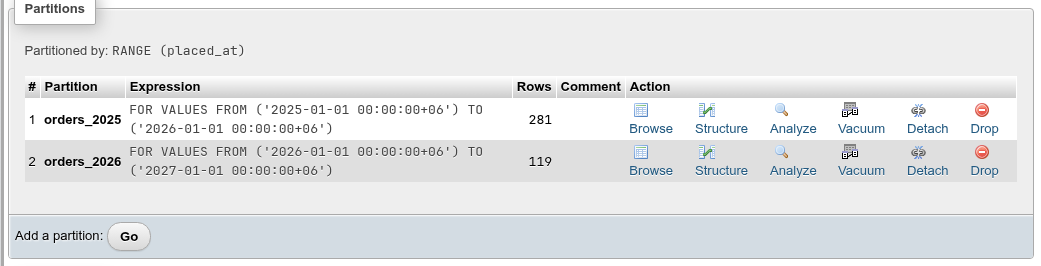
| Column | What it shows |
|---|---|
| # | Position. |
| Partition | The name (with its schema if different). A partitioned badge marks a sub-partitioned partition. |
| Expression | The bounds: FOR VALUES FROM ('2025-01-01 00:00:00+06') TO ('2026-01-01 00:00:00+06'), FOR VALUES IN ('de', 'fr'), FOR VALUES WITH (modulus 2, remainder 0) or DEFAULT. |
| Rows | The estimated row count. |
| Comment | The partition's comment. |
| Action | Browse and Structure of the partition, Analyze and Vacuum (run on the SQL tab), Detach, Drop. |
Bounds are shown in the server's time zone
Range bounds on a timestamp with time zone key are displayed in the session time zone (+06 above), even if you created them as '2025-01-01'. The boundary is the same instant.
Each partition is a table in its own right with its own Structure, Browse and Operations tabs. Indexes created on the partitioned table are created on every partition, including partitions added later.
Adding a partition
Click Go after Add a partition: to open the Add partition dialog. Its fields follow the parent's strategy.
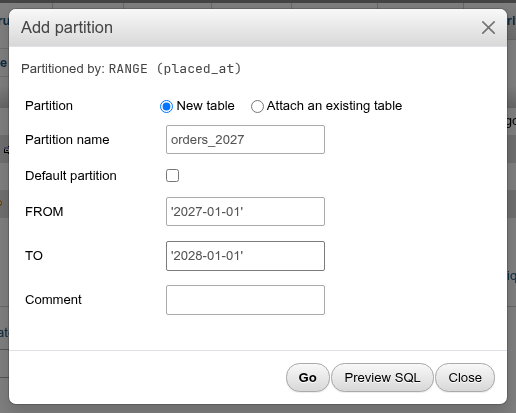
| Field | What it does |
|---|---|
| Partition | New table creates the partition; Attach an existing table attaches a table you already have. |
| Partition name | Name of the new table (created in the parent's schema). |
| Table | For attaching: Tables whose columns match the partitioned table's. |
| Default partition | Takes every row no other partition accepts. Range and list only. |
| FROM / TO | Range bounds. Lower inclusive, upper exclusive. Quote literals: '2027-01-01'. MINVALUE and MAXVALUE work too. |
| IN | List values, comma-separated and quoted: 'de', 'fr'. |
| MODULUS / REMAINDER | Hash partitions: one partition per remainder 0 … modulus-1. |
| Partitioned table? | pgAdmin's sub-partitioning: the new partition is partitioned in its turn. Partition type (RANGE, LIST or HASH) and Partition keys, each a Column of the table or an Expression (lower(name)); Add a key for more (not for LIST, which takes one). The partition is created with PARTITION BY RANGE (placed_at) and gets its own Partitions card. New tables only. |
| Comment | Comment of the new partition. |
The statements it generates:
-- New range partition
CREATE TABLE public.tbl_events_2026 PARTITION OF public.tbl_events
    FOR VALUES FROM ('2026-01-01') TO ('2027-01-01');

-- Default partition
CREATE TABLE public.tbl_events_other PARTITION OF public.tbl_events
    DEFAULT;

-- List partition
CREATE TABLE public.tbl_regions_eu PARTITION OF public.tbl_regions
    FOR VALUES IN ('de', 'fr');

-- Hash partition
CREATE TABLE public.tbl_shards_0 PARTITION OF public.tbl_shards
    FOR VALUES WITH (MODULUS 2, REMAINDER 0);

-- Attaching an existing table
ALTER TABLE IF EXISTS public.tbl_events ATTACH PARTITION public.tbl_events_2025
    FOR VALUES FROM ('2025-01-01') TO ('2026-01-01');
What PostgreSQL checks when you add a partition
- Bounds must not overlap an existing partition: partition "…" would overlap partition "…".
- With a default partition present, a new partition whose range contains rows that are already in the default fails: updated partition constraint for default partition would be violated by some row. Move those rows out of the default first.
- Attaching scans the table to check that every row fits the bounds (add a matching
CHECKconstraint beforehand to skip the scan), and the table's columns must match the parent's exactly, with no extra columns. - Hash partitions need a consistent modulus scheme; the moduli of all partitions must be factors of each other.
The values you type in FROM, TO and IN are inserted as you wrote them, as SQL literals. Unquoted text such as 2027-01-01 is read as arithmetic (2027 minus 1 minus 1) and fails.
Detaching and dropping
Detach runs ALTER TABLE parent DETACH PARTITION child; after a confirmation. The partition becomes an ordinary table with its data, and shows up again in the schema's table list. Drop runs DROP TABLE child;, deleting the partition and its rows.
Detaching locks the parent
A plain DETACH PARTITION takes an ACCESS EXCLUSIVE lock on the parent, blocking all queries on it until it finishes. On PostgreSQL 14+ the confirmation has a Detach without blocking queries on the table (CONCURRENTLY) box, which runs ALTER TABLE parent DETACH PARTITION child CONCURRENTLY; instead: it only takes a SHARE UPDATE EXCLUSIVE lock and waits for the queries that use the partition to finish. PostgreSQL refuses it when the table has a default partition.
If a concurrent detach is interrupted (cancelled, or the server stops), the partition stays attached in a detach pending state: the list shows a detach pending badge and its Detach link becomes Finalize detach, which runs ALTER TABLE parent DETACH PARTITION child FINALIZE; to complete it.
Partition maintenance
The Operations tab of a partitioned table has a Partition maintenance card, after phpMyAdmin's partition maintenance. Select one or more partitions, pick an operation and click Go.
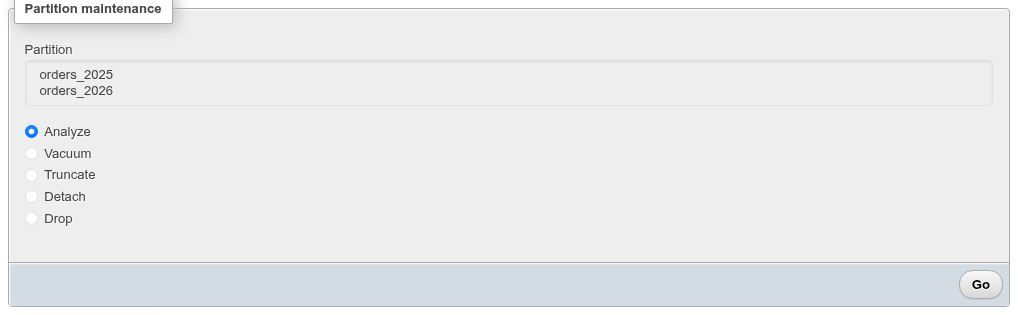
| Operation | What it does |
|---|---|
| Analyze | Opens the SQL tab and runs ANALYZE on each selected partition. |
| Vacuum | Opens the SQL tab and runs VACUUM on each. |
| Truncate | TRUNCATE TABLE each, after a confirmation. |
| Detach | ALTER TABLE parent DETACH PARTITION each, after a confirmation. |
| Drop | DROP TABLE each, after a confirmation. |
Truncate, Detach and Drop run one partition at a time; if one fails, the ones before it are done.
The partitioned table's DDL
The Show create tab of a partitioned table gives the parent's CREATE TABLE … PARTITION BY followed by a Partitions SQL section with each partition:
CREATE TABLE IF NOT EXISTS public.orders
(
    id bigserial NOT NULL,
    customer_id bigint NOT NULL,
    status order_status NOT NULL DEFAULT 'pending'::order_status,
    placed_at timestamp with time zone NOT NULL DEFAULT now(),
    total numeric(10,2) NOT NULL DEFAULT 0,
    CONSTRAINT orders_pkey PRIMARY KEY (id, placed_at),
    ...
) PARTITION BY RANGE (placed_at);

-- Partitions SQL

CREATE TABLE public.orders_2025 PARTITION OF public.orders
    FOR VALUES FROM ('2025-01-01 00:00:00+06') TO ('2026-01-01 00:00:00+06')
TABLESPACE pg_default;
Inheritance
Table inheritance predates declarative partitioning: a child table has all the columns of its parents plus its own, and a query on the parent also returns the children's rows (unless you write FROM ONLY parent). public.ebooks inherits from public.books in the demo.
When creating a table
Pick one or more parents in Inherits from on the create form. The new table gets the parents' columns first, then the ones you defined; on its Structure tab they show inherited from public.books under Attributes.
CREATE TABLE public.tbl_child
(
    extra text
)
    INHERITS (public.tbl_booking_s);
The Inheritance card
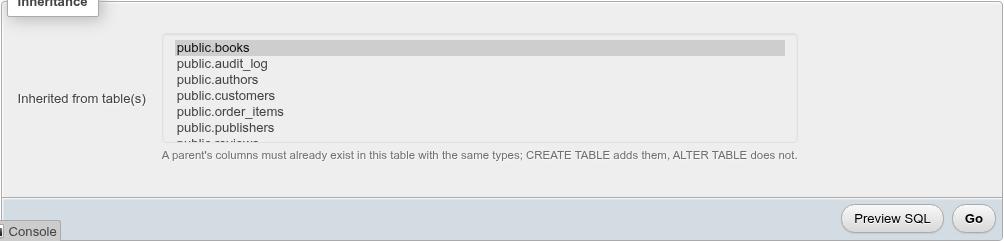
The Operations tab of an ordinary table has an Inheritance card with Inherited from table(s), a multi-select of the tables in the database, with the current parents selected. Change the selection (Ctrl-click) and click Go: newly selected tables are added with INHERIT, deselected ones removed with NO INHERIT.
ALTER TABLE IF EXISTS public.tbl_booking
    INHERIT public.tbl_booking_s;

ALTER TABLE IF EXISTS public.tbl_booking
    NO INHERIT public.tbl_booking_s;
ALTER TABLE INHERIT does not add columns
As the card says, A parent's columns must already exist in this table with the same types; CREATE TABLE adds them, ALTER TABLE does not. Otherwise PostgreSQL answers child table is missing column "…". NO INHERIT keeps the columns in the child; they just stop being linked to the parent.
What children inherit and what they do not
Children inherit the columns, NOT NULL and check constraints. They do not inherit indexes, primary keys, unique constraints or foreign keys: a unique key on the parent does not prevent duplicates across parent and children, and a foreign key pointing at the parent does not see rows stored in children. Declarative partitioning handles indexes (but not cross-partition uniqueness unless the key includes the partition columns); prefer it for new designs.
The Inheritance card also appears on partitioned tables and partitions, but PostgreSQL refuses INHERIT there: cannot change inheritance of partitioned table (or of a partition).
Coming from phpMyAdmin
| phpMyAdmin | Here |
|---|---|
| Partition by with partition definitions in the create form | Only Partition by: in the create form; partitions are added afterwards on the Partitions card. |
PARTITION BY KEY, LINEAR HASH | HASH (with MODULUS/REMAINDER). |
PARTITIONS 4 | Add the four hash partitions one by one (remainders 0–3, modulus 4). |
| Subpartitions | Tick Partitioned table? in the Add partition dialog; the partition shows with a partitioned badge and takes its own partitions. |
| Maintenance: Optimize, Rebuild, Repair, Check, Coalesce | Analyze, Vacuum, Truncate, Detach, Drop. |
| Remove partitioning | Not available. Create a plain table and copy the data. |