
Tablespaces
The Tablespaces tab at server level (/server/tablespaces) lists the server's tablespaces, creates them, and opens a page per tablespace to change it, manage its privileges, move objects out of it and drop it. A tablespace is a directory on the database server where PostgreSQL stores the files of tables, indexes and whole databases.
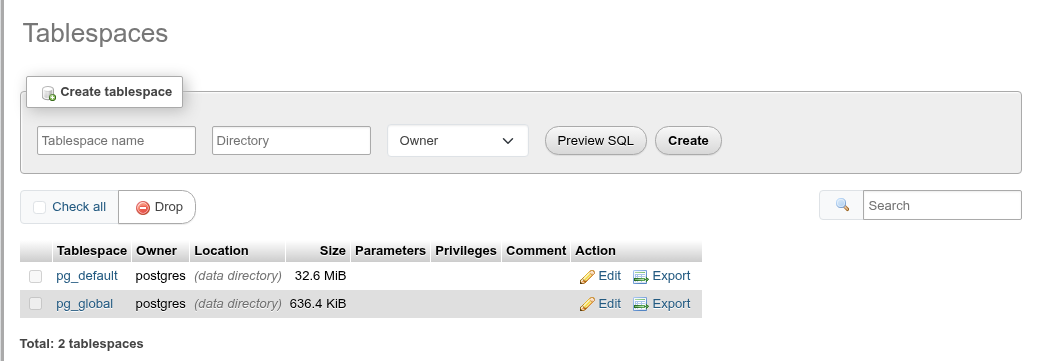
The list
Columns: Tablespace (links to its page), Owner, Location ((data directory) for the two built-in ones), Size (pg_tablespace_size, – where the role may not read it), Parameters (seq_page_cost, random_page_cost… set on it), Privileges (the raw ACL), Comment, and Edit, Export and Drop links. The search box filters by name; Total counts the rows.
pg_default (the data directory's base/) and pg_global (the shared catalogs) cannot be dropped: they have no checkbox and no Drop link.
Export shows the CREATE TABLESPACE statement with the owner, parameters, privileges and comment.
Sizes a role may not read
PostgreSQL lets a role read a tablespace's size only with CREATE on it, the privileges of pg_read_all_stats, or when it is the current database's default tablespace. For the other tablespaces (for an ordinary role, usually pg_global and tablespaces it has no CREATE on) Size shows –, here and on the tablespace's page; the rest of the list is the same.
Create a tablespace

| Field | What it does |
|---|---|
| Tablespace name | The name. Names starting with pg_ are reserved. |
| Directory | An absolute path to an existing, empty directory owned by the operating-system user the PostgreSQL server runs as. |
| Owner | The owning role; empty means you. |
Preview SQL shows the statement; Create runs it:
CREATE TABLESPACE srv_ts
  OWNER bookshop_staff
  LOCATION '/home/me/.cache/phppgadmin-docs/srv_ts';
Prepare the directory on the server first
phpPgAdmin cannot create the directory: create it on the database server, empty, owned by the server's user (usually postgres) with mode 700, for example mkdir /srv/pg_ts && chown postgres: /srv/pg_ts. Otherwise PostgreSQL answers directory "…" does not exist, could not set permissions on directory or tablespace location must be an absolute path. Only superusers may create tablespaces, and CREATE TABLESPACE cannot run inside a transaction block.
Tablespaces are not a backup or quota tool
A tablespace's files are part of the cluster: they cannot be attached to another server, and losing the directory breaks the cluster. Use them to put data on another disk.
The tablespace page
Edit or the name opens /server/tablespaces/<name>/edit, with one card per form. Every form has Preview SQL and Go.
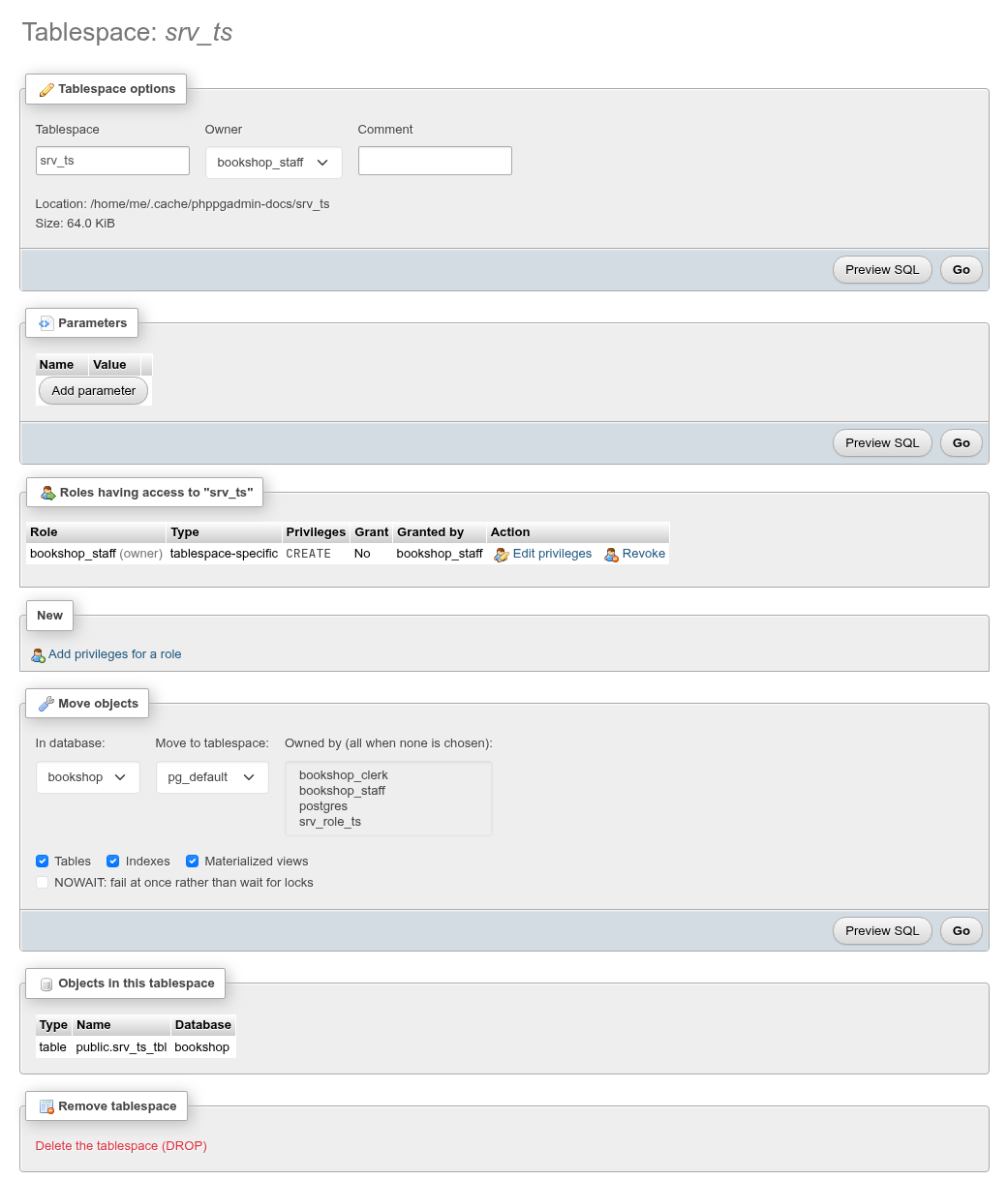
Tablespace options
Change the Tablespace name, Owner and Comment; the Location and Size are shown but cannot change (PostgreSQL has no way to move a tablespace's directory). For example:
ALTER TABLESPACE srv_ts
  RENAME TO srv_ts2;

ALTER TABLESPACE srv_ts2
  OWNER TO postgres;

COMMENT ON TABLESPACE srv_ts2
  IS 'Scratch tablespace for the docs';
After a rename the page moves to the new name. Go with nothing changed says Nothing to change.
Parameters
The planner settings the tablespace overrides for the objects in it: seq_page_cost, random_page_cost, effective_io_concurrency and maintenance_io_concurrency. Add parameter adds a row; pick the name, type the value, and Go runs ALTER TABLESPACE … SET (…); removing a row resets it.
ALTER TABLESPACE srv_ts
    SET (random_page_cost=1.1);
Privileges
Roles having access to "…" lists who holds CREATE on the tablespace (the only tablespace privilege), with Edit privileges and Revoke, and Add privileges for a role under New. It works like the other Privileges panels. Without CREATE a role cannot put tables or indexes in the tablespace, nor make it a database's default.
The grantor is the owner
When a superuser grants on a tablespace owned by someone else, PostgreSQL records the owner as the grantor (Granted by), not the superuser.
Move objects
pgAdmin's Move objects moves what one database stores in this tablespace to another one:
- In database: the database whose objects move (one at a time).
- Move to tablespace: the target.
- Owned by (optional, Ctrl+click for several): only objects owned by these roles; none chosen means all.
- Tables, Indexes, Materialized views: the kinds to move.
- NOWAIT: fail at once if a lock is held, rather than wait.
- Go, then confirm.
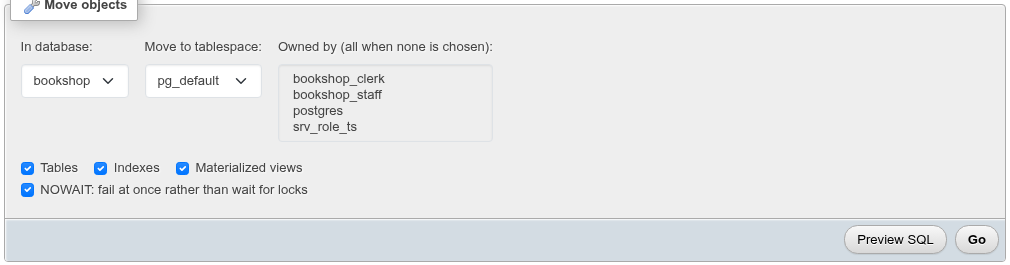
ALTER TABLE ALL IN TABLESPACE srv_ts SET TABLESPACE pg_default NOWAIT;
ALTER INDEX ALL IN TABLESPACE srv_ts SET TABLESPACE pg_default NOWAIT;
ALTER MATERIALIZED VIEW ALL IN TABLESPACE srv_ts SET TABLESPACE pg_default NOWAIT;
Moving rewrites the data and locks it
Each object is copied to the new location under an ACCESS EXCLUSIVE lock, so reads and writes on it wait until its copy is done. Without superuser rights, only objects you own are moved. A database whose default tablespace is this one is not moved by this; change it on the database's Operations tab.
Objects in this tablespace
List the objects stored in it in every database lists, across all databases you may connect to, the tables, indexes, sequences, materialized views and TOAST tables stored in it, and the databases whose default tablespace it is. It is loaded on demand because it connects to every database. Nothing is stored in this tablespace. when it is empty.
Remove tablespace
Delete the tablespace (DROP) asks, then runs DROP TABLESPACE. It is not shown for pg_default and pg_global.
Only an empty tablespace can be dropped
PostgreSQL refuses to drop a tablespace that still holds anything, in any database: tablespace "…" is not empty. Move the objects out first. Dropping removes PostgreSQL's subdirectory but not the directory you created.
See also
- Database operations: a database's default tablespace.
- Table operations: moving one table.