
Foreign data
PostgreSQL reads tables in other databases and other systems through foreign data wrappers (SQL/MED). phpPgAdmin manages the whole chain: foreign data wrappers, foreign servers and user mappings on the database's Objects tab, and foreign tables on a schema's Foreign tables tab. This page walks through each, then a complete example that reads bookshop.public.authors from another database.
The chain, and where each part lives:
| Object | What it is | Where |
|---|---|---|
| Foreign data wrapper | The driver: postgres_fdw, file_fdw, oracle_fdw… Usually created by an extension. | Database → Objects → Foreign data wrappers |
| Foreign server | One remote source: host, port, database | Database → Objects → Foreign servers |
| User mapping | The credentials a local role uses on that server | Database → Objects → User mappings |
| Foreign table | A local table whose rows come from the server | Schema → Foreign tables |
The sections share the Objects tab's layout (Add, Privileges, Edit, Export, Drop, with-selected Export and Drop, CASCADE on drop), described in How the sections work.
Option editors
Wrappers, servers, user mappings, foreign tables and foreign-table columns all take OPTIONS: name/value pairs the wrapper defines. Each dialog has the same grid for them: an Option and a Value per row, Remove per row, and Add option for a new row.
On Edit, phpPgAdmin compares the grid with the catalog and writes only the differences:
ALTER FOREIGN DATA WRAPPER dbo_fdw2
    OPTIONS (ADD level '2');
ALTER FOREIGN DATA WRAPPER dbo_fdw2
    OPTIONS (SET debug 'false');
ALTER FOREIGN DATA WRAPPER dbo_fdw2
    OPTIONS (DROP debug);
A row with neither name nor value is ignored. A value without a name, or the same option twice, is refused before anything runs (The option "level" is given twice.). Which option names are valid is decided by the wrapper's validator function: postgres_fdw rejects unknown names with invalid option "nonsense".
Foreign data wrappers
Most wrappers come from an extension: add postgres_fdw or file_fdw under Extensions and the wrapper appears in this list with its Handler, Validator, Options and Owner.

Add foreign data wrapper creates one by hand:
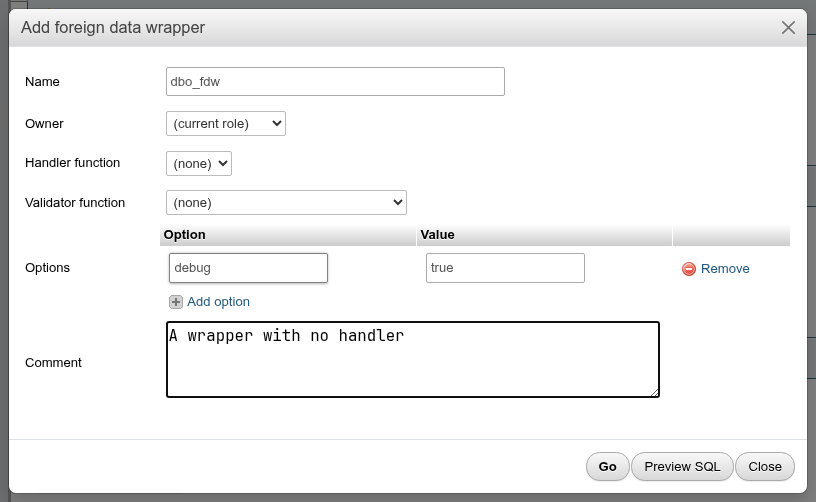
| Field | What it does | SQL |
|---|---|---|
| Name | On Edit, renames it | RENAME TO |
| Owner | Empty for the current role | OWNER TO |
| Handler function | The function returning fdw_handler that does the work; (none) gives a wrapper that can hold servers and mappings but whose foreign tables cannot be queried | HANDLER / NO HANDLER |
| Validator function | Checks the options of the wrapper, its servers, mappings and tables; (none) accepts any option | VALIDATOR / NO VALIDATOR |
| Options | The wrapper's own options | OPTIONS (…) |
| Comment | COMMENT ON FOREIGN DATA WRAPPER |
CREATE FOREIGN DATA WRAPPER dbo_fdw
    OPTIONS (debug 'true');

COMMENT ON FOREIGN DATA WRAPPER dbo_fdw
    IS 'A wrapper with no handler';
Superuser only
Creating or altering a wrapper needs a superuser. A wrapper that belongs to an extension should be changed by updating or dropping the extension, not here.
Foreign servers
Add foreign server needs a wrapper; without one you get Add a foreign data wrapper first: a server belongs to one.
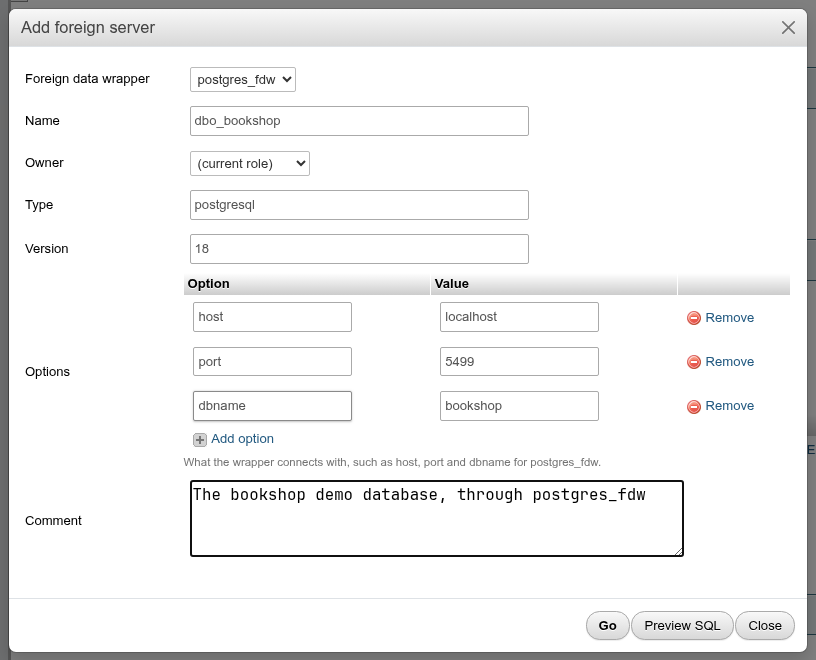
| Field | What it does |
|---|---|
| Foreign data wrapper | The wrapper the server uses; read-only on Edit |
| Name | On Edit, renames it |
| Owner | Empty for the current role |
| Type, Version | Free text that some wrappers read; postgres_fdw ignores them |
| Options | How the wrapper connects. For postgres_fdw: host, port, dbname, and connection settings such as sslmode or fetch_size. |
| Comment |
CREATE SERVER dbo_bookshop
    TYPE 'postgresql'
    VERSION '18'
    FOREIGN DATA WRAPPER postgres_fdw
    OPTIONS (host 'localhost', port '5499', dbname 'bookshop');
Changing the type drops the server
PostgreSQL cannot alter a server's type, so a new Type makes the dialog run DROP SERVER and CREATE SERVER (the Preview SQL starts with a warning). The drop has no CASCADE, so it fails with cannot drop server … because other objects depend on it while user mappings or foreign tables use the server, and nothing changes. The new server keeps the options, owner and comment. Version, owner, options, name and comment are plain ALTERs.
Dropping a server that has mappings or tables also fails without CASCADE; with it, the user mappings and foreign tables go too.
User mappings
A user mapping tells the wrapper which remote credentials a local role uses. Add user mapping needs a server (Add a foreign server first: a user mapping belongs to one.).
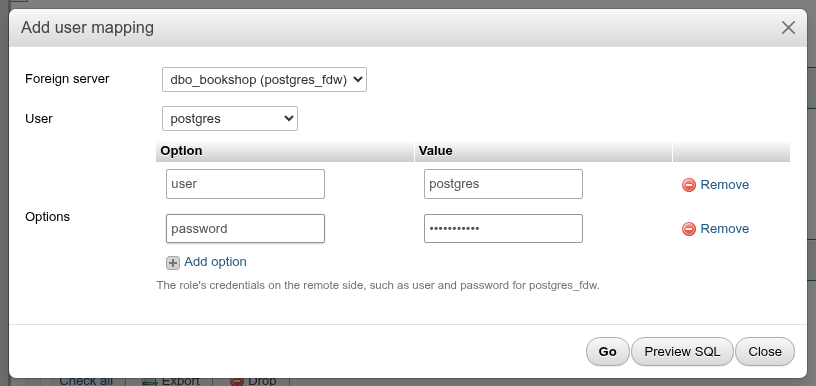
| Field | What it does |
|---|---|
| Foreign server | The server, shown as server (wrapper); read-only on Edit |
| User | CURRENT_USER, PUBLIC (every role without a mapping of its own) or a role; read-only on Edit |
| Options | For postgres_fdw: user and password on the remote side |
CREATE USER MAPPING FOR postgres SERVER dbo_bookshop
    OPTIONS ("user" 'postgres', password 's3cret-docs');
On Edit only the options change. To map another role or server, add a new mapping and drop the old one. The list names each mapping role @ server:

Passwords stay on the server
A password option never reaches the browser: the list shows it as ••••, the Edit dialog shows xxxxxx in a password field and Export writes password 'xxxxxx'. Leave the field as it is to keep the stored password, or type a new one to replace it. PostgreSQL itself still shows mapping options to the mapped role, the server's owner (if it has USAGE) and superusers through SELECT * FROM pg_user_mappings, and an exported mapping needs its real password filled in before it is run elsewhere.
postgres_fdw and passwords
For a role that is not a superuser, postgres_fdw requires a password in the mapping and that the remote server actually asks for it; otherwise queries fail with password is required. A superuser may connect without one, which is how the example below reads bookshop on a trust-authenticated local cluster.
Foreign tables
A schema's Foreign tables tab (/db/<database>/schema/<schema>/foreign-tables) lists its foreign tables with Rows (a Browse link), Server, Columns, Options and Comment, and Privileges, Edit, Export and Drop per row.
In the schema's table list too
The schema's Structure tab lists foreign tables among its tables, with the type Foreign table: Browse and Search work as for a table (each a query on the remote server), Structure opens the table's dialog here, and Drop, Show create, Export and the prefix actions of With selected include them. Insert, Empty, Copy table, Analyze and Vacuum leave them out.

Add a foreign table
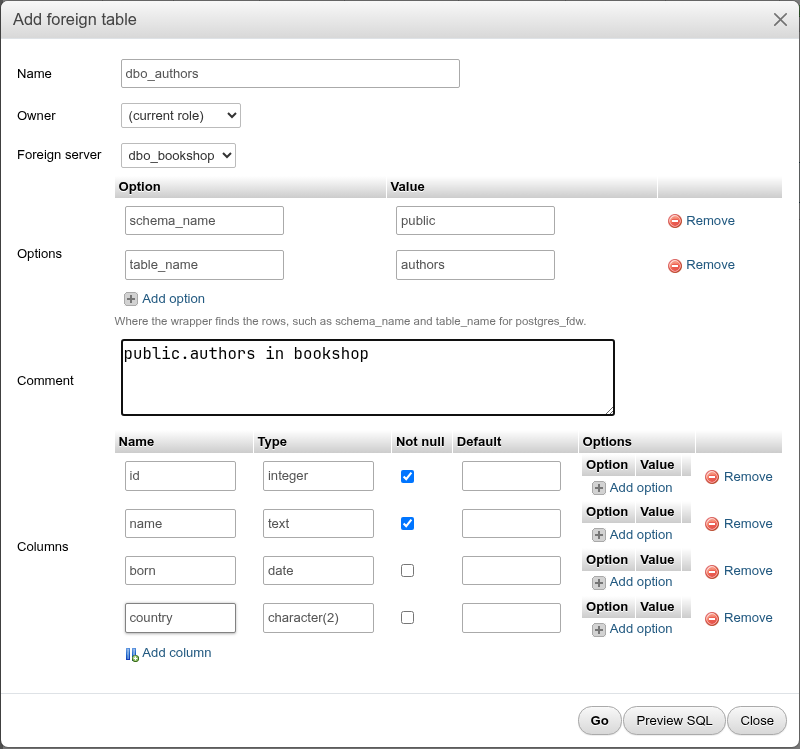
| Field | What it does |
|---|---|
| Name | The local table name |
| Owner | Empty for the current role |
| Foreign server | Read-only on Edit. Without any server the hint says to add one on the Objects tab. |
| Options | Where the wrapper finds the rows. For postgres_fdw: schema_name and table_name (default: the local names). |
| Comment | |
| Inherits | pgAdmin's Inherits: the tables (and foreign tables) whose columns it inherits, Ctrl-click for several. On Edit, a table added is INHERITed and one removed NO INHERITed. |
| Check constraints | pgAdmin's Constraints › Check: a row per constraint with Name, Check (the expression, price > 0), Validated? (unticked: NOT VALID) and No inherit?. On Edit, a removed constraint is dropped, a new one added, one whose expression or No inherit? changed dropped and added again, and one ticked Validated? VALIDATEd. Constraints inherited from a parent are not shown. |
| Columns | A row per column: Name, Type (with suggestions for common types; any type name works), Not null, Default, and column Options (for postgres_fdw, column_name maps a local column to a differently named remote one). Add column adds a row; Remove deletes one. |
The columns do not have to match the remote table one to one: you can leave remote columns out, and postgres_fdw matches by name (or column_name), not by position.
Constraints are not checked
NOT NULL, CHECK constraints and defaults on a foreign table are declarations for the planner and for INSERTs through the table; PostgreSQL does not verify that the remote rows obey them.
Edit columns
On Edit, phpPgAdmin compares the grid with the table's current columns and writes one ALTER per change, in this order: rename and owner of the table, dropped columns, then per kept column DROP/SET NOT NULL, TYPE, SET/DROP DEFAULT, RENAME COLUMN and its OPTIONS, then added columns:
ALTER FOREIGN TABLE IF EXISTS public.dbo_authors
    RENAME TO dbo_authors2;
ALTER FOREIGN TABLE IF EXISTS public.dbo_authors2
    OWNER TO bookshop_staff;
ALTER FOREIGN TABLE public.dbo_authors2
    DROP COLUMN id;
ALTER FOREIGN TABLE public.dbo_authors2
    ALTER COLUMN name DROP NOT NULL;
ALTER FOREIGN TABLE public.dbo_authors2
    ALTER COLUMN born TYPE text;
ALTER FOREIGN TABLE public.dbo_authors2
    ALTER COLUMN born SET DEFAULT 'unknown';
ALTER FOREIGN TABLE public.dbo_authors2
    RENAME COLUMN country TO country_code;
ALTER FOREIGN TABLE public.dbo_authors2
    ALTER COLUMN country_code OPTIONS (ADD column_name 'country');
ALTER FOREIGN TABLE public.dbo_authors2
    ADD COLUMN bio text;
These change only the local definition. The remote table is never altered.
Columns a foreign table inherits from a parent table are left out of the grid.
Browse
Browse opens the schema's SQL tab and runs SELECT * FROM schema.table;, so you get the usual result grid, with paging, export and the rest. Each page of results is a query on the remote server.
Privileges
Privileges opens a dialog with the table's grantees and its column grants, as on a table's Privileges tab: SELECT, INSERT, UPDATE, DELETE and the other table privileges, Add privileges for a role and Add column privileges (GRANT SELECT ON TABLE public.dbo_authors TO bookshop_staff;). A role reading a foreign table also needs a user mapping on its server.
Import foreign schema
Import foreign schema, beside Add foreign table, creates a foreign table for every table and view of a remote schema in one statement, with the columns the remote server reports. The dialog asks for:
| Field | What it does |
|---|---|
| Foreign server | The server to read the remote schema from. |
| Remote schema | The schema's name on the remote server. |
| Tables | All tables, Only these tables (LIMIT TO) or All but these tables (EXCEPT); the last two show a Table names box, one name per line. |
| Into schema | The local schema the foreign tables are created in; this schema by default. |
| Options | The wrapper's import options: postgres_fdw takes import_default, import_collate, import_not_null and import_generated. |
Preview SQL shows the statement; Go runs it:
IMPORT FOREIGN SCHEMA remote_src
    LIMIT TO (a, b)
    FROM SERVER loop
    INTO landing
    OPTIONS (import_default 'true');
A local table with the same name as a remote one makes the whole statement fail; nothing is created. Not every wrapper supports the statement (file_fdw does not).
Drop
Drop runs DROP FOREIGN TABLE schema.table; (with CASCADE, also dropping views on it). The remote table is untouched.
Worked example: read bookshop from another database
This reads public.authors of the bookshop database from a scratch database dbo_scratch on the same cluster (port 5499), as the superuser postgres.
- Install the wrapper. In
dbo_scratch, open Objects → Add extension, choosepostgres_fdw, click Go. The Foreign data wrappers list now showspostgres_fdw. - Add the server. Add foreign server, wrapper
postgres_fdw, namedbo_bookshop, optionshost=localhost,port=5499,dbname=bookshop. Go. - Add the user mapping. Add user mapping, server
dbo_bookshop (postgres_fdw), userpostgres, optionuser=postgres(andpasswordif the remote server asks for one). Go. - Add the foreign table. Open the
publicschema's Foreign tables tab, Add foreign table: namedbo_authors, serverdbo_bookshop, optionsschema_name=public,table_name=authors, and columnsid integer(not null),name text(not null),born date,country character(2). Go. - Browse it. Click Browse in the table's row.
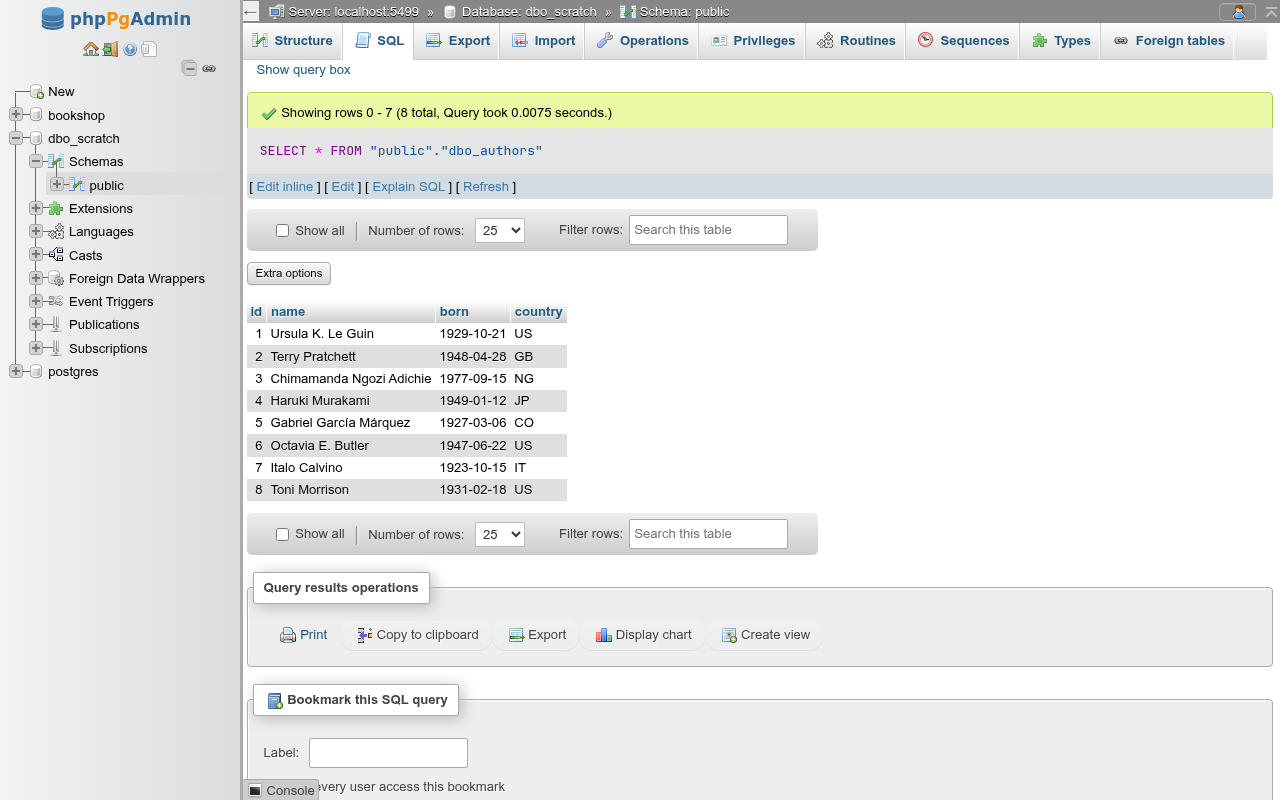
The rows come from bookshop at query time. To import every table of a remote schema at once, run IMPORT FOREIGN SCHEMA public FROM SERVER dbo_bookshop INTO local_schema; in the SQL editor; there is no form for it.
Limitations
- Partitions of a partitioned table that are foreign tables, and security labels on foreign objects have no form.