
Roles
The Roles tab at server level (/server/roles) manages PostgreSQL roles: the users and groups of the server. It follows phpMyAdmin's User accounts pages: an overview, an Add role page and an Edit privileges page per role. In PostgreSQL a user is a role with LOGIN, and a group is a role other roles are members of; both live here.
Roles overview
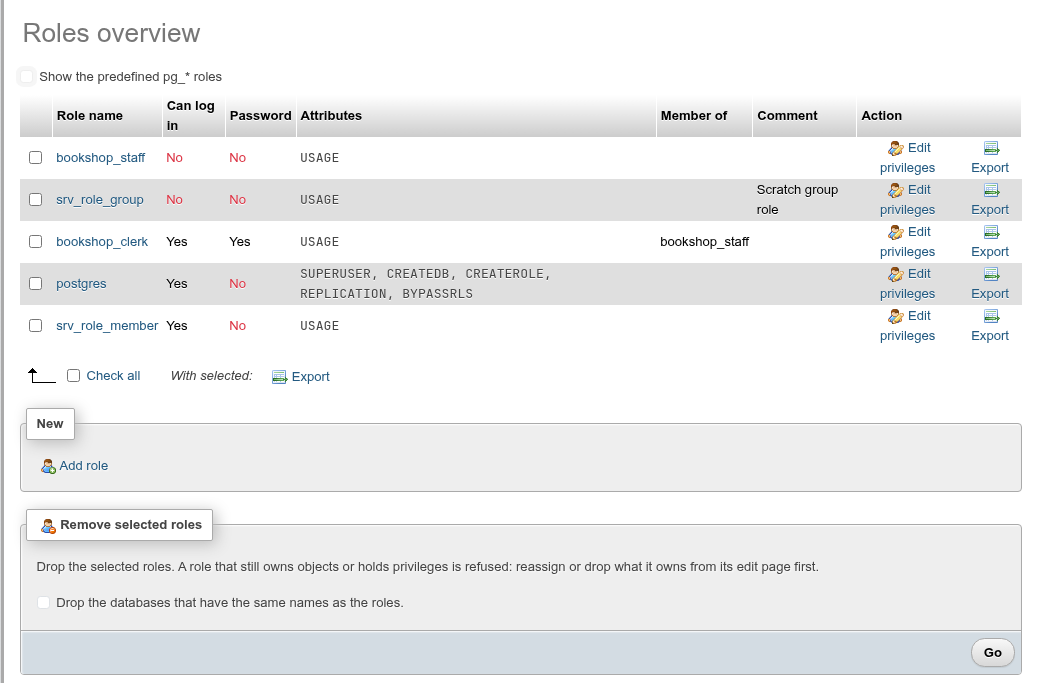
| Column | What it shows |
|---|---|
| Role name | Links to the role's edit page. |
| Can log in | LOGIN or not. |
| Password | Whether the role has a password. Shows – to a role that is not a superuser, which cannot read pg_authid. |
| Attributes | SUPERUSER, CREATEDB, CREATEROLE, REPLICATION, BYPASSRLS, or USAGE when it has none of them. |
| Member of | The roles it is a member of. |
| Comment | COMMENT ON ROLE. |
Roles are ordered with the non-login roles first, then by name. Each row has Edit privileges and Export.
Show the predefined pg_* roles also lists pg_monitor, pg_read_all_data and the other built-in roles. It is off by default. The role created by initdb (usually postgres, OID 10) is always listed.
Export
Export in a row opens the role's CREATE ROLE statement with its memberships, settings and comment, with Copy to clipboard. To export several, check them (or Check all) and click Export after With selected:; the statements are joined in one dialog.
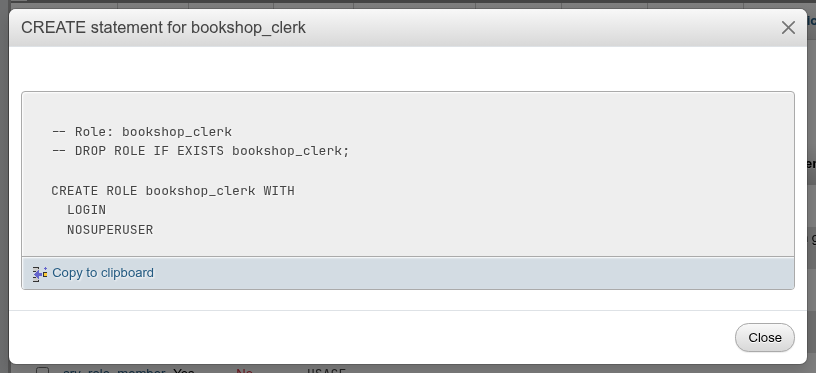
The export contains the password hash
For a role with a password the export includes ENCRYPTED PASSWORD 'SCRAM-SHA-256$…', read from pg_authid (superusers only). Running the statement on another server gives the role the same password. Treat the export like a password file.
Add a role
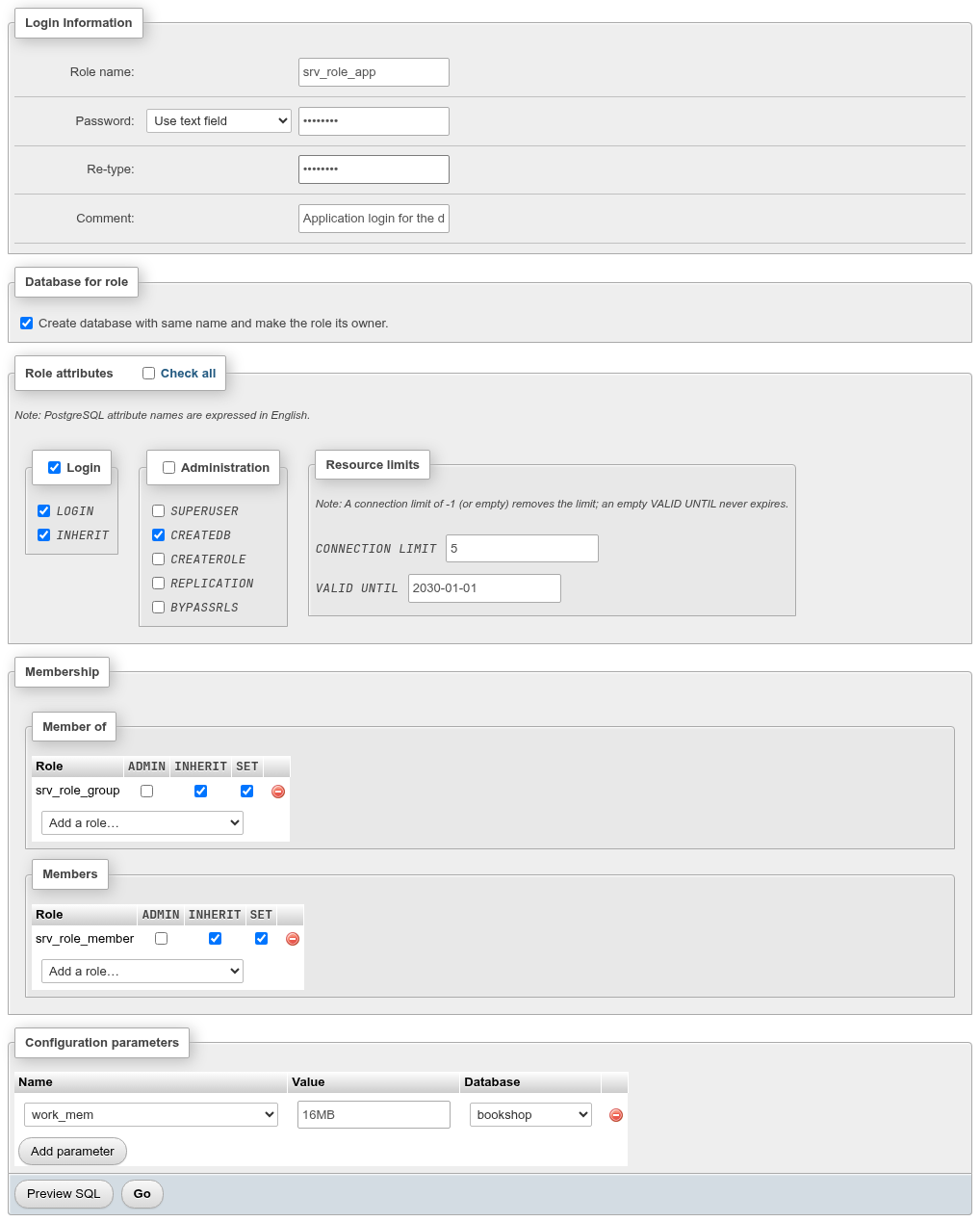
Add role in the New card opens /server/roles/create. Fill the parts you need and click Go; Preview SQL shows the statements first.
Login Information
| Field | What it does |
|---|---|
| Role name: | The name, up to 63 bytes. |
| Password: | Use text field (type it twice) or No password. Typing in a field selects Use text field. The two fields must match (The passwords aren't the same!). |
| Comment: | COMMENT ON ROLE. |
PostgreSQL stores the password hashed with password_encryption (scram-sha-256 by default). The Preview SQL shows it as PASSWORD 'xxxxxx'; the real statement sends the text you typed.
Database for role
Create database with same name and make the role its owner. creates the database after the role: CREATE DATABASE "name" OWNER "name"; (template template1, default encoding).
Role attributes
Two groups of checkboxes, each with its own Check all, plus the Check all in the legend:
| Attribute | Group | Meaning |
|---|---|---|
LOGIN | Login | May connect. On by default on this page. |
INHERIT | Login | Uses the privileges of the roles it is a member of without SET ROLE. On by default. |
SUPERUSER | Administration | Bypasses every permission check. Only a superuser may grant it. |
CREATEDB | Administration | May create databases. |
CREATEROLE | Administration | May create, alter and drop roles and grant membership in them. |
REPLICATION | Administration | May connect for streaming replication and create replication slots. Only a superuser may grant it. |
BYPASSRLS | Administration | Ignores row-level security policies. Only a superuser may grant it. |
Resource limits:
CONNECTION LIMIT: concurrent connections; empty or-1means no limit.VALID UNTIL: when the password stops working, as a timestamp (2030-01-01, or with a time and zone). Empty means it never expires. It only affects password authentication; withtrustor certificates the role still connects.
Hover a keyword for its description.
Membership
- Member of: roles this role joins (
GRANT group TO role). - Members: roles that join this one (
GRANT role TO member).
Pick a role in Add a role… to add a row; the red icon removes it. Each row has the options of the membership:
| Option | Meaning |
|---|---|
ADMIN | The member may grant and revoke membership in the role to others. |
INHERIT | The member uses the role's privileges without SET ROLE. |
SET | The member may SET ROLE to the role. |
INHERIT and SET per membership need PostgreSQL 16
Before PostgreSQL 16 only ADMIN is offered; whether privileges are inherited is then the member's INHERIT attribute.
Configuration parameters
Add parameter adds a row: the parameter Name, its Value and the Database it applies in, or (every database). Each row becomes ALTER ROLE … SET, or ALTER ROLE … IN DATABASE … SET, and applies when the role starts a new session.
What Go runs
The preview of the page above:
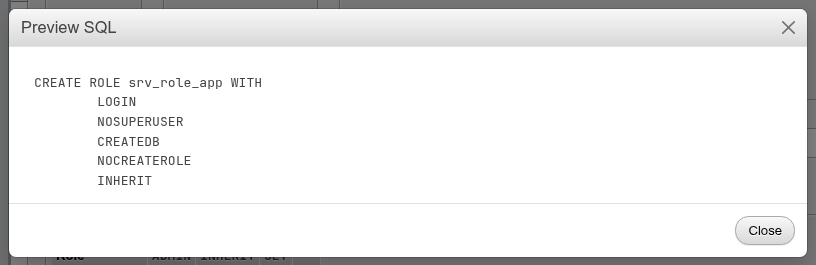
CREATE ROLE srv_role_app WITH
	LOGIN NOSUPERUSER CREATEDB NOCREATEROLE INHERIT NOREPLICATION NOBYPASSRLS
	CONNECTION LIMIT 5
	VALID UNTIL '2030-01-01'
	PASSWORD 'xxxxxx';
GRANT srv_role_group TO srv_role_app WITH ADMIN False, INHERIT True, SET True;
ALTER ROLE srv_role_app IN DATABASE bookshop SET work_mem TO '16MB';
COMMENT ON ROLE srv_role_app IS 'Application login for the docs';
GRANT srv_role_app TO srv_role_member WITH ADMIN False, INHERIT True, SET True;
CREATE DATABASE "srv_role_app" OWNER "srv_role_app";
On success you return to the overview with Role name has been created. If the database cannot be created, the role stays created and the message gives the database error.
Creating roles without being a superuser
A role needs CREATEROLE to create roles, and from PostgreSQL 16 it may only grant membership in roles it has ADMIN on and cannot give attributes it does not have itself. Without it the page shows permission denied to create role with PostgreSQL's DETAIL: Only roles with the CREATEROLE attribute may create roles.
Add replica replication user on the Replication page opens this page with REPLICATION already checked.
Edit a role
Edit privileges (or the role's name) opens /server/roles/<name>/edit, phpMyAdmin's Edit privileges page. Each part is its own form with Preview SQL and Go, so a Go changes only that part. If nothing changed, Preview SQL shows -- Nothing to change.
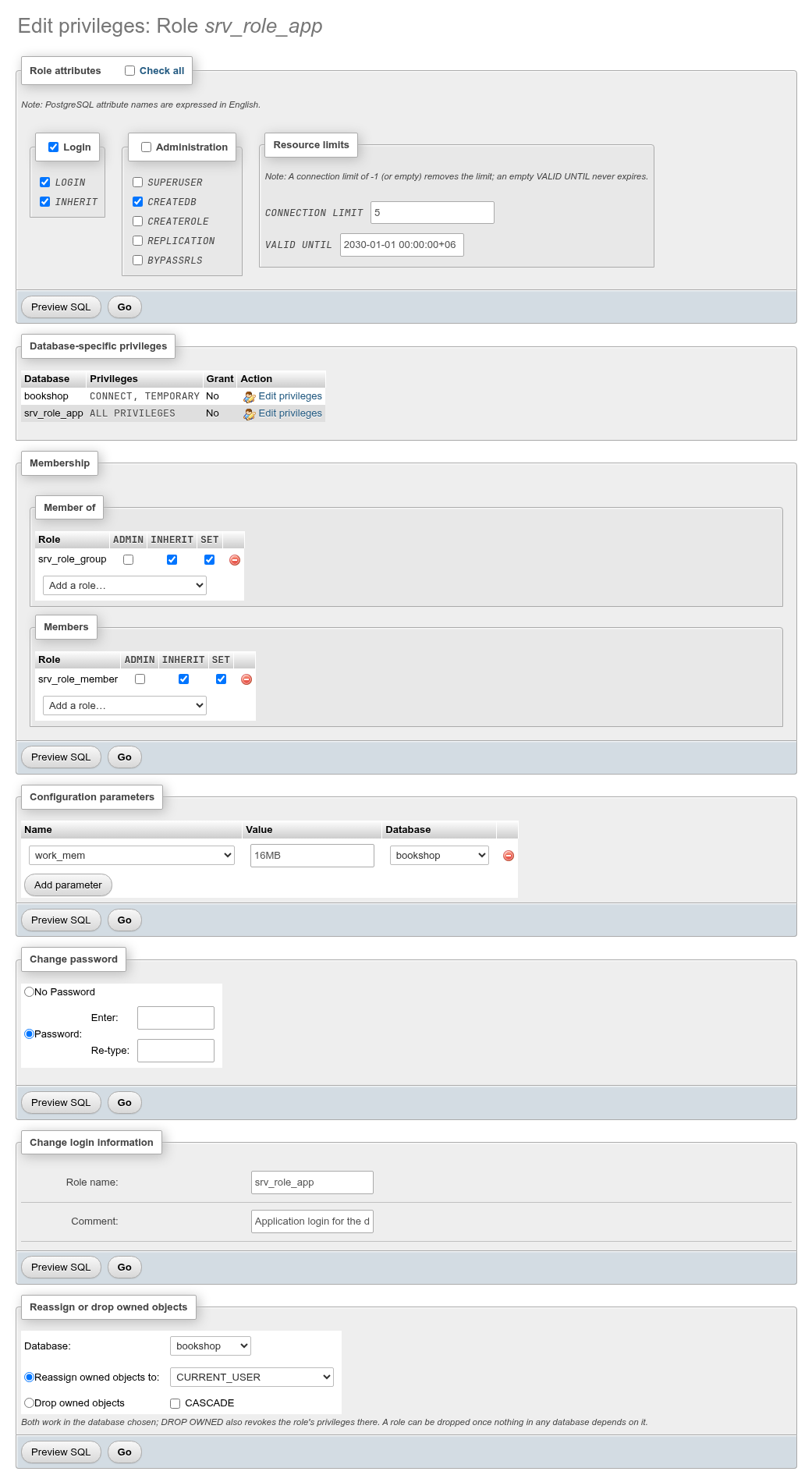
When you edit the role you are signed in as, a note says You are attempting to edit privileges of the role with which you are currently logged in.

Role attributes
The same checkboxes and limits as on the add page. Only what changed is altered, for example turning on CREATEROLE, off CREATEDB and clearing the connection limit:
ALTER ROLE srv_role_app
	NOCREATEDB
	CREATEROLE
	CONNECTION LIMIT -1
;
Database-specific privileges
A read-only table of the databases the role holds privileges on (CONNECT, CREATE, TEMPORARY, or ALL PRIVILEGES for a database it owns), whether it may grant them on, and an Edit privileges link to that database's Privileges tab.
Membership and configuration parameters
The same tables as on the add page. Changing the options of an existing membership re-grants it (GRANT srv_role_group TO srv_role_app WITH ADMIN True, INHERIT False, SET True;); removing a row revokes it; removing a parameter runs ALTER ROLE … [IN DATABASE …] RESET name.
Change password
Password: with Enter: and Re-type: sets a new password; No Password removes it (PASSWORD NULL). Next to No Password the page says (the role has none) when it has none.
Change login information
Role name: renames the role (ALTER ROLE … RENAME TO …) and Comment: sets its comment. After a rename the page moves to the new name.
Renaming clears an MD5 password
PostgreSQL clears a role's password when you rename it if the password is stored as an MD5 hash, since the hash includes the name. SCRAM passwords are kept.
Reassign or drop owned objects
pgAdmin's Reassign/Drop Owned, needed before a role that owns things can be dropped:
- Choose the Database:. Both statements work in one database at a time.
- Either Reassign owned objects to: a role (
CURRENT_USER,SESSION_USERor any other role), which runsREASSIGN OWNED BY role TO new_role;, - or Drop owned objects, optionally with
CASCADE, which runsDROP OWNED BY role;. It drops everything the role owns in that database and revokes its privileges there, including on the database itself and on shared objects. - Click Go and confirm the statement.
The messages are Reassign owned executed successfully! and Drop owned executed successfully!. Repeat for every database the role owns objects or holds privileges in.
DROP OWNED drops data
DROP OWNED drops the role's tables with their rows. Use Reassign to keep them.
Drop roles
Check the roles in the overview and click Go in Remove selected roles. The confirmation lists one DROP ROLE per role.

Drop the databases that have the same names as the roles. also drops, first, every database named like one of the roles (phpMyAdmin's "Drop the databases that have the same names as the users"). The confirmation lists those DROP DATABASE statements too.
A role that still owns something is refused
PostgreSQL refuses DROP ROLE while the role owns objects or holds privileges in any database: role "…" cannot be dropped because some objects depend on it. The DETAIL: under the message says where, one line per database (1 object in database bookshop), or names the objects when they are in the maintenance database. Use Reassign or drop owned objects on the role's page in each of those databases, then drop it. Roles are dropped one after another, so the ones before a failure stay dropped.
See also
- Privileges: what a role may do on databases, schemas, tables and columns.
- Status » Processes: the sessions of each role.