
Functions and procedures
A schema's Routines tab (/db/<database>/schema/<schema>/routines) lists the schema's functions, procedures, trigger functions, aggregates and operators, and opens the routine editor. In the navigation panel, routines sit under Functions, Procedures, Trigger functions, Aggregates and Operators; clicking a function, procedure or trigger function opens its editor, and clicking a container opens this tab.
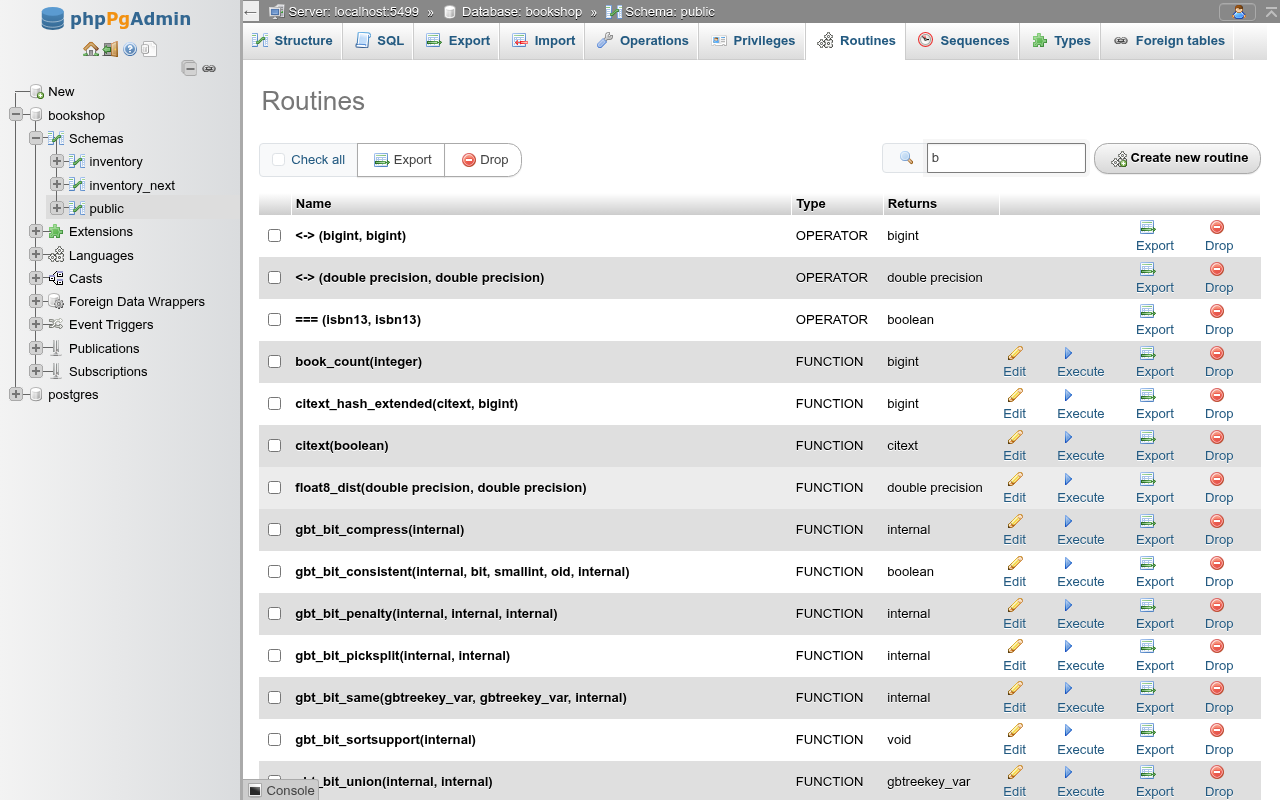
The routine list
Each row shows the signature (name and argument types), the Type (FUNCTION, PROCEDURE, TRIGGER FUNCTION, AGGREGATE or OPERATOR) and what it Returns (empty for a procedure; the result type of an aggregate or operator). The links per row:
| Link | Shown for | What it does |
|---|---|---|
| Edit | functions, procedures, trigger functions | Opens the routine editor. |
| Privileges | functions, procedures, trigger functions | Opens the routine editor at its privileges. |
| Execute | functions, procedures | Asks for the arguments and runs the call on the SQL tab; see Execute a routine. |
| Export | all | Shows the CREATE statement in a dialog with Copy to clipboard. |
| Drop | all | Asks for confirmation, then runs DROP FUNCTION, DROP PROCEDURE, DROP AGGREGATE or DROP OPERATOR with the signature. |
Above the table: Check all, then Export and Drop for the ticked rows (Export joins the statements; Drop runs one statement per row and reports N routines have been dropped.). The search box filters the rows by signature as you type, and Create new routine opens an empty editor. With nothing ticked the bulk buttons say No routine selected.
Extension members are listed too
Functions, operators and types that an extension installed into the schema (here citext, btree_gist and pg_trgm live in public) are listed with your own. Dropping one fails with cannot drop function citext_eq(citext,citext) because extension citext requires it. Use the filter box to find your routines.
Aggregates and operators
The arrow next to Create new routine opens Create aggregate and Create operator; the Edit link of an aggregate or operator row, or a click on one in the navigation panel, opens the same dialog filled in. Preview SQL shows the statements before Go runs them.
The aggregate dialog has the fields of CREATE AGGREGATE: the name, the Kind (normal, ordered-set or hypothetical-set), the Input types, the State function and State type, the state data size and Initial condition, the final, combine, serialization and deserialization functions, the Sort operator, Parallel, and with Moving-aggregate mode ticked the MSFUNC/MINVFUNC/MSTYPE set. For example:
CREATE AGGREGATE public.total_price(numeric) (
    SFUNC = price_sum_state,
    STYPE = numeric,
    INITCOND = '0'
);
Saving an existing aggregate runs CREATE OR REPLACE AGGREGATE under its old signature when a definition field changed, then ALTER AGGREGATE for a new owner, name or schema and COMMENT ON AGGREGATE. PostgreSQL keeps an aggregate's kind, input types and result type, so the first two are read-only when editing; a change of the final function's result type is refused by the server.
The operator dialog has the name, Function, the left and right operand types (no left type for a prefix operator), Commutator, Negator, the restriction and join selectivity functions, HASHES and MERGES. A commutator or negator given without a schema is taken from the operator's own schema. ALTER OPERATOR changes only the selectivity functions, owner, schema and comment; changing anything else drops the operator and creates it again, which the preview shows under a warning comment, and fails while an index or another object depends on it.
The routine editor
Create new routine opens …/routines/create; add ?type=procedure or ?type=trigger_function to start with that type. Edit opens …/routines/<kind>/<oid>/edit. Preview SQL shows the statements; Go runs them and returns to the list with Routine … has been created. or … has been altered.
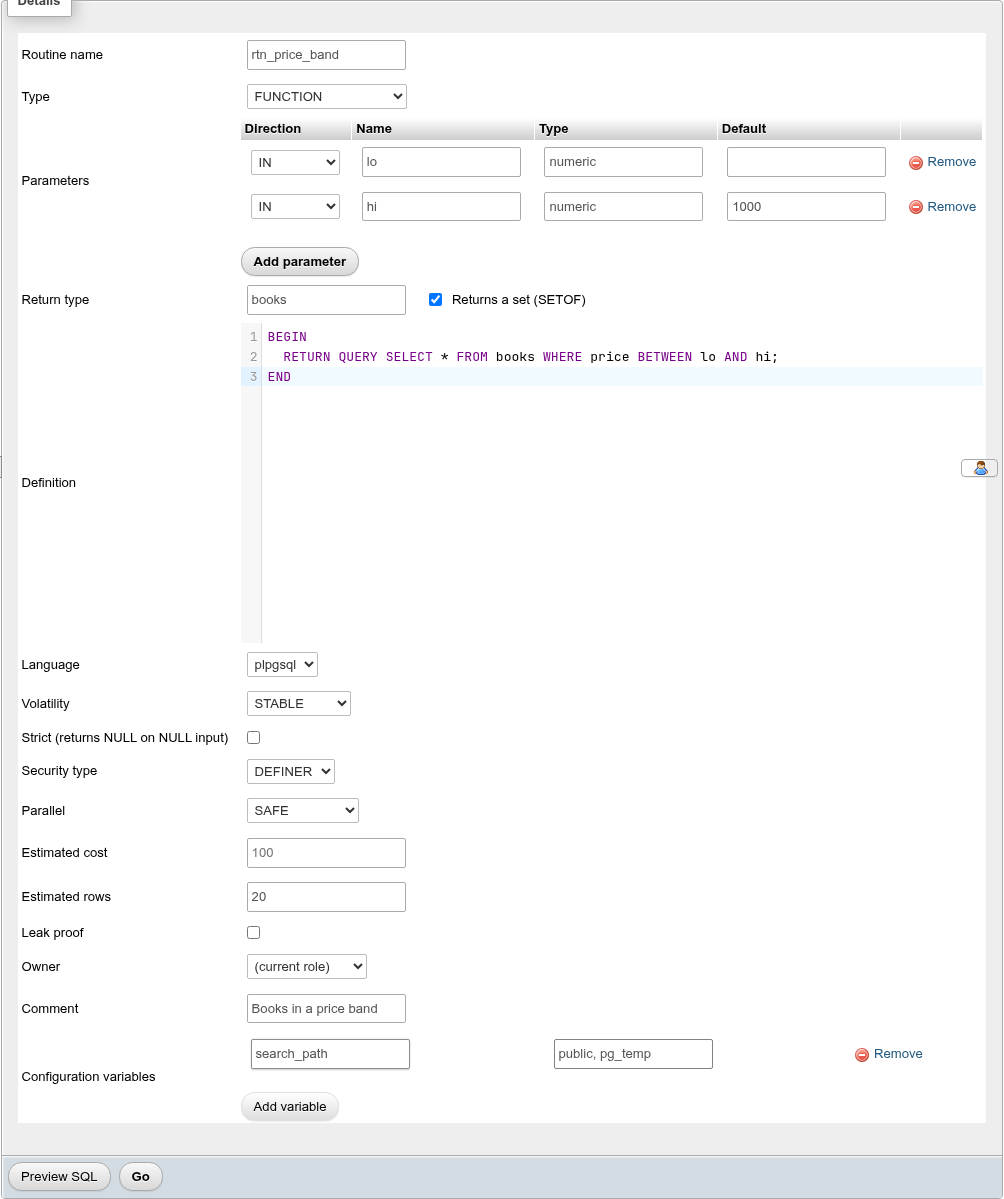
Which rows appear depends on the Type:
| Field | Function | Procedure | Trigger function | SQL |
|---|---|---|---|---|
| Routine name | yes | yes | yes | |
| Type | FUNCTION, PROCEDURE or TRIGGER FUNCTION; fixed when editing | |||
| Parameters | yes | yes | the argument list | |
| Return type, Returns a set (SETOF) | yes | always trigger | RETURNS [SETOF] type | |
| Definition | yes | yes | yes | AS $BODY$ … $BODY$ |
| Language | yes | yes | yes | LANGUAGE 'plpgsql' |
| Volatility | yes | yes | VOLATILE / STABLE / IMMUTABLE | |
| Strict (returns NULL on NULL input) | yes | yes | STRICT | |
| Security type | yes | yes | yes | SECURITY INVOKER / SECURITY DEFINER |
| Parallel | yes | PARALLEL UNSAFE / RESTRICTED / SAFE | ||
| Estimated cost | yes | yes | COST n (placeholder 100) | |
| Estimated rows | only with SETOF | ROWS n (placeholder 1000) | ||
| Leak proof | yes | yes | LEAKPROOF | |
| Window function | when created | WINDOW | ||
| Support function | yes | SUPPORT schema.function | ||
| Owner | yes | yes | yes | ALTER FUNCTION … OWNER TO |
| Comment | yes | yes | yes | COMMENT ON FUNCTION |
| Configuration variables | yes | yes | yes | SET name = value |
Parameters
Add parameter adds a row with Direction, Name, Type and Default; Remove deletes it.
- Direction:
IN,OUT,INOUTorVARIADIC.OUTandINOUTparameters make up the result row of a function; aVARIADICparameter must be last and be an array type (integer[]). - Type suggests the database's types as you type (built-in and
publictypes by bare name, others schema-qualified). Rows with an empty type are left out. - Default is an SQL expression (
1000,'none',now()). Once one parameter has a default, every later input parameter needs one too.
Return type
Type any type name, a table or view name (its row type), void, or TABLE (col type, …). Returns a set (SETOF) returns any number of rows; with it, Estimated rows appears. A function with OUT parameters still needs a return type matching them (record for several).
Definition and language
Definition is the body inside the dollar quotes: for PL/pgSQL the DECLARE … BEGIN … END block, for sql the queries. A sql body that starts with BEGIN ATOMIC is written as an SQL-standard body (no AS), which PostgreSQL parses at creation time and tracks dependencies for.
Language lists the languages installed in the database (plpgsql, sql, c, internal, and any others you added on the database's Languages page).
With Language c the Definition box is replaced by Object file (the shared library, for example $libdir/mylib) and Link symbol (the C function's name in it; left empty, it is the routine's name), as pgAdmin's dialog has them. Go writes them as AS '$libdir/mylib', 'f', and editing a C function shows both. Creating a C function requires a superuser.
Options
- Volatility:
VOLATILE(default) for anything with side effects or changing results;STABLEwhen the result is fixed within a statement (reads tables);IMMUTABLEonly when the result depends on the arguments alone (needed for use in indexes). - Strict: the function is not called and returns
NULLwhen any argument isNULL. - Leak proof: declares that the function reveals nothing about its arguments except through its result, so the planner may use it ahead of security barrier and row security conditions. Only a superuser can set it.
- Parallel: whether the function may run in parallel workers. Mark it
SAFEonly if it writes nothing and uses no temporary tables or cursors. - Estimated cost and Estimated rows are planner hints in units of
cpu_operator_costand rows.
SECURITY DEFINER needs a fixed search_path
A SECURITY DEFINER routine runs with its owner's rights. Set search_path in Configuration variables (name search_path, value public, pg_temp, with pg_temp last) so a caller cannot put their own objects in front of the ones the routine uses, and grant EXECUTE only to the roles that need it (Privileges). New functions are executable by PUBLIC by default.
Configuration variables
Add variable adds a Name / Value pair. The name box suggests the server's settings. Each pair becomes SET name = value on the routine, applied while it runs and restored afterwards. The search_path value is written unquoted, so a list such as public, pg_temp works; other values are quoted. Remove deletes a pair.
Window and support functions
Window function makes a function callable with OVER (…). Only C and internal functions can be window functions; the flag is set when the function is created and shown read-only afterwards, since PostgreSQL cannot change a routine's kind:
CREATE FUNCTION public.my_rank()
    RETURNS bigint
    LANGUAGE 'internal'
    VOLATILE WINDOW PARALLEL UNSAFE
AS $BODY$window_rank$BODY$;
An internal function's definition is the name of the built-in C function, written without surrounding line breaks.
Support function picks a planner support function (one taking and returning internal, in C or internal: the list shows the database's, pg_catalog included). Setting one needs a superuser; choosing the empty entry removes it (the function is restated without SUPPORT).
Options the editor does not have: TRANSFORM. Security labels are set on the editor's Security labels card, shown when the server has a label provider.
The editor above generates:
CREATE FUNCTION public.rtn_price_band(IN lo numeric, IN hi numeric DEFAULT 1000)
    RETURNS SETOF books
    LANGUAGE 'plpgsql'
    COST 50
    STABLE STRICT SECURITY DEFINER PARALLEL SAFE
    ROWS 20

    SET search_path=public, pg_temp
AS $BODY$
BEGIN
  RETURN QUERY SELECT * FROM books WHERE price BETWEEN lo AND hi;
END
$BODY$;

COMMENT ON FUNCTION public.rtn_price_band(numeric, numeric)
IS 'Books in a price band';Edit a routine
The editor for an existing routine shows its current settings. A Debug link appears above the form for PL/pgSQL functions and procedures when the database has the debugger extension; see Debugger.
How a change is applied:
- Routine name changes run
ALTER FUNCTION … RENAME TO. - Owner and Comment run
ALTER FUNCTION … OWNER TOandCOMMENT ON FUNCTION. - Anything else (body, options, variables, parameter names and defaults) runs
CREATE OR REPLACE FUNCTION(orPROCEDURE) with the full new definition. Grants and dependent triggers stay.
You cannot add or remove parameters of an existing routine: the hint says PostgreSQL cannot add or remove a parameter of an existing routine; create a new one instead.
What CREATE OR REPLACE cannot change
PostgreSQL identifies a routine by its name and input argument types, and CREATE OR REPLACE cannot change the result. So:
- Return type: changing it fails with cannot change return type of existing function. That includes adding or removing
SETOFand changingOUTparameters. Drop the function and create it again (dependent triggers, views and defaults must be dropped first). - Parameter types: changing an argument's type does not alter the routine. The statement creates a second function (an overload) with the new signature and leaves the old one in place; the editor still reports Routine … has been altered. Drop the old signature from the list afterwards.
- Renaming a parameter or removing a default is refused by PostgreSQL (cannot change name of input parameter, cannot remove parameter defaults from existing function).
Privileges
Below an existing routine's form, its grantees as on the Privileges tabs: each role holding EXECUTE (by default PUBLIC and the owner), Edit privileges and Revoke, and Add privileges for a role under New. To keep a routine from everyone else, revoke PUBLIC's row:
REVOKE EXECUTE ON FUNCTION public.apply_discount(numeric, numeric) FROM PUBLIC;Statistics, Dependencies and Dependents
Below the privileges:
- Statistics: Number of calls, Total time and Self time (milliseconds) from
pg_stat_user_functions. - Dependencies: the types, language and schema the routine uses.
- Dependents: triggers, views, defaults and other objects that use it.
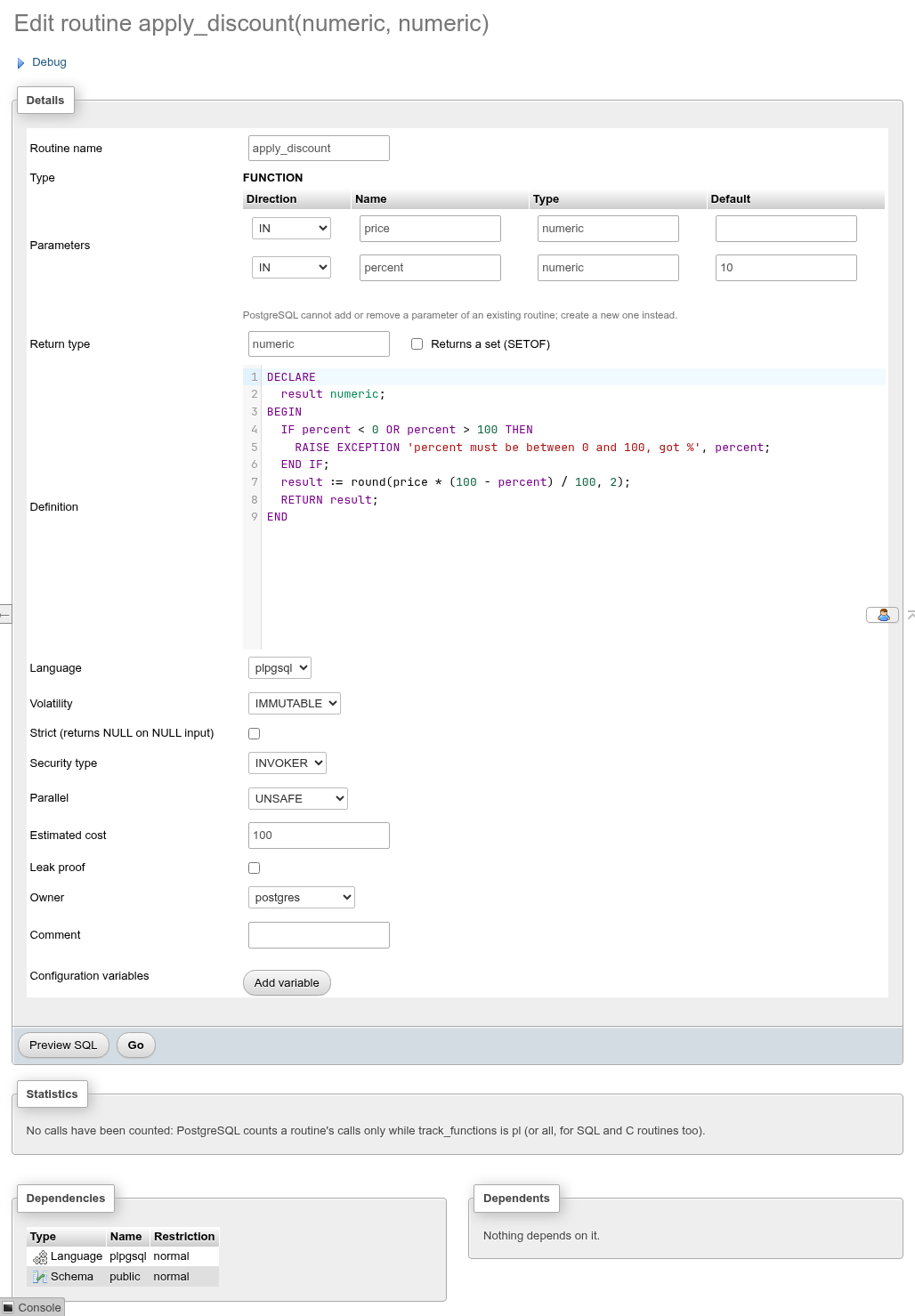
Call counts need track_functions
PostgreSQL counts calls only while track_functions is pl (PL functions) or all (also SQL and C functions). With it off, the panel says No calls have been counted: PostgreSQL counts a routine's calls only while track_functions is pl (or all, for SQL and C routines too). SQL functions that the planner inlines are never counted. Change the setting on the server's Variables page.
Execute a routine
Execute opens Routine parameters with one row per input parameter: Name, Type, a Value box and a NULL box. Go builds the call and runs it on the schema's SQL tab, where you see the result grid (or the error):
- a function:
SELECT * FROM "public"."rtn_price_band"(10, 12) - a procedure:
CALL "public"."restock"(…)
A routine without input parameters runs at once, without the dialog.
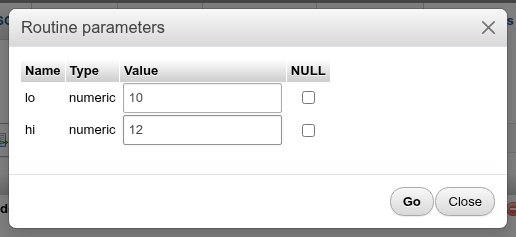
Numbers and true/false are passed as typed; everything else becomes a literal cast to the parameter's type ('2026-01-01'::date). Tick NULL to pass NULL.
Leave a box empty to use the parameter's default (shown greyed in the box): trailing parameters left empty are left out of the call, and when one in the middle is left empty the ones after it are passed by name, "public"."rtn_fn"(1, "c" => 'y'::text). A procedure's OUT parameters have no box and are passed as NULL, as CALL requires (CALL "public"."rtn_proc"(21, NULL)). The array of a VARIADIC parameter is passed with the VARIADIC keyword: SELECT * FROM "public"."rtn_sum"(VARIADIC '{1,2,3}'::integer[]).
Procedures and transactions
Procedures differ from functions:
- They are run with
CALL, not in aSELECT, and return no value except throughOUT/INOUTparameters (shown as a one-row result). - They can
COMMITandROLLBACKinside their body. That only works when theCALLis not inside an explicit transaction: with Run as one transaction ticked on the SQL tab, a procedure that commits fails with invalid transaction termination. Run it with the box cleared. - They have no volatility, strictness, parallel, cost or leakproof settings, which is why the editor hides those rows.
Trigger functions return trigger, take no declared parameters (they read NEW, OLD, TG_OP and TG_ARGV) and are attached to tables and views on the Triggers tab. They have no Execute link.
Drop a routine
Drop shows the statement, for example DROP FUNCTION "public"."rtn_price_band"(numeric, numeric);, and runs it on OK. There is no CASCADE option: a function used by a trigger, a view, a column default or another object fails with cannot drop function … because other objects depend on it. Check Dependents in the editor and drop those first, or run DROP FUNCTION … CASCADE on the SQL tab.