
Tables in a schema
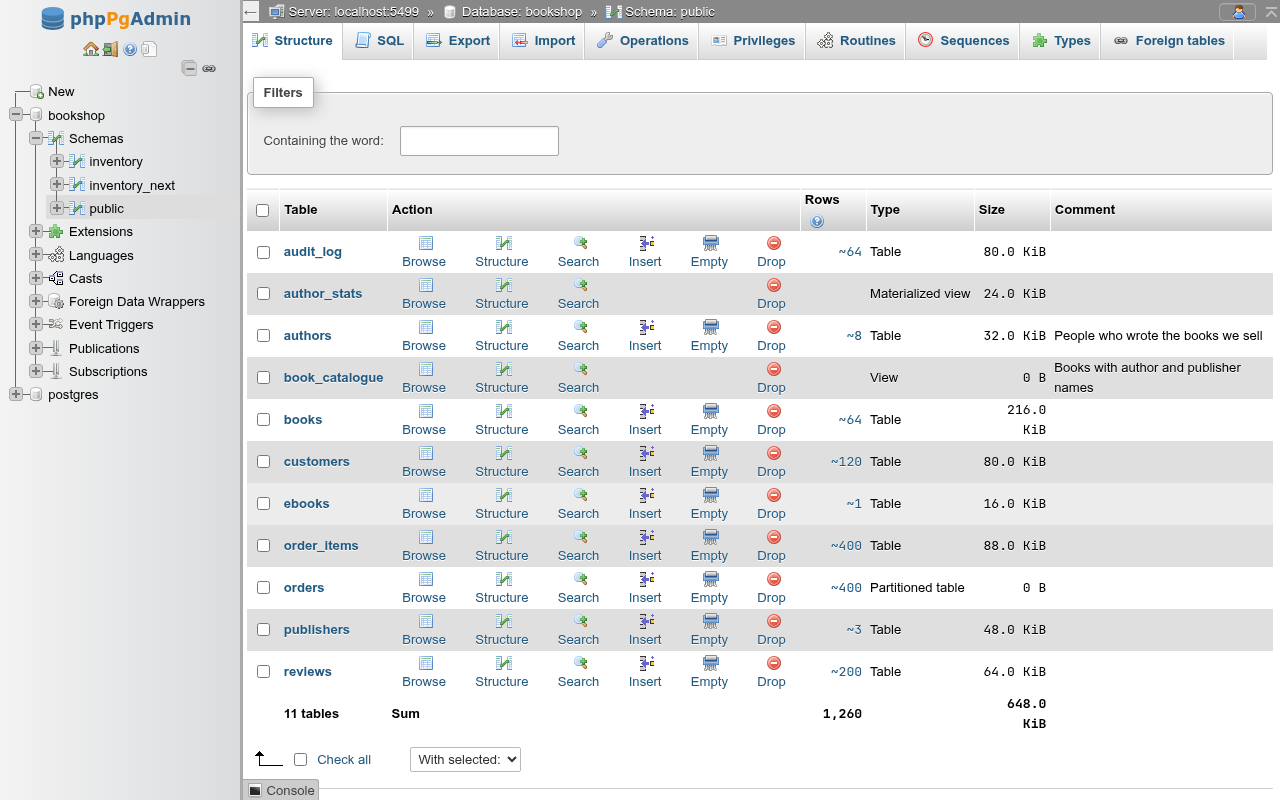
A schema's Structure tab lists its tables, views and materialized views in the layout of phpMyAdmin's database structure page, with per-row actions, bulk actions and the Create new table card. It is the page you land on when you open a schema, at /db/<database>/schema/<schema>.
Where it fits
PostgreSQL has one more level than MySQL: a database holds schemas, and a schema holds the tables. phpMyAdmin's database Structure page therefore lives one level lower here, on the schema. The database-level Structure tab lists the schemas instead (see Schemas).
In the navigation tree, clicking a schema's Tables or Statistics container also opens this page.
The tabs at schema level
| Tab | What it is for |
|---|---|
| Structure | This page. |
| SQL | The SQL editor, with the schema as the search path. |
| Export | Export the schema or chosen tables. |
| Import | Import a SQL or CSV file into the schema. |
| Operations | Rename, owner and comment of the schema: Schema operations. |
| Privileges | Privileges on the schema. |
| Routines | Functions and procedures. |
| Sequences | Sequences. |
| Types | Types, domains and collations. |
| Foreign tables | Tables of a foreign server: Foreign data. |
The table list
Each row is one relation. The list holds ordinary tables, partitioned tables, views and materialized views, sorted by name.
| Column | What it shows |
|---|---|
| Checkbox | Selects the row for With selected. |
| Table | The name; it links to the relation's Browse tab. A System badge marks a system table. |
| Action | The favorite star, then Browse, Structure, Search, Insert, Empty, Drop (see below). |
| Rows | The planner's estimate, ~64, from pg_class.reltuples. Click it for the exact count(*). ? means the table has never been analyzed or vacuumed. Views and materialized views show nothing. |
| Type | Table, Partitioned table, View or Materialized view. |
| Size | pg_total_relation_size: heap, indexes and TOAST together. A partitioned table shows 0 B; its data lives in the partitions. |
| Comment | The COMMENT ON text. |
The footer row gives the number of relations and the sums of the rows and sizes. The sum uses the estimates, or the exact count for rows you clicked.
Row counts are estimates
PostgreSQL does not keep an exact row count the way MyISAM does. The number comes from the last VACUUM/ANALYZE (or autovacuum), so it can lag behind after bulk changes. A freshly created or never-analyzed table shows ?. Click the number to run SELECT count(*), which reads the whole table.
Partitions are not listed
The partitions of a partitioned table (for example orders_2025 and orders_2026 of orders) do not appear in this list. Reach them from the partitioned table's Partitions card or from the navigation tree. A table you detach from its parent appears again as an ordinary table.
Filtering the list
The Filters card narrows the list to the names that contain what you type in Containing the word:. The match is case-insensitive and updates as you type. The footer sums follow the filter.
Row actions
| Action | What it does |
|---|---|
| Star | Add to Favorites (empty star) or Remove from Favorites (filled star): the navigation panel's Favorites list. Hidden when Favorite tables is 0 on Settings › Navigation panel. |
| Browse | Opens the Browse tab. |
| Structure | Opens the table's Structure tab (or the view's). |
| Search | Opens the Search tab. |
| Insert | Opens the Insert tab. Tables only. |
| Empty | Asks, then runs TRUNCATE TABLE schema.table;. Tables only. |
| Drop | Asks, then runs DROP TABLE, DROP VIEW or DROP MATERIALIZED VIEW. |
A table whose estimate is 0 shows the Browse, Search and Empty icons greyed, as phpMyAdmin does for empty tables. The links still work.
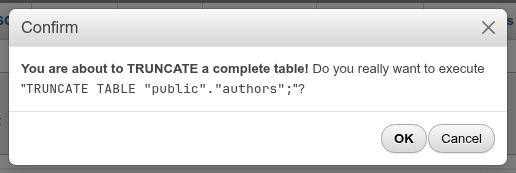
Empty and Drop here have no CASCADE
The confirmation runs the plain statement. If another table has a foreign key to the one you empty, PostgreSQL refuses with cannot truncate a table referenced in a foreign key constraint; a drop fails when views or foreign keys depend on the table. To cascade, use the table's Operations tab, which has CASCADE and RESTART IDENTITY boxes.
With selected
Tick rows (or Check all) and pick an action from With selected:.

| Action | What it does |
|---|---|
| Copy table | Asks for the target Schema of this database and the options of a table's Copy table to: Structure and data, Structure only or Data only, Add DROP TABLE, Add constraints (foreign keys). Each selected table is copied under its own name. Views are skipped. |
| Show create | Opens a dialog with the CREATE statements of the selected tables, views and materialized views, the same DDL as each one's Show create tab. |
| Export | Opens the schema's Export tab with those relations pre-selected. |
| Prints the page (the browser's print dialog; the action columns are hidden in print). | |
| Empty | One confirmation for all, then a TRUNCATE TABLE per selected table. Views are skipped. |
| Drop | One confirmation listing every DROP statement, then runs them one by one. |
| Analyze table | Opens the SQL tab and runs ANALYZE on the selected tables. |
| Vacuum table | Opens the SQL tab and runs VACUUM on the selected tables. |
| Add prefix to table | Asks for a prefix and renames each selected relation to the prefix followed by its name. |
| Replace table prefix | Asks for From and To. A name that starts with From gets To in its place; the other names stay as they are. |
| Copy table with prefix | Asks for From and To and copies each selected table, structure and data with its foreign keys, to To followed by the name with as many leading characters cut as From has, as phpMyAdmin does (the name need not start with From). |
With nothing ticked, each action answers No table selected.
How the bulk actions run
Empty, Drop, Copy table and the prefix actions run one table at a time, not in a single transaction. If the third of five drops fails, the first two are already gone and the error is shown. Analyze table and Vacuum table only include tables: views and materialized views you ticked are left out of the statement.
The Print link under the list prints the page as well.
Creating a table
The Create new table card at the bottom asks for a Table name and the Number of columns (4 by default) and opens the create form with that many empty rows. See Creating a table.

When a schema has no relations, the page shows No tables found in schema. and the card.
In the navigation tree
Under a schema, the tree groups objects in containers: Tables, Statistics, Views, Materialized views, Sequences, Functions, Procedures, Trigger functions, Aggregates, Operators, Types, Domains, Collations and the full text search objects. A table node opens its Browse tab; under it are its columns, indexes, constraints, partitions, triggers, rules and policies, each opening the page where that object is managed (Structure or Triggers). The Tables and Views containers start with a New entry that opens the create table and create view forms.
Coming from phpMyAdmin
| phpMyAdmin | Here |
|---|---|
| Database → Structure | Schema → Structure |
| Engine, Collation, Overhead columns | Not shown: PostgreSQL has no per-table engine (all tables use the heap access method), collation is per column, and dead space is a VACUUM matter. |
| Rows exact for MyISAM, estimate for InnoDB | Always an estimate until you click it. |
| With selected → Optimize, Repair, Check | Analyze table and Vacuum table; the others have no PostgreSQL counterpart. |
| With selected → Copy table to another database | Copies to another schema of the same database: PostgreSQL cannot copy a table between databases in one statement. Use Export and Import for that. |
| With selected → Adjust privileges, Add AUTO INCREMENT value in the copy dialog | Not offered. The copy keeps its own grants (none but the owner's); a SERIAL column's new sequence is moved past the copied rows. |