
Views and materialized views
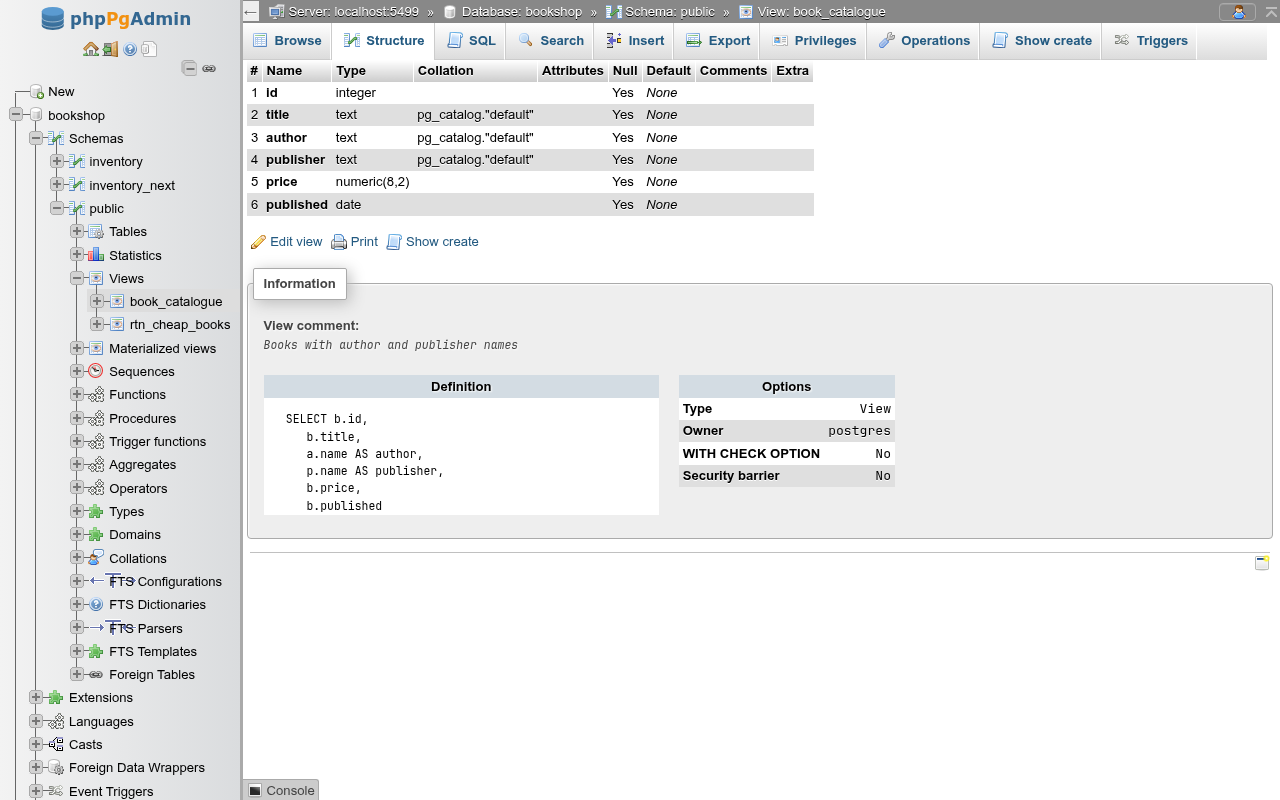
A view or materialized view gets the same tab bar as a table: Browse, Structure, SQL, Search, Insert, Export, Privileges, Operations, Show create and, for a plain view only, Triggers. This page covers creating and editing views, the Structure, Operations and Show create tabs, refreshing a materialized view, and triggers and rules on views. Views are listed with the tables on the schema's Structure tab; in the navigation panel they sit under Views and Materialized views, and clicking one opens its Browse tab.
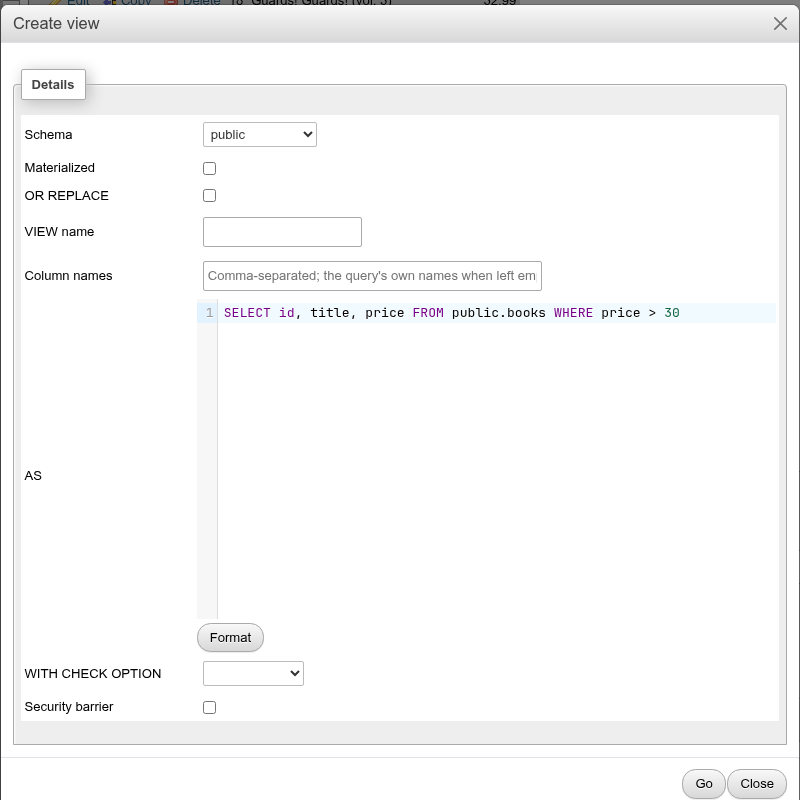
Create a view
There are three ways in:
- From the navigation panel. Open a schema's Views container; its first entry, New, opens the schema's create-view page, as phpMyAdmin's tree does. (The Tables container has a New entry too, for the create table form.)
- From a query result. Run a
SELECTon any SQL tab, then click Create view under the results (in Query results operations). The form opens in a modal with the query already in the AS box. After Go the new view's Structure tab opens. - From the URL
/db/<database>/schema/<schema>/create-view. This page shows the same form; add?sql=<query>to prefill the definition.
The form
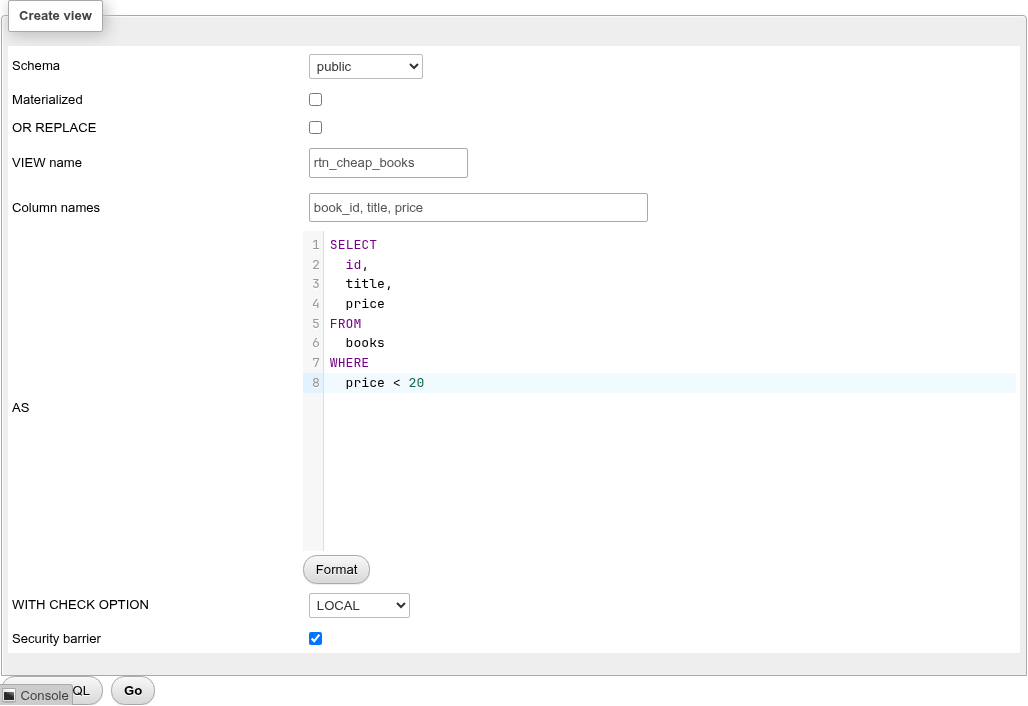
| Field | What it does | SQL |
|---|---|---|
| Schema | The schema the view is created in. | CREATE VIEW schema.name |
| Materialized | Creates a materialized view. The form swaps the view-only rows for Tablespace and WITH DATA. | CREATE MATERIALIZED VIEW |
| OR REPLACE | Replaces a view of the same name (plain views only). | CREATE OR REPLACE VIEW |
| RECURSIVE | Plain views only. The query may refer to the view by its own name; Column names becomes required. | CREATE RECURSIVE VIEW name (n) AS … |
| VIEW name | The name, up to 63 characters. | |
| Column names | Optional comma-separated list. Leave it empty to keep the query's own column names. | (book_id, title, price) |
| AS | The defining query, in the SQL editor. A trailing semicolon is dropped. Format reformats it with upper-case keywords. Ctrl+Enter submits the form. | AS SELECT … |
| WITH CHECK OPTION | Empty, CASCADED or LOCAL. Makes INSERT/UPDATE through an updatable view reject rows the view would not show. | WITH (check_option=local) |
| Security barrier | Stops the planner from pushing user functions in outer WHERE clauses below the view's own conditions, so leaky functions cannot see hidden rows. Use it for views that implement row filtering. | WITH (security_barrier=true) |
| Security invoker | PostgreSQL 15+. The base tables' privileges and row security policies are checked as the role querying the view rather than the view's owner. | WITH (security_invoker=true) |
| Tablespace | Materialized view only. (default) uses the database's default tablespace. | TABLESPACE name |
| WITH DATA | Materialized view only. Unticked creates the view empty and unscannable until its first refresh. | WITH DATA / WITH NO DATA |
Preview SQL shows the statement; Go runs it. The form above produces:
CREATE VIEW public.rtn_cheap_books (book_id, title, price)
WITH (
  check_option=local,
  security_barrier=true
) AS
SELECT id, title, price FROM books WHERE price < 20;
A recursive view:
CREATE RECURSIVE VIEW public.v_rec (n)
 AS
SELECT 1 UNION ALL SELECT n + 1 FROM v_rec WHERE n < 5;
Options the form does not offer
TEMPORARY views, and a materialized view's USING access method and storage parameters other than fillfactor, are not in the form. Run them on the SQL tab.
Edit a view
Edit view on the Structure tab opens the form for an existing view (…/view/<name>/edit). The name is fixed here (rename it on Operations); you can change the definition, WITH CHECK OPTION, Security barrier and Security invoker of a view, or the definition, Tablespace and WITH DATA of a materialized view.
What Go runs depends on the change:
- If the new query returns the same columns, with the same names and types, plus optionally new ones at the end, a view is changed in place with
CREATE OR REPLACE VIEW. Its grants, dependent views and triggers stay. - If a column is removed, renamed or changes type, PostgreSQL's
CREATE OR REPLACE VIEWcannot do it, so the app runsDROP VIEWfirst and then recreates the view, re-applying the owner and the grants it had. - A materialized view whose definition changed is always dropped and recreated (
DROP MATERIALIZED VIEW IF EXISTSthenCREATE MATERIALIZED VIEW), even when only a column is added. The same statement batch then restores what the drop removed: the owner, comment, tablespace, fillfactor and autovacuum settings, the grants and security labels, the column comments and every index (with its comment), so the unique index that REFRESH … CONCURRENTLY needs survives. Saving the form with the definition unchanged does not recreate it.
-- Removing the price column from rtn_cheap_books:
DROP VIEW public.rtn_cheap_books;

CREATE OR REPLACE VIEW public.rtn_cheap_books
    WITH (check_option=local, security_barrier=true, security_invoker=false)
    AS
    select id, title from books where price < 20;

ALTER TABLE public.rtn_cheap_books
    OWNER TO postgres;
GRANT SELECT ON TABLE public.rtn_cheap_books TO bookshop_staff;
GRANT ALL ON TABLE public.rtn_cheap_books TO postgres;
Use Preview SQL before Go to see which path you are on.
When recreating the view fails
When the view has to be dropped, a view with dependents fails with cannot drop view … because other objects depend on it. Nothing is changed; drop or rewrite the dependent views first.
If the new definition of a materialized view no longer has a column that one of its indexes or column comments uses, the save fails with column "…" of relation "…" does not exist and nothing is changed. Drop that index (or comment) first, then change the definition.
The column names you gave when creating the view are not shown in the editor; the new definition decides the column names.
Structure
The Structure tab lists the view's columns (number, name, type, collation, nullability, default, comment). They cannot be edited: a view's columns come from its query. Under the columns:
- Edit view: the edit form.
- Print: the browser's print dialog for the page.
- Show create: the Show create tab.
The Information card shows the view comment, the Definition (as PostgreSQL stores it, with qualified and cast expressions), and Options: type, owner, and for a view WITH CHECK OPTION and Security barrier. For a materialized view it shows Populated (whether it holds data), Tablespace, Access method, its Total size, and a Statistics table.
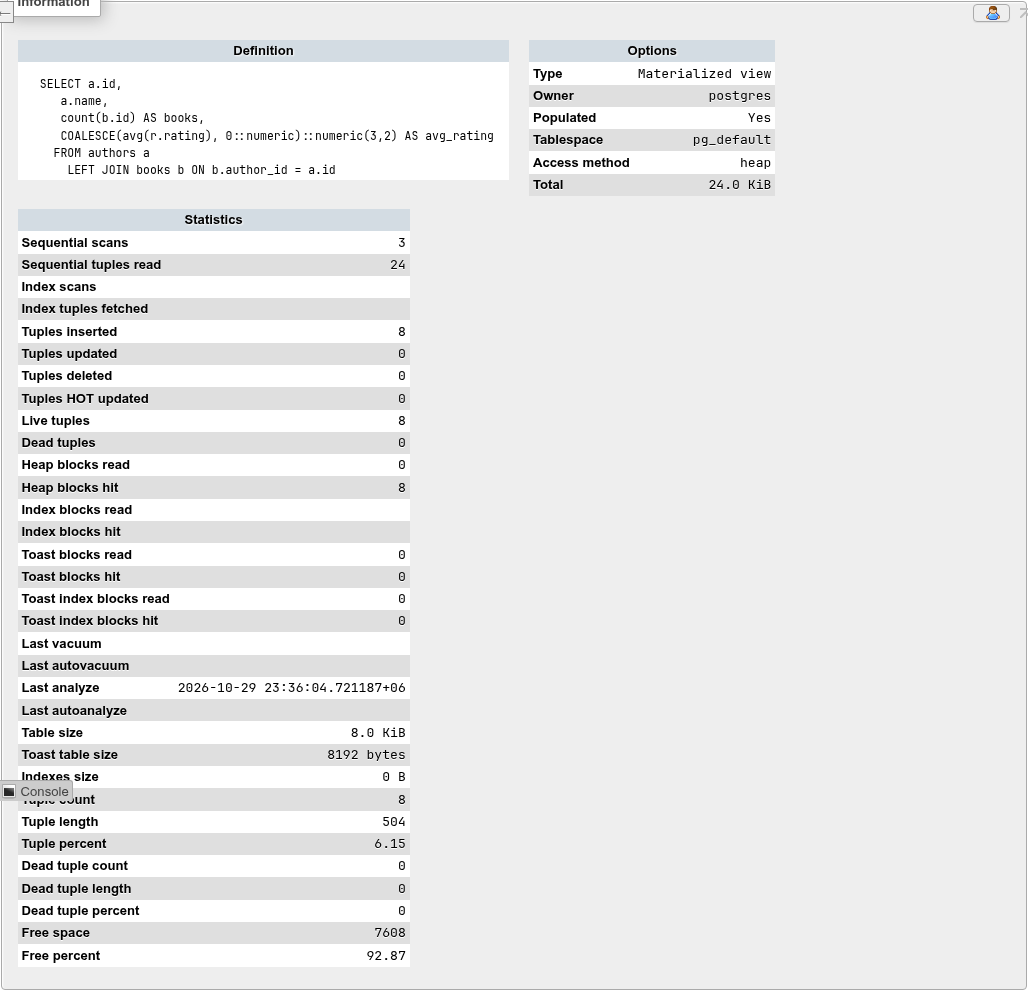
Statistics of a materialized view
The statistics come from pg_stat_all_tables and pg_statio_all_tables: scans, tuples inserted/updated/deleted, live and dead tuples, block reads and hits, last vacuum and analyze times, table, TOAST and index sizes.
pgstattuple adds tuple-level figures
When the pgstattuple extension is installed in the database, the table also shows Tuple count, Tuple length, Tuple percent, Dead tuple count/length/percent, Free space and Free percent. These come from pgstattuple(), which reads the whole materialized view, so the page is slower on large ones. Install the extension from the database's Extensions page (CREATE EXTENSION pgstattuple).
Plain views store no data and have no Statistics table.
Operations
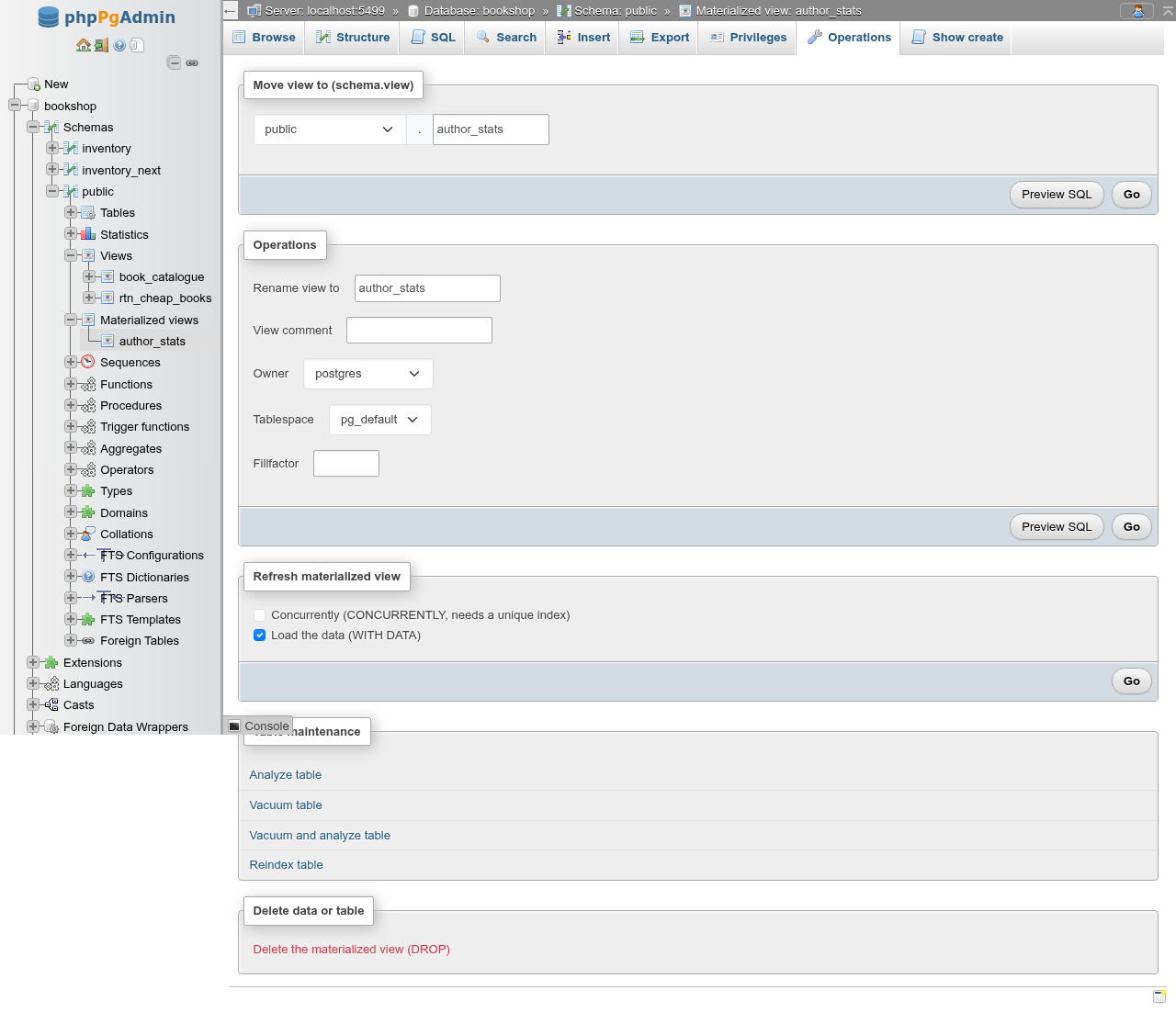
Each form card has Preview SQL and Go. Go with nothing changed says Nothing to change.
Move view to (schema.view)
Pick another schema and/or type a new name. The view is renamed with RENAME TO when the name changed and moved with SET SCHEMA, then the moved view's Operations tab opens.
ALTER VIEW IF EXISTS public.rtn_v
    RENAME TO rtn_v2;
ALTER VIEW IF EXISTS public.rtn_v2
    SET SCHEMA inventory;
Operations card
| Field | View | Materialized view | SQL |
|---|---|---|---|
| Rename view to | yes | yes | ALTER VIEW … RENAME TO |
| View comment | yes | yes | COMMENT ON VIEW / COMMENT ON MATERIALIZED VIEW |
| Owner | yes | yes | ALTER TABLE … OWNER TO |
| WITH CHECK OPTION | yes | ALTER VIEW … SET (check_option=…); empty runs RESET (check_option) | |
| Security barrier | yes | ALTER VIEW … SET (security_barrier=…) | |
| Security invoker | yes (PostgreSQL 15+) | ALTER VIEW … SET (security_invoker=…) | |
| Tablespace | yes | ALTER MATERIALIZED VIEW … SET TABLESPACE | |
| Fillfactor | yes (10–100) | ALTER MATERIALIZED VIEW … SET (FILLFACTOR = 70) |
The success message is Your SQL query has been executed successfully.
pg_global in the tablespace list
The tablespace list includes pg_global, which only holds shared catalogs. Choosing it fails with only shared relations can be placed in pg_global tablespace.
Refresh a materialized view
The Refresh materialized view card has two boxes:
- Concurrently (CONCURRENTLY, needs a unique index)
- Load the data (WITH DATA), ticked by default
Go runs REFRESH MATERIALIZED VIEW and says The materialized view has been refreshed.
| Boxes | Statement | Notes |
|---|---|---|
| neither ticked | REFRESH … WITH NO DATA | Empties the view; it becomes unscannable (Populated: No). |
| WITH DATA | REFRESH … WITH DATA | Takes an ACCESS EXCLUSIVE lock: reads of the view wait until the refresh ends. |
| CONCURRENTLY + WITH DATA | REFRESH … CONCURRENTLY | Readers are not blocked; only one refresh runs at a time. Slower, and needs a unique index. |
| CONCURRENTLY only | Refused: CONCURRENTLY and WITH NO DATA options cannot be used together. |
Requirements for CONCURRENTLY
- The materialized view needs at least one unique index on plain columns, without a
WHEREclause. Without one PostgreSQL answers cannot refresh materialized view "public.rtn_author_books" concurrently. Create it on the SQL tab, for exampleCREATE UNIQUE INDEX ON public.author_stats (id);. - The view must already be populated. On a view created WITH NO DATA the answer is CONCURRENTLY cannot be used when the materialized view is not populated; refresh it once without CONCURRENTLY first.
An unpopulated materialized view cannot be browsed
Browsing a materialized view created without data shows materialized view "…" has not been populated with the hint to run REFRESH MATERIALIZED VIEW.
Table maintenance (materialized views)
Analyze table, Vacuum table, Vacuum and analyze table and Reindex table open the view's SQL tab and run ANALYZE, VACUUM, VACUUM (ANALYZE) or REINDEX TABLE on it. See Maintenance for the options.
Delete the view (DROP)
Delete the view (DROP) (or Delete the materialized view (DROP)) asks for confirmation: You are about to DESTROY a complete view! with the statement. Tick Also the objects that depend on it (CASCADE) to drop dependent views too; without it a view that others depend on fails with cannot drop view … because other objects depend on it. After the drop the schema's Structure tab opens.
You can also drop several views at once from the schema's Structure tab.
Show create
The Show create tab shows the SQL that recreates the view: a commented DROP, the CREATE OR REPLACE VIEW (or CREATE MATERIALIZED VIEW … WITH DATA), the owner, comment and grants, with Copy to clipboard. Below it, Dependencies lists the columns, schema and roles the view uses and Dependents lists what uses it (or Nothing depends on it.).
Triggers and rules on views
A plain view has a Triggers tab with two lists, Triggers and Rules, each with Create new trigger / Create new rule. It works as on a table; see Triggers. On a view, a row trigger must be INSTEAD OF (INSERT, UPDATE or DELETE), which is how you make a non-updatable view writable. The trigger function itself is created on the Routines tab with type TRIGGER FUNCTION.
A materialized view has no Triggers tab: PostgreSQL allows neither triggers nor rules on one.
Views and materialized views have no Insert tab, as in phpMyAdmin; an INSERT through an updatable view runs from the SQL tab. A materialized view cannot be changed at all (cannot change materialized view "…"): its data only changes on refresh.
Other tabs
Browse, Search, Export, SQL and Privileges behave as for a table; see Browse, Search, Export and Privileges. Insert, edit and delete through a plain view only work when the view is automatically updatable (one table, no aggregates, DISTINCT, GROUP BY and so on) or has INSTEAD OF triggers.