
Variables
The Variables tab at server level (/server/variables) lists PostgreSQL's run-time parameters (pg_settings) and changes them with ALTER SYSTEM, where phpMyAdmin's "Server variables and settings" page runs SET GLOBAL.
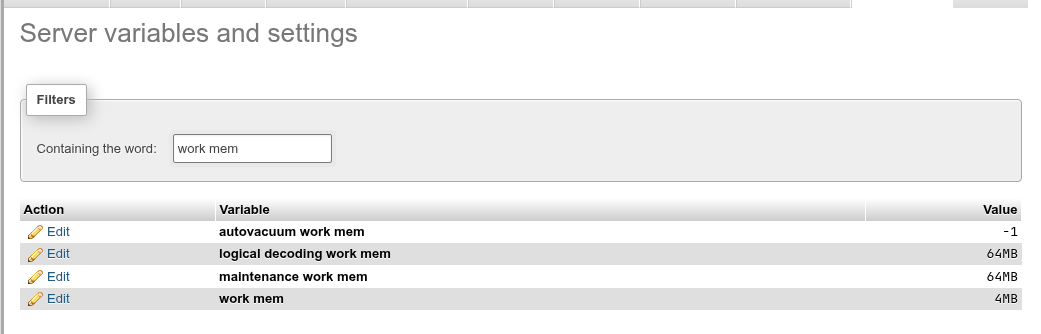
The list
Each row has the parameter's name (with spaces for underscores, as phpMyAdmin prints them), its current value as SHOW prints it, with its unit (4MB, 1min), and an Edit link. Hover the name for PostgreSQL's description of the parameter. The help icon next to the heading opens the PostgreSQL documentation on server configuration.
Filter
Type in Containing the word: to keep the parameters whose name contains the text. Spaces count as underscores and case does not matter, so work mem finds work_mem, maintenance_work_mem, autovacuum_work_mem and logical_decoding_work_mem. You can link to a filtered list with /server/variables?filter=shared_buffers; the Replication page uses this for its configure link.
Change a parameter
- Click Edit in the parameter's row. The value turns into an editor: a select with
on/offfor a boolean, a select of the allowed values for an enum, a text field otherwise. Hover a number's field for its range, for example 64 … 2147483647 kB. - Type or choose the new value. Units work as in
postgresql.conf(8MB,30s). - Press Enter or click Save. Escape or Cancel closes the editor without saving.

Save runs, for work_mem = 8MB:
ALTER SYSTEM SET work_mem TO '8MB';
SELECT pg_catalog.pg_reload_conf();
ALTER SYSTEM writes the value to postgresql.auto.conf in the data directory, and the reload makes every session pick it up when it next reads the configuration. The row shows the new value and the message is work_mem has been changed. A value PostgreSQL does not accept is refused with its own error, for example invalid value for parameter "work_mem": "lots", and nothing is written.
Reset
Reset in the editor runs ALTER SYSTEM RESET name and reloads: the entry is removed from postgresql.auto.conf, and the parameter goes back to the value of postgresql.conf, or its built-in default.
There is no separate "reload" button
Every save and reset reloads the configuration itself (pg_reload_conf()) and waits up to a second for the change to be visible. A value that was edited in postgresql.conf by hand needs a reload you run yourself: SELECT pg_reload_conf(); in the SQL editor.
ALTER SYSTEM is server-wide and outside transactions
The change applies to every database and role of the server (unless a role or database setting overrides it) and survives restarts. ALTER SYSTEM cannot run inside a transaction block, so it is not rolled back if something else fails. It does not touch postgresql.conf; a value set there stays overridden until you Reset it here.
Parameters that need a restart
Parameters of the postmaster context (shared_buffers, max_connections, wal_level, max_prepared_transactions, logging_collector…) can be saved, but only take effect when the server restarts. The message then says … has been changed in postgresql.auto.conf; the new value takes effect when the server restarts., the row keeps showing the running value, and a second row in italics, name (after a restart), shows the value waiting for the restart (from pg_file_settings). phpPgAdmin cannot restart the server.
Pending values need pg_read_all_settings
The "after a restart" row is read from pg_file_settings, which only superusers and members of pg_read_all_settings may read. Other roles see the running value only.
Who may edit what

- Internal parameters (
block_size,server_version,data_checksums…) are fixed when PostgreSQL is built or the cluster initialised. Their Edit is greyed out with the title This is a read-only variable and can not be edited. - Everything else may be changed by a superuser, and from PostgreSQL 15 by a role granted
ALTER SYSTEMon that parameter (GRANT ALTER SYSTEM ON PARAMETER work_mem TO role;). For other roles Edit is greyed out with Only a superuser, or a role granted ALTER SYSTEM on this parameter, can change it.
A role that is not a superuser sees fewer parameters
pg_settings hides some parameters (file locations, preload libraries and other superuser-only ones) from roles without pg_read_all_settings. On the docs cluster a superuser sees 399 rows and a plain login role 375.
See also
- Roles: parameters set for one role (
ALTER ROLE … SET). - Database operations: parameters set for one database.
- Status and Server logs for settings those pages depend on.