
Indexes and constraints
Indexes, primary keys, unique, check and exclusion constraints are managed from cards on a table's Structure tab; foreign keys from its Relation view. This page covers the index dialog, the constraint dialog and the relation view, with the SQL each generates.
Indexes
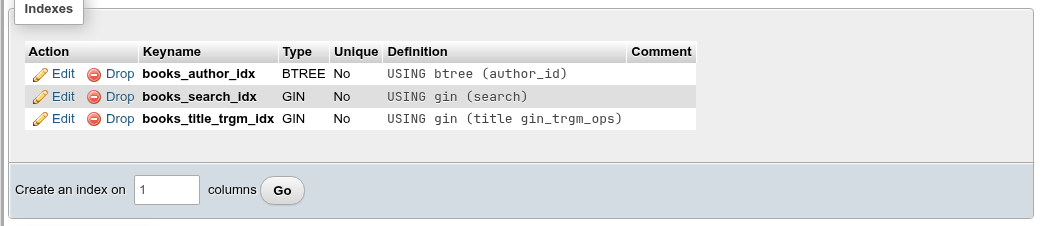
The Indexes card lists every index of the table, including the ones behind primary key, unique and exclusion constraints.
| Column | What it shows |
|---|---|
| Action | Edit and Drop. |
| Keyname | The index name. |
| Type | The access method: BTREE, HASH, GIST, GIN, SPGIST, BRIN (or one from an extension). |
| Unique | Yes or No. |
| Definition | The rest of pg_get_indexdef: USING gin (title gin_trgm_ops), with operator classes, sort order, INCLUDE, WITH (…) and WHERE. |
| Comment | The index comment. |
Drop asks, then runs DROP INDEX schema.name;. Dropping the index of a primary key or unique constraint fails (cannot drop index … because constraint … requires it); drop the constraint in the Constraints card instead.
Creating an index
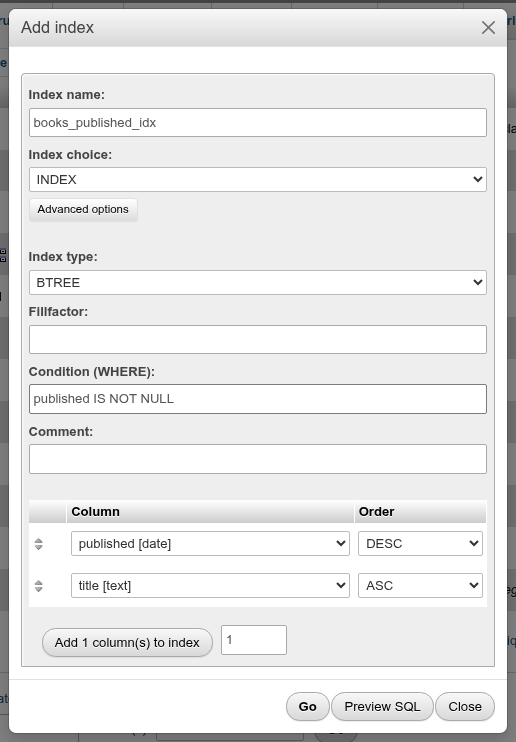
Type the number of columns in Create an index on [n] columns and click Go. The Add index dialog opens with that many column rows, pre-filled with the first columns of the table.
| Field | What it does | SQL |
|---|---|---|
| Index name: | Name of the index. Empty lets PostgreSQL pick one (t_col_idx). | CREATE INDEX name |
| Index choice: | INDEX, UNIQUE, or PRIMARY (only offered when the table has no primary key). | CREATE UNIQUE INDEX, ADD PRIMARY KEY |
| Advanced options → Index type: | The access method: BTREE, HASH, GIST, GIN, SPGIST, BRIN and any added by extensions. Changing it resets each column's operator class. | USING gin |
| Tablespace: | Where the index is stored; empty uses the database's default. | TABLESPACE fast_ssd |
| Include columns: | Non-key columns stored in the index so that index-only scans can return them (Ctrl-click for several). Offered for the methods that support it: BTREE, GIST, SPGIST. | INCLUDE (b, c) |
| Fillfactor: | Percentage of each index page to fill (10–100; btree default 90). BTREE, HASH, GIST, SPGIST. | WITH (fillfactor=70) |
| GIN pending list limit (kB): | GIN only: the size of the pending list before it is flushed into the index. | WITH (gin_pending_list_limit=4096) |
| Pages per range: | BRIN only: table blocks summarised by one index entry (default 128). | WITH (pages_per_range=32) |
| Buffering: | GIST only: AUTO, ON or OFF buffered build; empty leaves the default. | WITH (buffering=on) |
| Condition (WHERE): | Makes a partial index over the rows that match. | WHERE amount > 0 |
| Comment: | Index comment. | COMMENT ON INDEX |
| Deduplicate items | BTREE only, on by default. Clearing it stores every duplicate key. | WITH (deduplicate_items=false) |
| Fast update | GIN only, on by default. Clearing it writes every change straight into the index. | WITH (fastupdate=false) |
| Autosummarize | BRIN only, off by default: summarise new page ranges as soon as they fill. | WITH (autosummarize=true) |
| Cluster the table on this index | Marks the index the table is clustered by (BTREE and GIST). | ALTER TABLE … CLUSTER ON |
| Build without locking out writes (CONCURRENTLY) | New indexes only: builds the index without blocking inserts, updates and deletes. The statement runs on its own, outside a transaction. | CREATE INDEX CONCURRENTLY |
| Column | One select per indexed column; -- Ignore -- skips the row and -- Expression -- opens a text field for an expression such as lower(email). | ((lower(email))) |
| Operator class | Default (the type's default class) or another class of the access method: text_pattern_ops, gin_trgm_ops, jsonb_path_ops. The list is the method's classes, not filtered by the column's type. | title text_pattern_ops |
| Collation | For text columns and expressions: Default or another collation. | COLLATE "C" |
| Order, NULLs | BTREE only (hidden for the other methods): ASC or DESC, and NULLS FIRST or NULLS LAST. Choosing DESC switches NULLs to FIRST, PostgreSQL's default. | DESC NULLS FIRST |
| Add … column(s) to index | Adds more column rows. |
The storage parameter fields show only for the methods that take them, as in pgAdmin.
Click Preview SQL to see the statement and Go to create it. For example, a partial two-column btree index:
CREATE INDEX tbl_demo_partial_idx
    ON public.tbl_demo USING btree
    (amount DESC NULLS LAST, created ASC NULLS LAST)
    WITH (fillfactor=70)
    WHERE amount > 0;

COMMENT ON INDEX public.tbl_demo_partial_idx
IS 'Partial index for the docs';An expression index with an operator class, built concurrently with a covering column:
CREATE INDEX CONCURRENTLY docs_lower_title_idx
    ON public.docs USING btree
    ((lower(title)) text_pattern_ops DESC NULLS FIRST)
    INCLUDE(amount)
;
PRIMARY turns the dialog into a primary key: only plain columns, Tablespace:, Include columns:, Fillfactor: and Comment: remain, and the statement is ALTER TABLE t ADD PRIMARY KEY (…) INCLUDE (…) WITH (FILLFACTOR=…) USING INDEX TABLESPACE …. The new key appears in the Constraints card.
What each method is for
| Method | Use it for | Notes |
|---|---|---|
| BTREE | Equality and ranges on sortable types; ORDER BY; LIKE 'abc%' with text_pattern_ops | The default, and the only built-in method that supports unique indexes. |
| HASH | Equality only | Cannot be unique: UNIQUE with HASH fails with access method "hash" does not support unique indexes. |
| GIN | Arrays, jsonb, full text (tsvector), trigram search (pg_trgm) | Slower to update, fast to search. |
| GIST | Ranges, geometry, nearest-neighbour (<->), exclusion constraints | btree_gist adds scalar types. |
| SPGIST | Points, IP addresses, text prefixes | |
| BRIN | Very large tables whose values follow the physical order (timestamps of an append-only log) | Tiny; needs no per-row entries. |
The Order and NULLs columns are hidden for the other methods, which have no ordering.
Editing an index
Edit opens the same dialog with the index's settings; Index choice: cannot be changed. What happens depends on what you change:
- The Index name, Tablespace, the storage parameters (Fillfactor, Deduplicate items, Fast update, GIN pending list limit, Buffering, Pages per range, Autosummarize), Comment or Cluster: the index is altered in place (
ALTER INDEX … RENAME TO,SET TABLESPACE,SET (fillfactor=…),RESET (fillfactor)when emptied,COMMENT ON INDEX,CLUSTER ON). - The columns or expressions, their operator class, collation, order or NULLs, the type, the condition or the include columns: PostgreSQL cannot alter these, so the dialog drops the index and creates it again, which the preview shows:
DROP INDEX IF EXISTS public.tbl_demo_partial_idx;

CREATE INDEX tbl_demo_renamed_idx
    ON public.tbl_demo USING btree
    (amount DESC NULLS LAST)
    WITH (fillfactor=80)
    WHERE amount > 10;
Rebuilding an index on a large table locks writes to the table until it finishes.
On an existing index, each Expression row also has a Statistics box (pgAdmin's per-column statistics target, which PostgreSQL takes only on expression columns of an index): a number up to 10000, or empty (-1) for the default. A change is altered in place: ALTER INDEX i ALTER COLUMN 1 SET STATISTICS 500;.
With Index choice: UNIQUE on PostgreSQL 15 and later, NULLS NOT DISTINCT makes NULLs count as equal, so a second row with NULL in the column is refused (CREATE UNIQUE INDEX … (c) NULLS NOT DISTINCT). Changing it rebuilds the index.
What the dialog does not offer
| Feature | SQL to use on the SQL tab |
|---|---|
| The statistics target of a new index's expression column | Save the index, then Edit it, or ALTER INDEX i ALTER COLUMN 1 SET STATISTICS 500; |
| Rebuilding an existing index without blocking writes | REINDEX INDEX CONCURRENTLY i; (the database and schema Maintenance cards offer REINDEX … CONCURRENTLY) |
The drag handles next to the column rows are decoration: the rows cannot be reordered by dragging. To change the column order, pick the columns again in the selects.
CREATE INDEX CONCURRENTLY cannot run in a transaction block
CREATE INDEX CONCURRENTLY, DROP INDEX CONCURRENTLY and REINDEX … CONCURRENTLY build or drop the index without blocking writes, but PostgreSQL refuses to run them inside BEGIN … COMMIT. The dialog runs CREATE INDEX CONCURRENTLY as a statement of its own, then the comment and CLUSTER ON. On the SQL tab, run each one outside an explicit transaction. If a concurrent build fails it leaves an INVALID index behind; drop it and try again.
Constraints
The Constraints card lists the table's primary key, unique, foreign key, check and exclusion constraints with Edit, Drop, Name, Type, Definition and Comment.
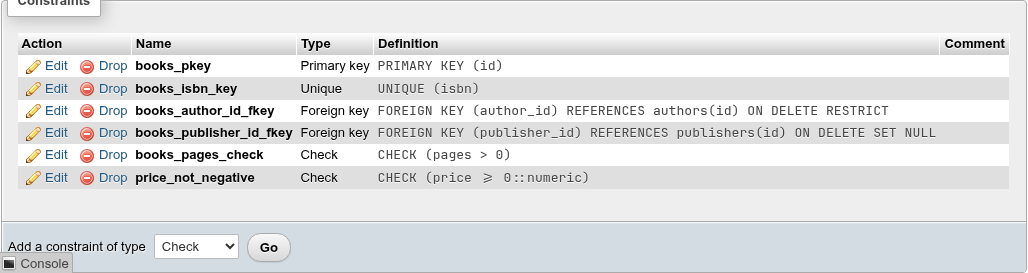
Definition is the constraint as pg_get_constraintdef writes it: PRIMARY KEY (id), UNIQUE (isbn), CHECK (pages > 0), FOREIGN KEY (author_id) REFERENCES authors(id).
NOT NULL is not listed here (PostgreSQL 18 records it as a constraint too); it is the Null column of the column grid.
Drop asks, then runs ALTER TABLE t DROP CONSTRAINT name;. Dropping a primary key or unique constraint that a foreign key references fails; drop the foreign key first.
Adding a constraint
Pick a type in Add a constraint of type (Check, Unique, Primary key when the table has none, Exclusion) and click Go. Foreign keys are added in the Relation view.
| Type | Fields | SQL |
|---|---|---|
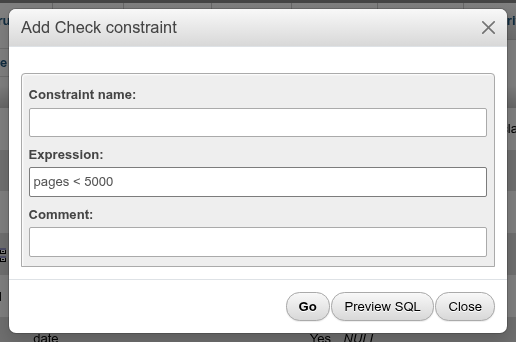
| Check | Constraint name:, Expression: (price > 0), Do not check the existing rows (NOT VALID), Comment: | ALTER TABLE t ADD CONSTRAINT n CHECK (qty > 0); |
| Unique | Constraint name:, Columns: (Ctrl-click for several), NULLS NOT DISTINCT (PostgreSQL 15+), Comment: | ADD CONSTRAINT n UNIQUE NULLS NOT DISTINCT (id, code); |
| Primary key | Constraint name:, Columns:, Comment: | ADD PRIMARY KEY (id); |
| Exclusion | see below | ADD CONSTRAINT n EXCLUDE USING gist (…); |
An empty name lets PostgreSQL choose one (t_pkey, t_col_key, t_col_check).
Existing rows are checked
Adding a check, unique, primary key or exclusion constraint validates every existing row, holding a lock on the table while it does. If a row violates it, PostgreSQL refuses: check constraint "tbl_room_qty_check" of relation "tbl_room" is violated by some row, or could not create unique index for duplicates. Fix the data first (the Search tab helps find the rows).
PostgreSQL can skip that check for checks and foreign keys with NOT VALID and validate later with ALTER TABLE t VALIDATE CONSTRAINT n;, which takes a weaker lock. Tick Do not check the existing rows (NOT VALID) in the Check dialog, or NOT VALID on a new row of the Relation view:
ALTER TABLE IF EXISTS public.books
    ADD CONSTRAINT pages_sane CHECK (pages < 5000)
    NOT VALID;
New rows are checked from then on; the old ones are not until you validate.
Validating a constraint
A check or foreign key added NOT VALID shows NOT VALID at the end of its Definition, and a Validate link in the Constraints card (foreign keys have it in the Relation view as well). It asks, then runs:
ALTER TABLE IF EXISTS public.books
    VALIDATE CONSTRAINT pages_sane;
If a row still violates the constraint, the validation fails with PostgreSQL's error (check constraint "pages_sane" of relation "books" is violated by some row) and the constraint stays NOT VALID. Fix the rows and validate again.
Column order in Unique and Primary key
The Columns: list is a plain multi-select: the constraint takes the columns in table order, whatever order you click them in. Selecting code then id gives UNIQUE (id, code). For a different order, use the index dialog with UNIQUE, which keeps the row order, or the SQL tab.
Editing a constraint
Edit on a primary key, unique, check or exclusion constraint opens a small dialog with the Constraint name:, the expression or definition (read-only) and the Comment:. Those are what PostgreSQL lets you change:
ALTER TABLE IF EXISTS public.tbl_room
    RENAME CONSTRAINT tbl_room_qty_check TO tbl_room_qty_positive;
COMMENT ON CONSTRAINT tbl_room_qty_positive ON public.tbl_room
    IS 'must be positive';
To change a check's expression or a key's columns, drop the constraint and add a new one. Edit on a foreign key opens the Relation view.
Exclusion constraints
An exclusion constraint generalises unique: no two rows may match on all the listed operators. The classic case is "no two bookings of the same room may overlap", as inventory.promotions does with EXCLUDE USING gist (book_id WITH =, during WITH &&).
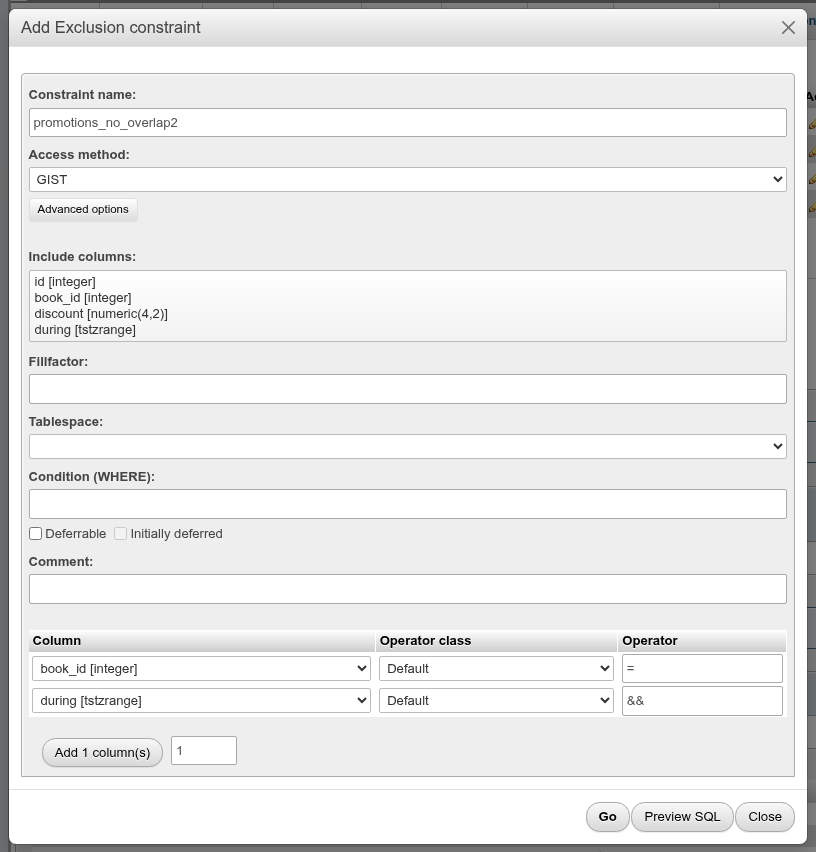
| Field | What it does |
|---|---|
| Constraint name: | Name; empty lets PostgreSQL choose. |
| Access method: | GIST (the usual one), BTREE, HASH, SPGIST. |
| Advanced options → Include columns: | Extra columns stored in the index (INCLUDE, GiST on PostgreSQL 12+). |
| Fillfactor:, Tablespace: | Index storage options. |
| Condition (WHERE): | The constraint applies to matching rows only. |
| Deferrable, Initially deferred | Check at commit instead of per statement. |
| Comment: | Constraint comment. |
| Column | The column of each row; -- Ignore -- skips it. |
| Operator class | Default or another class of the access method. |
| Order, NULLs | For BTREE only. |
| Operator | The operator that must not match for any two rows: =, &&. The field suggests the operators the column's type has once you pick the column. |
Each picked column needs an operator; otherwise the dialog says Each column of an exclusion constraint needs an operator.
ALTER TABLE IF EXISTS public.tbl_room
    ADD CONSTRAINT tbl_room_no_overlap EXCLUDE USING gist (
    code WITH =,
    during WITH &&)
    WHERE (qty > 0)
    DEFERRABLE INITIALLY DEFERRED;
GiST and plain columns need btree_gist
GiST has no operator class for plain scalar types such as integer or text. Combining = on such a column with && on a range only works with the btree_gist extension installed (CREATE EXTENSION btree_gist;, see Extensions). The demo database has it. The Operator class list is not filtered by the column's type, so it can offer classes that do not fit; leave it on Default unless you know you need another.
Foreign keys (Relation view)
The Relation view pill (above the column grid) opens phpMyAdmin's relation view: one row per foreign key, with an empty row at the end for a new one.
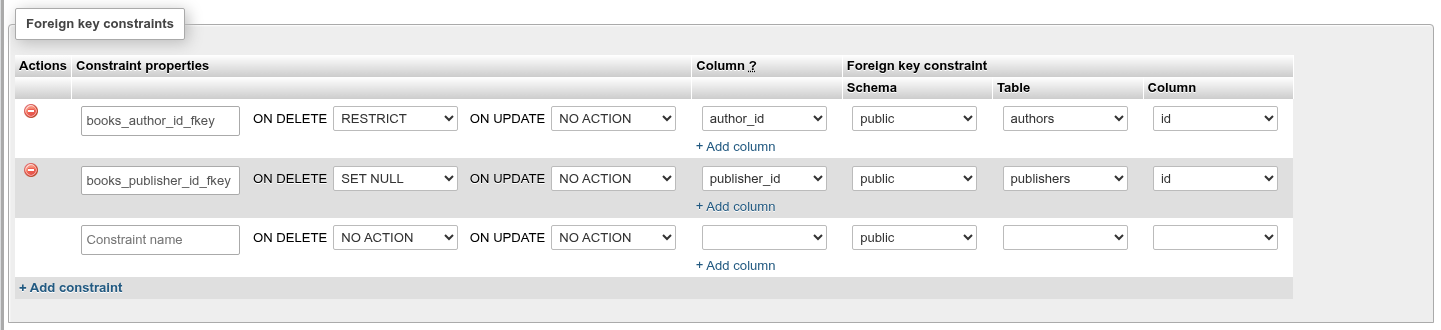
| Field | What it does |
|---|---|
| Drop | Drops that foreign key at once, after a confirmation. |
| Constraint name | Name; empty lets PostgreSQL choose (t_col_fkey). |
| ON DELETE, ON UPDATE | NO ACTION (the default), RESTRICT, CASCADE, SET NULL, SET DEFAULT. |
| MATCH | SIMPLE (the default: a row with any key column NULL is not checked) or FULL (all key columns NULL, or none). |
| DEFERRABLE, INITIALLY DEFERRED | Allow checking the key at commit (SET CONSTRAINTS … DEFERRED), or check it at commit by default. Ticking INITIALLY DEFERRED ticks DEFERRABLE. |
| NOT VALID (new keys) | Adds the key without checking the existing rows. An existing key added so shows NOT VALID with a Validate link instead. |
| Auto FK index (new keys) | Also creates an index on the referencing columns, pgAdmin's Auto FK index?. The name field beside it defaults to fki_<constraint name> (or fki_<table>_<columns> for an unnamed key). |
| Column | The column(s) of this table. + Add column adds another pair for a multi-column key. |
| Schema, Table, Column | The referenced schema, table and column(s). Any schema of the database can be chosen. |
| + Add constraint | Adds another empty row. |
Preview SQL shows the statements and Save runs them; Foreign key constraints have been saved. confirms. With nothing changed, you get Nothing to change.
ALTER TABLE IF EXISTS public.tbl_booking
    ADD CONSTRAINT tbl_booking_room_fkey FOREIGN KEY (room_id, room_code)
    REFERENCES public.tbl_room (id, code) MATCH FULL
    ON UPDATE SET NULL
    ON DELETE CASCADE
    DEFERRABLE INITIALLY DEFERRED
    NOT VALID;

CREATE INDEX IF NOT EXISTS fki_tbl_booking_room_fkey
    ON public.tbl_booking(room_id, room_code);
Without those boxes the key is MATCH SIMPLE, not deferrable and validated, and no index is created.
Changing the actions, match type, deferral or columns of an existing key drops and re-adds it (keeping it NOT VALID if it was); changing only the name renames it with RENAME CONSTRAINT.
Requirements PostgreSQL checks
- The referenced columns must have a primary key or unique constraint over exactly those columns. Otherwise: there is no unique constraint matching given keys for referenced table.
- Existing rows are checked. A row that points nowhere makes the save fail with insert or update on table "…" violates foreign key constraint "…". Find such rows with Check referential integrity on the Operations tab.
- PostgreSQL does not create an index on the referencing columns. Tick Auto FK index, or add one (More → Index), if you delete from the referenced table or join on the key often; otherwise every delete there scans this table.
Not in the relation view
On PostgreSQL 15 and later, a key of several columns whose ON DELETE is SET NULL or SET DEFAULT shows a list of its columns under the action: pick the ones the action sets (ON DELETE SET NULL (customer_id)), or none for all of them. Only the key's own columns are taken. The Show create tab shows all clauses of existing keys.
Coming from phpMyAdmin
| phpMyAdmin | Here |
|---|---|
| Index types PRIMARY, UNIQUE, INDEX, FULLTEXT, SPATIAL | PRIMARY, UNIQUE, INDEX, with the method (btree, GIN, GiST…) under Advanced options. Full text is a GIN index on a tsvector; spatial is GiST. |
| Index Size (prefix length) | No prefix indexes; use an expression index (left(col, 10)) on the SQL tab. |
| Key block size, Parser | Tablespace, Include columns, the method's storage parameters, Condition (WHERE). |
| Foreign keys need InnoDB | Every PostgreSQL table supports them. |
| Internal relations (phpMyAdmin configuration storage) | Not needed: only real foreign keys are used. |
CHECK constraints (MariaDB) | Constraints card, Check. |
| Exclusion constraints | No MySQL counterpart. |