
Introduction
phpPgAdmin is a web application for administering PostgreSQL 13 and newer. It looks and behaves like phpMyAdmin, and covers the PostgreSQL objects and tools that pgAdmin 4 covers. This page explains what it is, what it needs, and how its pages are organised.
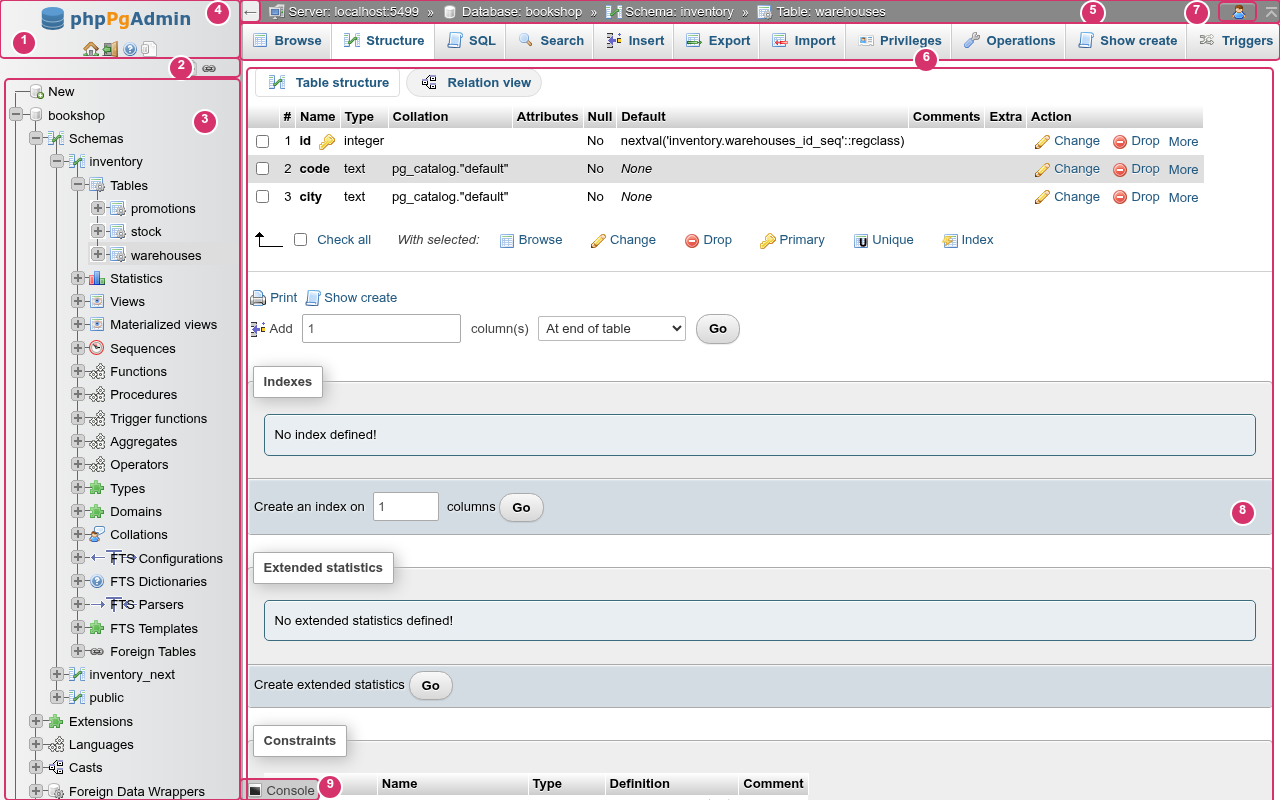
- The navigation panel header: logo and the Home, Log out and documentation links.
- The tree controls: Collapse all and Link with main panel.
- The navigation tree: databases, then the objects inside each one.
- The arrow that collapses and expands the navigation panel.
- The breadcrumb: server, database, schema and table of the page you are on.
- The tab bar of that level.
- The user menu.
- The page itself.
- The console bar.
Finding your way around describes each part.
What it is
- The phpMyAdmin interface. The layout, the pmahomme theme, the tab names, the "With selected:" lists, the confirmation dialogs and the settings pages follow phpMyAdmin 5.2. If you know phpMyAdmin, you already know where most things are.
- pgAdmin's coverage of PostgreSQL. Schemas, partitions, inheritance, materialized views, procedures, domains, range and composite types, collations, full text search, extensions, foreign data wrappers, publications and subscriptions, row-level security, event triggers and more. Most create and alter forms can show the SQL they will run before they run it.
- A plain PHP application. PHP 8.3 with the
pgsqlextension, behind any web server. There is no agent or daemon to run, and nothing to install on the database server. You sign in with a PostgreSQL role, and every statement runs as that role, so PostgreSQL's own privileges decide what you can do.
How it compares
| phpMyAdmin | pgAdmin 4 | phpPgAdmin | |
|---|---|---|---|
| Database | MySQL, MariaDB | PostgreSQL | PostgreSQL 13+ |
| Runs as | PHP web app | Python web app or desktop app | PHP web app |
| Sign-in | Database account | Its own user accounts, then a saved password per server | PostgreSQL role, per session |
| Interface | Tabs per level, navigation tree | Object browser with dialogs | phpMyAdmin's tabs and tree |
| Own storage | Optional configuration storage database | SQLite pgadmin4.db | SQLite file in storage/ |
Not the classic phpPgAdmin
This is a new application. Its configuration (config/*.php and PGADMIN_* environment variables) has nothing in common with the classic phpPgAdmin's conf/config.inc.php, so a classic installation cannot be upgraded in place. Compared with the classic phpPgAdmin sets the two side by side.
The object hierarchy
PostgreSQL has one more level than MySQL: a database holds schemas, and tables, views, functions and types live in a schema. The interface follows that hierarchy. Each level has its own address, breadcrumb entry and tab bar:
| Level | Address | Breadcrumb | Example |
|---|---|---|---|
| Server | /server/<tab> | Server: host:port | /server/roles |
| Database | /db/<database>/<tab> | Database: name | /db/bookshop/search |
| Schema | /db/<database>/schema/<schema>/<tab> | Schema: name | /db/bookshop/schema/public/routines |
| Table, view, materialized view | /db/<database>/schema/<schema>/table/<name>/<tab> (view/, mview/) | Table:, View: or Materialized view: name | /db/bookshop/schema/public/table/books/ddl |
Every page has an address you can bookmark, reload or open in a new browser tab.
One connection per database
PostgreSQL connections belong to one database, so phpPgAdmin opens a connection to each database you work in. Objects that belong to the whole cluster (roles, tablespaces, databases, replication) are on the server level. Objects inside a database (schemas, extensions, casts, event triggers, publications) are on the database level.
What you can do
Getting started: Installation, Configuration, Signing in, Finding your way around, Known limitations.
Server level
- Databases: list, create and drop databases, with their sizes.
- Status and monitoring: server activity, sessions with cancel and terminate, locks, prepared transactions and live charts.
- Server logs: read the server's log files.
- Roles: create and edit roles and memberships.
- Tablespaces: create, edit and drop tablespaces.
- Replication: replication slots, standbys, publications and subscriptions.
- Variables: the server's configuration parameters.
- Settings: your own phpPgAdmin preferences.
Database level
- Schemas: the schemas of a database.
- Database operations: rename, change the owner or settings, copy, and run maintenance.
- Search: find text in every table of a database.
- Extensions and other objects: extensions, casts, languages, event triggers and the other database-wide objects.
- Foreign data: foreign data wrappers, servers, user mappings and foreign tables.
- Designer: an ER diagram you can edit.
- Schema diff: compare two schemas and get the migration script.
Schema level
- Tables in a schema, Creating a table
- Views and materialized views
- Functions and procedures
- Sequences
- Types, domains and collations
- Full text search
- Schema operations
Table level
- Browsing data, Inserting and editing rows, Searching a table
- Structure: columns, Indexes and constraints
- Partitions and inheritance, Triggers, rules and policies
- Table operations
Tools
- SQL editor, History, bookmarks and macros, Console
- Privileges
- Export, Import, Maintenance
- Debugger for PL/pgSQL
Requirements
| Component | Requirement |
|---|---|
| PostgreSQL server | 13 or newer. |
| PHP | 8.3 or newer, with the pgsql, pdo_sqlite, mbstring, ctype, zlib and session extensions. proc_open and exec must not be disabled. |
| Web server | Any server that can run PHP: nginx with PHP-FPM, Apache, or PHP's built-in server for local use. phpPgAdmin must be served from the root of a host name. |
| PostgreSQL client programs | pg_dump, pg_dumpall, pg_restore and psql, for Export, Import and Maintenance. Everything else works without them. |
| Browser | A current browser with JavaScript enabled. Without JavaScript the page stays blank. |
| Optional | The pgstattuple extension for more table statistics; the pldbgapi extension and shared_preload_libraries = 'plugin_debugger' for the Debugger. |
Installation has the details. On your own Linux or macOS machine, phnx setup phppgadmin with phnx installs and serves it in one step.
Older PostgreSQL versions
The SQL phpPgAdmin sends is written for PostgreSQL 13 and newer. Signing in to an older server is not refused, but pages may fail with SQL errors.
Known limitations
Some controls are drawn but their feature is not built yet. They look like working controls, as in phpMyAdmin, and answer with the notice Not available yet. when you use them. Known limitations lists them, along with other gaps.