
Export
The Export tab writes a dump of what you are looking at: the whole server with pg_dumpall, or a database, a schema or a single table, view or materialized view with pg_dump. CSV is written by COPY through psql. The tab sits on every level — server, database, schema and relation — and is laid out like phpMyAdmin's export page: templates, Export method, Format, what to export, Output and the format's options.
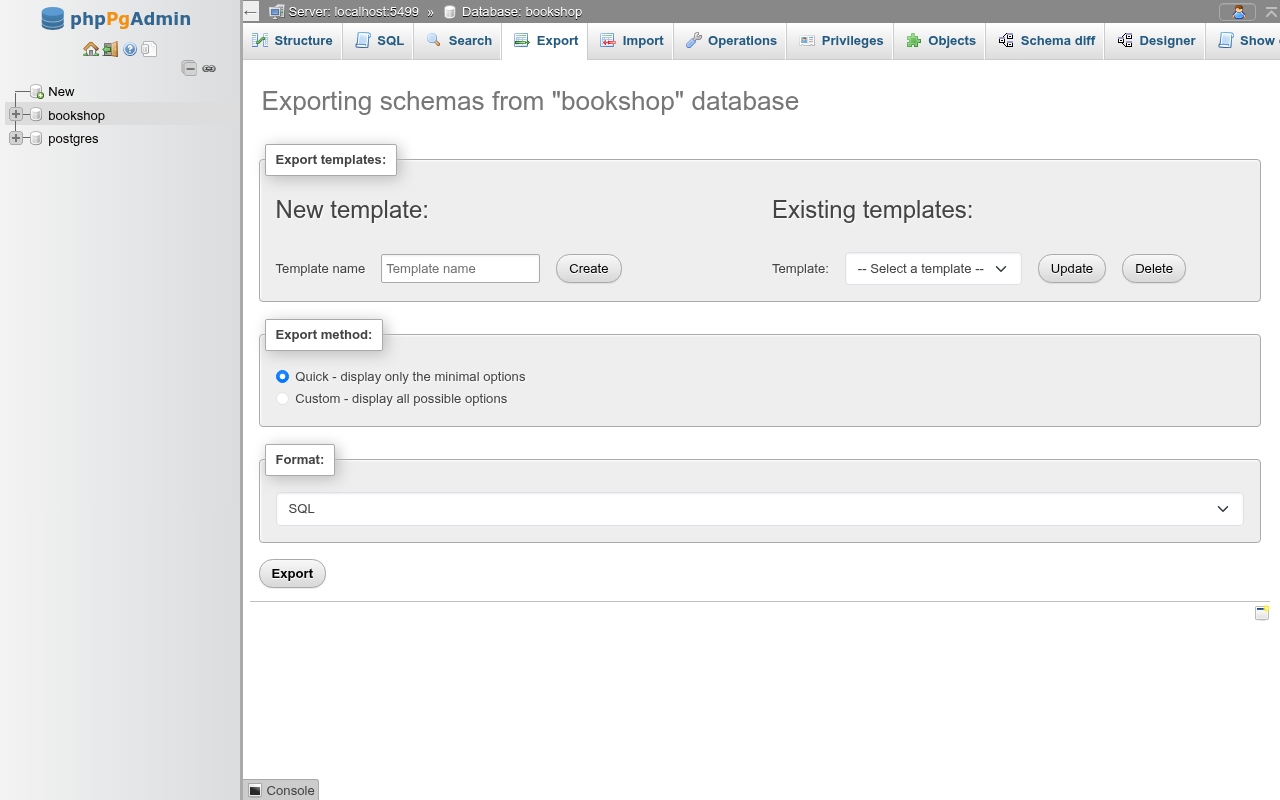
The dump is not written by PHP. The web server runs PostgreSQL's own client programs and streams their output to your browser, so the file you get is exactly what pg_dump would have written on the command line, and it can be restored with psql or pg_restore, or on the Import tab.
The client programs must be on the web server
Export needs pg_dump and pg_dumpall (and psql for CSV) on the machine that runs phpPgAdmin. By default the newest ones found are used: on the PATH, in /usr/lib/postgresql/<major>/bin, /usr/pgsql-<major>/bin, Homebrew's postgresql@<major>/bin, /usr/local/pgsql/bin, /usr/bin and /usr/local/bin. To pin a directory, set PGADMIN_PG_BIN_DIR (the bin_dir entry of config/tools.php, see Configuration).
When no pg_dump is found, the page shows pg_dump was not found on the web server… in red and Export does nothing else.
pg_dump must be at least as new as the server
pg_dump refuses to dump a server newer than itself. When the programs found are older than the server's major version the page says pg_dump 16.4 cannot export from a PostgreSQL 18 server and refuses the export (HTTP 422). Install the client package of the server's version, or newer, and point PGADMIN_PG_BIN_DIR at it. CSV exports are not affected: COPY through an older psql works.
Quick and Custom
- Quick - display only the minimal options exports with
pg_dump's defaults: everything in the scope, structure and data, uncompressed, to a file named after the scope (localhost.sql,bookshop.sql,public.sql,authors.sql). Only Format can be changed. - Custom - display all possible options shows the selection, Output and Format-specific options cards described below.
The method, format and compression the page starts with are your preferences on the Export settings page (Settings).
Quick ignores the compression and file-name preferences
In Quick mode only the scope and the format are sent, so the file is never gzipped and is named after the default template, whatever your saved compression or file-name template says.
Formats
| Format | Program | File | Offered at |
|---|---|---|---|
| SQL | pg_dumpall (server) or pg_dump --format=plain | .sql | every level |
| PostgreSQL custom archive (pg_restore) | pg_dump --format=custom | .dump | database, schema, relation |
| PostgreSQL tar archive (pg_restore) | pg_dump --format=tar | .tar | database, schema, relation |
| PostgreSQL directory archive (pg_restore, downloaded as tar) | pg_dump --format=directory, packed as a tar file | .tar | database, schema, relation |
| CSV | psql running COPY … TO STDOUT (FORMAT csv) | .csv | database, schema, relation |
| CSV for MS Excel | the same, every value quoted, CRLF line ends | .csv | database, schema, relation |
| Tab-separated values (COPY text) | psql running COPY … TO STDOUT (FORMAT text), a header line first | .tsv | database, schema, relation |
| HTML | read through a cursor by phpPgAdmin: one HTML table, the column names as its first row | .html | relation, query |
| XML | read through a cursor: the classic phpPgAdmin's <data><header><records> layout, which Import reads back | .xml | relation, query |
| JSON | read through a cursor: phpMyAdmin's JSON export layout | .json | schema, relation, query |
The server level offers SQL only: pg_dumpall writes plain SQL and nothing else.
Directory archive
pg_dump's directory format writes a folder of files (toc.dat and one file per table) instead of one stream, and is the only format it can write with several parallel jobs. phpPgAdmin lets pg_dump write the folder in the web server's temporary directory, packs it into a tar file whose one folder is the dump (named after the file, bookshop/ in bookshop.tar), removes the folder and sends the tar file. Extract it and restore the folder:
tar -xf bookshop.tar
pg_restore -l bookshop          # the archive's table of contents
pg_restore -d bookshop_copy -j 4 bookshop
The tar file is not a pg_restore tar archive: extract it first. Number of jobs: under Output (shown for this format) is --jobs; each job is one more connection to the server. Compression: gzipped compresses each data file (3456.dat.gz, pg_dump's default for this format); None writes them with --compress=0.
The directory archive downloads only when it is finished
Unlike the other formats the download starts once pg_dump has finished, so a large database shows nothing for a while, and the web server needs room in its temporary directory for the dump and its tar file at once. A failure is always an error message, never a cut-off file. View output as text is not offered for this format.
Which format to pick
Plain SQL is readable and restores with psql, but must be restored whole and in order. A custom archive restores with pg_restore, which can pick objects, skip owners and privileges, and run in parallel; it is the format to use for backups. Tar holds the same as custom, in a tar file.
What to export
Server: databases
At the server level, Custom shows a Databases list with Select all and Unselect all. pg_dumpall always dumps every database it can connect to; the ones you leave unselected are passed as --exclude-database. template0 is never listed.
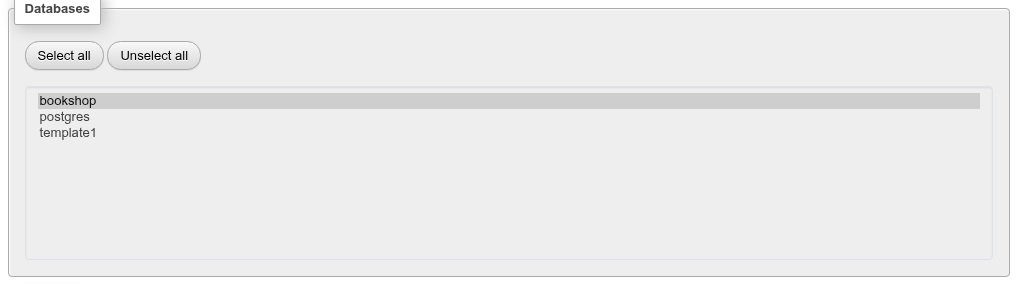
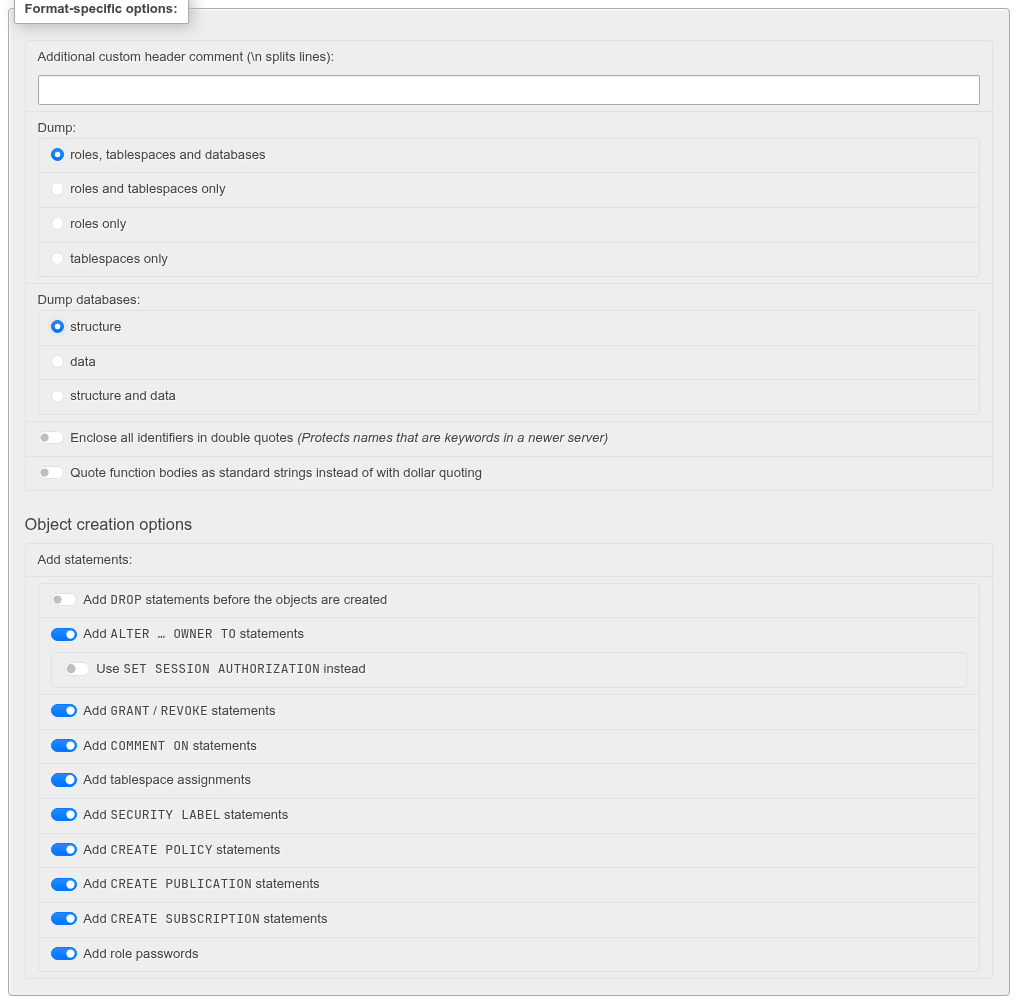
The Dump: choice under the format options picks what of the cluster goes in:
| Option | pg_dumpall flag |
|---|---|
| roles, tablespaces and databases | (none) |
| roles and tablespaces only | --globals-only |
| roles only | --roles-only |
| tablespaces only | --tablespaces-only |
and Dump databases: chooses structure (--schema-only), data (--data-only) or structure and data.
A server export contains role password hashes
pg_dumpall writes ALTER ROLE … PASSWORD 'SCRAM-SHA-256$…' for every role with a password. Treat the file as a secret, or switch off Add role passwords (--no-role-passwords).
Database: schemas, and schema: tables
At the database level the card is Schemas:, at the schema level Tables: (tables, views, materialized views, foreign tables and standalone sequences; partitions come with their partitioned table, and a sequence owned by a column comes with its table). Each row has a Structure and a Data box, and the first column ticks both. A view has no Data box.
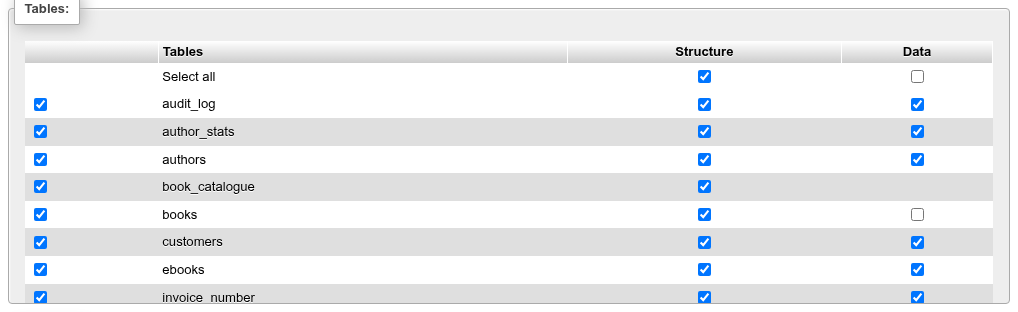
phpMyAdmin picks structure and data per table. pg_dump dumps one set of objects with or without their rows, so the boxes are mapped onto its options:
| What you tick | What runs |
|---|---|
| Every box | pg_dump of the whole database (--schema= for a schema), extensions, publications and event triggers included |
| Some rows, both boxes | --schema=… per schema, or --table=… per relation |
| Structure everywhere, Data on some | the rows of the others left out with --exclude-table-data=… |
| No Data box at all | --schema-only |
| No Structure box at all | --data-only |
A partitioned table is selected with --table-and-children and its rows excluded with --exclude-table-data-and-children (pg_dump 16 or newer), so its partitions follow it.
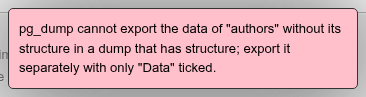
Data without its structure is refused
Ticking Data without Structure for one table while other tables have both is the one combination pg_dump cannot write. The export stops with pg_dump cannot export the data of "authors" without its structure in a dump that has structure; export it separately with only "Data" ticked.
A chosen subset leaves out what lies outside the schemas
When not every schema (or every relation of a schema) is ticked, the dump is narrowed with --schema or --table. Functions, types and the other objects of a schema come along with --schema; with --table only the chosen relations and what they own (their sequences, indexes, constraints, triggers) are dumped. Extensions are only in a whole-database dump.
With selected: Export on a schema's Structure page opens this page with the ticked tables preselected (?table=authors&table=books in the address) and Custom chosen.
Relation
On a table, view or materialized view Dump table: chooses structure, data or structure and data. A partitioned table takes its partitions along; a view's export is its CREATE VIEW. A view's or foreign table's data, which pg_dump cannot write, is read through a cursor and written as INSERT statements or COPY … FROM stdin, with the same Data creation options.
HTML and XML read the rows through a cursor in a read-only repeatable-read transaction, a thousand at a time, so a large table is streamed rather than held in memory. HTML has Replace NULL with: and Put columns names in the first row, after phpMyAdmin's Word format; XML has no options.
JSON
JSON writes phpMyAdmin's JSON export layout: one array with a header object, a database object, and a table object per relation whose data holds its rows, each row an object of column name to value:
[
{"type":"header","version":"0.2.0","comment":"Export to JSON plugin for phpPgAdmin"},
{"type":"database","name":"bookshop"},
{"type":"table","name":"authors","database":"bookshop","schema":"public","data":
[
{"id":"1","name":"Ann","born":null}
]
}
]
Values are PostgreSQL's text output, as phpMyAdmin writes MySQL's: numbers, booleans ("t"), arrays and json columns are strings, and NULL is null. schema is added to phpMyAdmin's table object. On a schema's Export tab the relations ticked under Data go into one file, read in one repeatable-read transaction; on a relation's tab, its rows (a view's too); for a query, its rows, named after the table they all come from or query_result. The options are phpMyAdmin's Output pretty-printed JSON and Output unicode characters unescaped (on by default; off writes \u00e9 for é). The file is UTF-8 whatever the character set chosen.
Query results
Export under a query's results on the SQL page, and With selected: Export in a results grid (the rows ticked, selected by their key), open the Export page for that statement's rows (/db/<database>/export/query). It offers SQL (INSERT or COPY statements, for the table all the columns come from, or query_result), CSV, CSV for MS Excel, tab-separated, HTML, XML and JSON. The statement must be one SELECT, VALUES or TABLE; it is declared as a cursor in a read-only transaction first, so one that writes, even in a WITH clause, is refused before anything is read.
Output
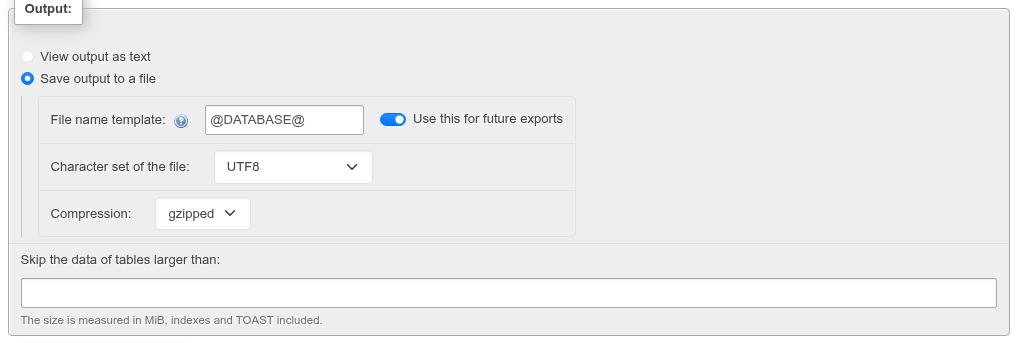
- View output as text runs the export and shows it in a text box under the form instead of downloading it. It is meant for a quick look; the whole output is loaded into the page.
- Save output to a file downloads the dump while it is written. Nothing is held in memory or on disk on the web server.
| Field | What it does |
|---|---|
| File name template: | @SERVER@, @DATABASE@, @SCHEMA@ and @TABLE@ become the names, strftime conversions (%Y, %m, %d, %H, %M, %S, …) the time. The extension is added. /, \, : and other characters a file system dislikes become _. |
| Use this for future exports | remembers the template for that level in this browser (local storage) |
| Character set of the file: | --encoding for pg_dump, ENCODING for COPY |
| Compression: | None, or gzipped |
| Skip the data of tables larger than: | in MiB, indexes and TOAST included (pg_total_relation_size); the rows of larger tables are left out with --exclude-table-data (database, schema and relation levels) |
For example @SERVER@-@DATABASE@-@SCHEMA@-@TABLE@-%Y%m%d downloads localhost-bookshop-public-authors-20261029.sql.
Compression
| Format | gzipped gives |
|---|---|
| SQL, tar, CSV | the output gzipped on the fly: bookshop.sql.gz, bookshop.tar.gz, authors.csv.gz |
| Custom archive | pg_dump's own compression of the archive (its default), still bookshop.dump |
| Directory archive | pg_dump compresses each file in the folder; the tar file itself is not gzipped |
A custom archive is uncompressed by default
With Compression: None a custom archive is written with --compress=0, unlike pg_dump's own default. Choose gzipped for a compressed archive (the bookshop archive went from 171 KB to 83 KB).
SQL and archive options
Format-specific options shows pg_dump's (or pg_dumpall's) options. Switches that do not apply to the current choice are hidden: the structure options when only data is exported, the data options when only structure is, the plain-SQL-only ones for an archive.
General
| Option | Flag |
|---|---|
| Additional custom header comment (\n splits lines): | written as -- lines before the dump (plain SQL only) |
Wait for a SERIALIZABLE, READ ONLY, DEFERRABLE snapshot | --serializable-deferrable (not on the server level) |
| Enclose all identifiers in double quotes | --quote-all-identifiers |
| Quote function bodies as standard strings instead of with dollar quoting | --disable-dollar-quoting |
| Sections to dump: pre-data, data, post-data | --section=… for each one ticked, when not all three are (not on the server level) |
| Leave out schemas matching: | --exclude-schema=… per pattern, separated by commas; * and ? are wildcards (database level) |
| Lock wait timeout: | --lock-wait-timeout: milliseconds, or a number with ms, s, min or h; the dump fails instead of waiting longer for a table lock |
| Verbose | --verbose: in plain SQL, comments with the start and end times of the dump and each object |
Sections split a dump the way pg_restore --section does: pre-data is the definitions of tables, types and functions, data the rows, and post-data the indexes, triggers, rules and most constraints. Exporting pre-data, loading the data, then post-data is the fast way to restore a large database.
Object creation options
| Option | Flag | Notes |
|---|---|---|
Add CREATE DATABASE / \connect statement | --create | database level, plain SQL |
Add DROP statements before the objects are created | --clean | plain SQL; IF EXISTS adds --if-exists |
Add ALTER … OWNER TO statements | off: --no-owner | plain SQL |
Use SET SESSION AUTHORIZATION instead | --use-set-session-authorization | plain SQL |
Add GRANT / REVOKE statements | off: --no-privileges | |
Add COMMENT ON statements | off: --no-comments | |
| Add tablespace assignments | off: --no-tablespaces | |
Add SECURITY LABEL statements | off: --no-security-labels | |
Add CREATE POLICY statements | off: --no-policies | pg_dump 18 or newer |
Add CREATE PUBLICATION statements | off: --no-publications | server and database |
Add CREATE SUBSCRIPTION statements | off: --no-subscriptions | server and database |
| Add role passwords | off: --no-role-passwords | server |
| Add TOAST compression methods | off: --no-toast-compression | pg_dump 14 or newer |
| Add table access methods | off: --no-table-access-method | pg_dump 15 or newer |
| Add the planner statistics | --statistics | pg_dump 18 or newer, structure and data |
Create and Drop together drop the database
With both Add CREATE DATABASE and Add DROP statements the dump begins with DROP DATABASE IF EXISTS bookshop;. Running that file with psql drops the database before recreating it.
For an archive, owner, CREATE DATABASE, DROP and SET SESSION AUTHORIZATION are not offered: pg_dump always records them in an archive and pg_restore decides when you restore (see Import).
Data creation options
| Option | Flag |
|---|---|
| Disable triggers while the data is loaded | --disable-triggers (data-only dumps; restoring needs a superuser) |
| Dump the data of unlogged tables | off: --no-unlogged-table-data |
| Dump large objects | --large-objects / off: --no-large-objects (database and schema) |
| Load partitions through the partitioned table | --load-via-partition-root |
| Dump only the rows row security lets the role see | --enable-row-security (not on the server level). Without it a dump of a table with row security fails for a role that row security applies to. Restore such data from INSERT statements |
extra_float_digits for floating-point values | --extra-float-digits=N, from -15 to 3; empty keeps pg_dump's default (exact values) |
| Function to use when dumping data: | COPY (default) or INSERT |
With INSERT, INSERT … ON CONFLICT DO NOTHING statements (--on-conflict-do-nothing) and Syntax to use when inserting data: appear:
| Syntax | Flags |
|---|---|
include column names in every INSERT statement | --column-inserts |
insert multiple rows in every INSERT statement | --rows-per-insert=N |
| both of the above | --column-inserts --rows-per-insert=N |
| neither of the above | --inserts |
Rows in each INSERT statement: is the N (100 by default).
CSV
CSV is data only, as in phpMyAdmin: the Structure column disappears from the selection card, and what is ticked under Data is exported. Each relation is one COPY (SELECT * FROM …) TO STDOUT WITH (FORMAT csv, …); with several, they run one after the other in a REPEATABLE READ READ ONLY transaction, so all are read as of the same moment.
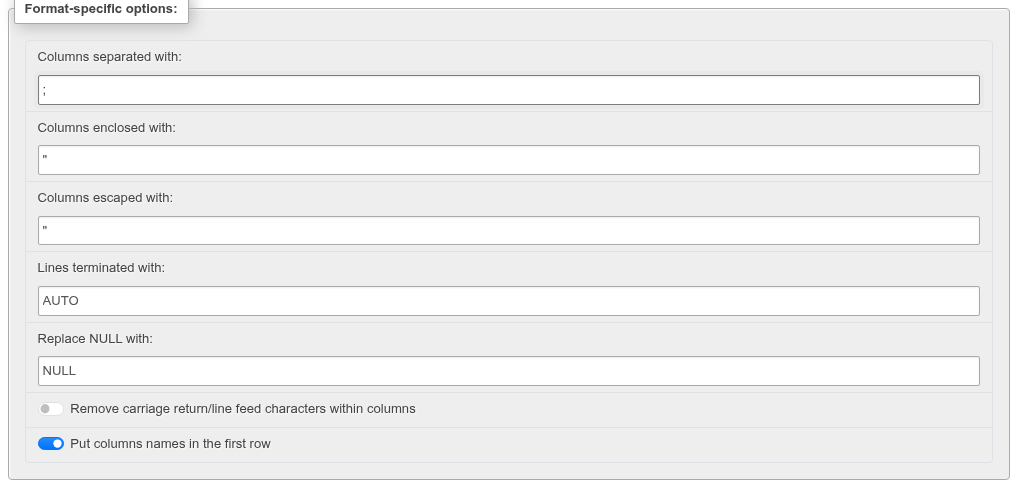
| Option | COPY option | Default |
|---|---|---|
| Columns separated with: | DELIMITER (\t for a tab) | , |
| Columns enclosed with: | QUOTE | " |
| Columns escaped with: | ESCAPE (empty: the enclosing character) | " |
| Lines terminated with: | AUTO is \n; \r\n and others are put in after COPY | AUTO |
| Replace NULL with: | NULL | NULL |
| Remove carriage return/line feed characters within columns | each column read through regexp_replace(col::text, '[\r\n]', '', 'g') | off |
| Put columns names in the first row | HEADER | on |
CSV for MS Excel has Replace NULL with:, the CR/LF and header switches, and Excel edition: (Windows and Excel 2003 / Macintosh separate with ;, Excel 2008 / Macintosh with ,). It quotes every value (FORCE_QUOTE *) and ends lines with \r\n.
Several tables go into one CSV file
A CSV export of a schema or a database writes every table into the same file, one after the other, each with its own header row. To get one file per table, export each table from its own Export tab.
CSV limits
Separator, enclosure and escape must each be one single-byte character (;; is refused with COPY takes one single-byte character to separate columns with.), and the separator and the enclosure must differ. The header row is never quoted, even in the Excel format. At the database level the tables and materialized views of the ticked schemas are exported. A view has no Data box on the schema level, but its own Export tab exports its rows as CSV.
Export templates
The Export templates: card saves the page's options under a name and loads them again, like phpMyAdmin's.

- Set the options, type a Template name under New template: and click Create.
- To load one, pick it under Existing templates:. The form takes its options at once; the tables it had ticked are ticked again only where they exist on this page.
- Update overwrites the selected template with the page's current options; Delete removes it.
Templates are stored in phpPgAdmin's own SQLite storage, per role, per server and per level (server, database, schema, relation), so a table template is offered on every table. Names are unique per role and level (case does not matter) and up to 64 characters.
Delete does not ask
Delete removes the selected template immediately, without a confirmation.
When an export fails
The download only starts once the program has written its first bytes. A failure before that — no connection, a permission or a lock error, a bad option — comes back as an error notification and no file is saved: for example pg_dump: error: query failed: ERROR: permission denied for table authors when you sign in as a role that cannot read every table, or invalid client encoding (HTTP 422).
A failure after the download has begun can only be reported in the file: a plain SQL dump ends with a -- comment holding the program's message, an archive is cut short, and the message goes to the web server's error log.
A lock makes the export wait
pg_dump takes an ACCESS SHARE lock on every table it dumps and, unless Lock wait timeout: is set, waits for it without a timeout. When another session holds an exclusive lock (an ALTER TABLE, a VACUUM FULL, a long transaction that altered the table), the browser shows nothing until the lock is released — in a test, a table locked for 20 seconds delayed the download by 22 seconds. PHP's time limit is lifted for the export.
Large exports
The dump is streamed, so its size is limited only by the client and by proxies between you and the web server. If you use nginx, X-Accel-Buffering: no is sent so that it does not buffer the dump; other proxies may need their read timeouts raised for long dumps.
Differences from phpMyAdmin
- The SQL is PostgreSQL's own
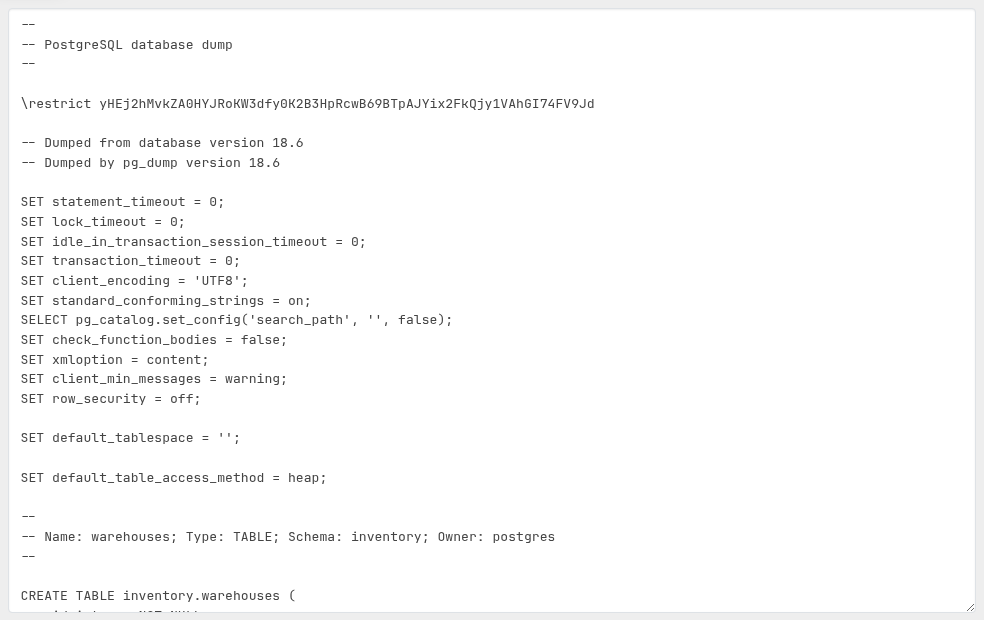
pg_dumpoutput, including\restrict/\unrestrictlines (pg_dump18 and the 2025 minor releases), not phpMyAdmin's generated SQL. Restore it withpsqlor phpPgAdmin's Import, which handles those lines. - There are no LaTeX, PDF, ODS or Word formats; HTML stands in for Word, and XML is the classic phpPgAdmin's layout rather than phpMyAdmin's. JSON is phpMyAdmin's layout, at the schema, relation and query levels (not the database's).
- A server export is a cluster dump: roles and tablespaces are part of it.