
Schema diff
The Schema diff tab of a database (/db/<database>/schema-diff) compares two schemas, after pgAdmin's Schema Diff tool: every object of both is listed as identical, different, only in the source or only in the target, each with its DDL on both sides, and the objects you tick make a script that turns the target into the source. The two schemas can be in the same database, in two databases of the server, or on two servers. With no schema picked on either side, the whole databases are compared.
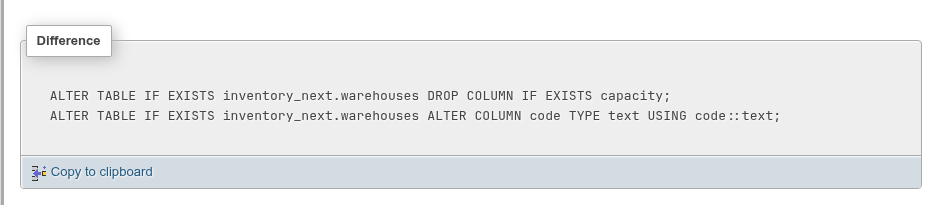
The examples compare inventory (the source) with inventory_next (the target) in bookshop, which the demo seed created with drift: inventory_next.warehouses has an extra capacity column and code is varchar(8), stock lacks the foreign key to public.books and has a CHECK, promotions is missing, and there is an extra suppliers table.
Comparing
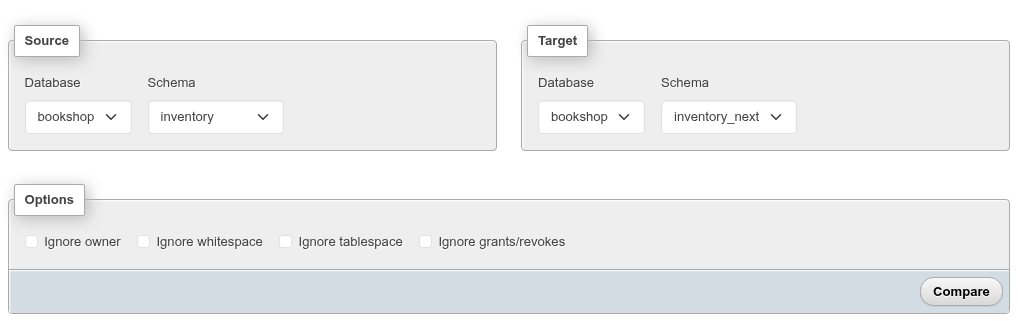
- In Source, pick the Server, Database and Schema you want the target to look like.
- In Target, pick the server, database and schema to change. Both sides start on the server you are signed in to, the current database and its
publicschema. Pick (whole database) as the schema on both sides to compare two databases. - Tick what to ignore under Options, and click Compare.
| Option | Ignores |
|---|---|
| Ignore owner | ALTER … OWNER TO |
| Ignore whitespace | differences in spaces and line breaks |
| Ignore tablespace | tablespace clauses |
| Ignore grants/revokes | GRANT and REVOKE |
Comparing a schema with itself is refused (The source and the target are the same schema.), and so is a schema on one side with the whole database on the other. Object names are compared without their schema, so inventory.stock and inventory_next.stock are the same object.
Another server
The Server list holds the server you are signed in to and the other saved servers (the ones a login has succeeded against). Picking another one asks for a Username and Password for it; Connect signs in, and the databases of that server appear. The credentials are kept in your session, like the session's own, until you log out; they are not saved. When the target is on another server, the script dialog has no button for the SQL page, which works on the server you are signed in to: copy the script instead.
Whole databases
With (whole database) on both sides, the comparison takes the database's own objects first, as pgAdmin's database compare does: schemas, extensions, languages, foreign data wrappers, foreign servers, user mappings, casts, event triggers, publications and subscriptions. Then the objects of each schema, the schemas matched by name: a schema only in the source has all its objects Source only, one only in the target all its objects Target only. The results are grouped under Database objects and Schema: … headings.
A schema that differs is altered, never dropped: its owner (ALTER SCHEMA … OWNER TO), its comment and its grants. An extension of another version gets ALTER EXTENSION … UPDATE TO, one in another schema … SET SCHEMA. The objects an extension owns (citext's functions and casts, for example) are never listed: CREATE EXTENSION makes them.
The other database-level objects are altered too wherever PostgreSQL can, so that what depends on them (a server's user mappings and foreign tables, a cast's views) stays:
| Object | Altered with |
|---|---|
| Foreign data wrapper | ALTER FOREIGN DATA WRAPPER … HANDLER / VALIDATOR (or NO …), OPTIONS (ADD …, SET …, DROP …) |
| Foreign server | ALTER SERVER … VERSION, OPTIONS (ADD …, SET …, DROP …) |
| User mapping | ALTER USER MAPPING FOR … SERVER … OPTIONS (…) |
| Language | CREATE OR REPLACE LANGUAGE |
| Event trigger | ALTER EVENT TRIGGER … ENABLE / DISABLE / ENABLE REPLICA / ENABLE ALWAYS |
| Publication | ALTER PUBLICATION … SET TABLE …, TABLES IN SCHEMA … and … SET (publish = …) |
| Subscription | ALTER SUBSCRIPTION … DISABLE, SET (…), CONNECTION …, SET PUBLICATION … WITH (refresh = false), ENABLE |
| Any of them, cast included | only the owner, grants and comment when nothing else differs |
Only what has no ALTER for the difference is dropped and made again, without CASCADE: a server on another wrapper or of another TYPE, an event trigger on another event or function, a publication going to or from FOR ALL TABLES, a cast with another function or context. When something depends on it, the DROP fails and the transaction stops; settle that by hand. After SET PUBLICATION, run ALTER SUBSCRIPTION … REFRESH PUBLICATION to start copying the tables it adds.
The script of a whole-database comparison puts the database-level creates that the schemas' objects use first (schemas, extensions, languages, wrappers, servers, user mappings), after the drops of casts, event triggers, publications and subscriptions only the target has. Then come the objects of all the schemas together, in the phases described below: every drop, every type, routine and table, every view, every foreign key, so that a.child REFERENCES b.t or a view a.v on b.t finds b.t made whatever the order of the schemas' names, and c.v on d.t is dropped before d.t. Then the new casts, event triggers, publications and subscriptions; and last the drops of the database-level objects only the target has, schemas at the very end.
PostgreSQL runs some statements only outside a transaction block (DROP SUBSCRIPTION of a subscription with a replication slot, CREATE SUBSCRIPTION making one): the script keeps every subscription statement outside its BEGIN; … END;, the drops before it and the rest after it.
Results
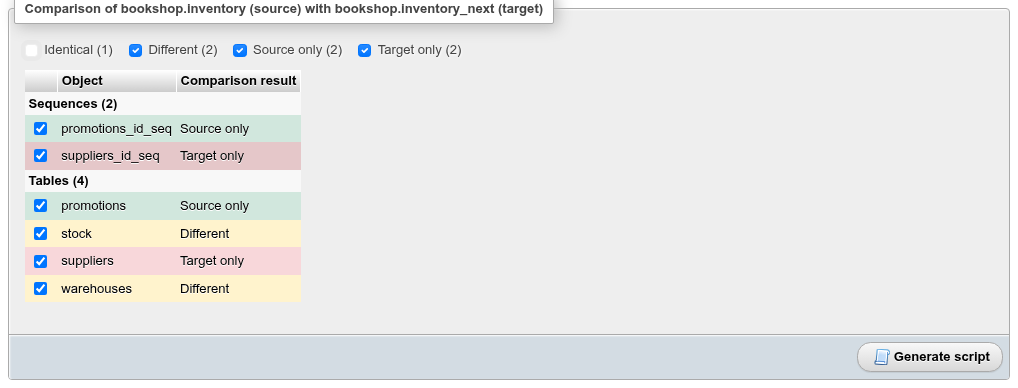
The objects are grouped by type and coloured like pgAdmin's: Different yellow, Source only green, Target only red. The boxes above the list filter by status and show the counts; Identical objects are hidden at first.
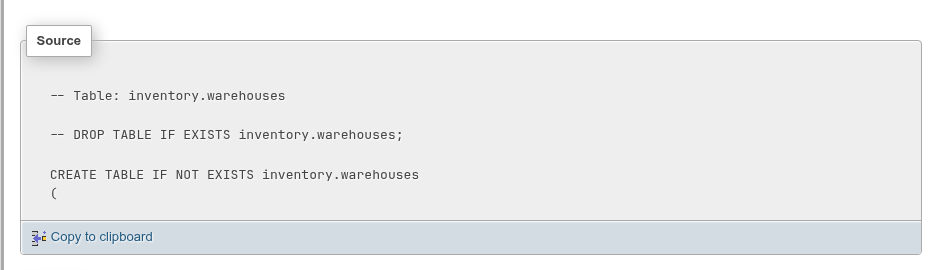
Click an object to see its DDL in three panes: Source, Target, and Difference, the statements that would make the target's object like the source's.
How each kind of difference is written:
| Status | Statements |
|---|---|
| Source only | the source's CREATE, written in the target schema |
| Target only | DROP … IF EXISTS |
| Different table | ALTER TABLE: columns added, dropped, retyped (TYPE … USING col::type), defaults, NOT NULL, identity, comments; constraints, indexes and triggers dropped and made again where they differ; the owner and grants the source sets, and revokes for grants only the target has |
| Different sequence | ALTER SEQUENCE for the increment, bounds, start, cache and cycle |
| Different routine or view | CREATE OR REPLACE |
| Only the owner, grants or comment differ | ALTER … OWNER TO, GRANT / REVOKE, COMMENT ON |
| A database-level object | the ALTER of the table above |
| Anything else that differs | DROP and CREATE again |
What a table's diff leaves to you
Rules, policies and storage parameters of a table are not altered; when they differ, the difference names them in a comment for you to settle. A generated column whose expression changed is dropped and added again, which loses its values only to recompute them.
The script
Every object that is not identical starts ticked. Untick what you want to leave alone and click Generate script:
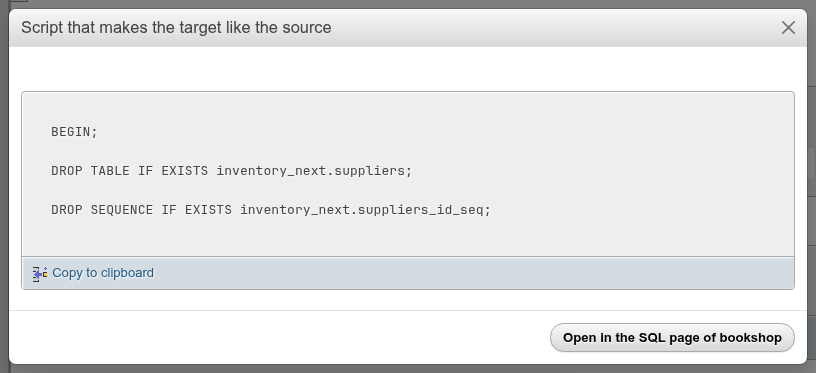
The script is wrapped in BEGIN; … END; and starts with SET LOCAL check_function_bodies = false;, as pg_dump's does: a SQL function's body would otherwise be checked against tables made further down. It runs in phases:
- the drops of what is only in the target, in the reverse of the creation order (a view before the table it reads, a referencing table before the one it references);
- the rest in creation order: collations, types, domains, text search objects, sequences, functions, procedures, trigger functions, aggregates, operators, tables and foreign tables (an inheritance child after its parent, a partitioned table with its partitions). A new table is made without its foreign keys, indexes, triggers, rules and policies;
- views and materialized views, each after the views it selects from;
- the new tables' indexes, then their foreign keys (
ALTER TABLE … ADD CONSTRAINT … FOREIGN KEY, so two tables that reference each other can both be made), then their triggers, rules, policies and row level security; - the sequences'
OWNED BY.
Open in the SQL page of bookshop puts the script into the target database's SQL page query box. It is not run: read it, and click Go there when you are sure.
A table only in the source is made with its sequences in order: the sequence is created first, the table's serial column is written as its type with a DEFAULT nextval(…) of that sequence (a serial would make a second sequence, promotions_id_seq1), and the ALTER SEQUENCE … OWNED BY that ties the sequence to the column comes at the end of the script, once the table exists. If you untick the sequence and the target has none, the column stays serial and CREATE TABLE makes it.
Privileges end up as the source has them. For a table or sequence that differs, the script first revokes each grant only the target has (REVOKE SELECT, UPDATE ON TABLE inventory.stock FROM bookshop_staff;), privilege for privilege and column grants included, then makes the source's grants. With Ignore grants/revokes ticked, neither is in the script.
Every name in the DDL carries its schema (REFERENCES public.books(id), FROM public.items): the comparison reads the definitions with an empty search_path, as pg_dump does, so the script does not depend on the search_path of the session that runs it.
Routine bodies between two schema names
When the two schemas have different names, references to the source schema are rewritten to the target's in names, types, defaults, view queries and '…'::regclass literals, and in a routine's SET search_path. String literals and routine bodies are not rewritten: a body is opaque text. A function in inventory whose body reads inventory.stock therefore differs from one in inventory_next reading inventory_next.stock.
Try it on copies
To see a script applied without touching the real schemas, copy them first: for example pg_dump -s -d bookshop | psql -d scratch and compare the two schemas in scratch. That is how the script above was checked: it ran clean, and a new comparison showed every object identical. The other way round (inventory_next into a copy of inventory) runs clean too, and leaves only stock's extra grants.
What is compared
Objects inside the schemas: collations, types, domains, the four kinds of full text search objects, sequences, functions, procedures, trigger functions, aggregates, operators, tables (with their columns, constraints, indexes, triggers and comment), foreign tables, views and materialized views.
With whole databases, also the database-level objects listed above.
Not compared:
- the database's own settings (its owner, encoding,
ALTER DATABASE … SET); - database-level objects when two schemas are compared;
- roles and tablespaces, which belong to the server;
- data.