
Databases
The Databases tab at server level (/server/databases) lists the databases of the server, creates new ones and drops them. It is laid out like phpMyAdmin's Databases tab: the Create database card on top, the check-all and Drop bar with a search box, then the list.
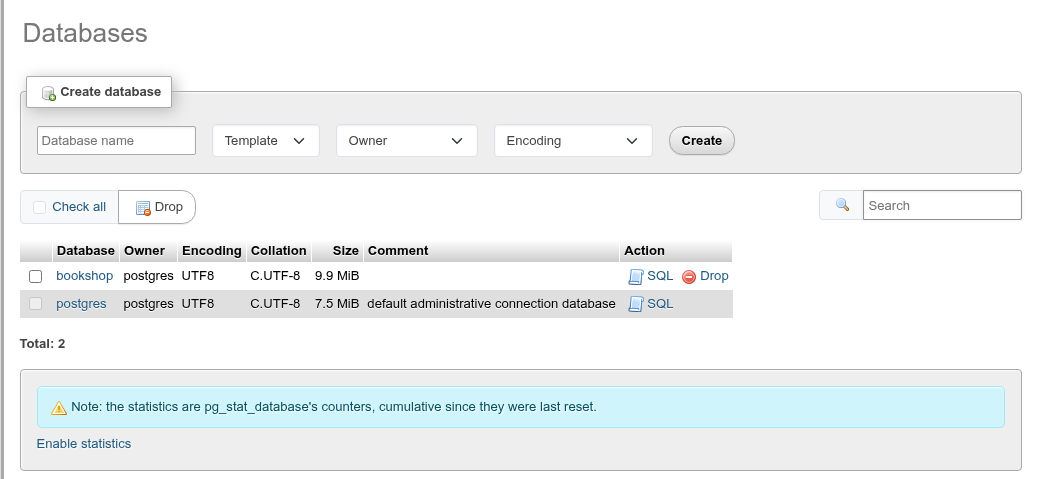
The list
Each row shows the database's Owner, Encoding, Collation (datcollate), Size (pg_database_size) and Comment. The name links to the database; Check privileges opens the database's Privileges tab (CONNECT, CREATE, TEMPORARY and the default privileges), as phpMyAdmin's link of the same name does; SQL opens its Show create page (the CREATE DATABASE statement and the statements for its settings and privileges); Drop drops it. Total counts the rows shown.
- The Search box filters the list by name as you type (case-insensitive, matched anywhere in the name).
- A database you may not connect to (
datallowconnoff, or noCONNECTprivilege) is greyed out, has no link and shows – instead of a size. - The list has no column sorting; it is ordered by name.
Template databases are not listed
template0 and template1 do not appear in the list, as in pgAdmin. They are still offered in the Template select of the create card, and you can reach template1 by URL (/db/template1).
The maintenance database cannot be dropped from here
The database phpPgAdmin uses for its own server-level queries (postgres unless the saved server names another one) has no checkbox and no Drop link: PostgreSQL cannot drop the database a session is connected to.
Statistics
The card under the list has Enable statistics. It adds the counters of pg_stat_database as extra columns: Backends, Xact committed, Xact rolled back, Blocks read, Blocks hit, Tuples returned, Tuples fetched, Tuples inserted, Tuples updated and Tuples deleted. Disable statistics removes them again. The counters are cumulative since they were last reset (pg_stat_reset()), not per second; for rates use the Monitor.
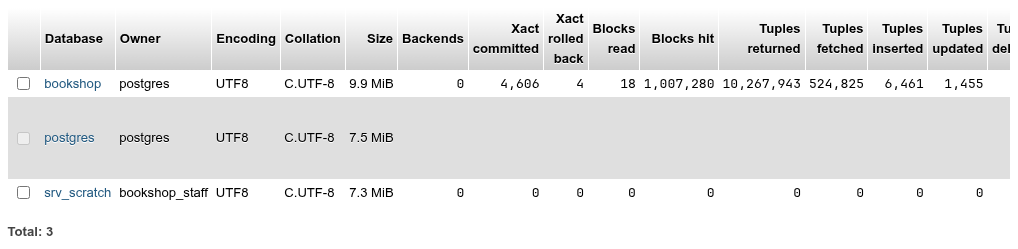
No statistics for postgres
The statistics query skips databases whose OID is below the first user OID, as pgAdmin's does, so the row of the postgres database (created by initdb) stays empty.
Create a database
The Create database card has four fields and Create:

| Field | What it does | SQL |
|---|---|---|
| Database name | The new database's name (up to 63 bytes). Required. | CREATE DATABASE name |
| Template | The database to copy. Empty means template1. | TEMPLATE t |
| Owner | The role that will own it. Empty means you. | OWNER role |
| Encoding | The character set. Empty means the template's. | ENCODING 'enc' |
- Type the name.
- Pick a template, owner and encoding if you want something other than the defaults.
- Click Create. The list and the navigation tree refresh, and the message Database name has been created. appears.
For example, name srv_scratch, template template0, owner bookshop_staff and encoding UTF8 runs:
CREATE DATABASE srv_scratch
    WITH
    OWNER = bookshop_staff
    TEMPLATE = template0
    ENCODING = 'UTF8'
    IS_TEMPLATE = false;
Preview SQL shows the statement before it runs. More options adds a second row:
| Field | SQL |
|---|---|
| Collation (LC_COLLATE) and Character type (LC_CTYPE), suggested from the libc locales the server has | LC_COLLATE 'C', LC_CTYPE 'C' |
| Locale provider: libc, icu (PostgreSQL 15+) or builtin (17+), with its ICU locale or Builtin locale | LOCALE_PROVIDER 'icu', ICU_LOCALE 'en-US' |
| Tablespace | TABLESPACE ts |
| Connection limit (-1 for none) | CONNECTION LIMIT 5 |
A locale other than the template's needs template0 as the template.
The encoding must match the server's locale
Unless More options sets them, the new database inherits the locale (LC_COLLATE / LC_CTYPE) of its template. An encoding the locale does not support is refused by PostgreSQL, for example on a cluster initialised with C.UTF-8:
encoding "LATIN1" does not match locale "C.UTF-8"To create a database in another encoding, run CREATE DATABASE ... TEMPLATE template0 ENCODING 'LATIN1' LOCALE 'C' (or a locale in that encoding) in the SQL editor.
Template in use
PostgreSQL copies the template only while nobody else is connected to it. If another session is connected to the template (for example bookshop open in another tab), the create fails with source database "…" is being accessed by other users.
Stale collation version
From PostgreSQL 15 the server refuses a template whose recorded collation version differs from the one the operating system now provides (after an OS or ICU upgrade). Instead of the bare error, phpPgAdmin then asks whether to refresh the template first, with the versions in the question, and Refresh and create runs:
ALTER DATABASE template1 REFRESH COLLATION VERSION;
CREATE DATABASE ...;
Refreshing only updates the recorded version; reindex indexes on collatable columns of databases created from that template if the collation really changed.
Drop databases
- Drop in a row asks about that database.
- To drop several, check their boxes (or Check all) and click Drop in the bar above the list. With nothing checked you get No databases selected.
The confirmation repeats phpMyAdmin's warning and shows each statement:
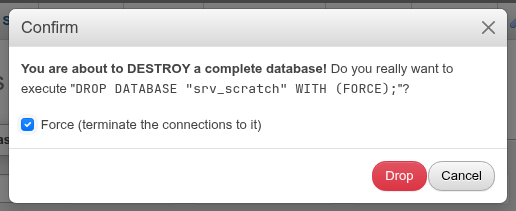
Force (terminate the connections to it) adds WITH (FORCE) (PostgreSQL 13 and later), which terminates other sessions connected to the database first. Without it the drop fails while anybody, including another phpPgAdmin tab, is connected. The databases are dropped one at a time, so if one fails the ones before it stay dropped and the message tells you which error stopped the run.
DROP DATABASE cannot be undone and cannot run in a transaction
Each statement runs on its own; there is no rollback. Use Export first if you may need the data.
Without the right to drop
The checkbox is offered for every database except the maintenance one, even for a role that does not own the database and is not a superuser. The drop then fails with PostgreSQL's must be owner of database ….
See also
- Database operations: rename, copy, owner, tablespace, connection limit, settings of one database.
- Privileges:
CONNECT,CREATEandTEMPORARYon a database. - Roles: Add role can create a database with the same name.