
Structure: columns
A table's Structure tab shows its columns with their actions, then cards for indexes, extended statistics, constraints, partitions and table information. This page covers the columns, the Change page, the extended statistics and the Information card; indexes and constraints have their own page. The tab is the table's own URL, /db/<database>/schema/<schema>/table/<table>.
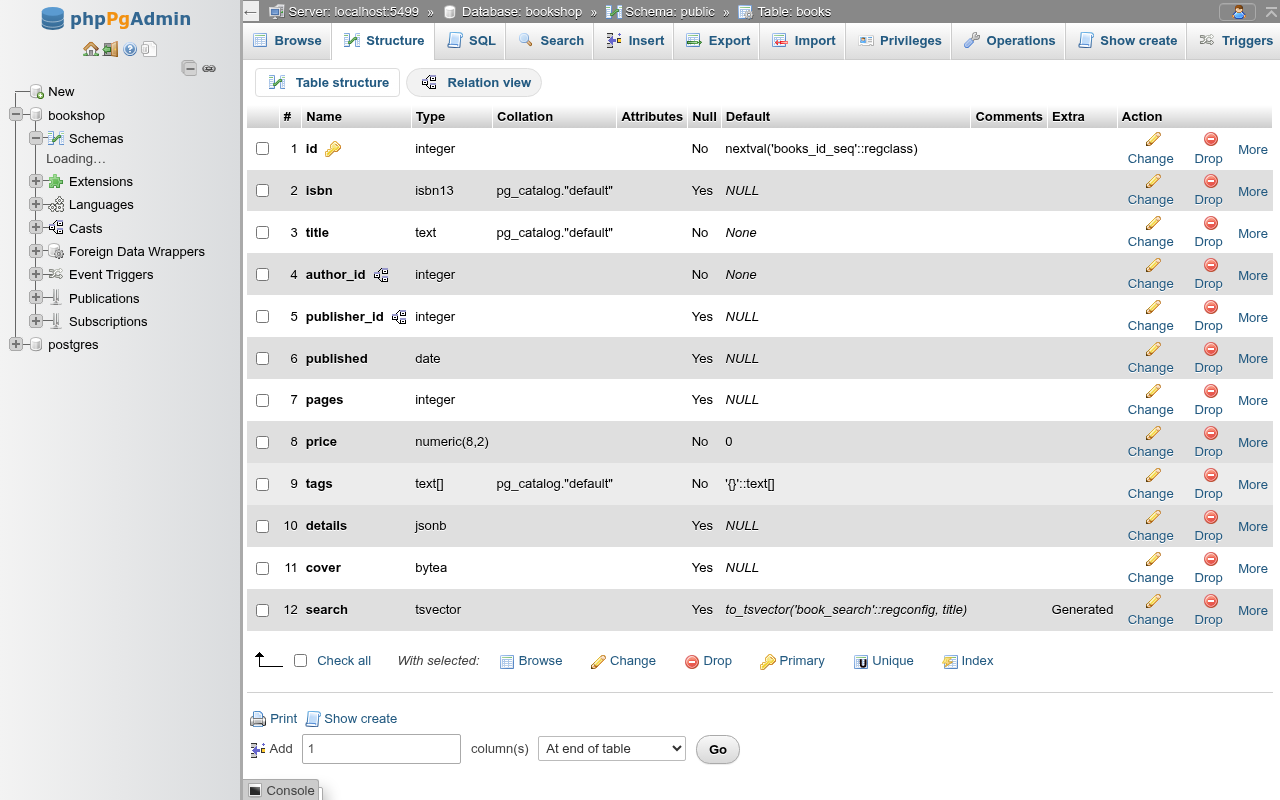
The tabs of a table are Browse, Structure, SQL, Search, Insert, Export, Import, Privileges, Operations, Show create and Triggers. See Browsing data, Searching a table, Inserting and editing rows, Export, Import, Privileges, Table operations and Triggers, rules and policies.
Two pills sit above the grid: Table structure (this page) and Relation view, the foreign key editor described under Foreign keys.
The column grid
| Column | What it shows |
|---|---|
| # | Position in the table. |
| Name | The column name. A key icon marks primary key columns, a relation icon foreign key columns. A dotted underline means the column has a comment; hover for it. |
| Type | The type as PostgreSQL formats it: numeric(8,2), text[], isbn13. |
| Collation | The column's collation, for collatable types. |
| Attributes | inherited from public.books for a column that comes from a parent table. |
| Null | Yes or No (NOT NULL). |
| Default | The default expression. NULL (in italics) means no default on a nullable column, None no default on a NOT NULL column. A generated column shows its expression in italics. |
| Comments | The column comment. |
| Extra | Identity (BY DEFAULT), Identity (ALWAYS) or Generated. |
| Action | Change, Drop and the More menu. |
serial columns
A serial or bigserial column shows its real type (integer, bigint) and the default nextval('…_seq'::regclass), as books.id does. An identity column shows None as its default and Identity (…) under Extra.
Column actions
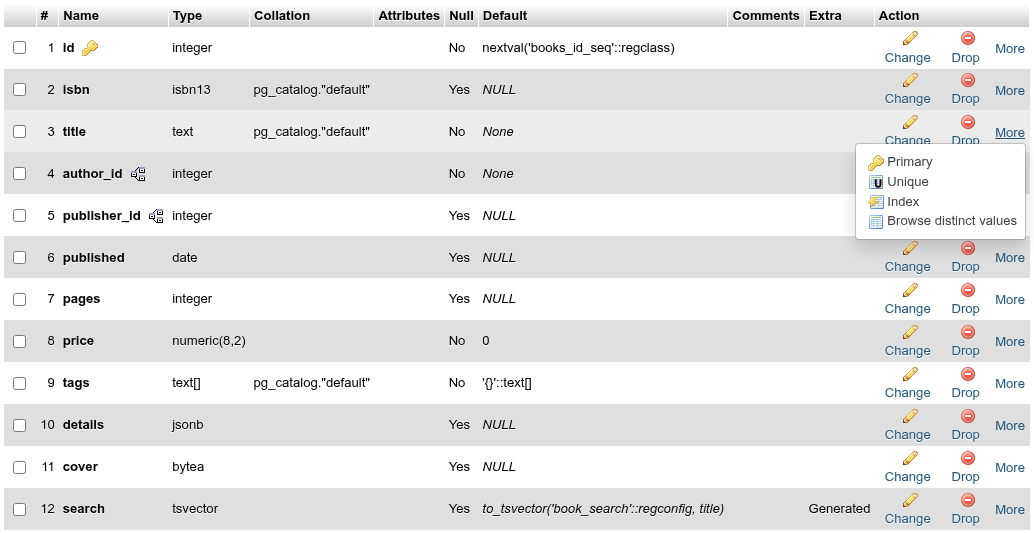
| Action | What it does | SQL |
|---|---|---|
| Change | Opens the Change page for this column. | |
| Drop | Asks, then drops the column. | ALTER TABLE t DROP COLUMN c; |
| More → Primary | Adds the column to the primary key (greyed when it already is in it). | see below |
| More → Unique | Adds a unique constraint on the column. | ALTER TABLE t ADD UNIQUE (c); |
| More → Index | Adds a btree index on the column. | CREATE INDEX ON t USING btree (c); |
| More → Browse distinct values | Opens Browse with each distinct value and its count. | SELECT COUNT(*) AS "Rows", c FROM t GROUP BY c ORDER BY "Rows" DESC |
Primary rebuilds an existing primary key
PostgreSQL cannot add a column to an existing primary key. If the table already has one, Primary drops it and creates a new one with the old columns plus the new: ALTER TABLE t DROP CONSTRAINT t_pkey, ADD PRIMARY KEY (id, title); (you see the statement before it runs). That fails if a foreign key elsewhere references the old key. The new key's columns become NOT NULL, which fails if they hold NULLs.
Drop has no CASCADE
The column is dropped with a plain DROP COLUMN. If a view, a foreign key or another object depends on it, PostgreSQL refuses and names the dependent object. Drop or change that first, or run ALTER TABLE t DROP COLUMN c CASCADE; on the SQL tab. Indexes and constraints that only involve the column go with it.
With selected
Tick columns (or Check all) and click one of the links after With selected::
| Link | What it does |
|---|---|
| Browse | Runs SELECT c1, c2 FROM t on the table's SQL tab. |
| Change | Opens the Change page with all ticked columns. |
| Drop | One ALTER TABLE t DROP COLUMN c1, DROP COLUMN c2;, after a confirmation. |
| Primary | Adds the ticked columns to the primary key (rebuilding it, as above). |
| Unique | One unique constraint over all ticked columns. |
| Index | One btree index over all ticked columns. |
The columns go into the key or index in table order, not in the order you ticked them. With nothing ticked, each link answers No column selected.
Print prints the page; Show create opens the Show create tab.
Adding columns
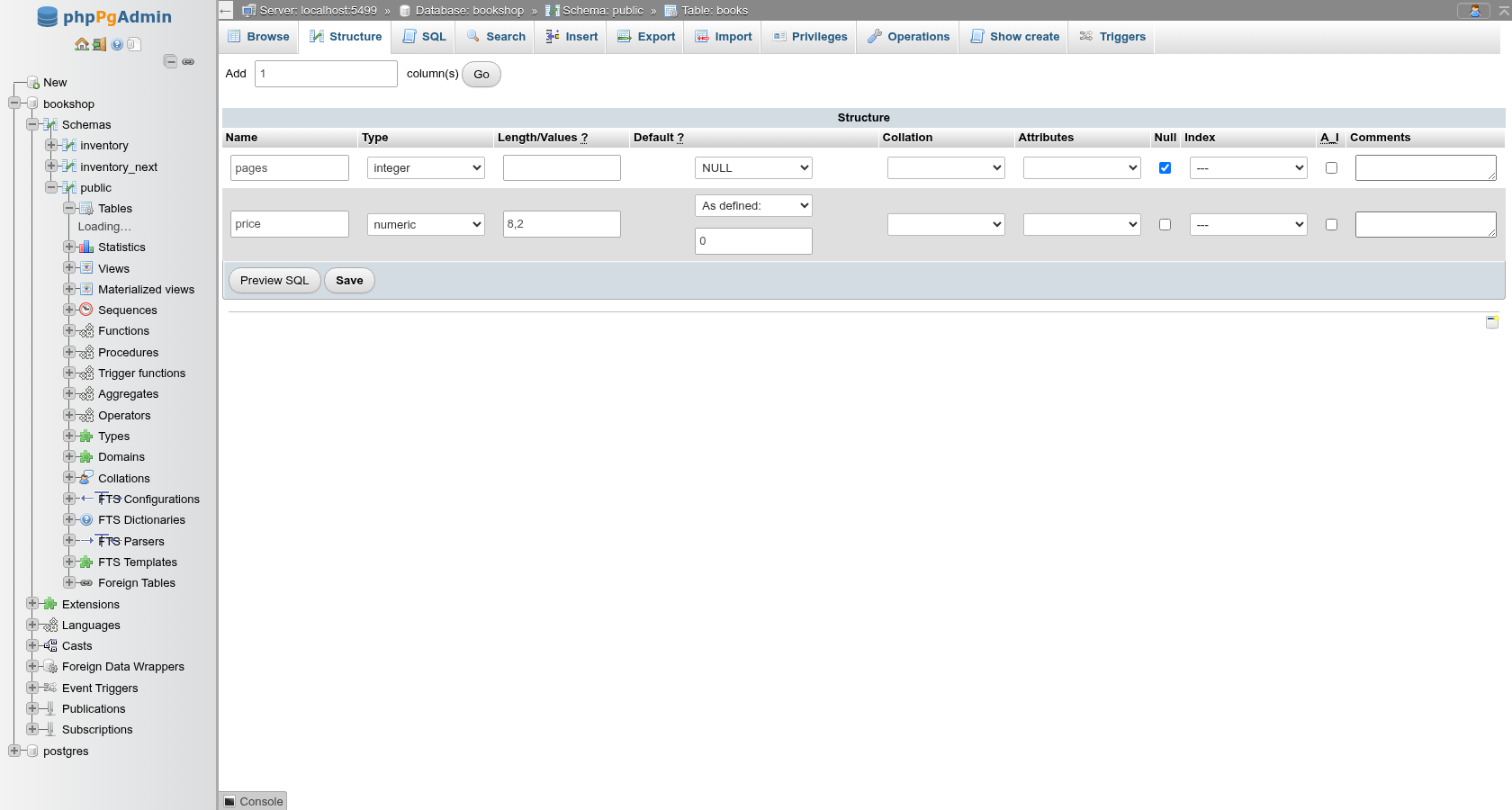
The line under the grid reads Add [1] column(s) [position] Go. It opens the add-columns page, the same grid as the create form with empty rows. Preview SQL shows one ALTER TABLE … ADD COLUMN per column (plus CREATE INDEX or ADD UNIQUE for the Index column); Save runs them and returns to Structure.
PostgreSQL cannot place a column
The position select offers At beginning of table, after last column and At end of table, as phpMyAdmin does, but PostgreSQL always appends new columns. Picking anything other than the end shows PostgreSQL adds new columns at the end of the table. and adds them at the end. To get a different column order you have to create a new table and copy the data across. Column order rarely matters in PostgreSQL: name columns in your queries instead of relying on SELECT *.
Adding a column with a default
Since PostgreSQL 11, ADD COLUMN … DEFAULT <constant> does not rewrite the table, even on large tables. A volatile default such as DEFAULT gen_random_uuid() or clock_timestamp() still rewrites every row and holds an exclusive lock while it does.
Changing columns
Change (on a row or for the ticked columns) opens /…/columns/change?attnums=…, the column grid filled with the current definitions. Change what you need and click Preview SQL or Save. Only the fields you changed produce statements.
| You change | Statement |
|---|---|
| Name | ALTER TABLE t RENAME c TO c2; |
| Type, Length/Values, Attributes | ALTER TABLE t ALTER COLUMN c TYPE integer; |
| Default | ALTER COLUMN c SET DEFAULT … (or DROP DEFAULT for None) |
| Null | ALTER COLUMN c SET NOT NULL / DROP NOT NULL |
| Collation | part of the TYPE … COLLATE … clause |
| Index | PRIMARY adds the column to the primary key; UNIQUE and INDEX add a new constraint or index |
| A_I | ALTER COLUMN c ADD GENERATED BY DEFAULT AS IDENTITY / DROP IDENTITY |
| A_I → BY DEFAULT / ALWAYS | ALTER COLUMN c SET GENERATED ALWAYS |
| A_I → sequence options | ALTER COLUMN c SET INCREMENT 5 SET CACHE 10 … (only the options you changed; a new Start does not restart the sequence) |
| Comments | COMMENT ON COLUMN t.c IS … |
| Virtuality emptied | ALTER COLUMN c DROP EXPRESSION (the column keeps its values and becomes a plain column) |
| Virtuality expression | ALTER COLUMN c SET EXPRESSION AS (…) (PostgreSQL 17+; rewrites the table) |
| Storage | ALTER COLUMN c SET STORAGE EXTERNAL (empty goes back to the type's own) |
| Compression | ALTER COLUMN c SET COMPRESSION lz4 (empty: SET COMPRESSION default); only values written afterwards use it |
| Statistics | ALTER COLUMN c SET STATISTICS 500 (empty: -1, the default); takes effect at the next ANALYZE |
For example, renaming price to amount, changing it from numeric(8,2) to integer, setting the default to 5, making it NOT NULL and commenting it gives:
ALTER TABLE IF EXISTS public.tbl_demo
    RENAME price TO amount;

ALTER TABLE public.tbl_demo
    ALTER COLUMN amount TYPE integer;
ALTER TABLE IF EXISTS public.tbl_demo
    ALTER COLUMN amount SET DEFAULT 5;

ALTER TABLE IF EXISTS public.tbl_demo
    ALTER COLUMN amount SET NOT NULL;

COMMENT ON COLUMN public.tbl_demo.amount
    IS 'Whole units';
Renames work inside the same save: the later statements already use the new name. Renaming a column does not break views or foreign keys, which refer to columns by number.
Type changes and USING
ALTER COLUMN … TYPE converts the existing values with the cast PostgreSQL allows implicitly or by assignment: numeric → integer (rounding), integer → bigint or text, varchar(80) → varchar(200) work. Other conversions need a USING expression: boolean → integer, text → integer or date, or a plain column to an array.
When you change a column's type, length or Attributes, a box appears under the Type select. Leave it empty to use the automatic cast; type an expression to convert the values yourself. The placeholder shows the usual one, the column cast to the new type:
| Change | USING |
|---|---|
varchar holding numbers → integer | v::integer |
boolean → integer | flag::integer |
integer → integer[] (Attributes ARRAY) | ARRAY[n] |
text[] → text | array_to_string(a, ',') |
ALTER TABLE public.t
    ALTER COLUMN v TYPE integer USING v::integer;
Without an expression, a change that needs one fails with PostgreSQL's column "v" cannot be cast automatically to type integer, and its hint names the expression to use. A value the expression cannot convert ('abc'::integer) fails the whole statement, and nothing is changed.
Rewrites and locks
A type change rewrites the table (except for widening a varchar or removing its length) and holds an ACCESS EXCLUSIVE lock while it runs, and it fails if a view uses the column.
Changing a column to a type without collations (integer, date, boolean) drops its collation: the statement has no COLLATE clause. Adding or removing ARRAY changes the type too, so the array brackets follow what the form says.
A_I on an existing column
Ticking A_I on a column that already has a nextval() default (a serial) fails, because a column cannot have both; drop the default first (Default → None, save), then tick A_I. Unticking A_I drops the identity; the column keeps its values but gets no new ones.
Generated columns cannot be made from existing ones
PostgreSQL cannot turn an existing column into a generated one: choosing STORED on a plain column answers PostgreSQL cannot make an existing column generated; add a new column instead. Add a new column with the expression and drop the old one.
Extended statistics
The Extended statistics card lists the CREATE STATISTICS objects on the table: Name, Kinds (ndistinct, dependencies, mcv, or all), Columns / expressions, Target (default or a number) and Comment, with Edit and Drop. In the navigation tree they are under the schema's Statistics container; clicking one opens this card.

Extended statistics tell the planner how columns relate (for example that city determines zip), which improves row estimates for queries that filter on several columns. They take effect after the next ANALYZE of the table.
Create extended statistics → Go opens the dialog:
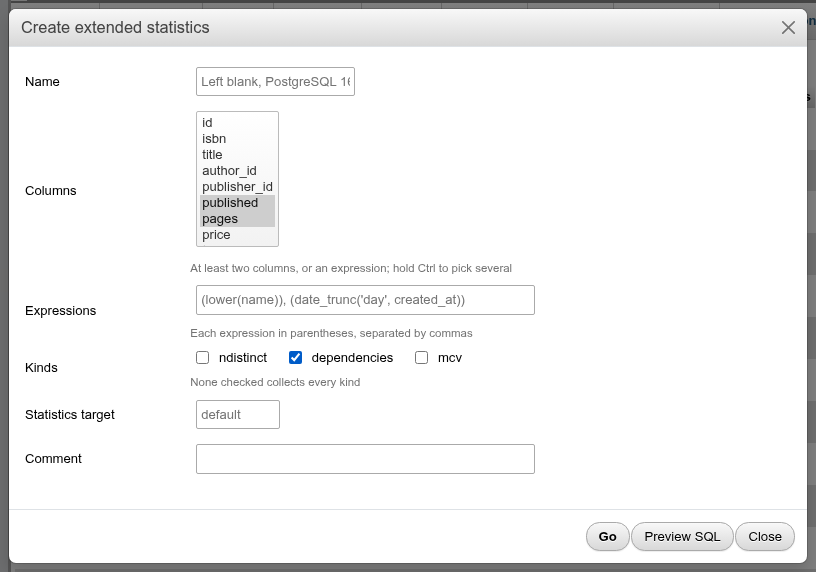
| Field | What it does |
|---|---|
| Name | The object's name. Left blank, PostgreSQL 16 and later name the object themselves (tbl_room_id_qty_expr_stat); the target and comment are then set with ALTER STATISTICS and COMMENT ON STATISTICS under that name. |
| Columns | The table's columns to cover; Ctrl-click for several. At least two, or one column plus an expression. |
| Expressions | Expressions in parentheses, separated by commas: (lower(name)), (date_trunc('day', created_at)). |
| Kinds | ndistinct, dependencies, mcv. None checked collects every kind. |
| Statistics target | Per-object SET STATISTICS; empty means the default (default_statistics_target). |
| Comment | COMMENT ON STATISTICS. |
CREATE STATISTICS public.tbl_room_stx
    (ndistinct, mcv)
    ON id, qty, (lower(code))
    FROM public.tbl_room;
When you edit an existing object, only Name, Statistics target and Comment can change (ALTER STATISTICS … RENAME TO, SET STATISTICS); the columns, expressions and kinds are shown read-only, since PostgreSQL cannot alter them. Drop and recreate the object to change those.
With a single column and no expression, the dialog answers At least 2 columns must be specified for multi-column statistics. (plain per-column statistics need no object).
Referenced by and inheritance
After the Constraints card, as on the classic phpPgAdmin's table Info page:
- Referenced by lists the foreign keys of other tables (or of the table itself) that point at it: the table, the constraint, its columns, the columns they reference and the definition.
- Inheritance lists the tables the table inherits from (Parent) and those that inherit from it (Child), or the partition it is (Parent, with the partitioned table). A partitioned table's partitions are on the Partitions card instead.
A card with nothing to list is not shown.
The Information card
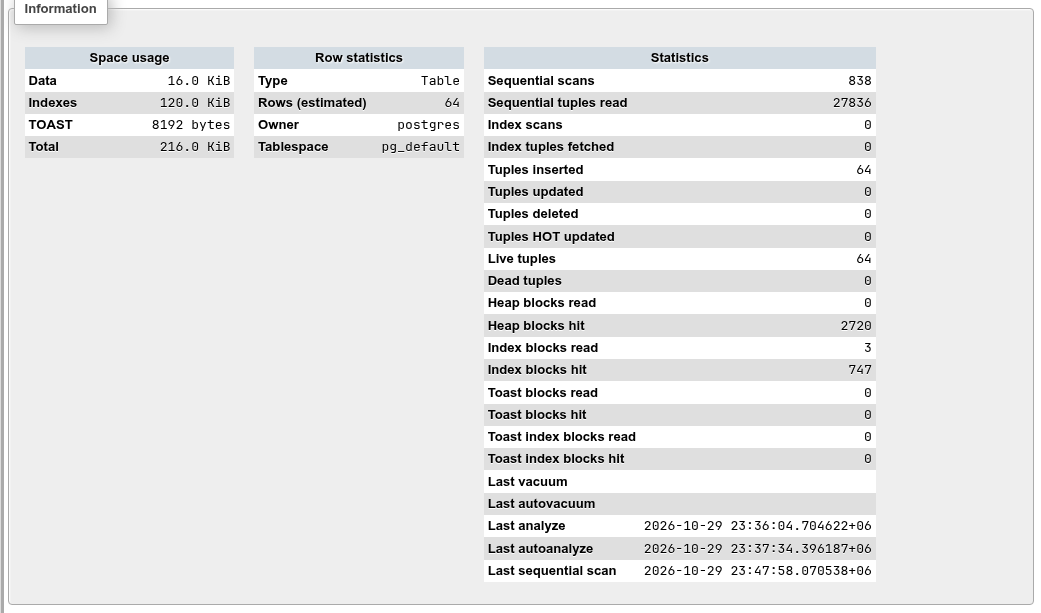
The card shows the table comment (if any) and three tables:
- Space usage: Data (the heap), Indexes, TOAST (out-of-line storage for long values) and Total.
- Row statistics: Type (Table, Partitioned table or Partition), Rows (estimated), Owner, Tablespace.
- Statistics: the counters from
pg_stat_user_tablesandpg_statio_user_tables: sequential and index scans, tuples inserted, updated, deleted and HOT updated, live and dead tuples, heap, index and TOAST block reads and hits, and the times of the last vacuum, autovacuum, analyze, autoanalyze and (PostgreSQL 16+) sequential scan.
Reading the counters
Dead tuples that keep growing mean vacuum is not keeping up; Sequential scans far above Index scans on a large table often mean a missing index. The counters are cumulative since the last statistics reset; blank Last … times mean "never". To run VACUUM or ANALYZE, see Table maintenance.
Coming from phpMyAdmin
| phpMyAdmin | Here |
|---|---|
| Move columns | Not possible: PostgreSQL has no column order clause. |
| More → Spatial, Fulltext | Use the index dialog with GiST or GIN. |
| Add column after … | Always added at the end. |
| Track table, Propose table structure | Not available. |
| Normalize | Not available. |
| Row statistics Row length, Next autoindex, Format | Not applicable; see the Statistics counters instead. |