
Settings
The server's Settings tab holds your own phpPgAdmin preferences, like phpMyAdmin's user preferences: how many rows a result shows, how the navigation tree pages long lists, what the Export and Import pages start with, and so on. Open it from the server level's tab bar (Settings, after Import), at /server/settings.
Settings belong to your role on this server. They are stored in phpPgAdmin's storage database under the server's host and port and the role name, so another role, or the same role on another server, has its own. They follow you from browser to browser. A setting left at its default is not stored, so it follows the default if a later version changes it.
Per host and port as typed
localhost:5432 and 127.0.0.1:5432 count as two servers, each with its own settings. See Saved servers.
Pages
The pills at the top of the tab are the pages, as in phpMyAdmin (which also has a Two-factor authentication page; phpPgAdmin does not):
| Pill | Address | Holds |
|---|---|---|
| Manage your settings | /server/settings | Import, export and reset. |
| Features | /server/settings/features | General (Confirm DROP queries), Console. |
| SQL queries | /server/settings/sql | Query history length. |
| Navigation panel | /server/settings/navigation | The Recent and Favorites lists' lengths, the navigation tree's page sizes and filter. |
| Main panel | /server/settings/main-panel | Browse mode (rows per page). |
| Export | /server/settings/export | Export defaults. |
| Import | /server/settings/import | Import defaults. |
Changing settings
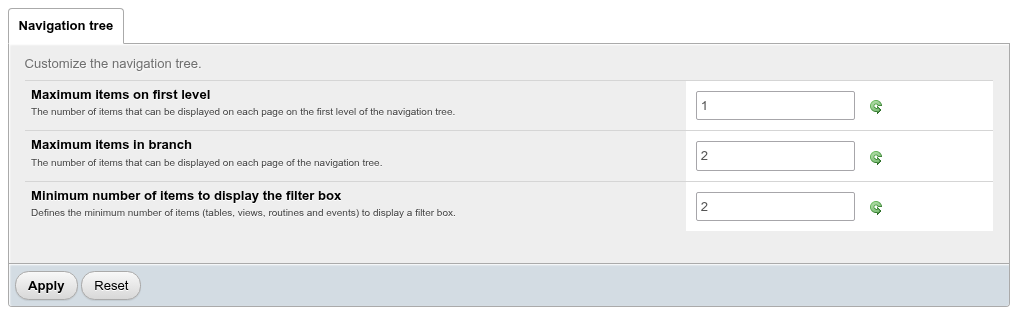
Each page has a tab per group of settings. Each row has the setting's name, a line explaining it, the field, and a Restore default value icon, which is bright when the value differs from the default.
- Change the fields.
- Click Apply. The message Configuration has been saved. confirms it, and the change takes effect at once, without a reload.
Reset, under the fields, throws away the changes you have not applied yet. Restore default value puts the default back into the field; click Apply to save it.
Numbers out of range
Apply checks the number fields before anything is saved, as phpMyAdmin's settings forms do. An empty field, a fraction, or a value outside the setting's limits is refused with a message that names the setting and its limits, such as "Number of rows: enter a whole number of at least 1." or "Query history length: enter a whole number from 1 to 500.", the tab with that field is opened, and nothing is applied.
If you change a console option from the console's own Options card, or resize the console, an open Settings page shows the new values as long as you have not started editing it.
Features
General
| Setting | Default | Effect |
|---|---|---|
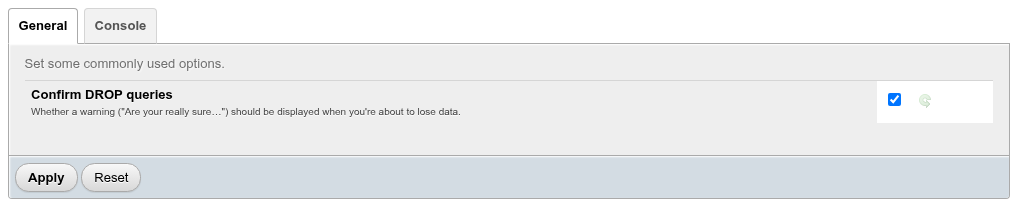
| Confirm DROP queries | On | On the SQL tab and in the console, a statement that starts with DROP, ALTER TABLE … DROP, DELETE FROM or TRUNCATE, or an UPDATE without WHERE, asks Do you really want to execute "…"? before it runs. Off, it runs straight away. phpMyAdmin's Confirm. |
SQL tab and console
The setting applies to what you type on an SQL tab or in the console, and to links that open the SQL tab with a statement to run. The Drop buttons and links on the other pages always ask, whatever the setting.
Console
| Setting | Default | Effect |
|---|---|---|
| Always expand query messages | Off | The console shows each query's whole text instead of its first line. |
| Show query history at start | Off | The console opens on the query history (its History button starts pressed). |
| Execute queries on Enter and insert new line with Shift+Enter | Off | In the console, Enter runs the query and Shift+Enter starts a new line. Off, Ctrl+Enter runs it and Enter starts a new line. The console's first line says which applies ("Press Enter to execute query"). |
| Console height | 92 | The height in pixels of the open console's message area, at least 32. Dragging the console's toolbar changes and saves it too. |
The first three are also on the console's Options card; changing them there saves them here. See Console.
SQL queries
| Setting | Default | Effect |
|---|---|---|
| Query history length | 500 | How many statements your query history keeps on this server, from 1 to 500. When a new statement is recorded, the oldest beyond the limit are deleted. phpMyAdmin's QueryHistoryMax. |
The history itself is described in History, bookmarks and macros.
Lowering it deletes history
The limit is applied when the next statement is recorded: with the length set to 2, running three statements left two in the history. Raising the limit again does not bring the deleted ones back.
Navigation panel
The page has two tabs, as phpMyAdmin's has: Navigation panel and Navigation tree.
| Setting | Default | Effect |
|---|---|---|
| Recently used tables | 10 | How many tables the panel's Recent list keeps, newest first; 0 hides the list and stops recording. Lowering it cuts the list at once. phpMyAdmin's NumRecentTables. |
| Favorite tables | 10 | How many tables Favorites may hold; adding one more answers Favorite List is full!. 0 hides the list and the star column of the schema Structure page. phpMyAdmin's NumFavoriteTables. |
| Maximum items on first level | 100 | Databases per page in the tree. phpMyAdmin's FirstLevelNavigationItems. |
| Maximum items in branch | 50 | Items per page in every other list of the tree (schemas, tables, functions…). phpMyAdmin's MaxNavigationItems. |
| Minimum number of items to display the filter box | 30 | A list gets the Type to filter these box once it has this many items. It applies to the database list too, not only to tables, views and routines as the description says. phpMyAdmin's NavigationTreeDisplayItemFilterMinimum. |
| Show system objects | off | Lists pg_catalog, information_schema, the template databases, the predefined pg_* roles and the other built-in objects in the tree and on the object lists. The classic phpPgAdmin's show_system. |
See Long lists: fast filter and pages for what the helpers look like.
Main panel
| Setting | Default | Effect |
|---|---|---|
| Number of rows | 25 | Rows per page when browsing a table, on table search results and on SQL query results, at least 1. With 5, SELECT generate_series(1, 40) showed 5 rows and the page links. phpMyAdmin's MaxRows. |
| Limit column characters | 50 | How much of a long value a grid cell shows in Partial texts mode, and of a foreign key's description in its select. phpMyAdmin's LimitChars. |
| Show column comments | on | A table column's comment under its name in the results grid. phpMyAdmin's ShowBrowseComments. |
The Number of rows select above a result still changes it for that result only.
Export
These set what the Export page starts with.
| Setting | Default | Choices |
|---|---|---|
| Export method | Quick | Quick - display only the minimal options to configure, Custom - display all possible options to configure. An export opened with objects already selected starts in Custom whatever this says. |
| Format | SQL | SQL, PostgreSQL custom archive (pg_restore), PostgreSQL tar archive (pg_restore), CSV, CSV for MS Excel. A server export always starts on SQL (pg_dumpall), whatever this says. |
| Compression | None | None or gzipped. |
Import
These set what the Import page starts with.
| Setting | Default | Effect |
|---|---|---|
| Character set of the file | UTF8 | The encoding the page starts with, as PostgreSQL names it (UTF8, LATIN1, WIN1252…). Case does not matter: latin1 started the page on LATIN1. A name the server does not know is ignored and UTF8 is used. |
| Stop at the first error | On | For an SQL file: psql's ON_ERROR_STOP. |
Manage your settings
Export
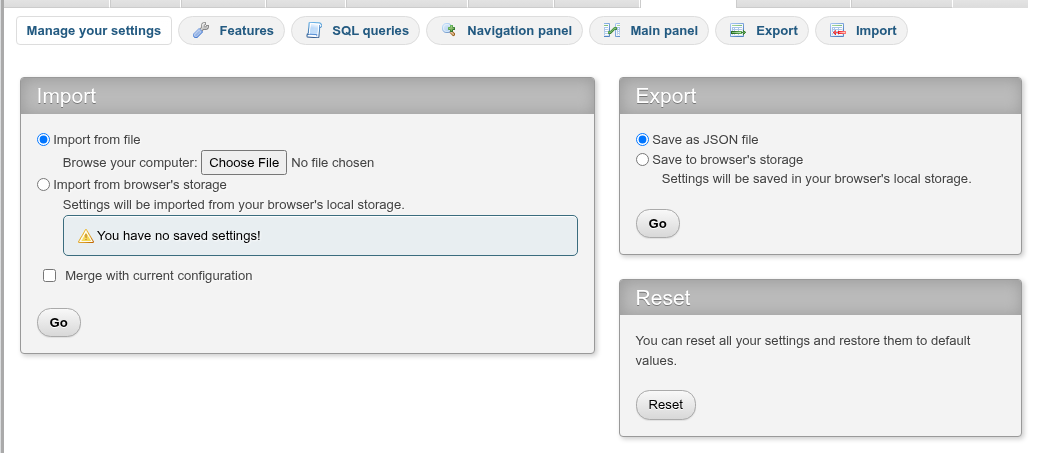
Save as JSON file downloads
phppgadmin-config-<host name>.jsonwith the settings that differ from their defaults, for example:json{ "main.max_rows": 5, "features.confirm": false, "export.format": "custom" }Save to browser's storage keeps the same values in this browser's local storage, with the date. Existing settings will be overwritten! warns when something is already saved there. The message is Configuration has been saved.
The export does not include your language.
Import
- Import from file: choose a JSON file exported here and click Go.
- Import from browser's storage: imports what Save to browser's storage saved in this browser, showing Saved on: and the date, or You have no saved settings!.
- Merge with current configuration: when checked, settings missing from the file keep their current values. When not checked, every setting missing from the file returns to its default.
After a successful import the message is Configuration has been imported. and the Features page opens.
Keys phpPgAdmin does not know, and values of the wrong type (a text where a number belongs), are skipped without a message. A file that is not a JSON object gives The file does not hold settings exported from here.; Go without a file gives Choose a file to import.
Reset
Reset returns every setting to its default and removes them from storage. The message is Your settings have been reset to their default values. Your language is not reset.
Settings in another role's name
Export from one role and import into another to copy a set of settings, for example to give a team the same rows per page and export defaults. The file holds no server or role names.