
Import
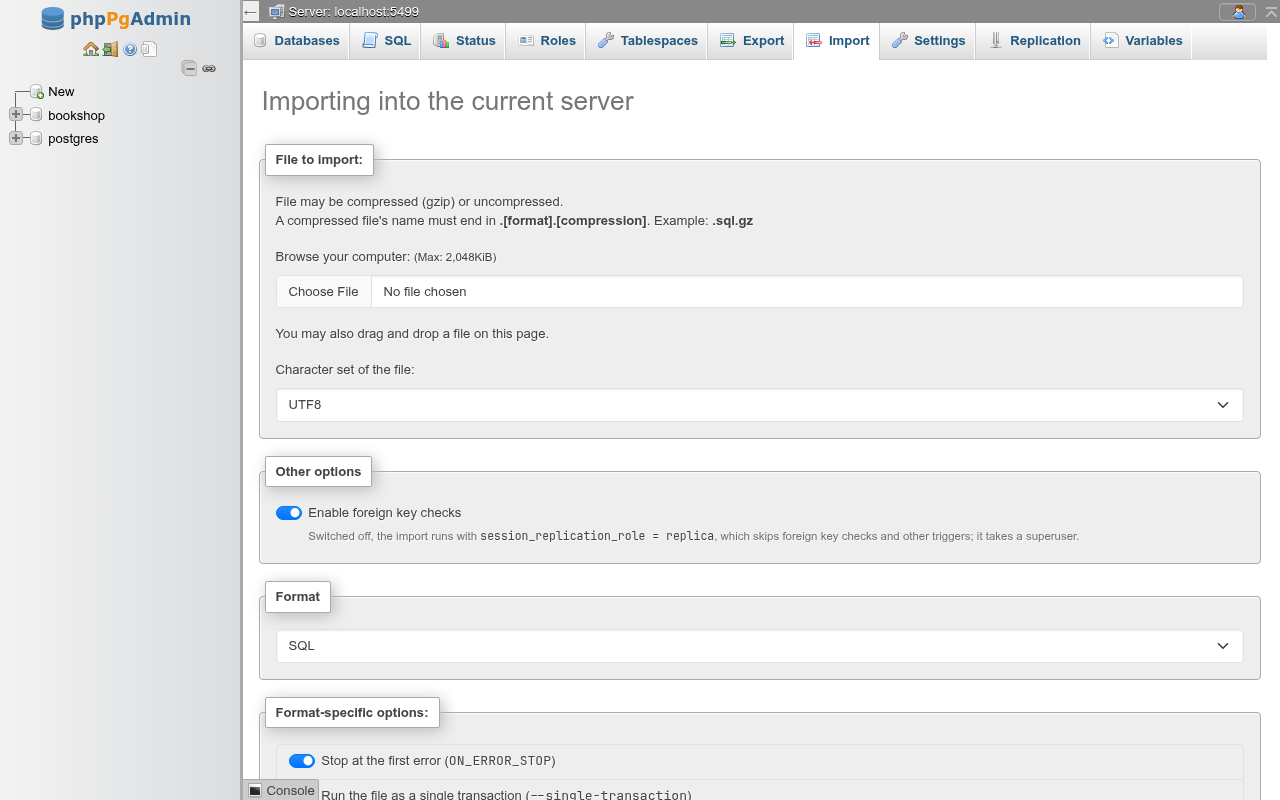
The Import tab runs a file against the server, a database, a schema or a table: an SQL script through psql, a pg_dump custom or tar archive through pg_restore, or — on a table — rows in CSV or in COPY's text or binary format through COPY … FROM STDIN. The tab follows Export on every level except views, and is laid out like phpMyAdmin's import page: File to import:, Other options, Format and Format-specific options:.
Every import runs in the background on the web server. The page uploads the file, starts the program and shows a card that follows it; you can leave the page and come back.
The client programs must be on the web server
Import runs psql and pg_restore from the directory PGADMIN_PG_BIN_DIR names, or the newest found (see Export for where it looks). The background runner is started with the PHP command-line binary next to the running PHP (PHP_BINDIR/php under php-fpm); set PGADMIN_PHP_BINARY (php_binary in config/tools.php) when it lives elsewhere. A missing program is named in a red box above the form.
The file
Browse your computer: picks the file; you can also drop a file anywhere on the page. The label shows the largest upload PHP accepts, (Max: 2,048KiB) on the docs server.
A file may be gzipped (its name ending in .sql.gz, .dump.gz, .csv.gz, …); it is inflated as it is fed to the program. Zip files are refused. What the file holds is read from its first bytes, not its name: a custom archive starts with PGDMP, a tar archive has ustar at byte 257, a COPY binary file starts with PGCOPY, anything else is text.
Picking a file also picks the Format from its extension: .sql, .psql, .pgsql → SQL; .dump, .backup, .bak, .custom, .tar, .pgdump → the archive format; on a table .csv → CSV, .tsv, .copy and .txt → PostgreSQL COPY text format. You can change it afterwards.
Character set of the file: is the file's encoding: PGCLIENTENCODING for an SQL file, ENCODING for COPY. An archive records the encoding it was dumped in and pg_restore uses that one; the binary COPY format has no text to convert. The default comes from your Import settings (UTF8).
Selecting a file on the web server
When PGADMIN_UPLOAD_DIR is set (upload_dir in config/storage.php), the card has two tabs, Upload a file and Select file to import. The second lists the files of that directory whose names end in .sql, .dump, .backup, .custom, .tar, .pgdump, .csv, .tsv, .txt or .copy (optionally .gz); such a file is not uploaded and is not deleted afterwards. This avoids the upload limits for large dumps. The docs server has no upload directory, so this was not tried here.
Upload size limits
Three limits apply to an uploaded file, and the smallest wins:
| Limit | Where it is set | What you see |
|---|---|---|
PHP upload_max_filesize (2M here) and post_max_size (8M here) | php.ini | the page refuses before uploading: The file is larger than PHP accepts in an upload (2.0 MiB). |
The web server's request size (nginx client_max_body_size, 1 MiB by default) | the web server's configuration | the upload is sent and refused with HTTP 413: The file is larger than the web server accepts in a request. |
| PHP refusing the file after all | php.ini | The file is larger than PHP accepts (upload_max_filesize = …). |
The limit shown is PHP's only
The (Max: …) label and the check before uploading know PHP's limits, not the web server's. On the docs server nginx is left at its 1 MiB default, so a 1.5 MiB file passes the page's check and is then refused with the 413 message. Raise client_max_body_size (or Apache's LimitRequestBody) together with upload_max_filesize and post_max_size, or use the upload directory.
Other options
Enable foreign key checks is on by default. Switched off, the import runs with session_replication_role = replica (passed in PGOPTIONS), the PostgreSQL counterpart of phpMyAdmin's FOREIGN_KEY_CHECKS = 0: foreign keys and other triggers do not fire, so rows that reference missing rows get in.
Switching foreign key checks off needs a superuser
Setting session_replication_role takes a superuser (or a role granted SET on it). For other roles the import fails at once with a permission error. Rows imported this way are not checked later either.
SQL
At the server level psql runs the file in the maintenance database (postgres); at the database level in that database; at the schema level with search_path set to the schema, so unqualified names land in it; on a table, also with the table's schema as search_path.
| Option | psql |
|---|---|
Stop at the first error (ON_ERROR_STOP) | --set=ON_ERROR_STOP=1 (on by default; your Import settings decide) |
Run the file as a single transaction (--single-transaction) | --single-transaction: with Stop at the first error, an error rolls back the whole file |
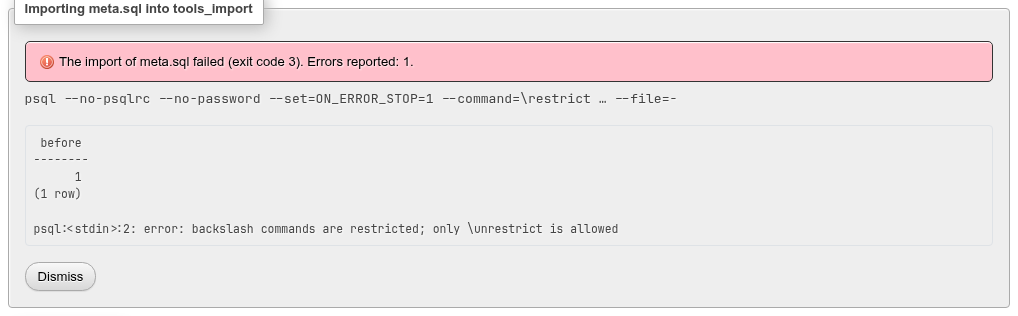
The card shows the command, for example psql --no-psqlrc --no-password --set=ON_ERROR_STOP=1 --command=\restrict … --file=-. The connection comes from the environment, never from the command line.
Restricted mode
psql runs the file in restricted mode (\restrict with a random key the file cannot know). In that mode every backslash command in the file is refused, so a file cannot run \! (a shell on the web server), \o or \w (write the web server's files), \copy from the web server's files, or \connect elsewhere:
What restricted mode means for your files
- A file with meta-commands —
\connect,\set,\i,\copy— fails at that line. Apg_dumpallfile (a server export) uses\connectto move between databases and therefore cannot be imported here as a whole; restore it withpsqlon the command line. - Plain
pg_dumpfiles work: their own\restrictand\unrestrictlines are blanked beforepsqlreads them, andCOPY … FROM stdindata blocks are read normally. - Restricted mode needs
psql18, or 17.6, 16.10, 15.14, 14.19, 13.22 or newer. With an olderpsqlthe SQL format is refused (psql 16.4 cannot run a file in restricted mode…).
Outcome and errors
| Card | When |
|---|---|
| Import has been successfully finished. (green) | exit code 0, no error lines |
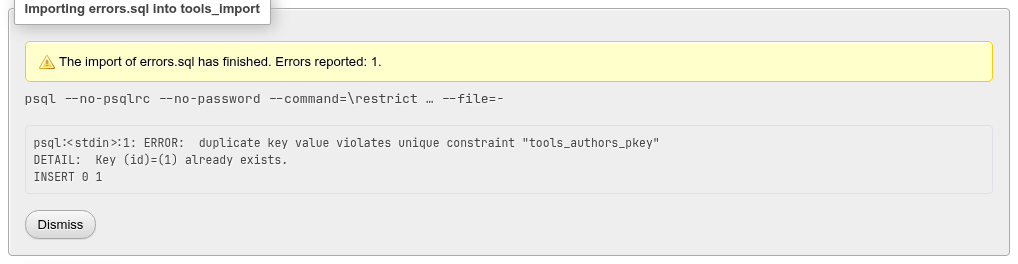
| The import of … has finished. Errors reported: N. (yellow) | exit code 0, but N ERROR: lines — without Stop at the first error, psql goes on after errors |
| The import of … failed (exit code N). (red) | the program failed; psql exits with 3 when ON_ERROR_STOP stopped it |
| The import of … was stopped. | you clicked Stop |
| … ended without reporting how. | the runner disappeared (the web server restarted) |
Archives
PostgreSQL custom or tar archive (pg_restore) restores a pg_dump archive with pg_restore.
| Level | What pg_restore does |
|---|---|
| Server | connects to the maintenance database and runs with --create: the database named in the archive is created and restored into |
| Database | restores into this database |
| Schema | --schema=<schema>: only the archive's objects in a schema of that name |
| Table | --schema and --table: only the table's definition and rows; its indexes, constraints and triggers are separate entries and are not restored |

A server-level restore of an existing database goes into that database
With --create, pg_restore first runs CREATE DATABASE for the database the archive was dumped from. If a database of that name exists, that statement fails, pg_restore goes on, connects to the existing database and restores into it — duplicating rows. Restore into a new database at the database level instead, or tick Stop at the first error (--exit-on-error).
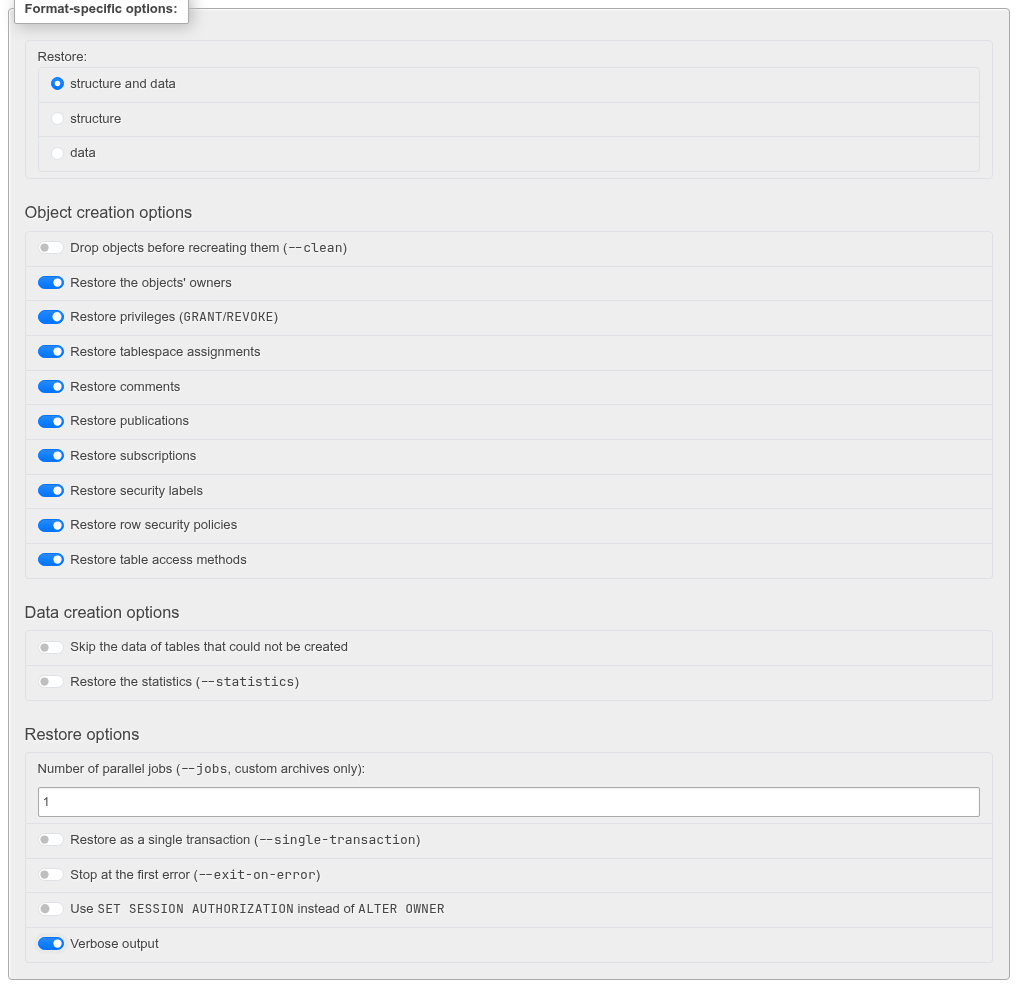
Restore: chooses structure and data, structure (--schema-only) or data (--data-only).
| Option | Flag | Shown for |
|---|---|---|
Drop objects before recreating them (--clean) | --clean; Add IF EXISTS to the drops adds --if-exists | structure |
| Restore the objects' owners | off: --no-owner | structure |
Restore privileges (GRANT/REVOKE) | off: --no-privileges | structure |
| Restore tablespace assignments | off: --no-tablespaces | structure |
| Restore comments | off: --no-comments | structure |
| Restore publications / subscriptions / security labels | off: --no-publications, --no-subscriptions, --no-security-labels | structure |
| Restore row security policies | off: --no-policies | pg_restore 18 |
| Restore table access methods | off: --no-table-access-method | pg_restore 15 |
Disable triggers while the data is loaded (--disable-triggers) | --disable-triggers | data only |
| Skip the data of tables that could not be created | --no-data-for-failed-tables | structure and data |
Restore the statistics (--statistics) | --statistics | pg_restore 18 |
Number of parallel jobs (--jobs, custom archives only): | --jobs=N (1–64) | always |
Restore as a single transaction (--single-transaction) | --single-transaction | one job |
Stop at the first error (--exit-on-error) | --exit-on-error | always |
Use SET SESSION AUTHORIZATION instead of ALTER OWNER | --use-set-session-authorization | always |
| Verbose output | --verbose | always |
"Failed" does not mean nothing was restored
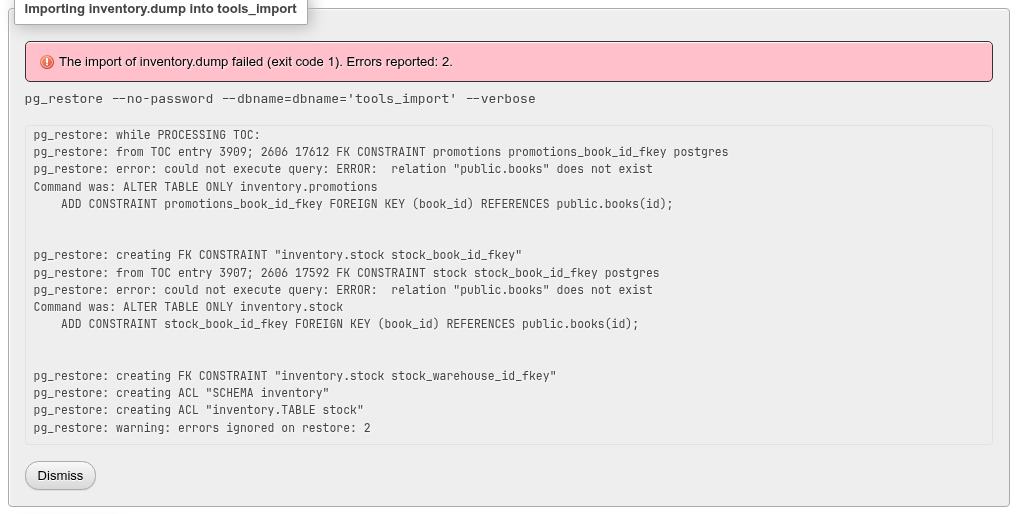
pg_restore goes on after an error and exits with 1 at the end when any statement failed. The card then says failed (exit code 1). Errors reported: 2. even though every table and row of the example above was restored — only the two foreign keys to public.books, which the target database lacks, were not. Read the output. Use Restore as a single transaction or Stop at the first error when you want all or nothing: with --single-transaction the same restore left nothing behind.
Restoring twice
Restoring an archive into a database that already has its objects reports an error per existing object (17 for the inventory schema) and, without Drop objects before recreating them, appends the rows again where no key stops them. With --clean --if-exists the objects are dropped and recreated first.
Parallel jobs
--jobs only works on an uncompressed custom archive: a tar archive, or a gzipped file (which pg_restore must read from its input) is refused with a message, and so is a single transaction.
Table rows: CSV, COPY text and COPY binary
On a table the format list starts with CSV, PostgreSQL COPY binary format, Tab-separated values (PostgreSQL COPY text format) and XML; a database or schema offers CSV too, which creates a new table (below). The rows are loaded by psql running COPY … FROM STDIN; the file is data, never a script, so nothing in it can run as a command.
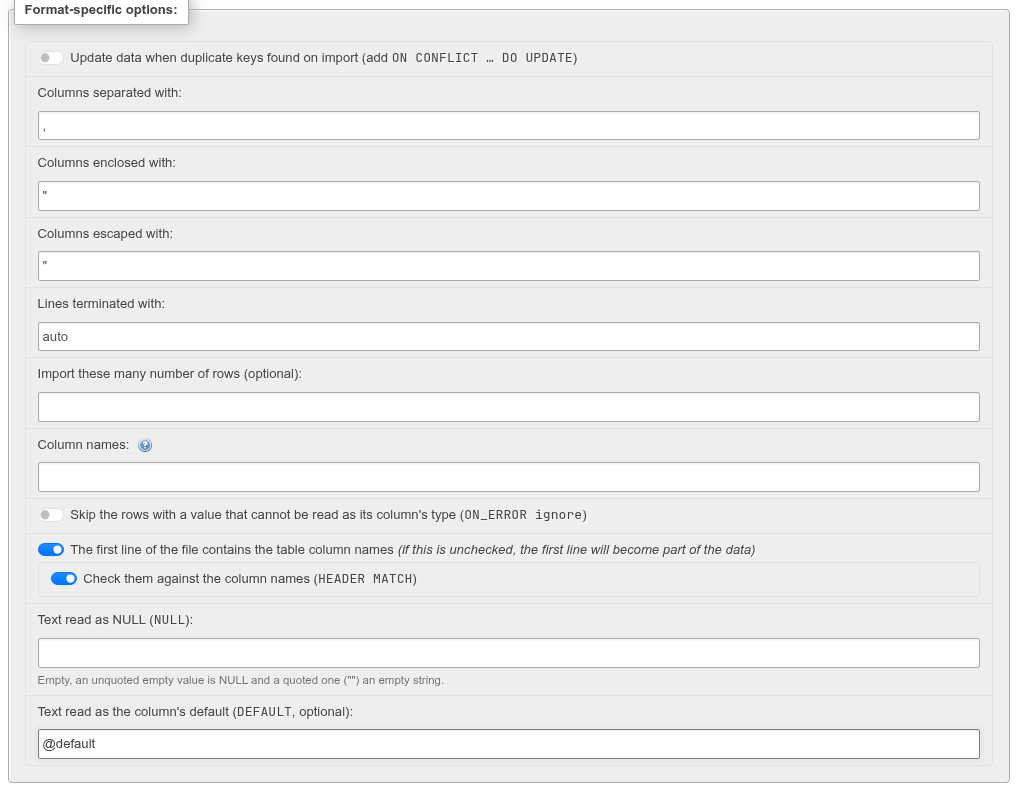
| Option | COPY | Formats |
|---|---|---|
Update data when duplicate keys found on import (add ON CONFLICT … DO UPDATE) | see below | all |
| Columns separated with: | DELIMITER (\t for a tab); default , for CSV, tab for text | CSV, text |
| Columns enclosed with: / Columns escaped with: | QUOTE / ESCAPE (one character each) | CSV |
| Lines terminated with: | only auto (or \n, \r\n, \r): COPY reads whichever the file uses | CSV, text |
| Import these many number of rows (optional): | stops after N rows | all |
| Column names: | the column list, COPY t (b, a, c), for a file in another order; the help icon shows the table's order | all |
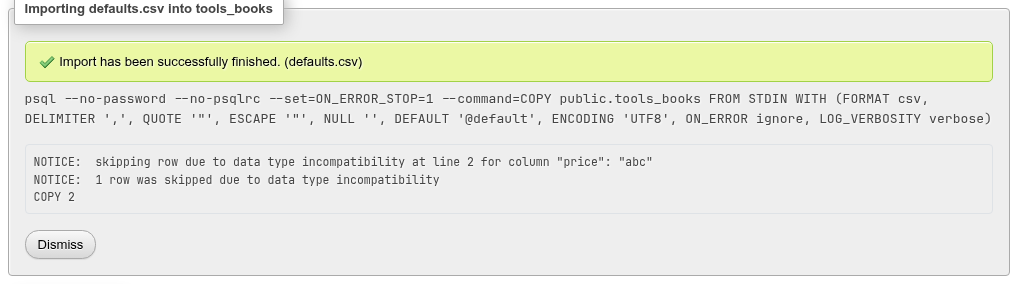
Skip the rows with a value that cannot be read as its column's type (ON_ERROR ignore) | ON_ERROR ignore, LOG_VERBOSITY verbose | CSV, text; PostgreSQL 17 |
| The first line of the file contains the table column names | HEADER true | CSV; text from PostgreSQL 15 |
Check them against the column names (HEADER MATCH) | HEADER MATCH | PostgreSQL 15 |
Text read as NULL (NULL): | NULL — empty for CSV (an unquoted empty value; "" is an empty string), \N for text | CSV, text |
Text read as the column's default (DEFAULT, optional): | DEFAULT | CSV, text; PostgreSQL 16 |
Options the server is too old for are hidden. Generated columns are never imported; naming one in Column names: is refused.
XML
XML reads the classic phpPgAdmin's layout, which the Export page writes:
<data>
<header><column name="id" type="int4" /><column name="note" type="text" /></header>
<records>
  <row><column name="id">1</column><column name="note" null="null" /></row>
</records>
</data>
and the data of phpMyAdmin's XML export, where each <table name="…"> inside a <database> is a row; only the rows whose table name is the table imported into are taken. The columns are the header's, or the first row's in their order; a column a row leaves out is NULL. The file is converted to COPY's text format and loaded as above, with the duplicate, row limit and ON_ERROR options. A column the table lacks, or a file that is not well-formed, is refused before anything is loaded. The file declares its own encoding.
Updating duplicates and the row limit
COPY cannot update rows or stop early, so with Update data when duplicate keys found or a row limit the file goes through a temporary table first, all in one transaction:
BEGIN;
CREATE TEMPORARY TABLE phppgadmin_import ON COMMIT DROP AS
  SELECT id, author_id, title, price, note FROM public.tools_books WITH NO DATA;
ALTER TABLE pg_temp.phppgadmin_import ADD COLUMN "row" bigint GENERATED ALWAYS AS IDENTITY;
COPY pg_temp.phppgadmin_import (id, author_id, title, price, note) FROM STDIN WITH (FORMAT csv, …);
INSERT INTO public.tools_books (id, author_id, title, price, note)
  SELECT id, author_id, title, price, note FROM pg_temp.phppgadmin_import ORDER BY "row" LIMIT 2
  ON CONFLICT (id) DO UPDATE SET author_id = EXCLUDED.author_id, title = EXCLUDED.title, …;
COMMIT;
The duplicate is found by the primary key; a table without one is refused (The table "…" has no primary key for a duplicate to be found by.). An identity column GENERATED ALWAYS in the file gets OVERRIDING SYSTEM VALUE.
HEADER MATCH and header lines
Without The first line of the file contains the table column names, a header line is read as data and usually fails on its first typed column. With Check them against the column names, a header that names other columns stops the import: column name mismatch in header line field 2: got "author", expected "author_id".
A new table from a CSV file
On a database's or a schema's Import page the format list also has CSV, and a .csv file picks it. The file then becomes a new table, as in phpMyAdmin. Instead of the duplicate-key and column-list options there are:
| Option | What it does |
|---|---|
| Name of the new table (optional): | The table's name. Left empty, the file's name (books_new.csv → books_new), with _1, _2… added if the schema has a relation of that name already. A name you type must be free. |
| Schema of the new table: | On a database's page only: the schema it is created in, public to start with. |
| Guess the column types from the rows | On by default: each column becomes integer, bigint, numeric, boolean, date, timestamp (with or without time zone) when every value of the first 1000 rows reads as one, else text. Off, every column is text. |
The columns are named from the first line when The first line of the file contains the table column names is on (an empty name becomes COL 1, COL 2…, a repeated one gets _2), and COL 1, COL 2… otherwise. CREATE TABLE runs in the same transaction as the COPY, so a row COPY cannot read leaves no table behind:
BEGIN;
CREATE TABLE landing.books_new (id integer, name text, price numeric, active boolean, born date, "note, long" text);
COPY landing.books_new FROM STDIN WITH (FORMAT csv, DELIMITER ',', QUOTE '"', ESCAPE '"', NULL '', HEADER true, ENCODING 'UTF8');
COMMIT;
The row limit and ON_ERROR ignore work as for a table. The table has no primary key; add one on its Structure tab.
Binary
PostgreSQL COPY binary format reads what COPY … TO … (FORMAT binary) wrote. The file must start with COPY's signature (a text file is refused: does not start with the signature of COPY's binary format), and the columns must match the table (or Column names:) in number and type exactly.
The background process
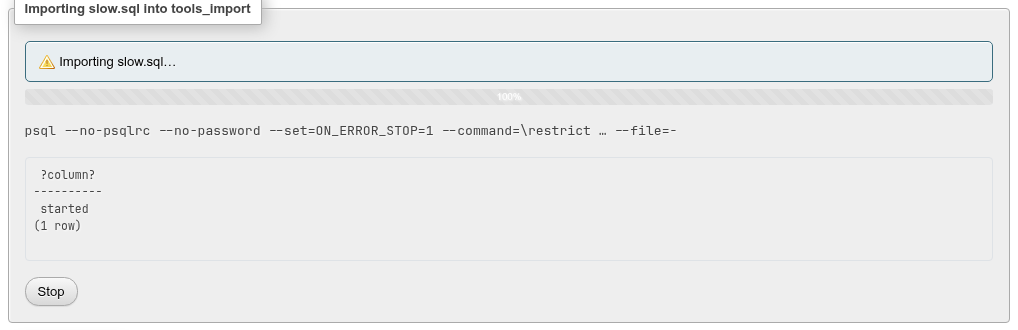
The card of an import shows:
- the state (running, finished, failed, stopped), with the number of error lines counted;
- while it runs, a progress bar of the share of the file read so far — the file is read ahead of what the server has done, so a small file shows 100 % while its statements still run;
- the command, with the file by its name;
- the program's output, as it comes (the page keeps the last 1 MiB);
- Stop while it runs, Dismiss once it has ended.
The runner (bin/process-runner.php) is detached from the web request. The import goes on when you leave or reload the page, and its card is there again when you come back to the same Import tab: cards are listed per level (the server, a database, a schema, a table) for your role on this server. A finished import's card stays until you Dismiss it, which deletes its output. Every job, of every level, is also listed under Status » Background jobs, linked under the cards.
Stop sends the program SIGINT, which psql and pg_restore answer by cancelling the statement on the server (canceling statement due to user request), and SIGTERM five seconds later if it is still running. What was committed before stays.
Where the files go
The upload, the output and the status are kept in storage/processes/<id>/ (PGADMIN_PROCESS_DIR); the uploaded file is deleted when the import ends, the output when you dismiss the card. The password never reaches that directory: the runner gets the connection in its environment.
What the import made shows at once
When an import ends, the navigation tree is refreshed, so a database, schema or table it created appears without reloading.
Differences from phpMyAdmin
- There is no partial import that resumes from an offset after a timeout, and no "Allow the interruption of an import" switch: the import is not bound by PHP's time limit, because it runs outside the web request.
- ODS, ESRI shape and MediaWiki formats are not offered; XML is read in the classic phpPgAdmin's layout and in phpMyAdmin's data layout.
- The SQL compatibility modes of phpMyAdmin do not exist; the file must be PostgreSQL SQL.