
Schemas
When you open a database, phpPgAdmin lands on its Structure tab: the list of the database's schemas, where you create and drop them. The same level has the tab bar for everything else you can do with the database, and the Show create tab with the database's DDL, statistics and dependencies.
In phpMyAdmin a database holds tables directly. In PostgreSQL a database holds schemas, and the schemas hold the tables, views, functions and types. Where phpMyAdmin shows a database's tables, phpPgAdmin shows its schemas. Click a schema to reach its tables.
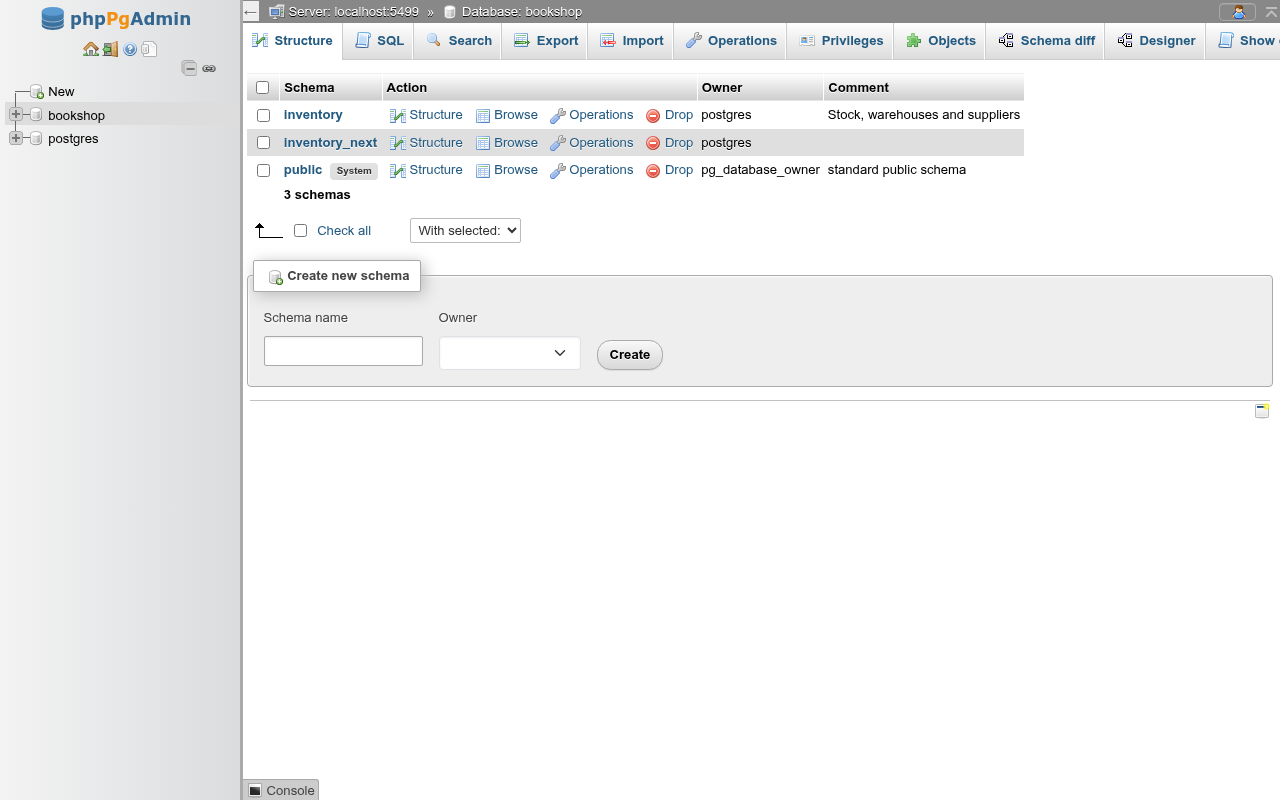
The database tab bar
Every page inside a database shows these tabs, in this order:
| Tab | What it is for | Page |
|---|---|---|
| Structure | The schema list (this page) | Schemas |
| SQL | Run SQL against the database | SQL editor |
| Search | Search for a value across tables | Search |
| Export | Dump the database or chosen schemas and tables | Export |
| Import | Run an SQL file or load CSV | Import |
| Operations | Comment, rename, copy, drop, owner, limits, maintenance | Database operations |
| Privileges | GRANT/REVOKE on the database and default privileges | Privileges |
| Objects | Extensions, languages, casts, event triggers, foreign data wrappers, servers and user mappings | Extensions and other objects, Foreign data |
| Schema diff | Compare two schemas and get the SQL that aligns them | Schema diff |
| Designer | Draw tables and their foreign keys | Designer |
| Show create | The DDL that recreates the database | Show create |
TIP
At 1280 pixels wide the last tab is cut off at the right edge. Widen the window or collapse the navigation panel to see Show create.
The schema list
The table has a row per schema:
| Column | What it shows |
|---|---|
| Checkbox | Selects the schema for With selected |
| Schema | The name, linking to the schema's Structure tab. public carries a System badge. |
| Action | Structure and Browse (both open the schema's table list), Operations (the schema's Operations tab), Drop |
| Owner | The owning role. public is owned by pg_database_owner since PostgreSQL 15. |
| Comment | The schema's COMMENT |
The foot of the table counts the schemas. The system schemas pg_catalog, information_schema and pg_toast are not listed.
Browse goes to the table list
In phpMyAdmin Browse shows a table's rows. A schema has no rows, so here Browse opens the same table list as Structure.
Create a schema

- In Create new schema, type the Schema name (up to 63 characters).
- Optionally pick an Owner. Leave it empty to make the role you signed in as the owner.
- Optionally type a Comment.
- Click Create.
The form runs:
CREATE SCHEMA dbo_schema_a
    AUTHORIZATION bookshop_staff;

COMMENT ON SCHEMA dbo_schema_a
    IS 'Staging area for the import';
Without a comment only the CREATE SCHEMA runs. The comment can be changed later on the schema's Operations tab.
Names PostgreSQL refuses
Names starting with pg_ are reserved: PostgreSQL answers unacceptable schema name "pg_dbo". A name that already exists fails with schema "…" already exists. Either error shows at the top of the page and nothing is created.
Drop schemas
To drop one schema, click Drop in its row. To drop several, tick their checkboxes (or Check all) and choose Drop from With selected. If nothing is ticked you get No schemas selected.
A confirmation dialog shows the statements before they run, with one box:
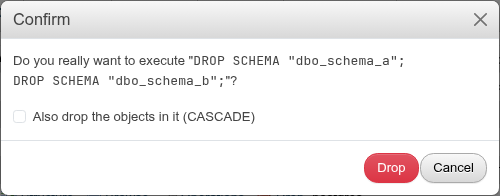
| Option | Effect | SQL |
|---|---|---|
| (default) | Drops the schema only if it is empty | DROP SCHEMA name; |
| Also drop the objects in it (CASCADE) | Drops the schema with its tables, views, functions and everything that depends on them, in other schemas too | DROP SCHEMA name CASCADE; |
A schema with objects in it needs CASCADE
Without CASCADE, dropping a schema that still holds a table fails with cannot drop schema … because other objects depend on it. With several schemas selected, the drops run one after another: the schemas before a failing one stay dropped and the rest are not tried.
DANGER
CASCADE follows dependencies out of the schema. A view in another schema that selects from a dropped table is dropped too. Check the dependents first on the table's or schema's DDL page.
Print and Data dictionary
Under the schema list, as under phpMyAdmin's table list, Print prints the page and Data dictionary opens phpMyAdmin's data dictionary (/db/<database>/data-dictionary): the database's name and comment, a Print button, and for every table, partitioned table, partition, view, materialized view and foreign table of every schema (as schema.table, schema by schema):
- its comment (Table comments:);
- its columns: Column (with (Primary) for a primary key column), Type, Null, Default (an identity or a generated column shows
GENERATED … AS IDENTITYor its expression), Links to (the table and column a foreign key references, linked to that table's Structure page, when the table has foreign keys) and Comments; - its indexes: Keyname, Type (the access method: BTREE, GIN, …), Unique, one row per Column (an expression index shows the expression, an
INCLUDEcolumn is marked), its Collation when not the default, Null, and the index's Comment; or No index defined!
?schema=public in the address limits it to one schema. When printed, the navigation panel and the Print buttons are left out.
Differences from phpMyAdmin
phpMyAdmin's Packed and Cardinality index columns have no PostgreSQL counterpart and are not shown, nor is Media type. phpMyAdmin's data dictionary covers one database's tables; here a database has schemas, so the tables are grouped by schema.
Show create
The Show create tab shows the database's DDL the way pgAdmin's SQL tab does, with two panels below it.
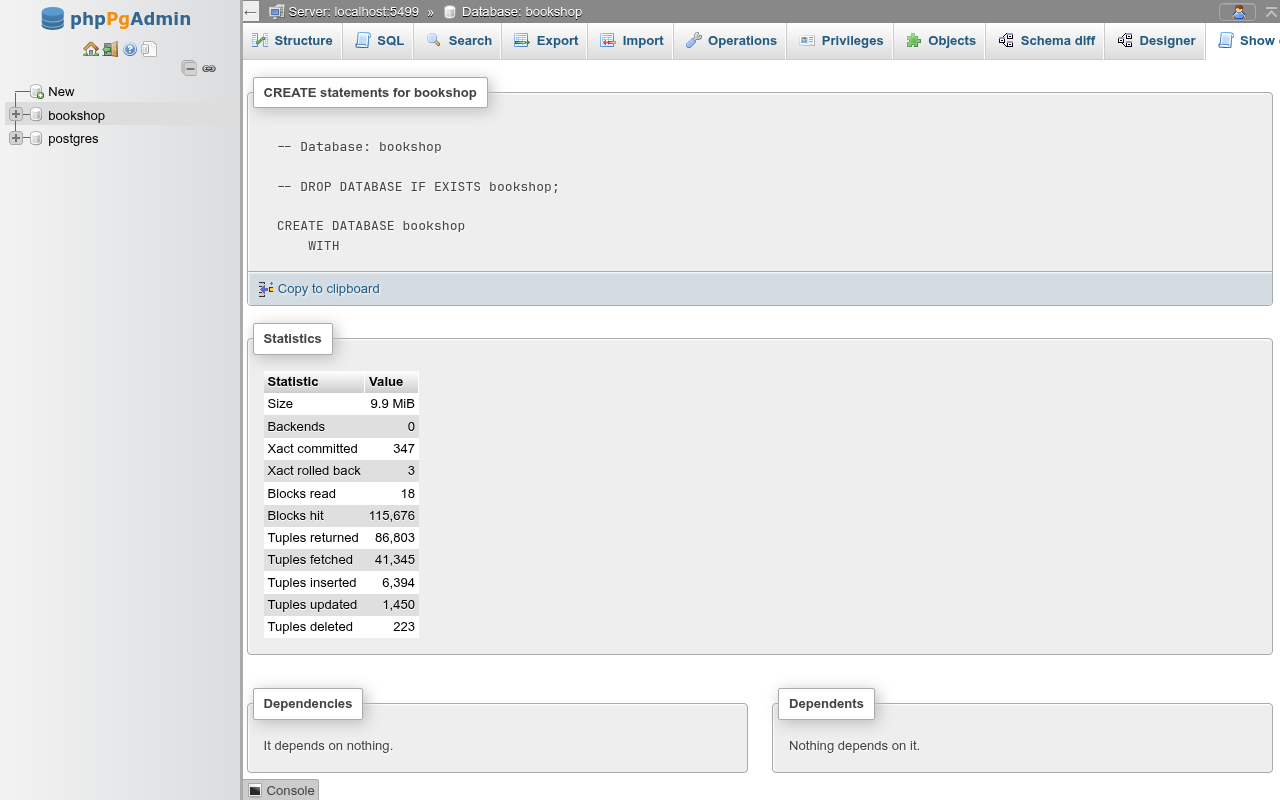
- CREATE statements for <database>: a commented
DROP DATABASE IF EXISTS, thenCREATE DATABASEwith owner, encoding, collation and ctype, locale provider, tablespace, connection limit and template flag, thenCOMMENT ON DATABASE, anyALTER DATABASE … SET parametersettings, theGRANTs on the database and its default privileges. Copy to clipboard copies the text. - Statistics: the database's
pg_stat_databasecounters: size, backends, transactions committed and rolled back, blocks read and hit, tuples returned, fetched, inserted, updated and deleted. They are cumulative since the statistics were last reset. - Dependencies and Dependents: what the database depends on and what depends on it in
pg_shdepend. For a database both are usually empty.
Database-level settings are shown but not edited here
ALTER DATABASE … SET work_mem TO '8MB' and similar per-database settings appear in the DDL, but the Operations tab has no form for them. Run ALTER DATABASE name SET parameter = value in the SQL editor. For settings per role and database, use the role's variables.