
Types, domains and collations
A schema's Types tab (/db/<database>/schema/<schema>/types) lists the schema's data types and domains, its collations, and its full text search objects, and opens their editors. Composite, enum and range types and domains have an editor page; collations and text search objects open in dialogs on the same page (text search is covered in Full text search). In the navigation panel these sit under Types, Domains, Collations and the FTS containers.
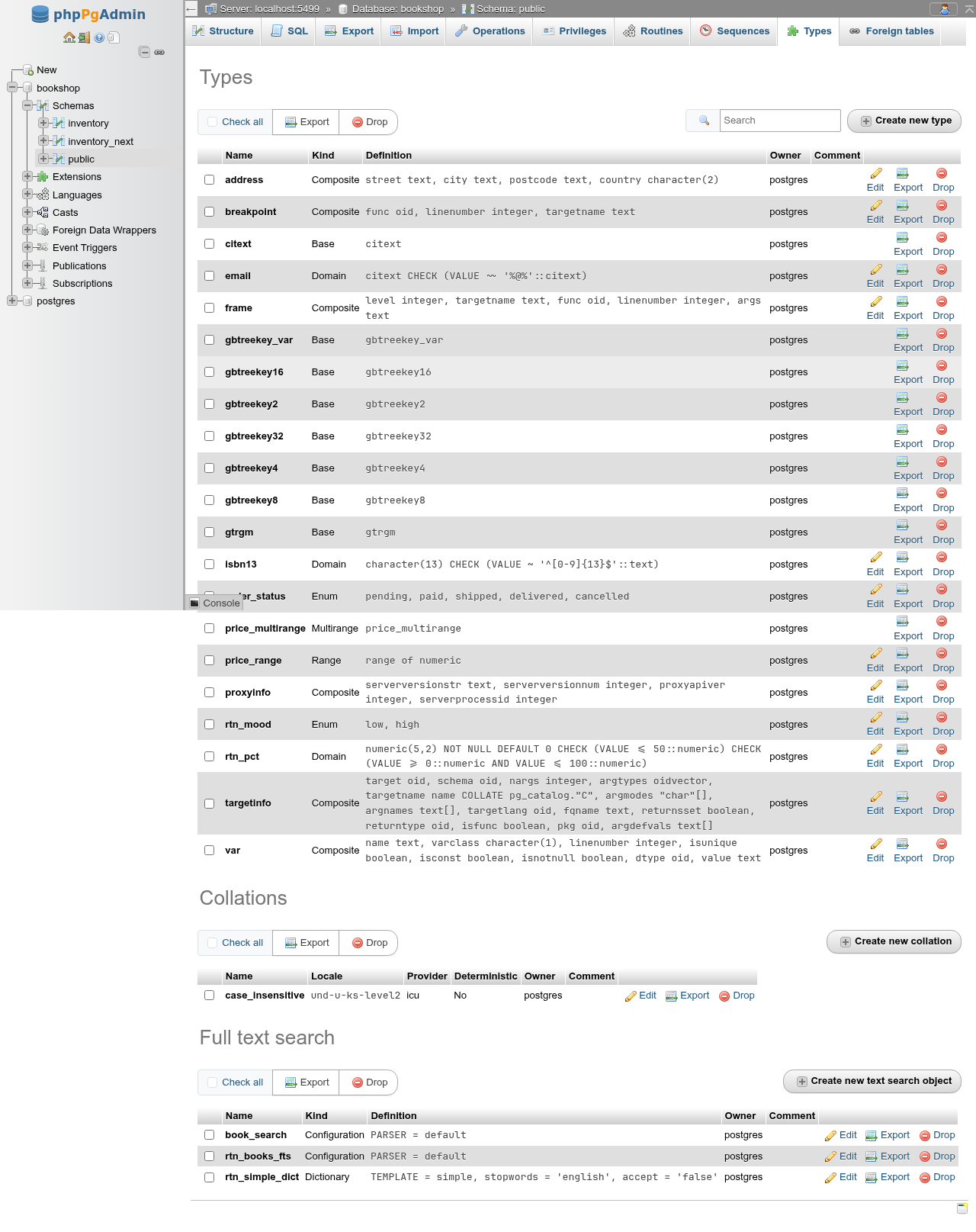
The type list
The first list shows every type and domain with Name, Kind, Definition, Owner and Comment, and Edit, Privileges, Export and Drop links. Privileges (for the kinds that can be edited) opens the editor at its privileges: below the form, the grantees of USAGE on the type or domain as on the Privileges tabs, with Edit privileges, Revoke and Add privileges for a role (GRANT USAGE ON DOMAIN public.rtn_email TO bookshop_staff;). The kinds are:
| Kind | Definition column | Edit |
|---|---|---|
| Composite | the members: street text, city text, … | yes |
| Enum | the labels in order: pending, paid, shipped, … | yes |
| Range | range of numeric | yes (limited, see Range) |
| Domain | base type and checks: character(13) CHECK (VALUE ~ '^[0-9]{13}$'::text) | yes |
| Multirange | its name | no |
| Base | its name | yes (limited, see Base types) |
| Shell | its name | yes (name, owner, comment) |
The multirange type PostgreSQL creates with each range type is listed, exported and dropped only. Base types usually come from extensions (citext, gtrgm, gbtreekey*); the editor also creates them, see Base types.
Above the list: Check all with bulk Export and Drop, the filter box, and Create new type. The Collations and Full text search lists below have their own check-all, Export, Drop and create buttons.
Composite types of extensions and tables
Every table also has a composite row type, but those are not listed here. The composite types breakpoint, frame, proxyinfo, targetinfo and var in the demo database belong to the debugger extension.
Export and drop
Export shows the CREATE TYPE (or CREATE DOMAIN) statement with the owner and comment. Drop shows DROP TYPE "public"."rtn_mood"; (DROP DOMAIN for a domain) and Also the objects that depend on it (CASCADE). Without CASCADE a type in use fails with cannot drop type rtn_mood because other objects depend on it.
CASCADE drops columns
Dropping a type or domain with CASCADE drops every table column of that type, and the data in it, as well as functions and views that use it. Check the type's Dependents panel first.
Create a type
Create new type opens …/types/create; add ?kind=e, ?kind=r, ?kind=d, ?kind=b or ?kind=p to start with an enum, range, domain, base or shell type. Every kind has Type name, Kind (fixed when editing), Owner and Comment. Preview SQL shows the statements; Go runs them and returns to the list with Type … has been created. An existing type's editor (…/types/type/<name>/edit or …/types/domain/<name>/edit) also shows Dependencies and Dependents under the form.
Composite types
Members has one row per attribute: Name, Type (suggests the database's types), Length and Scale (for numeric(6, 2), varchar(40) and the like), and Collation. Add member adds a row; Remove deletes one.
CREATE TYPE public.rtn_dims AS
(
	width numeric(6, 2),
	label text COLLATE case_insensitive
);
When editing, the changes become ALTER TYPE statements: a new row is ADD ATTRIBUTE, a removed row DROP ATTRIBUTE, a changed name RENAME ATTRIBUTE … TO, and a changed type, length or collation ALTER ATTRIBUTE … SET DATA TYPE:
ALTER TYPE public.rtn_dims
    ADD ATTRIBUTE depth integer;
ALTER TYPE public.rtn_dims
    RENAME ATTRIBUTE width TO w;
ALTER TYPE public.rtn_dims
        ALTER ATTRIBUTE label SET DATA TYPE varchar COLLATE public.case_insensitive;
Harmless extra statements
After a rename, the editor also emits ALTER ATTRIBUTE … SET DATA TYPE for members whose type did not change. They succeed and change nothing. PostgreSQL refuses to change an attribute's type while a table column uses the composite type.
Enum types
Labels lists the values in sort order. Add label appends one; on a new type Remove deletes a row.
CREATE TYPE public.rtn_mood AS ENUM
    ('low', 'high');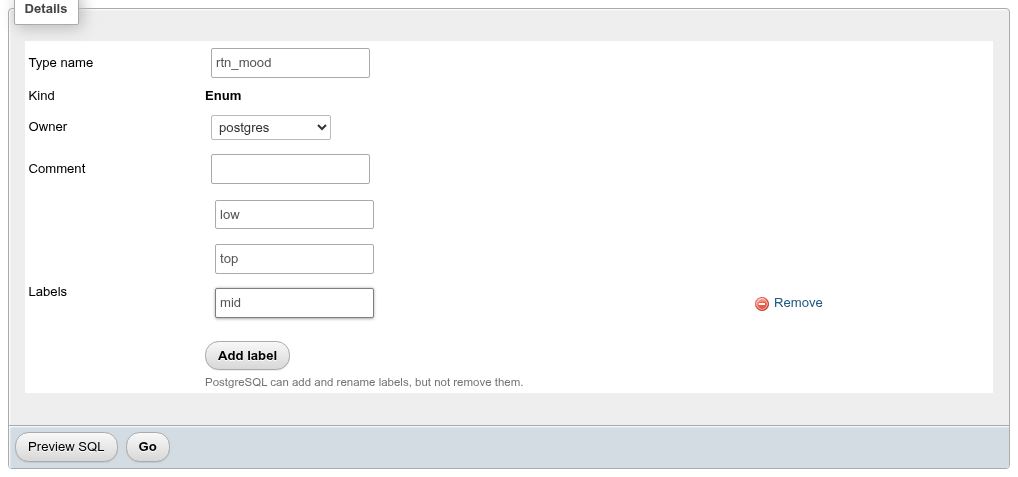
On an existing enum you can rename a label (RENAME VALUE) and add labels at the end (ADD VALUE … AFTER the current last label):
ALTER TYPE public.rtn_mood
    ADD VALUE 'mid' AFTER 'high';

ALTER TYPE public.rtn_mood
    RENAME VALUE 'high' TO 'top';
Enum labels cannot be removed or reordered
PostgreSQL has no ALTER TYPE … DROP VALUE, so existing labels have no Remove link; the hint says PostgreSQL can add and rename labels, but not remove them. New labels are always added at the end; to put one elsewhere run ALTER TYPE … ADD VALUE 'x' BEFORE 'y' on the SQL tab. To remove a label, create a new enum, convert the columns with ALTER TABLE … ALTER COLUMN … TYPE new_enum USING col::text::new_enum, and drop the old type. A label added inside a transaction cannot be used until that transaction commits.
Range types
| Field | What it does | SQL |
|---|---|---|
| Subtype | The element type (internal names: int4, numeric, timestamptz, …). Only types with a btree operator class are offered. | SUBTYPE = int4 |
| Subtype operator class | The btree operator class that orders the subtype; the list follows the subtype. Empty uses the default. | SUBTYPE_OPCLASS |
| Collation | For collatable subtypes such as text. | COLLATION |
| Canonical function | Turns a range into its canonical form (needed for discrete types such as integers to treat [1,3] and [1,4) as equal). Must take and return the range type, so it is usually written in C after a shell type. | CANONICAL |
| Subtype diff function | Returns the difference of two subtype values as double precision; improves GiST index performance. | SUBTYPE_DIFF = int4range_subdiff |
| Multirange type name | The name of the multirange type PostgreSQL creates alongside (default: the range name with range replaced by multirange, or _multirange appended). | MULTIRANGE_TYPE_NAME |
CREATE TYPE public.rtn_intrange AS RANGE
(
    SUBTYPE=int4,
    SUBTYPE_DIFF = int4range_subdiff,
    MULTIRANGE_TYPE_NAME = rtn_intmultirange
);
A range's definition is fixed
PostgreSQL cannot alter a range type's subtype or functions. On an existing range type those fields are read-only with the hint A range's definition cannot be altered; drop and recreate the type to change it. Only the name, owner and comment can change. The constructor functions (rtn_intrange(integer, integer) and the multirange ones) appear on the Routines tab and are dropped with the type.
Base types
A base type (pgAdmin's "External" kind) is defined by its functions: Input function and Output function are required, the others optional. Each function field suggests the database's functions; the typmod fields suggest the functions of the right signature.
| Field | Clause |
|---|---|
| Input function, Output function | INPUT, OUTPUT |
| Receive function, Send function | RECEIVE, SEND (the binary format) |
| Typmod in function, Typmod out function | TYPMOD_IN, TYPMOD_OUT |
| Analyze function | ANALYZE |
| Subscript function | SUBSCRIPT (PostgreSQL 14+) |
| Internal length | INTERNALLENGTH: bytes, or -1 for a variable-length type |
| Passed by value | PASSEDBYVALUE |
| Alignment, Storage | ALIGNMENT (char, int2, int4, double), STORAGE (PLAIN, EXTERNAL, MAIN, EXTENDED) |
| Like type | LIKE: copies the internal length, passed by value, alignment and storage of another type |
| Category, Preferred | CATEGORY (U for user-defined types, …), PREFERRED |
| Default | DEFAULT |
| Element type, Delimiter | ELEMENT (the type is an array of it), DELIMITER |
| Collatable | COLLATABLE = true |
The input function must return the new type and the output function take it, so a base type is made in three steps: a Shell type (the kind with no other field, CREATE TYPE name;), then the functions (in C, or LANGUAGE internal for a built-in one), then the base type with the shell's name, which fills it in:
CREATE TYPE public.myint;

CREATE FUNCTION public.myint_in(cstring) RETURNS public.myint
    AS 'int4in' LANGUAGE internal IMMUTABLE STRICT;
CREATE FUNCTION public.myint_out(public.myint) RETURNS cstring
    AS 'int4out' LANGUAGE internal IMMUTABLE STRICT;

CREATE TYPE public.myint
(
    INPUT = public.myint_in,
    OUTPUT = public.myint_out,
    INTERNALLENGTH = 4,
    PASSEDBYVALUE,
    ALIGNMENT = int4
);
Creating a base type needs a superuser. Once it exists, only the receive, send, typmod, analyze and subscript functions and the storage change (ALTER TYPE … SET (…), a cleared function becomes NONE); the other fields are shown read-only.
Domains
A domain is a base type with a default, NOT NULL and check constraints attached.
| Field | SQL |
|---|---|
| Base type | AS numeric |
| Length, Scale | numeric(5,2) |
Default (an SQL expression, e.g. 0 or 'none') | DEFAULT 0 / DROP DEFAULT |
| Not NULL | NOT NULL / DROP NOT NULL |
| Collation | COLLATE |
| Check constraints: Name, Check, Validated | ADD CONSTRAINT name CHECK (…) |
In Check, refer to the value as VALUE: VALUE BETWEEN 0 AND 100. Add constraint adds a row, Remove drops the constraint. A new constraint with Validated unticked is added NOT VALID: existing data is not checked, new data is.
CREATE DOMAIN public.rtn_pct
    AS numeric(5,2)
    DEFAULT 0
    NOT NULL;

ALTER DOMAIN public.rtn_pct
    ADD CONSTRAINT rtn_pct_range CHECK (VALUE BETWEEN 0 AND 100);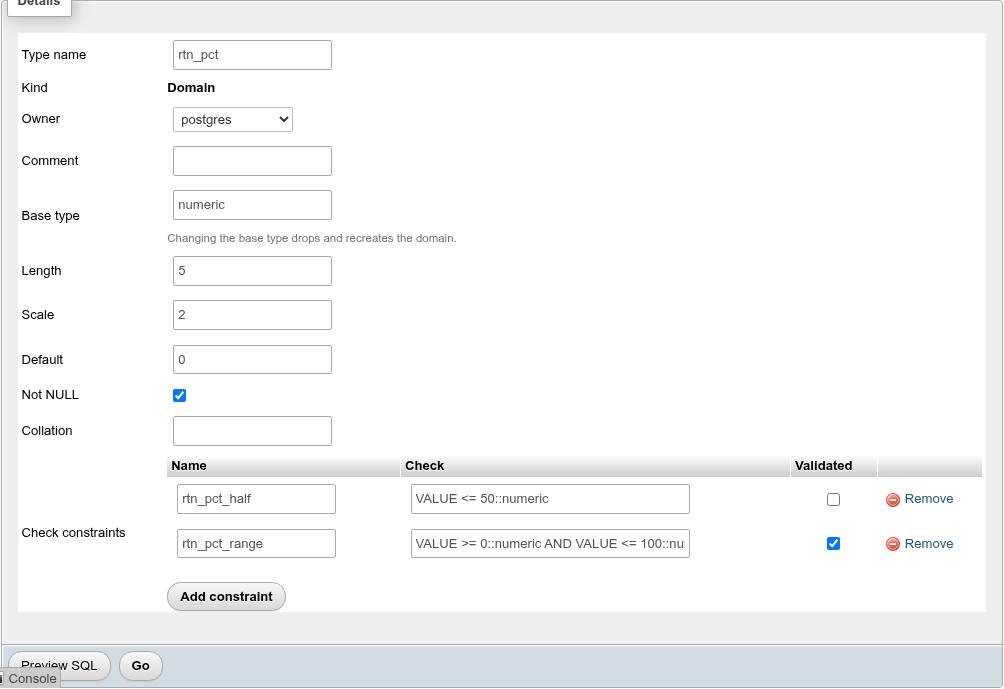
When editing:
- Unticking Not NULL or clearing Default runs
DROP NOT NULL/DROP DEFAULT. - Removing a constraint row runs
ALTER DOMAIN … DROP CONSTRAINT. - Ticking Validated on a
NOT VALIDconstraint runsALTER DOMAIN public.rtn_pct VALIDATE CONSTRAINT rtn_pct_half;, which checks the existing columns of the domain and fails if a value breaks the constraint. Unticking it on a validated constraint does nothing (PostgreSQL cannot mark a constraint not valid again). - Changing a constraint's Check drops it and adds it again with the new expression. The new version is validated, so it fails if a column of the domain holds a value that breaks it.
- Base type changes, or a changed collation, drop and recreate the domain; the hint says Changing the base type drops and recreates the domain. The preview starts with a warning comment and
DROP DOMAIN, which fails while any column uses the domain.
Collations
The Collations list shows each collation's Name, Locale (LC_COLLATE / LC_CTYPE when they differ), Provider, Deterministic, Version, Owner and Comment. Create new collation and Edit open the collation dialog.
Create a collation
Choose a Definition:
- Locale: one locale for both collation and character classification.
- LC_COLLATE / LC_CTYPE: the two set separately (libc).
- Copy a collation: copy an existing collation (
CREATE COLLATION … FROM); the other fields disappear.
| Field | What it does |
|---|---|
| Collation name | The new name. |
| Owner | (current role) or a role. |
| Provider | (default) (which is libc), libc, icu, or builtin on PostgreSQL 17+. |
| Locale / LC_COLLATE, LC_CTYPE | For ICU a BCP 47 tag such as de-u-co-phonebk or und-u-ks-level2; for libc an OS locale such as C or en_US.utf8. |
| Deterministic | Unticked makes strings that compare equal but differ in bytes count as equal (case- or accent-insensitive comparison). |
| Rules | ICU tailoring rules, PostgreSQL 16+, e.g. &V << w <<< W. |
| Version | The collation version to record; normally left empty so PostgreSQL records the library's version. |
| Comment |
CREATE COLLATION public.rtn_de_icu
    (LOCALE = 'de-u-co-phonebk', PROVIDER = 'icu', RULES = '&V << w <<< W');
Non-deterministic collations need ICU
With Provider left at (default), unticking Deterministic fails with nondeterministic collations not supported with this provider, because the default is libc. Choose icu. Before PostgreSQL 18, LIKE and regular expressions refuse non-deterministic collations.
Edit a collation
PostgreSQL cannot change a collation's definition, so the dialog for an existing collation shows the locale, provider, deterministic flag, rules and version read-only. Only Collation name, Owner and Comment are saved:
ALTER COLLATION public.rtn_de_icu
    OWNER TO bookshop_staff;

COMMENT ON COLLATION public.rtn_de_icu
    IS 'German phone book order';

ALTER COLLATION public.rtn_de_icu
    RENAME TO rtn_de_phonebook;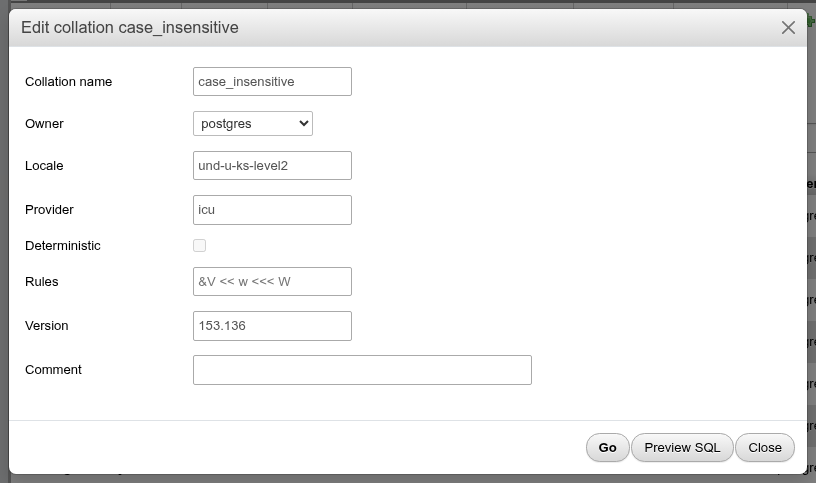
Refresh the version
Version is the collation version PostgreSQL recorded when the collation was created. When the operating system's C library or ICU is upgraded, the version the library provides changes, and the sort order of indexes built with the collation may no longer match it. The list then shows both, like \dO+'s comparison: 1.0 ⚠ the system provides 2.44, with a Refresh version link. Rebuild the indexes that use the collation first (Maintenance, REINDEX), then click it; after the confirmation it runs:
ALTER COLLATION "public"."stale_coll" REFRESH VERSION;and the warning goes away. A collation without a recorded version (C, POSIX) shows none.
Dropping a collation that a column or index uses fails unless you tick Also the objects that depend on it (CASCADE).
Operator classes, families and conversions
The last list on the Types tab holds the schema's operator classes, operator families and conversions, each with its Kind, a Definition summary (FOR TYPE integer USING btree, USING btree, FOR 'LATIN1' TO 'UTF8' FROM iso8859_1_to_utf8), owner and comment.
Create new operator class, family or conversion opens one dialog for the three, with Preview SQL:
- An operator class has its access method, For data type, DEFAULT, an existing Operator family (or a new one of the same name) and Storage type, then its members: each an
OPERATORby strategy number or aFUNCTIONby support number, with optional left and right types and, for an ordering operator, FOR ORDER BY. A B-tree class starts with rows for the five strategies and comparison function 1. A function is written with its argument types,btint4cmp(integer, integer). - An operator family has only its access method.
- A conversion has its source and destination encodings, the conversion function and DEFAULT.
CREATE OPERATOR CLASS claude_v.int_ops
    FOR TYPE integer USING btree AS
    OPERATOR 1 <,
    OPERATOR 2 <=,
    OPERATOR 3 =,
    OPERATOR 4 >=,
    OPERATOR 5 >,
    FUNCTION 1 btint4cmp(integer, integer);
They are not altered here: run ALTER OPERATOR FAMILY … ADD or DROP on the SQL tab to change a family's members.
- Export shows the
CREATE OPERATOR CLASSwith its operators, support functions andSTORAGE, theCREATE OPERATOR FAMILYwith anALTER OPERATOR FAMILY … ADDfor the members that belong to no class, or theCREATE CONVERSION, aspg_dumpwrites them. - Drop runs
DROP OPERATOR CLASS … USING …,DROP OPERATOR FAMILY … USING …orDROP CONVERSION, with CASCADE when ticked. Creating an operator class withoutFAMILYalso creates a family of the same name, which stays when the class is dropped.
The built-in ones are in pg_catalog, which the list shows with Show system objects on.
Opening a dialog from a link
The navigation panel opens a collation or text search object with a link of the form /db/<database>/schema/<schema>/types?open=<node>:<name>, where <node> is collation, fts_configuration, fts_dictionary, fts_parser or fts_template. The Types tab opens with that object's dialog and removes the parameter from the address bar. You can bookmark such a link, for example …/schema/public/types?open=collation:case_insensitive.