
Creating a table
The create form is phpMyAdmin's column definition form adapted to PostgreSQL: one row per column, then the table's comment, owner, tablespace, parents, LIKE source, composite type, access method, UNLOGGED and partitioning, with Preview SQL and Save. Open it from the Create new table card at the bottom of a schema's Structure tab, or go to /db/<database>/schema/<schema>/create-table.
Steps
- On the schema's Structure tab, type a Table name and the Number of columns in the Create new table card, and click Create.
- Fill in one row per column (see Column attributes). Rows whose Name is empty are ignored, so spare rows do no harm.
- Need more rows? Type a number next to Add … column(s) at the top and click Go.
- Set the table options under the grid if you need them.
- Click Preview SQL to see the statements, then Save.
On success you get Table … has been created. and land on the new table's Structure tab. On an error the form stays as it is, with PostgreSQL's message in the corner, and nothing is created: fix the field and Save again.
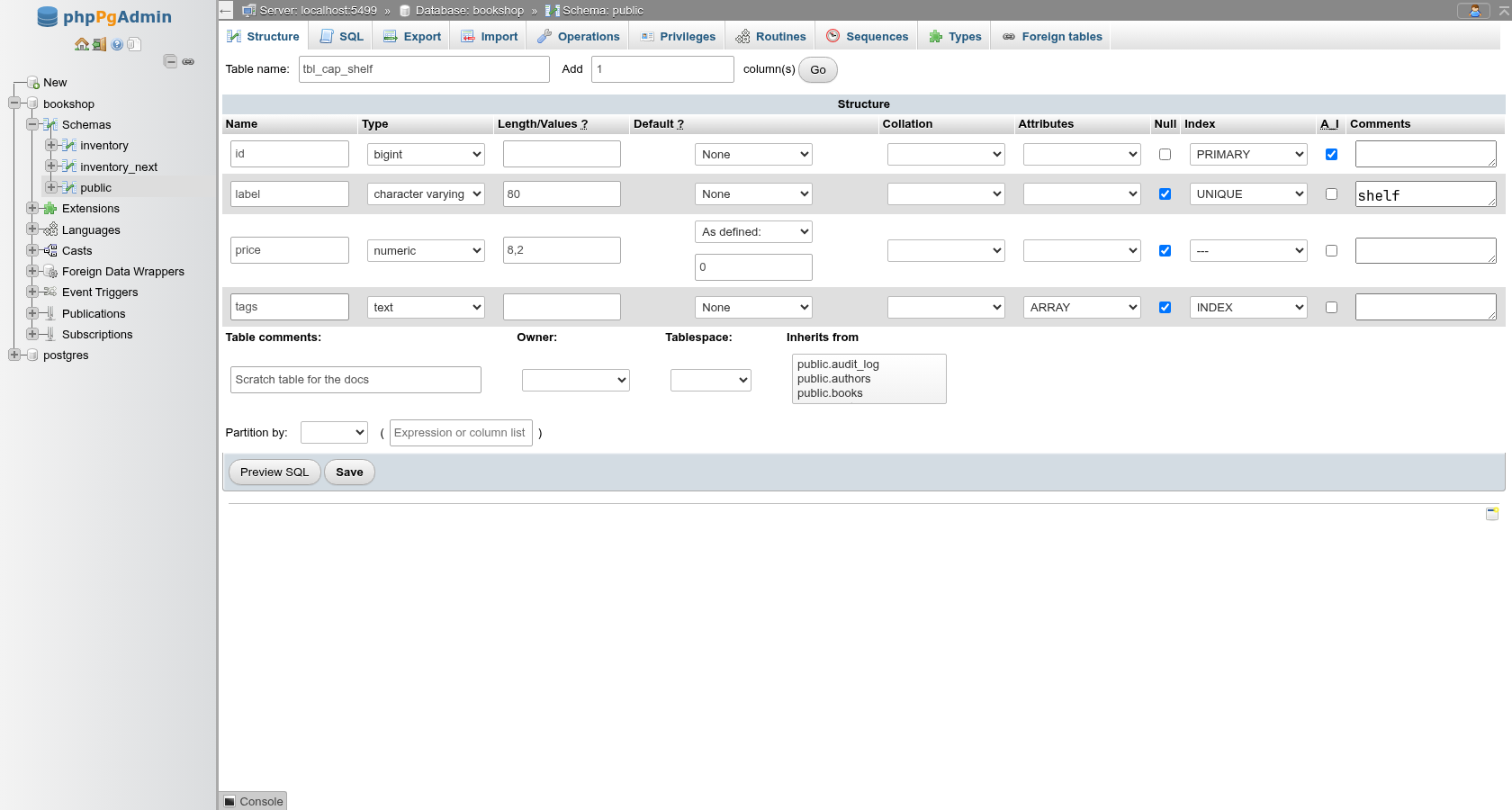
Column attributes
| Field | What it does | SQL |
|---|---|---|
| Name | Column name, up to 63 characters. Quoted only when needed. | title |
| Type | The data type (see Type list). | character varying |
| Length/Values | Length of a character or bit type; precision of time, timestamp and interval; precision,scale for numeric. Ignored for other types. | (200), (8, 2), timestamp(3) |
| Default | None, As defined: (opens a text box), NULL, CURRENT_TIMESTAMP, UUID. | DEFAULT … |
| Collation | Any collation of the server, including ICU and your own. Empty means the type's default. | COLLATE public.case_insensitive |
| Attributes | ARRAY makes the column an array of the type. | integer[] |
| Null | Ticked (the default) allows NULL; unticked adds NOT NULL. | NOT NULL |
| Index | PRIMARY, UNIQUE or INDEX on this column. | see below |
| A_I | Makes the column an identity column; ticking it shows the identity options (see Identity columns). | GENERATED BY DEFAULT AS IDENTITY |
| Comments | Column comment. | COMMENT ON COLUMN … |
| Virtuality | STORED makes a generated column and shows a box for its expression; VIRTUAL (PostgreSQL 18) one computed when read (see Generated columns). | GENERATED ALWAYS AS (upper(name)) STORED |
| Storage | How a variable-length value is stored: PLAIN (inline, uncompressed), MAIN (inline, compressed), EXTERNAL (out of line in TOAST, uncompressed: fast substring on large text/bytea) or EXTENDED (compressed, then out of line). Empty keeps the type's own; fixed-length types such as integer only take PLAIN. | ALTER COLUMN c SET STORAGE EXTERNAL |
| Compression | The TOAST compression method, pglz or lz4 (PostgreSQL 14+; lz4 needs a server built with it). Empty uses default_toast_compression. | COMPRESSION lz4 |
| Statistics | The column's statistics target for ANALYZE, 0 to 10000 (more detail for skewed columns; 0 collects none). Empty uses default_statistics_target. | ALTER COLUMN c SET STATISTICS 500 |
Type list
The Type select groups the common built-in types the way phpMyAdmin groups MySQL's: Numeric (including smallserial, serial, bigserial and money), String, Date and time, Boolean, Binary (bytea), JSON, UUID, Network address and Geometric. Other lists every other type the database knows: enums, composite and range types, domains (isbn13, email in the demo), extension types such as citext, and the internal reg*/pg_* types.
Array types are not in the list; pick the element type and set Attributes to ARRAY. Only one dimension is offered (integer[]), which is all PostgreSQL enforces anyway.
Defaults
| Choice | Generates |
|---|---|
| None | No DEFAULT clause. |
| As defined: | The value you type, quoted as a string literal, unless the type is numeric or boolean or the value looks like a function call (now(), nextval('s')). it's becomes 'it''s'. |
| NULL | DEFAULT NULL. |
| CURRENT_TIMESTAMP | DEFAULT CURRENT_TIMESTAMP. |
| UUID | DEFAULT gen_random_uuid() (built in since PostgreSQL 13). |
"As defined" quotes keywords and casts
Only a value of the form name(…) is passed through as an expression on non-numeric types. CURRENT_DATE on a date column becomes DEFAULT 'CURRENT_DATE', which PostgreSQL rejects, and 'x'::text on a text column becomes the string '''x''::text'. Use a function call where one exists (now(), clock_timestamp(), gen_random_uuid()), or set such defaults afterwards on the SQL tab: ALTER TABLE t ALTER COLUMN c SET DEFAULT CURRENT_DATE;. On numeric types the value is used as typed, so 1+1 is accepted as an expression.
Keys and indexes from the Index column
- PRIMARY on one or more rows makes one primary key over those columns, in row order:
PRIMARY KEY (id)insideCREATE TABLE. The columns becomeNOT NULLautomatically. - UNIQUE adds a one-column
UNIQUE (col)constraint per row. - INDEX adds a separate
CREATE INDEX ON t USING btree (col);per row after the table.
PostgreSQL names them itself (tbl_pkey, tbl_col_key, tbl_col_idx). For multi-column unique keys, other index methods, partial indexes, check, foreign key and exclusion constraints, save the table first and use the Structure tab.
Identity columns (A_I)
A_I stands in for MySQL's AUTO_INCREMENT and makes the column an identity column. It works on smallint, integer and bigint. Untick Null too, or PostgreSQL adds NOT NULL for you (an identity column cannot be nullable).
Ticking A_I shows, under the box:
- BY DEFAULT or ALWAYS:
BY DEFAULTlets anINSERTsupply its own value;ALWAYSrefuses one unless theINSERTsaysOVERRIDING SYSTEM VALUE. - Start, Increment, Minimum, Maximum, Cache and Cycle: the options of the identity sequence. Empty fields keep PostgreSQL's defaults (start 1, increment 1, the type's range, cache 1, no cycle).
An integer column with ALWAYS and Increment 5 gives id integer NOT NULL GENERATED ALWAYS AS IDENTITY ( INCREMENT 5 ).
Identity or serial?
serial/bigserial (in the Numeric group) create a sequence owned by the column and a nextval() default; they are a shorthand, not a type, and the column then shows as integer with that default. Identity columns are the SQL-standard form: the sequence is tied to the column, permissions follow the table, and TRUNCATE … RESTART IDENTITY resets it. Prefer A_I for new tables.
The table's Structure tab shows which kind a column has (Identity (ALWAYS) or Identity (BY DEFAULT) under Extra).
Generated columns (Virtuality)
phpMyAdmin's Virtuality column is where PostgreSQL's generated columns go: pick STORED and type the expression in the box that appears, for example upper(name) or price * quantity. The value is computed on every write and stored; the column cannot be written to and has no default, so Default and A_I are ignored for it (picking STORED unticks A_I). The expression may only use columns of the same row and immutable functions.
On PostgreSQL 18 the list also has VIRTUAL, phpMyAdmin's other kind: the value is computed when the row is read and takes no space (GENERATED ALWAYS AS (price * quantity) VIRTUAL). PostgreSQL cannot turn one kind into the other, nor drop the expression of a virtual column; the form says so (PostgreSQL cannot turn a STORED generated column into a VIRTUAL one or back), and its expression can be changed like a stored one's.
Table options
Under the grid:
| Field | What it does | SQL |
|---|---|---|
| Table comments: | Table comment. | COMMENT ON TABLE … |
| Owner: | Role that owns the table. Empty means you. | ALTER TABLE … OWNER TO … |
| Tablespace: | Where the table's files go. Empty means the database default. | TABLESPACE … |
| Inherits from | One or more parent tables (Ctrl-click for several). Their columns are added to the new table. | INHERITS (public.books) |
| Like: | A table, view or foreign table whose columns the new table copies, before the ones you define. Picking one shows the INCLUDING boxes: ALL ticks every one; DEFAULTS, CONSTRAINTS (check and not-null), INDEXES (with primary key and unique), STORAGE, COMMENTS, COMPRESSION (PostgreSQL 14+), GENERATED, IDENTITY and STATISTICS (extended statistics) copy that part of the source. | LIKE public.authors INCLUDING DEFAULTS … |
| Of type: | A composite type the table is made of (a typed table). The grid is replaced by the type's attributes; see Typed tables. Picking a type clears Like and Inherits from, which a typed table cannot have. | OF public.address |
| Access method: | The table access method. Default (heap) leaves it to default_table_access_method; extensions can add others. | USING heap |
| Persistence: | UNLOGGED skips the write-ahead log: faster writes, but the table is emptied after a crash and is not replicated. Temporary tables are not offered, since each request runs on a new connection. | CREATE UNLOGGED TABLE … |
| Partition by: | RANGE, LIST or HASH, and in the parentheses the column list or expression. | PARTITION BY RANGE (placed_at) |
| Storage parameters (WITH) | pgAdmin's Advanced › Parameters: Fill factor (10–100), Parallel workers, Toast tuple target (bytes, 128 and up), and Autovacuum and TOAST autovacuum (Default, On, Off). Empty ones are left out. Later changes are made on the table's Operations tab. | WITH (FILLFACTOR = 70, autovacuum_enabled = FALSE) |
Typed tables (OF type)
With Of type: set, each row of the grid is one attribute of the type: its name and type are shown as text, since the type decides them. What you can still set per column is Default, Null (untick for NOT NULL), Index, A_I and Comments; a column with any of those is written as col WITH OPTIONS …, the others are left to the type. For public.address (street text, city varchar(80), zip integer) with a default on city, zip not null and street as primary key:
CREATE TABLE public.t_typed
    OF public.address
(
    city WITH OPTIONS DEFAULT 'Dhaka',
    zip WITH OPTIONS NOT NULL,
    PRIMARY KEY (street)
);
Extra rows added with Add … column(s) fail with column … does not exist: a typed table has exactly the type's columns. Setting Of type: back to empty gives you empty rows again.
LIKE
The copied columns come first, then the rows of the grid, then the keys from the Index column. Not-null constraints are always copied; the rest only with its box ticked. LIKE never copies foreign keys, triggers, privileges or the owner. The copy's identity columns get new sequences starting at 1. To copy the rows too, use Copy table instead.
pg_global is listed but cannot hold tables
The Tablespace list includes pg_global, which is reserved for shared catalogs; choosing it fails with only shared relations can be placed in pg_global tablespace.
The partition definition is only the parent's PARTITION BY clause; you add the partitions afterwards on the new table's Structure tab. See Partitions and inheritance.
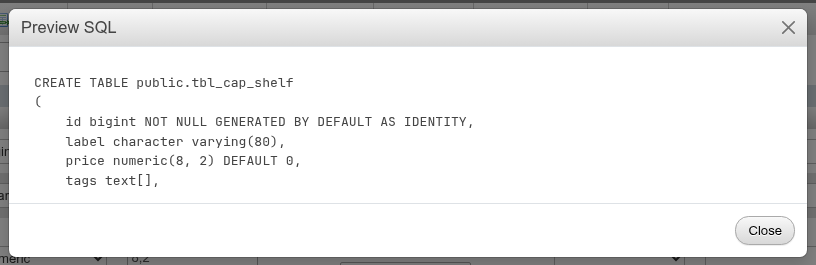
The preview of the form shown above is:
CREATE TABLE public.tbl_cap_shelf
(
    id bigint NOT NULL GENERATED BY DEFAULT AS IDENTITY,
    label character varying(80),
    price numeric(8, 2) DEFAULT 0,
    tags text[],
    PRIMARY KEY (id),
    UNIQUE (label)
);

COMMENT ON TABLE public.tbl_cap_shelf
    IS 'Scratch table for the docs';

COMMENT ON COLUMN public.tbl_cap_shelf.label
    IS 'Shown on the shelf';

CREATE INDEX
    ON public.tbl_cap_shelf USING btree
    (tags)
;
The Preview SQL box has a fixed height and scrolls when the statement is longer.
Saving runs CREATE TABLE, the comments, owner change and separate indexes in one transaction. If any statement fails, none of them is kept: for example an INDEX on a json column fails with data type json has no default operator class for access method "btree", and the table is not created either.
What the form does not offer
These table and column features exist in PostgreSQL but have no field here. Create the table with the form, then add them with ALTER TABLE on the schema's SQL tab, or write the whole CREATE TABLE there.
| Feature | SQL to use |
|---|---|
Autovacuum thresholds and the other autovacuum_* parameters | CREATE TABLE … WITH (autovacuum_vacuum_scale_factor = 0.05) or ALTER TABLE t SET (…) |
| Check, foreign key and exclusion constraints | The new table's Structure tab. |
| Temporary tables | CREATE TEMPORARY TABLE … makes no sense here: the table would vanish with the request's connection. |
Generated columns show the expression in the Default column and Generated under Extra on the Structure tab, as books.search does in the demo.
Coming from phpMyAdmin
| phpMyAdmin field | Here |
|---|---|
| Storage Engine | Access method: (heap unless an extension adds another). |
| Collation (table) | No table-level collation: set it per column. |
| A_I | Identity column, GENERATED BY DEFAULT AS IDENTITY or ALWAYS. |
Attributes: UNSIGNED, on update CURRENT_TIMESTAMP | Not in PostgreSQL. Use a CHECK (col >= 0) constraint, and a trigger for "on update" timestamps. The Attributes select offers ARRAY instead. |
ENUM('a','b') in Length/Values | Create an enum type first (Types), then pick it under Other. |
| Virtuality (generated columns) | STORED, and VIRTUAL on PostgreSQL 18. |
| Partition by with partition rows | Only the PARTITION BY clause here; partitions are added on the Structure tab. |
| Column Move / position | PostgreSQL has no column order clause; new columns always go at the end. |