
Table operations
A table's Operations tab, after phpMyAdmin's, holds the cards that act on the table as a whole: move and rename, owner, comment and tablespace, storage parameters, inheritance, row-level security, copy, maintenance, emptying and dropping, and referential integrity checks. This page also covers the Show create tab, which shows the table's DDL and what depends on it.
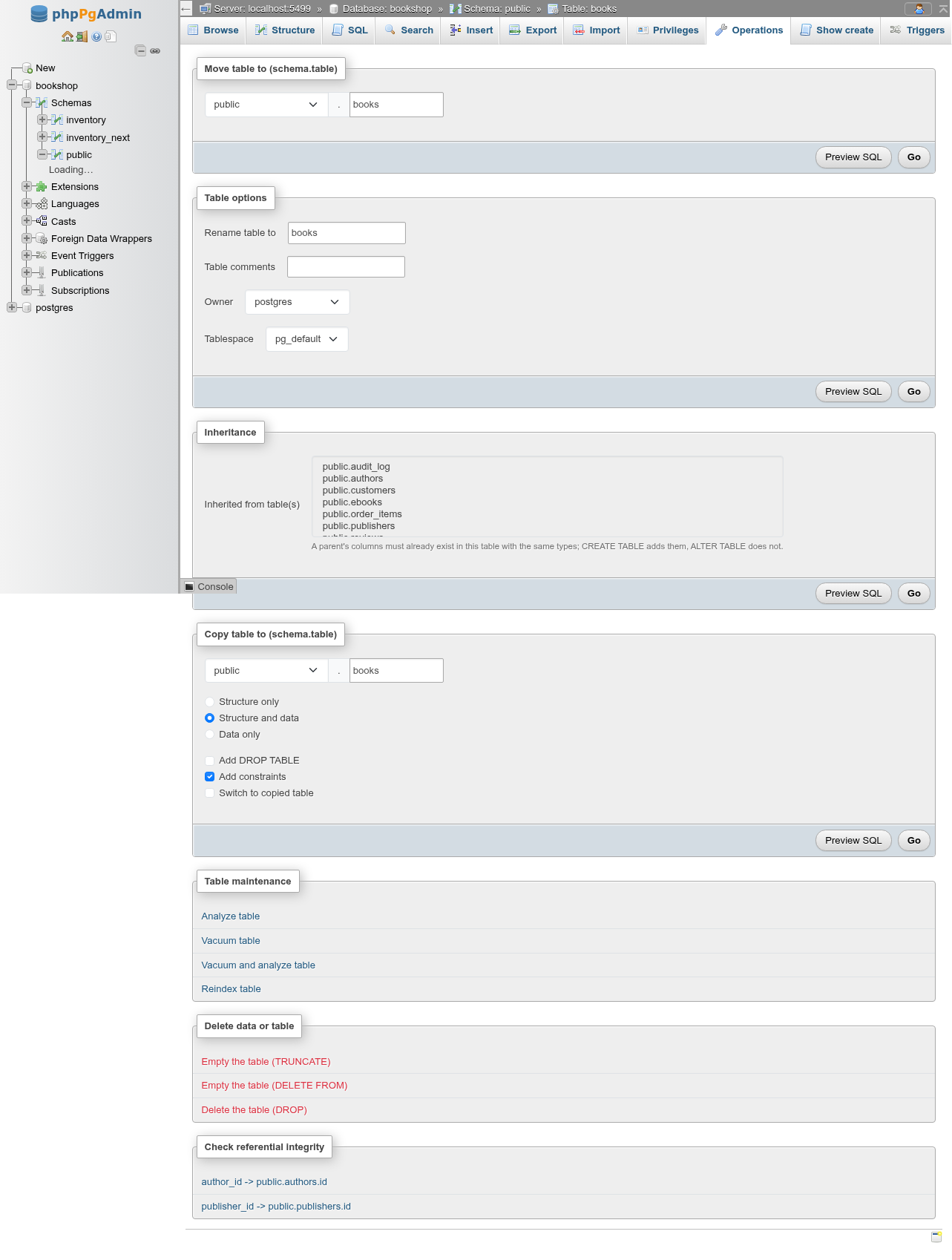
The cards, from top to bottom: Move table to (schema.table), Table options, Storage parameters (not on partitioned tables), Inheritance, Row-level security, Copy table to (schema.table), Partition maintenance (partitioned tables only), Table maintenance, Delete data or table, and Check referential integrity (tables with foreign keys only). Each form card has Preview SQL and Go.
Moving a table to another schema
Move table to (schema.table) has a schema select and a name field. Pick another schema (and optionally a new name) and click Go:
ALTER TABLE IF EXISTS public.tbl_demo2
  SET SCHEMA tbl_scratch;
With a new name too, the table is renamed first, then moved. You get Table "public"."tbl_demo2" has been moved to "tbl_scratch"."tbl_demo2". and the page reloads at the new location. The table's indexes, constraints, owned sequences (serial and identity) and triggers move with it.
Moving does not touch queries that use the table
Views, functions and foreign keys that reference the table keep working (they hold its OID), but SQL in your application that names public.tbl does not follow the move. phpMyAdmin's "move to another database" has no direct equivalent: PostgreSQL cannot move a table between databases. Use Export and Import for that.
Table options
| Field | What it does | SQL |
|---|---|---|
| Rename table to | New name. | ALTER TABLE … RENAME TO … |
| Table comments | The comment; empty removes it. | COMMENT ON TABLE … IS … |
| Owner | The owning role. | ALTER TABLE … OWNER TO … |
| Tablespace | Where the table's files live. | ALTER TABLE … SET TABLESPACE … |
Only changed fields produce statements; with nothing changed, Go answers Nothing to change. For example:
ALTER TABLE IF EXISTS public.tbl_demo
    RENAME TO tbl_demo2;

ALTER TABLE IF EXISTS public.tbl_demo2
    OWNER TO postgres;

COMMENT ON TABLE public.tbl_demo2
  IS 'Renamed scratch';
Changing the tablespace rewrites the table
SET TABLESPACE copies every file of the table to the new location while holding an ACCESS EXCLUSIVE lock; nobody can read the table until it finishes. Indexes stay where they are. pg_global is in the list but refused: only shared relations can be placed in pg_global tablespace. See Tablespaces.
Changing the owner needs membership
To give a table to another role you must be a member of that role (or a superuser), and the new owner needs CREATE on the schema. The owner can always drop and alter the table, whatever the privileges say.
Storage parameters
The Storage parameters card sets Fill factor, Parallel workers and TOAST tuple target, and, with Custom auto-vacuum settings for the table (or for its TOAST table) switched on, Auto-vacuum (enabled, disabled or the server default) and each autovacuum setting, with the server's default shown beside it. An emptied field is RESET; switching the custom settings off resets them all:
ALTER TABLE IF EXISTS public.orders_2025
    SET (FILLFACTOR=80);
ALTER TABLE IF EXISTS public.orders_2025 SET (
    autovacuum_enabled = false,
    autovacuum_vacuum_scale_factor = 0.05
);
A partitioned table has no storage of its own and does not show the card.
UNLOGGED
UNLOGGED has no field on this tab. Use the table's SQL tab:
ALTER TABLE public.audit_log SET UNLOGGED; -- or SET LOGGEDInheritance
The Inheritance card sets the parents the table inherits from (INHERIT / NO INHERIT). It is described with partitioning under Partitions and inheritance.
Row-level security
The Row-level security card has two boxes, pgAdmin's RLS Policy? and Force RLS Policy?:
| Box | Ticked | Cleared |
|---|---|---|
| Enable row-level security (ENABLE ROW LEVEL SECURITY) | The table's policies apply. | DISABLE ROW LEVEL SECURITY: nobody is restricted, the policies stay defined. |
| Apply the policies to the table owner too (FORCE ROW LEVEL SECURITY) | The owner is restricted as well. | NO FORCE ROW LEVEL SECURITY: the owner bypasses the policies. |
The boxes show the table's current state (pg_class.relrowsecurity and relforcerowsecurity); only a box you change produces a statement, so Go with nothing changed answers Nothing to change. Ticking both on a table without row security previews:
ALTER TABLE IF EXISTS public.reviews
    ENABLE ROW LEVEL SECURITY;

ALTER TABLE IF EXISTS public.reviews
    FORCE ROW LEVEL SECURITY;
Enabling it with no policy hides every row
Once row security is enabled, a role with no matching policy sees no rows and can change none (default deny). Superusers and roles with BYPASSRLS are never restricted, so Browse still shows you every row when you are signed in as a superuser. The Triggers tab shows the state above the policies.
Copying a table
Copy table to (schema.table) copies the table under another name, in this schema or another.
| Option | What it does |
|---|---|
| Structure only | Creates the new table. |
| Structure and data | Creates it and copies the rows (the default). |
| Data only | Copies the rows into an existing table of that name. |
| Add DROP TABLE | Drops the target first, if it exists. |
| Add constraints | Also creates the foreign keys. Only shown when the table has foreign keys; ticked by default. |
| Switch to copied table | Opens the copy's Operations tab afterwards. |
DROP TABLE IF EXISTS public.tbl_booking_copy;

CREATE TABLE public.tbl_booking_copy
    (LIKE public.tbl_booking INCLUDING ALL);

INSERT INTO public.tbl_booking_copy
    SELECT * FROM public.tbl_booking;

ALTER TABLE IF EXISTS public.tbl_booking_copy
    ADD FOREIGN KEY (room_id, room_code)
    REFERENCES public.tbl_room (id, code) MATCH SIMPLE
    ON UPDATE SET NULL
    ON DELETE CASCADE;
LIKE … INCLUDING ALL copies the columns with their defaults, NOT NULL, check, primary key and unique constraints, indexes, comments, identity, generated columns, storage settings and extended statistics. It does not copy foreign keys (that is Add constraints), triggers, rules, policies, privileges, partitions or the inheritance link; the copy is owned by you.
Identity and serial columns after a copy
The copy's identity column gets a new sequence that starts at 1, while the copied rows keep their old ids, so the next INSERT without an id fails with duplicate key value violates unique constraint. Move the sequence past the copied values:
SELECT setval(pg_get_serial_sequence('public.tbl_booking_copy', 'id'),
              (SELECT max(id) FROM public.tbl_booking_copy));
A serial column is copied with the same nextval('original_seq') default, so both tables draw ids from the source table's sequence (and dropping the source fails while the copy uses it).
Data only into a table that already holds the same keys fails as a whole: duplicate key value violates unique constraint "…", and no rows are copied.
Partition maintenance
A partitioned table gets a Partition maintenance card to analyze, vacuum, truncate, detach or drop chosen partitions. See Partitions and inheritance.
Table maintenance
The Table maintenance card has links that open the table's SQL tab and run the statement there, as phpMyAdmin's do:
| Link | Statement |
|---|---|
| Analyze table | ANALYZE "public"."books" |
| Vacuum table | VACUUM "public"."books" |
| Vacuum and analyze table | VACUUM (ANALYZE) "public"."books" |
| Reindex table | REINDEX TABLE "public"."books" |
| Cluster the table on … | CLUSTER "public"."books"; only shown when an index (a plain index, or a primary key's or unique constraint's) is marked as the clustering index |
| Cluster the table using index: | CLUSTER "public"."books" USING "books_pkey", with the index chosen in the select (B-tree and GiST indexes); it also marks that index as the clustering one |
Reset the table statistics does not open the SQL tab: it asks first (The statistics counters of the table and its indexes … will be set back to zero.), then runs pgAdmin's Reset Statistics:
SELECT pg_catalog.pg_stat_reset_single_table_counters(16412);The number is the table's OID. It zeroes the table's row in pg_stat_user_tables (sequential and index scans, rows inserted, updated and deleted, live and dead row estimates, vacuum and analyze counts) and its indexes' rows in pg_stat_user_indexes, which the Structure tab's statistics show. It does not touch the planner statistics that ANALYZE collects. Autovacuum decides when to run from the dead-row and changed-row counters, so after a reset it waits until enough changes are counted again. Resetting needs a superuser, or EXECUTE on the function.
For VACUUM FULL, VACUUM (VERBOSE), REINDEX … CONCURRENTLY and maintenance of several tables, use the Maintenance tool.
VACUUM and the SQL tab
VACUUM cannot run inside a transaction block; the SQL tab runs it as a plain statement, so the link works. If you paste it into a script that starts with BEGIN, PostgreSQL refuses with VACUUM cannot run inside a transaction block. REINDEX TABLE (without CONCURRENTLY) locks writes and queries that use the indexes while it rebuilds them.
Emptying and dropping
The Delete data or table card offers three actions, each with a confirmation that shows the statement.
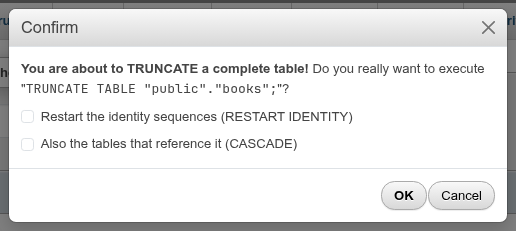
| Action | What it does |
|---|---|
| Empty the table (TRUNCATE) | TRUNCATE TABLE …, with two boxes: Restart the identity sequences (RESTART IDENTITY) and Also the tables that reference it (CASCADE). |
| Empty the table (DELETE FROM) | Opens the SQL tab and runs DELETE FROM …, which reports the number of rows deleted. |
| Delete the table (DROP) | DROP TABLE …, with a CASCADE box. Afterwards you land on the schema's table list. |
The statement in the dialog updates as you tick the boxes, for example TRUNCATE TABLE "public"."tbl_room" RESTART IDENTITY CASCADE;.
TRUNCATE and foreign keys
TRUNCATE fails on a table that other tables reference, even if they hold no matching rows: cannot truncate a table referenced in a foreign key constraint. CASCADE truncates those referencing tables too, completely, and their referencing tables in turn. That is all their rows, not only the ones that pointed at this table. Check what references the table on the Show create tab first.
DELETE FROM instead deletes row by row: it follows each foreign key's ON DELETE action (CASCADE, SET NULL, or an error for NO ACTION/RESTRICT), fires DELETE triggers and rules (the demo's audit_log rule turns it into nothing), and leaves dead rows for VACUUM. TRUNCATE fires only TRUNCATE triggers, is much faster, and returns the space at once.
RESTART IDENTITY
Without RESTART IDENTITY, identity and owned serial sequences keep counting from where they were. With it, they restart at their start value. It has no effect on sequences the table only uses through a nextval() default it does not own.
DROP … CASCADE
CASCADE also drops every object that depends on the table: views, foreign key constraints in other tables (the constraint, not the other table), and so on. Without it, the drop fails and names the first dependent object. The Show create tab lists the dependents.
Referential integrity
For each foreign key, the Check referential integrity card has a link such as author_id -> public.authors.id. It opens the SQL tab with a query that returns the rows whose key points to no row in the referenced table:
SELECT "public"."books".* FROM "public"."books"
  LEFT JOIN "public"."authors" ON "public"."books"."author_id" = "public"."authors"."id"
  WHERE "public"."authors"."id" IS NULL AND "public"."books"."author_id" IS NOT NULL
With a valid foreign key in place the result is always empty; the check is useful for keys added NOT VALID, or before you add a foreign key, to find the rows that would make it fail.
Security labels
A Security labels card, pgAdmin's grid of the same name, sets SECURITY LABELs on the table and, picked in its Label: select, on each of its columns. Each row is a Provider and its Security label; Remove clears one, Add label adds one. Preview SQL shows the statements, Go runs them:
SECURITY LABEL FOR selinux ON TABLE public.authors IS 'system_u:object_r:sepgsql_table_t:s0';
SECURITY LABEL FOR selinux ON COLUMN public.authors.name IS NULL;
The card appears only when the server has a label provider loaded (sepgsql or dummy_seclabel in shared_preload_libraries) or the object already has a label: without a provider SECURITY LABEL fails. The same card is on the Operations tabs of views, materialized views, schemas and databases, and in the editors of functions, procedures, trigger functions, types, domains, sequences and roles.
Show create
The Show create tab (…/table/<table>/ddl) shows the SQL that recreates the table, under CREATE statements for public.books, with Copy to clipboard. It includes the columns, constraints, PARTITION BY and partitions, owner, grants, comments, indexes, triggers, rules and policies.
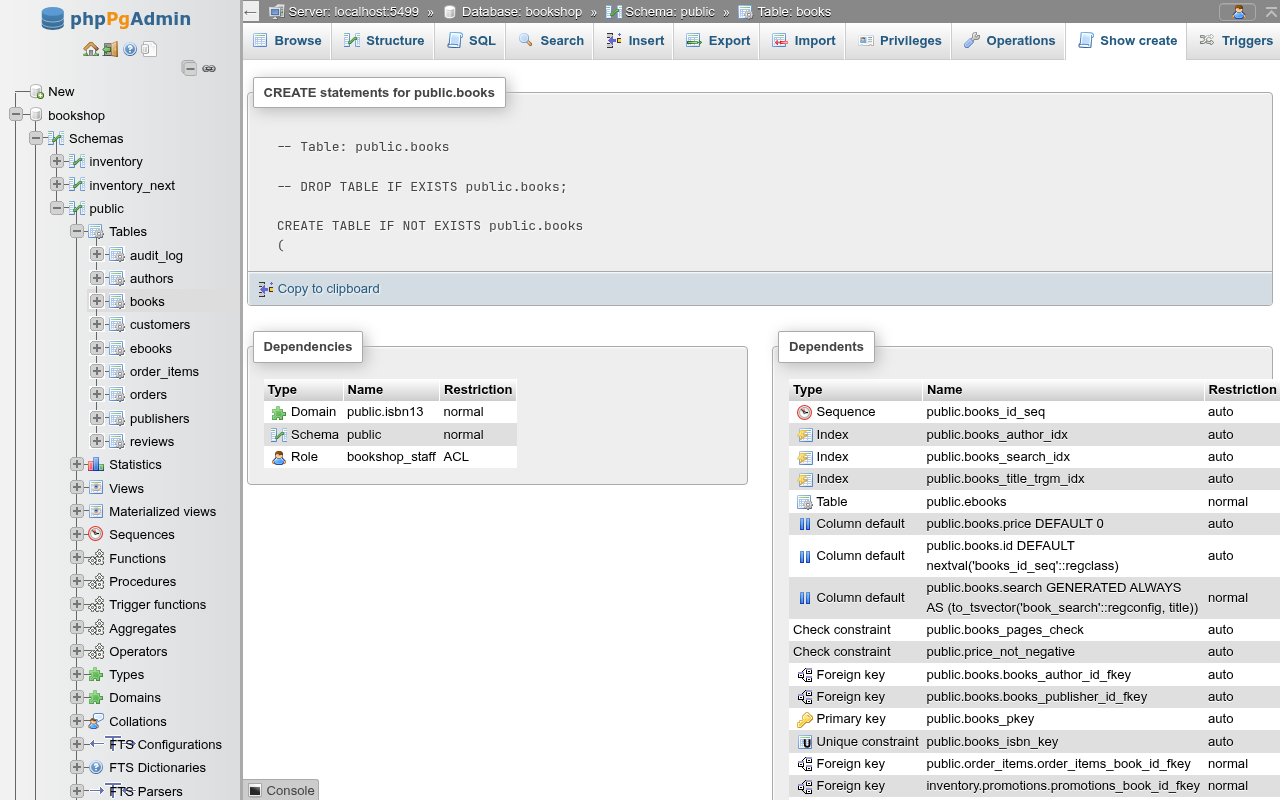
Below the DDL, two cards show the table's entries in pg_depend:
- Dependencies: what the table depends on: its schema, the types and domains of its columns, roles in its ACL.
- Dependents: what depends on the table: its sequences, indexes, constraints, triggers, child tables, views and foreign keys in other tables.
Restriction is the kind of dependency: normal (dropping the table needs CASCADE or fails), auto (dropped along with the table), internal, or ACL.
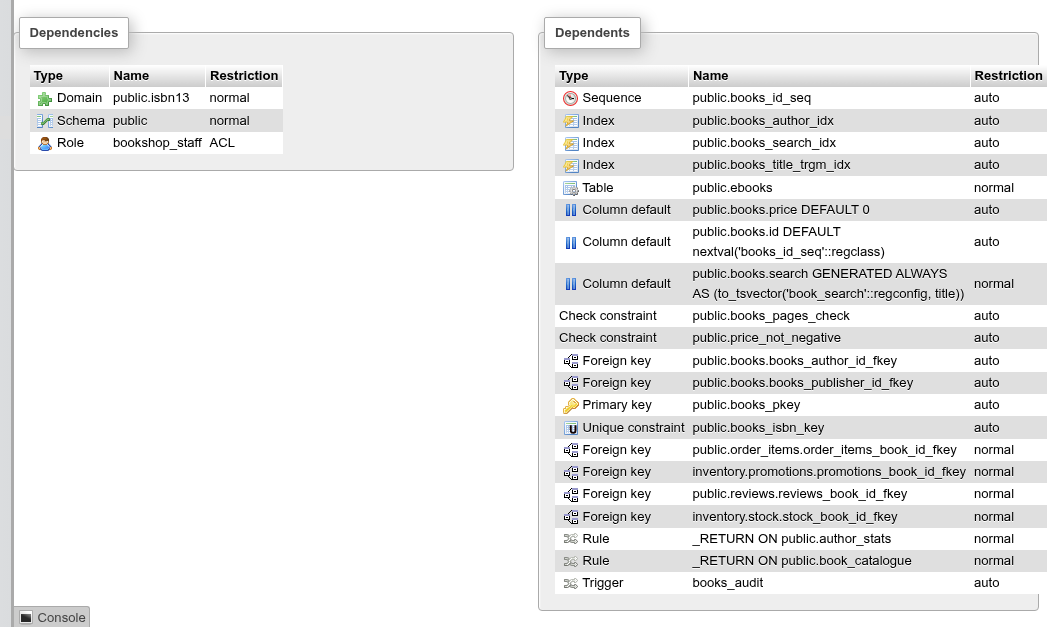
Column defaults and generated columns that call a function are listed as Column default, named by the column and its expression (public.books.id DEFAULT nextval('books_id_seq'::regclass)). An object that depends both on the table and on one of its columns, such as a check constraint or a trigger with a WHEN condition, is listed once.
Show create on several tables at once is in the schema's With selected menu.
Coming from phpMyAdmin
| phpMyAdmin | Here |
|---|---|
| Move table to (database.table) | Move to another schema in the same database. |
Table options: Storage engine, Collation, AUTO_INCREMENT, PACK_KEYS, CHECKSUM, ROW_FORMAT | Owner and Tablespace. No engine or table collation; set an identity's next value with ALTER TABLE t ALTER COLUMN id RESTART WITH 1000;. |
| Copy table to (database.table) | Same schema or another schema; Add constraints means the foreign keys. |
| Table maintenance: Check, Defragment, Flush, Optimize, Repair | Analyze, Vacuum, Vacuum and analyze, Reindex, Cluster. VACUUM FULL is the closest to Optimize. |
| Delete data or table | The same three actions, with RESTART IDENTITY and CASCADE for TRUNCATE and DROP. |