
Privileges
The Privileges tab grants and revokes PostgreSQL privileges on one object. It is on every database (after Operations), every schema (after Operations) and every table, view and materialized view (before Operations). Database and schema pages also hold the Default privileges for objects created later, and a schema's page has the Grant wizard for many objects at once. Tablespaces have the same panel on their own page, and sequences, functions, procedures, types and domains below their editor's form: the Privileges link of each row on the Sequences, Routines and Types lists opens it. Languages, foreign data wrappers, foreign servers and foreign tables open theirs in a dialog from the Privileges link of their row on the Objects and Foreign tables pages. The layout follows phpMyAdmin's database Privileges tab.
Roles having access
The panel lists every grantee of the object, read from its ACL with the built-in defaults filled in, so what the owner and PUBLIC hold implicitly shows too.
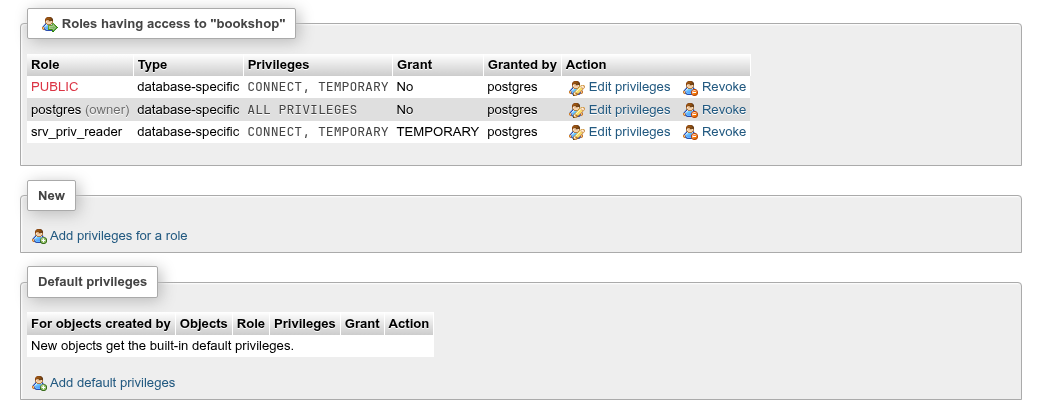
| Column | What it shows |
|---|---|
| Role | The grantee; PUBLIC (every role) in red; (owner) after the owner. |
| Type | database-specific, schema-specific, table-specific, view-specific, materialized view-specific, foreign table-specific, sequence-specific, routine, type-specific, domain-specific, tablespace-specific, language-specific, foreign data wrapper-specific, foreign server-specific, or Column: name for a column grant. |
| Privileges | The privileges held, or ALL PRIVILEGES when it holds every one the object accepts. |
| Grant | No, or the privileges it holds WITH GRANT OPTION (it may grant them on). |
| Granted by | The grantor(s). |
| Edit privileges, Revoke | Change this grantee's privileges, or revoke them all. |
Grant privileges
- Under New, click Add privileges for a role.
- Choose the Role:, or
PUBLIC. If the role already holds privileges here, the checkboxes start from them. - Check the privileges. The second checkbox of each row adds
WITH GRANT OPTION. Check all in the legend checks every privilege. - Preview SQL shows the statements; Go runs them. The list updates and the message is The privileges of role have been updated.
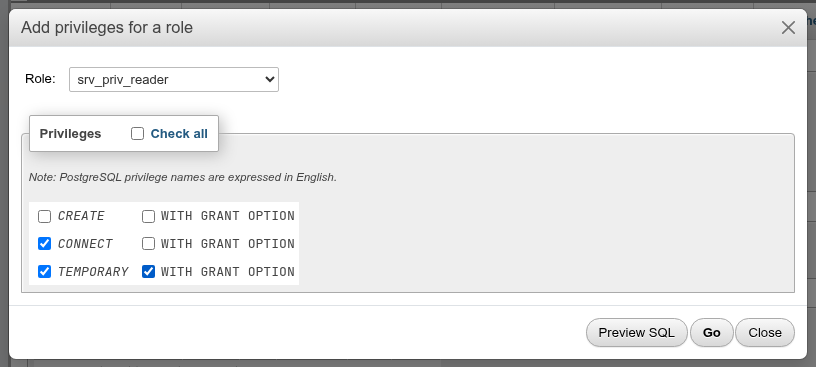
The dialog above runs:
GRANT CONNECT ON DATABASE bookshop TO srv_priv_reader;

GRANT TEMPORARY ON DATABASE bookshop TO srv_priv_reader WITH GRANT OPTION;
Edit privileges opens the same dialog for one grantee. phpPgAdmin compares what you check with what the role holds and writes only the difference, as GRANT for what was added and REVOKE for what was removed (REVOKE CONNECT ON DATABASE bookshop FROM srv_priv_reader;). Revoke asks, showing the REVOKE, and removes everything the grantee holds on the object.
Privileges each object accepts
| Object | Privileges offered |
|---|---|
| Database | CREATE, CONNECT, TEMPORARY |
| Schema | USAGE, CREATE |
| Table, view, materialized view, foreign table | INSERT, SELECT, UPDATE, DELETE, TRUNCATE, REFERENCES, TRIGGER, MAINTAIN (PostgreSQL 17+) |
| Column | INSERT, SELECT, UPDATE, REFERENCES |
| Sequence | USAGE, SELECT, UPDATE |
| Function, procedure | EXECUTE |
| Type, domain | USAGE |
| Tablespace | CREATE |
| Language, foreign data wrapper, foreign server | USAGE |
Hover a privilege for what it allows.
Revoking from PUBLIC
Every role is a member of PUBLIC. Revoking a privilege from one role does not remove what it gets through PUBLIC: bookshop's PUBLIC row (CONNECT, TEMPORARY, the built-in default for databases) still lets every role connect. Revoke from PUBLIC to close that.
Only owners and grant holders may grant
PostgreSQL lets the owner, a superuser, or a role holding the privilege WITH GRANT OPTION grant it. When a superuser grants on an object owned by someone else, the grant is recorded as made by the owner, so Granted by shows the owner.
Column privileges
On a table or view the panel also lists column grants, one row per column and grantee (Column: name), and New has Add column privileges:
- Click Add column privileges.
- Choose the Column, then the Role:.
- Check
INSERT,SELECT,UPDATEorREFERENCESand click Go.
GRANT SELECT (name), UPDATE (name) ON TABLE srv_priv_schema.srv_priv_tbl TO srv_priv_reader;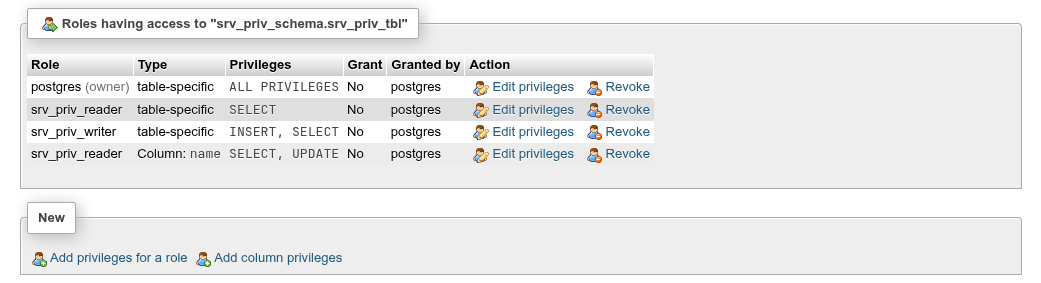
Revoke on a column row revokes only that column's privileges (REVOKE SELECT (name), UPDATE (name) ON TABLE … FROM srv_priv_reader;).
Table privileges include every column
A role with SELECT on the table can read all columns, whatever the column grants say. To limit a role to some columns, grant on those columns only and not on the table.
Default privileges
The Default privileges fieldset (database page) and Default privileges in this schema (schema page) manage ALTER DEFAULT PRIVILEGES: the privileges objects get when they are created later. Existing objects are not changed.
Each row: For objects created by (the role whose new objects it applies to), Objects (tables, sequences, functions, types, and schemas on the database page only), the grantee Role, the Privileges, Grant, and Edit privileges / Revoke. With no rows, new objects get the built-in defaults (the owner holds everything; PUBLIC gets EXECUTE on functions and USAGE on types).
To add one:
- Click Add default privileges.
- For objects created by: a role, or (current role).
- Objects: the kind.
- Role: the grantee, then the privileges, and Go.
ALTER DEFAULT PRIVILEGES FOR ROLE srv_priv_writer GRANT SELECT ON TABLES TO srv_priv_reader;On the schema page the statement gets IN SCHEMA name.

A table srv_priv_writer creates afterwards starts with srv_priv_reader=r/srv_priv_writer in its ACL.
Defaults follow the creating role, not you
A default privilege applies only to objects created by the role in For objects created by. If tables are created by a migration role, add the defaults for that role, not for yourself. Setting defaults for another role requires being a member of it (or a superuser).
The owner's row
Once a default exists for a role and kind, PostgreSQL stores the owner's own privileges with it, so the list shows a second row for the creating role itself. Revoking the other grantee's row removes the whole entry again when nothing differs from the built-in defaults.
Grant wizard
A schema's Privileges tab ends with pgAdmin's Grant wizard, which grants on many objects of the schema in one run:
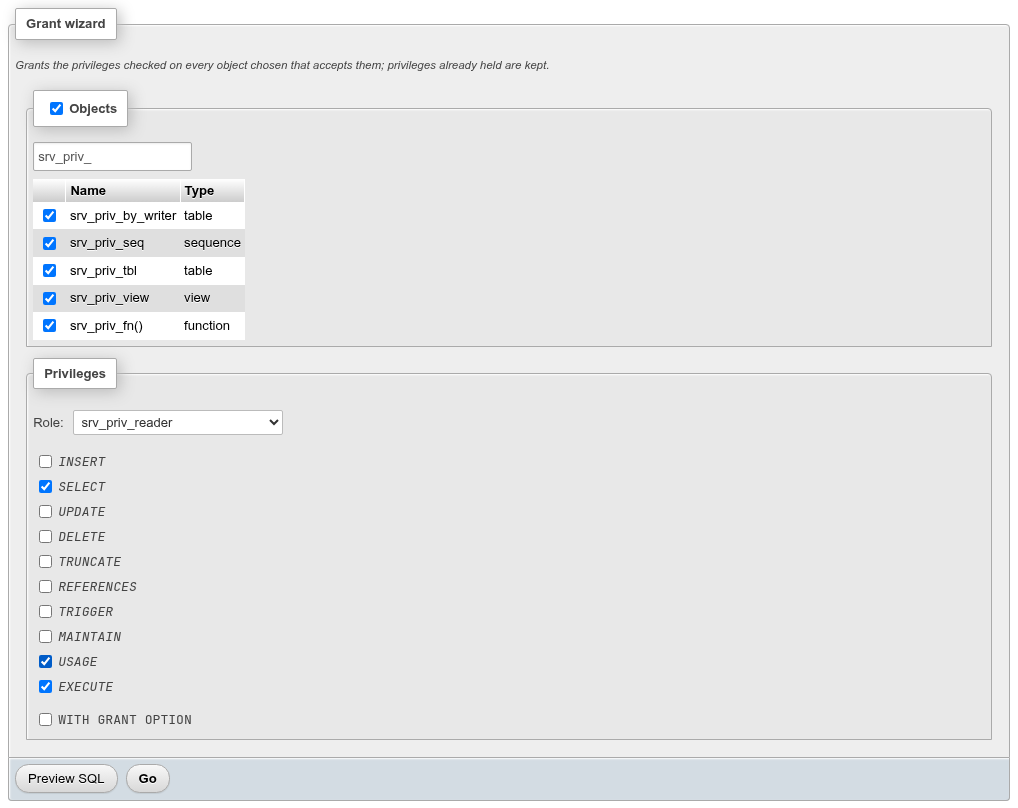
- In Objects, check the tables, partitioned tables, views, materialized views, foreign tables, sequences, functions, procedures, trigger functions, types and domains to grant on (pgAdmin's grant wizard list, plus types and domains; array and table row types are left out, as PostgreSQL gives them the privileges of their element type or table). The search box filters the list; the Objects checkbox checks every object shown.
- Choose the Role: (or
PUBLIC). - Check the privileges. Only privileges at least one checked object accepts are offered; each object gets the ones it accepts (
EXECUTEon routines,USAGEon sequences, types and domains, and so on). WITH GRANT OPTION applies to all of them. - Preview SQL, then Go and confirm.
GRANT SELECT, USAGE ON SEQUENCE srv_priv_schema.srv_priv_seq TO srv_priv_reader;

GRANT SELECT ON TABLE srv_priv_schema.srv_priv_tbl TO srv_priv_reader;

GRANT SELECT ON TABLE srv_priv_schema.srv_priv_view TO srv_priv_reader;

GRANT EXECUTE ON FUNCTION srv_priv_schema.srv_priv_fn() TO srv_priv_reader;
The wizard only adds privileges; ones already held are kept and not repeated (above, a fifth checked table where the role already had SELECT got no statement). The message counts the objects that got a statement: … on 4 objects. Use each object's Privileges tab to revoke. Without a role, Go says Choose a role to grant the privileges to.
See also
- Roles: the databases a role holds privileges on.
- Tablespaces:
CREATEon a tablespace. - Triggers, rules and policies: row-level security, which restricts rows within the privileges granted here.