
Triggers, rules and policies
The Triggers tab of a table lists its triggers, rewrite rules and row security policies in three sections, each with Create new …, per-row Edit, Export and Drop, and a check-all group for bulk Export and Drop. Views have the same tab with triggers and rules; materialized views have none. The tab lives at …/table/<table>/triggers (or …/view/<view>/triggers).
phpMyAdmin's Triggers tab only knows MySQL triggers; rules and policies are PostgreSQL additions laid out the same way.
Triggers

Each row shows the Name, Time (BEFORE, AFTER, INSTEAD OF), Event (INSERT OR UPDATE OF price OR DELETE), For each (ROW or STATEMENT), the Function with its arguments, and an Enabled box, followed by Enable Replica or Enable Always for a trigger in one of those states.
Ticking or unticking Enabled in the list takes effect at once:
ALTER TABLE public.tbl_room DISABLE TRIGGER tbl_room_touch;
ALTER TABLE public.tbl_room ENABLE TRIGGER tbl_room_touch;
A disabled trigger does not fire, but stays defined.
Under the list of a table's triggers, All triggers: Enable All | Disable All (pgAdmin's Trigger(s) menu) switches every trigger of the table at once, the internal ones that enforce foreign keys included, which takes a superuser:
ALTER TABLE public.tbl_room DISABLE TRIGGER ALL;Creating or editing a trigger
Create new trigger opens the dialog. A trigger calls a trigger function, a function that RETURNS trigger; create that first under the schema's Routines (the demo has public.log_change).
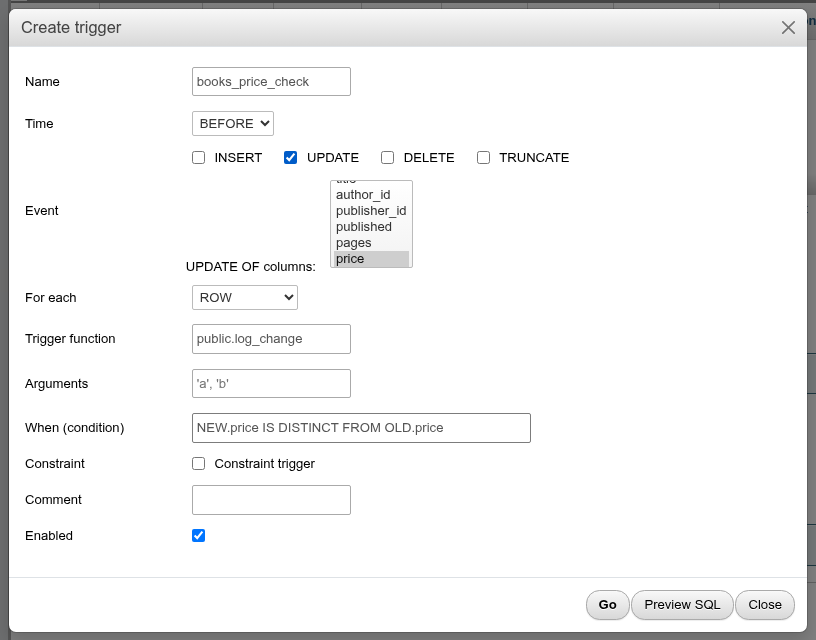
| Field | What it does | SQL |
|---|---|---|
| Name | Trigger name, unique per table. | CREATE TRIGGER name |
| Time | BEFORE or AFTER on a table; INSTEAD OF on a view (the only choice there). | BEFORE |
| Event | INSERT, UPDATE, DELETE, TRUNCATE; several at once. INSERT is ticked for a new trigger. | INSERT OR UPDATE |
| UPDATE OF columns: | Appears when UPDATE is ticked: fire only when one of these columns is in the UPDATE's SET list. | UPDATE OF code, qty |
| For each | ROW (once per row) or STATEMENT (once per statement). | FOR EACH ROW |
| Trigger function | Type or pick from the list of trigger functions. | EXECUTE FUNCTION public.log_change() |
| Arguments | Literal arguments, comma-separated; the function reads them as TG_ARGV. | ('from-docs') |
| When (condition) | Fire only when the condition holds; may use NEW. and OLD.. | WHEN (NEW.qty IS DISTINCT FROM OLD.qty) |
| Constraint → Constraint trigger, Deferrable, Initially deferred | Tables only: a constraint trigger, which can be deferred to commit. | CREATE CONSTRAINT TRIGGER … DEFERRABLE INITIALLY DEFERRED |
| Transition tables → OLD TABLE AS, NEW TABLE AS | Shown for STATEMENT triggers: names for the sets of old and new rows. | REFERENCING OLD TABLE AS gone |
| Comment | Trigger comment. | COMMENT ON TRIGGER |
| Enabled | pgAdmin's Trigger enabled?: Enable, Enable Replica (fires only when session_replication_role is replica, as on a logical replication subscriber), Enable Always (fires in either role) or Disable. | ALTER TABLE t ENABLE REPLICA TRIGGER name, … ENABLE ALWAYS …, … DISABLE … |
Preview SQL shows the statements and Go runs them. A new trigger is created with CREATE OR REPLACE TRIGGER (PostgreSQL 14+):
CREATE OR REPLACE TRIGGER tbl_room_touch
    BEFORE UPDATE OF code, qty
    ON public.tbl_room
    FOR EACH ROW
    WHEN (NEW.qty IS DISTINCT FROM OLD.qty)
    EXECUTE FUNCTION public.tbl_touch('from-docs');

COMMENT ON TRIGGER tbl_room_touch ON public.tbl_room
    IS 'demo trigger';
Editing a trigger renames it if you changed the name (ALTER TRIGGER … RENAME TO), then replaces it with CREATE OR REPLACE TRIGGER. A trigger that was disabled (or set to ENABLE REPLICA / ENABLE ALWAYS) keeps that state: the replace re-enables it, so the matching ALTER TABLE … DISABLE TRIGGER follows.
PostgreSQL has no CREATE OR REPLACE for constraint triggers, so an edited constraint trigger (or a trigger turned into or out of one) is dropped and created again in the same batch, with its comment and state restored:
DROP TRIGGER IF EXISTS tbl_room_check ON public.tbl_room;

CREATE CONSTRAINT TRIGGER tbl_room_check
    AFTER INSERT OR DELETE
    ON public.tbl_room
    DEFERRABLE INITIALLY DEFERRED
    FOR EACH ROW
    EXECUTE FUNCTION public.tbl_check();
Rules PostgreSQL enforces
These combinations are refused when you click Go, with PostgreSQL's message:
- A
WHENcondition that usesOLDon anINSERTtrigger, orNEWon aDELETEtrigger: INSERT trigger's WHEN condition cannot reference OLD values. Remember that INSERT is ticked by default. - TRUNCATE with FOR EACH ROW: TRUNCATE FOR EACH ROW triggers are not supported.
- Transition tables on a
BEFOREtrigger or with UPDATE OF columns, or on a trigger with several events (PostgreSQL only allows transition tables onAFTERtriggers). - A constraint trigger that is not
AFTER … FOR EACH ROW. INSTEAD OFtriggers only on views, and onlyFOR EACH ROWwithoutWHEN.
The dialog only shows the transition table fields for STATEMENT triggers, though PostgreSQL also allows them on AFTER … FOR EACH ROW triggers; write those on the SQL tab.
UPDATE OF lists the columns in table order, whatever order you select them in.
Export and drop
Export opens the trigger's CREATE statement in a dialog with Copy to clipboard:
-- Trigger: tbl_room_touch2

-- DROP TRIGGER IF EXISTS tbl_room_touch2 ON public.tbl_room;

CREATE OR REPLACE TRIGGER tbl_room_touch2
    BEFORE UPDATE OF code, qty
    ON public.tbl_room
    FOR EACH ROW
    WHEN (new.qty > old.qty)
    EXECUTE FUNCTION public.tbl_touch('from-docs');
Drop asks, then runs DROP TRIGGER name ON table;. Tick several rows (or the check-all box) and use the Export or Drop buttons of the section to act on all of them at once; the result reads 2 objects have been dropped. With nothing ticked: Nothing selected.
Rules
The Rules section lists the table's rewrite rules: Event, Condition, Instead (Yes/No), Commands and Enabled. The demo's audit_log has audit_log_no_delete, which turns every DELETE into nothing.

A rule rewrites a query before it runs: ON DELETE TO t DO INSTEAD NOTHING silently discards deletes; DO ALSO runs extra commands next to the original. Views are implemented as ON SELECT rules (their _RETURN rule is not listed here).
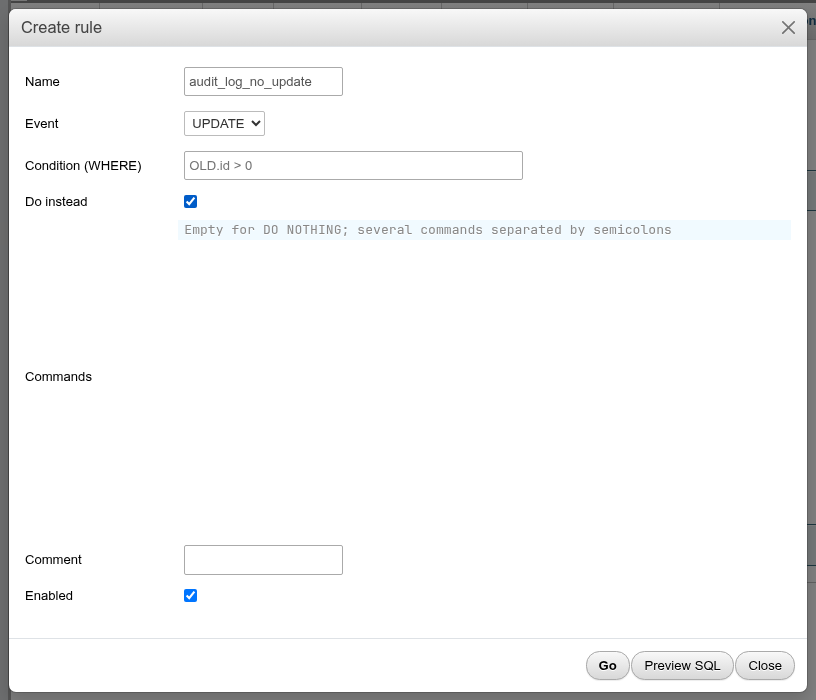
| Field | What it does | SQL |
|---|---|---|
| Name | Rule name. | CREATE RULE name AS |
| Event | SELECT, INSERT, UPDATE or DELETE. | ON DELETE TO t |
| Condition (WHERE) | Apply only when the condition holds; uses NEW./OLD.. | WHERE (OLD.qty > 100) |
| Do instead | Ticked: replace the original command (INSTEAD). Unticked: run in addition (ALSO). Ticked by default on a view. | DO INSTEAD |
| Commands | The SQL to run. Empty for DO NOTHING; several commands separated by semicolons. | DO (NOTIFY a; NOTIFY b) |
| Comment | Rule comment. | COMMENT ON RULE |
| Enabled | Unticked: the rule is created disabled. | ALTER TABLE t DISABLE RULE name |
CREATE RULE tbl_room_keep AS
    ON DELETE TO public.tbl_room
    WHERE (OLD.qty > 100)
    DO INSTEAD NOTHING;

COMMENT ON RULE tbl_room_keep ON public.tbl_room IS 'never delete big rooms';
The Enabled box in the list runs ALTER TABLE t DISABLE RULE name / ENABLE RULE name at once. CREATE OR REPLACE RULE keeps a rule's state, so editing a disabled rule leaves it disabled.
Prefer triggers to rules
Rules interact surprisingly with volatile functions, RETURNING, INSERT … ON CONFLICT and multi-row statements, and an ON SELECT rule on a table is not allowed. For audit logging or validation use a trigger; keep rules for the simple "do nothing instead" case. On views, INSTEAD OF triggers or the automatic updatability of simple views are usually clearer than rules.
Row security policies
Policies decide which rows each role can see or change. The Row security policies section appears on tables only: Command, Type (PERMISSIVE/RESTRICTIVE), Roles, Using and With check. The demo's reviews has reviews_visible, which shows bookshop_staff only the reviews that are not hidden.

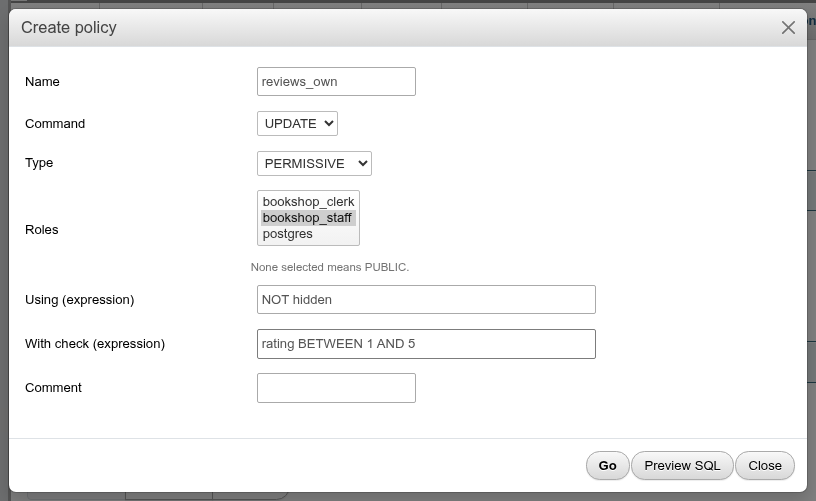
| Field | What it does | SQL |
|---|---|---|
| Name | Policy name. | CREATE POLICY name ON t |
| Command | ALL, SELECT, INSERT, UPDATE, DELETE. Fixed once created. | FOR UPDATE |
| Type | PERMISSIVE (policies are OR-ed) or RESTRICTIVE (must also pass). Fixed once created. | AS RESTRICTIVE |
| Roles | The roles it applies to; None selected means PUBLIC. | TO bookshop_staff |
| Using (expression) | Which existing rows are visible / can be updated or deleted. Hidden for INSERT. | USING (qty < 1000) |
| With check (expression) | Which new or updated rows are allowed. Hidden for SELECT and DELETE. | WITH CHECK (qty > 0) |
| Comment | Policy comment. | COMMENT ON POLICY |
CREATE POLICY tbl_room_staff
    ON public.tbl_room
    AS RESTRICTIVE
    FOR UPDATE
    TO bookshop_staff
    USING (qty < 1000)
    WITH CHECK (qty > 0);
When you edit a policy, Command and Type are disabled (PostgreSQL cannot change a policy's command or type; drop and recreate it instead.); the name, roles and expressions change with ALTER POLICY.
Policies do nothing until row security is enabled
A policy only applies once row level security is enabled on the table. Creating policies on a table without it changes nothing for anyone. A notice above the section says which state the table is in: Row-level security is disabled on this table, so these policies do nothing yet. (a warning, when the table has policies), …is enabled… or …is enabled and forced…, with a link to the Row-level security card on the Operations tab, where two boxes run ENABLE / DISABLE ROW LEVEL SECURITY and FORCE / NO FORCE ROW LEVEL SECURITY.
Once it is enabled, a role with no matching policy sees no rows at all (default deny). Superusers and roles with BYPASSRLS always bypass policies, and the table owner does too unless you FORCE it. Since phpPgAdmin usually runs as a superuser, Browse shows you every row regardless of the policies; sign in as the role, or SET ROLE bookshop_staff; on the SQL tab, to test them.
Triggers and rules on views
A view's Triggers tab has the triggers and rules sections only. A new trigger's Time can only be INSTEAD OF, which makes a view writable through a trigger function, and Do instead is ticked for a new rule. There is no constraint trigger option on views.
CREATE OR REPLACE TRIGGER book_catalogue_insert
    INSTEAD OF INSERT
    ON public.book_catalogue
    FOR EACH ROW
    EXECUTE FUNCTION public.book_catalogue_insert();
See Views and materialized views for the rest of a view's tabs.
Coming from phpMyAdmin
| phpMyAdmin | Here |
|---|---|
| Trigger body written in the dialog | A trigger calls a separate trigger function; write it under Routines first. |
| Definer | No definer: the function runs with the rights of the user whose statement fired it, unless the function is SECURITY DEFINER. |
| One event per trigger | Several events, UPDATE OF columns, WHEN, statement-level triggers and transition tables. |
| Events (scheduler) | No built-in scheduler; with the pg_cron extension, its jobs are managed on the pg_cron jobs page. |