
Browse
The Browse tab, the first tab of a table, view or materialized view, shows the relation's rows in phpMyAdmin's results grid: page by page, sortable, filterable, and — for a table with a primary key — editable in place. The same grid shows the results of the SQL tab and the Search tab, so everything below about the grid applies there too.
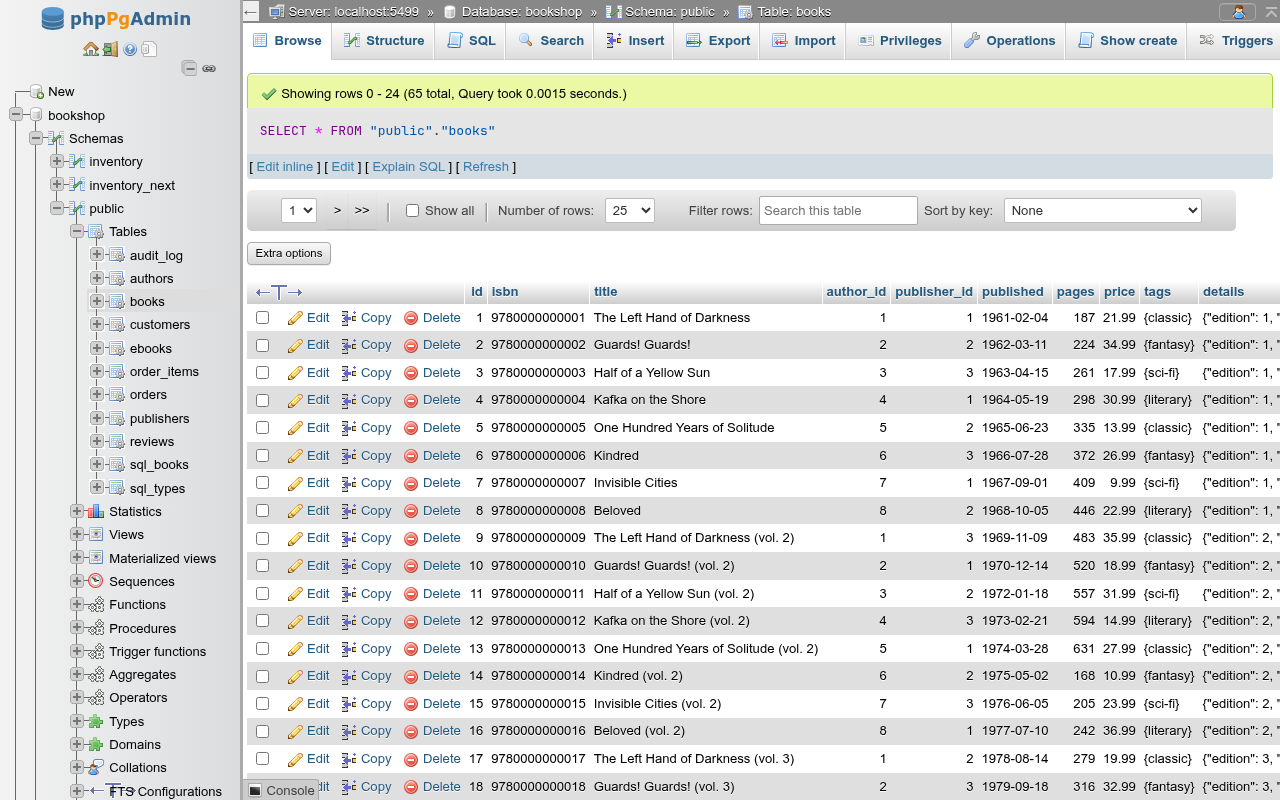
What Browse runs
Browse runs SELECT * FROM "schema"."table", paged as described in How paging and ordering work. Without an order of your own, a table is sorted by its primary key, as pgAdmin's data view does, so a row stays in place after you edit it. A view, a materialized view or a table without a primary key comes in the order the server returns it, which can change between pages.
The page, the rows per page and the order are kept in the URL (?pos=50&rows=100&order=published:desc), so reloading the page or using the browser's Back button returns to the same place.
Inherited and partitioned tables
SELECT * FROM parent includes the rows of tables that inherit from it: Browse of books also lists the rows of ebooks, and an edit or delete of such a row through books changes ebooks. A partitioned table such as orders is browsed and edited through the parent; changing a value of the partition key moves the row to the matching partition. Browse a partition or child table itself to see only its rows.
The navigation bar
The bar appears above and below the grid.
| Control | What it does |
|---|---|
| <<, < | First page, previous page. Shown from the second page on. |
| Page selector | Jumps to a page. Shown when there is more than one page; with more than 200 pages it lists the first and last five, the ten around the current one and round numbers in between. |
| >, >> | Next page, last page. |
| Show all | Shows every row on one page (?rows=all), after asking Do you really want to see all of the rows? Offered, as in phpMyAdmin, only when the result has at most 500 rows. Untick to return to the default page size. |
| Number of rows: | 25, 50, 100, 250 or 500 rows per page. The default is the Number of rows setting under Settings → Main panel. |
| Filter rows: | Hides the rows of this page that do not contain the text, in any column, ignoring case. It does not query the server; use Search to filter the table. |
| Sort by key: | Tables only. PRIMARY (ASC)/(DESC) and the same for each index whose columns are all in the result. Indexes on expressions are left out. None returns to the default order. |
A typed ?rows=all is not capped
The Show all box is not offered past 500 rows, but a URL that already says ?rows=all still sends every row of the table to the browser at once.
Sorting by a column
Click a column heading to sort by it; click it again to reverse the order. A date, time or timestamp column starts newest first, others ascending. The grid sorts by one column at a time: clicking another heading replaces the order. The arrow next to a heading shows the current direction.
Headings are links only when the result can be paged, and only for a name that one column has: two columns called the same (SELECT 1 AS a, 2 AS a) cannot be told apart by ORDER BY. On the SQL tab, results of a batch, of a statement with its own LIMIT, of EXPLAIN and so on cannot be sorted from the grid.
Extra options
Extra options opens display options for this grid:

| Option | What it does |
|---|---|
| Partial texts (default) | Cuts values longer than 50 characters and adds ..., on one line. |
| Full texts | Shows values whole, wrapping lines and keeping line breaks and indentation. The ←T→ icon in the grid's corner switches between the two as well. |
| Relational key (default) / Display column for relationships | Shown when a column is a foreign key. Display column for relationships shows, in place of each key, the referenced row's display column (the first text column of the referenced table, the one the insert form's dropdown shows), with the key on hover. Keys past the foreign-key dropdown limit (100) stay as they are. |
| Show binary contents | Shows bytea values as their hex text (\xdeadbeef) instead of [BLOB - 4 B]. |
| Hide browser transformation | phpMyAdmin's transformations are not built; the box answers Not available yet. |
| Geometry (default) / Well Known Text / Well Known Binary | Shown when a column is PostGIS geometry or geography. Geometry shows [GEOMETRY - 21 B], Well Known Text the value as EWKT (SRID=4326;POINT(1 2), Z and M kept), read in the browser from the hex EWKB, and Well Known Binary that hex as PostgreSQL outputs it. Drawing them is Visualize GIS data. |
Go closes the card; the options apply as you change them. They are not saved and reset when the page reloads.
How values are shown

| Type | Shown as |
|---|---|
| NULL | NULL in grey italics; an empty string is an empty cell |
| Numbers | Right-aligned, as PostgreSQL prints them (12.50 for numeric(10,2)) |
boolean | true / false (phpMyAdmin shows 1 / 0) |
date, time, timestamp(tz) | ISO text, never wrapped. timestamptz and timetz are shown in the session time zone, the server's TimeZone setting |
bytea | [BLOB - 4 B], or the hex text with Show binary contents. Never editable in place |
json, jsonb | The document as text (jsonb normalised by the server) |
| Arrays | PostgreSQL's array text: {x,"y z"} |
| Composite types | Row text: ("1 High St",Leeds,"LS1 1AA",GB) |
| Ranges | [1,10) |
| Enums | The label |
tsvector | The lexemes with positions: 'brown':3 'fox':4 'quick':2 |
| Generated columns | The computed value, read-only |
Editing rows
When the rows can be edited (see below), each row starts with a check box and Edit, Copy and Delete.
| Action | What it does |
|---|---|
| Edit | Opens the edit form for the row. |
| Copy | Opens the insert form filled with the row's values, to insert a new row like it. A primary key with a default and every identity column are left for the server to number (Copy a row). |
| Delete | Asks Do you really want to execute "DELETE FROM … WHERE "id" = '5'"? in a browser dialog and deletes the row. |
Double-click editing
Double-click a cell to edit it in place:
- Enter saves; Esc cancels; clicking elsewhere saves what changed.
- Text and JSON open in a multi-line box; Shift+Enter adds a line break. A JSON document is laid out over several lines.
- A nullable column has a NULL check box under the box.
- An enum column offers its labels in a list. A foreign key column offers the referenced values (
description - key) while there are at most 100 of them; beyond that the browse-foreign-values icon answers that it is not available, and you type the key. - Date and time columns open the date/time picker. PostgreSQL accepts more than the picker offers (
infinity,epoch,today, time zones); type those in.
Saving sends one UPDATE "schema"."table" SET "col" = $1 WHERE "pk" = $2 RETURNING * with the value as a parameter, shows 1 row affected. and reloads the page. If the server rejects the value (a check constraint, a bad date), its message appears and the cell stays open. If another session deleted or re-keyed the row meanwhile, the save fails with The row to change was not found.
With selected
Tick rows (or Check all, which ticks the rows of this page that the filter shows) and pick an action after With selected::
| Action | What it does |
|---|---|
| Edit | Opens the edit form with every ticked row. |
| Copy | Opens the insert form with a copy of every ticked row. |
| Delete | Shows the DELETE statements in Preview SQL; Yes runs them in one transaction. |
| Export | Answers that it is not available; use the Export tab. |
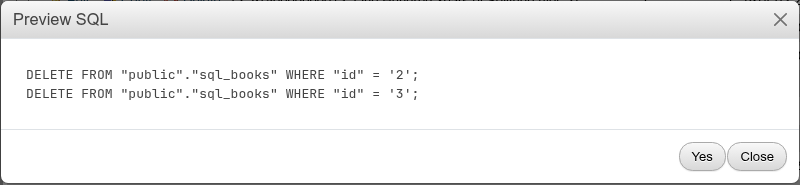
INFO
An action clicked with no row ticked answers with the "not available" message instead of asking you to select rows.
Which results can be edited
A grid is editable when the rows can be addressed by primary key. phpPgAdmin decides it from the result's column metadata, after pgAdmin:
- All columns that come from a table come from one table. Expressions (
upper(title),count(*)) do not count and are shown read-only. - That table is an ordinary or partitioned table (not a view, materialized view, foreign table or sequence) and has a primary key.
- Every primary key column is in the result, under its own name, once.
A column counts as the table's own when its name and type match a column of the table. PostgreSQL tells the client which table a result column comes from but, through PHP's pgsql extension, not which column, so phpPgAdmin matches by name. As a result:
- A column selected under another name (
SELECT id, title AS t …) is read-only; if it is the primary key, the whole grid is read-only. - A column selected twice is read-only in both places.
- A column of a domain type is read-only: the server reports the domain's base type, which does not match. In the demo,
books.isbn(domainisbn13) andcustomers.email(domainemail) cannot be double-clicked; edit them in the edit form or withUPDATE. - Generated columns are always read-only.
For phpMyAdmin users
phpMyAdmin can edit rows of a table without a primary key by using a unique key or all the column values in the WHERE clause. phpPgAdmin only edits by primary key. Add one (ALTER TABLE t ADD PRIMARY KEY (id)), or use UPDATE … WHERE ctid = '(0,1)' on the SQL tab for a one-off change.
Distinct values
…/browse?distinct=<column> lists each value of a column with the number of rows that have it, most frequent first. The Structure tab's Browse distinct values action opens it.
SELECT COUNT(*) AS "Rows", "publisher_id" FROM "public"."books" GROUP BY "publisher_id" ORDER BY "Rows" DESC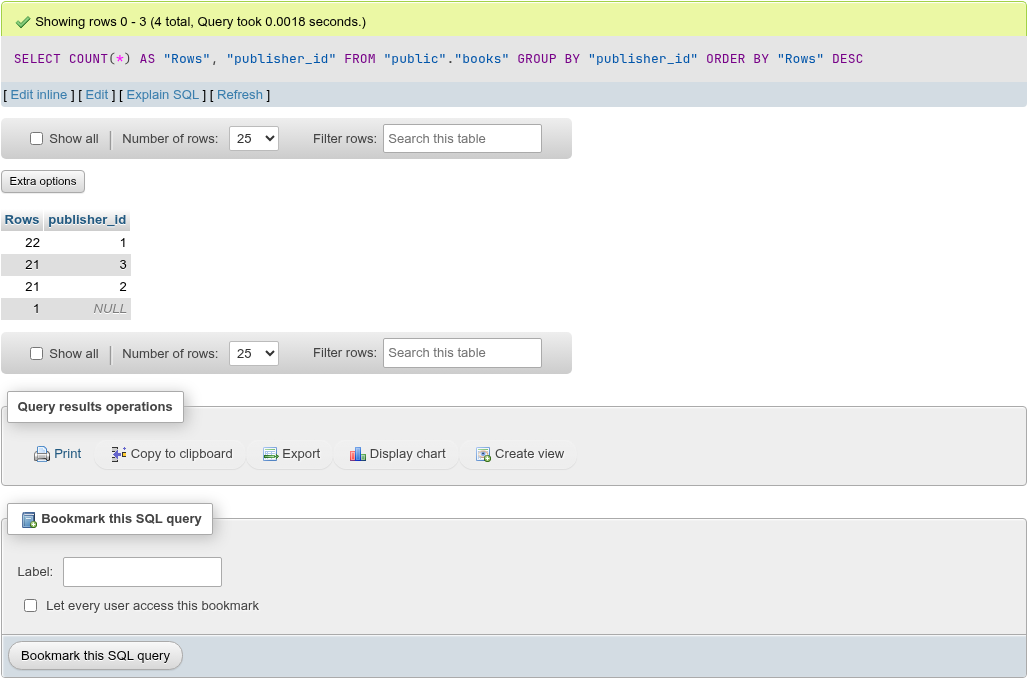
The result is read-only and the URL's column name is case-sensitive (?distinct=publisher_id).
Under the grid
The Query results operations card (Print, Copy to clipboard, Export, Display chart, Create view) and the Bookmark this SQL query card work as on the SQL tab; see Results and Bookmarks. The message's Edit and Edit inline links open the table's SQL tab with the statement; Explain SQL and Explain analyze run the statement there and show its query plan; Refresh reloads the page of rows.