
Full text search
PostgreSQL's full text search turns documents into tsvector values and queries into tsquery values, using four kinds of objects: parsers split text into tokens, dictionaries turn tokens into lexemes (or drop them), templates are the code dictionaries are built on, and configurations pick a parser and map each token type to a list of dictionaries. phpPgAdmin lists and edits all four on the schema's Types tab, in the Full text search list, through one dialog. In the navigation panel they sit under FTS Configurations, FTS Dictionaries, FTS Parsers and FTS Templates.
The list
The Full text search list shows each object's Name, Kind (Configuration, Dictionary, Parser or Template), Definition, Owner and Comment, with Edit, Export and Drop, bulk Export and Drop, and Create new text search object.
The definition column shows PARSER = default for a configuration, the template and options for a dictionary, and the functions of a parser or template. Only the schema's own objects are listed; the built-in ones (english, simple, english_stem, default and so on) live in pg_catalog.
Drop offers Also the objects that depend on it (CASCADE). A dictionary used in a configuration's mappings fails without it (cannot drop text search dictionary rtn_simple_dict because other objects depend on it); with it, the whole configuration is dropped, not only the mapping. Bulk Drop runs one statement per ticked object and reports 3 objects have been dropped.
The dialog
Create new text search object opens the dialog with Kind set to Configuration; change Kind to create another kind. Edit (or a link from the navigation panel, …/types?open=fts_configuration:<name>) opens an existing object, whose kind is fixed. Every kind has Name and Comment; configurations and dictionaries also have Owner. Preview SQL shows the statements, Go runs them.
Configurations
A new configuration is Based on either:
- Parser: a parser (normally
default). The configuration starts with no token mappings, so it indexes nothing until you add them. - Copy configuration: an existing configuration such as
english, copying its parser and all its mappings. The list shows the built-in configurations by bare name.
CREATE TEXT SEARCH CONFIGURATION public.rtn_books_fts (
    PARSER = default
);
The mappings are edited on the existing configuration: open it again with Edit. The Token mappings table has one row per token type: a Token (the parser's token types: asciiword, word, numword, email, url, int, uint, float, …) and the Dictionaries, comma-separated, suggested as you type. Add mapping adds a row, Remove deletes one. The hint says Dictionaries are tried in order, separated by commas; a token without a mapping is dropped.
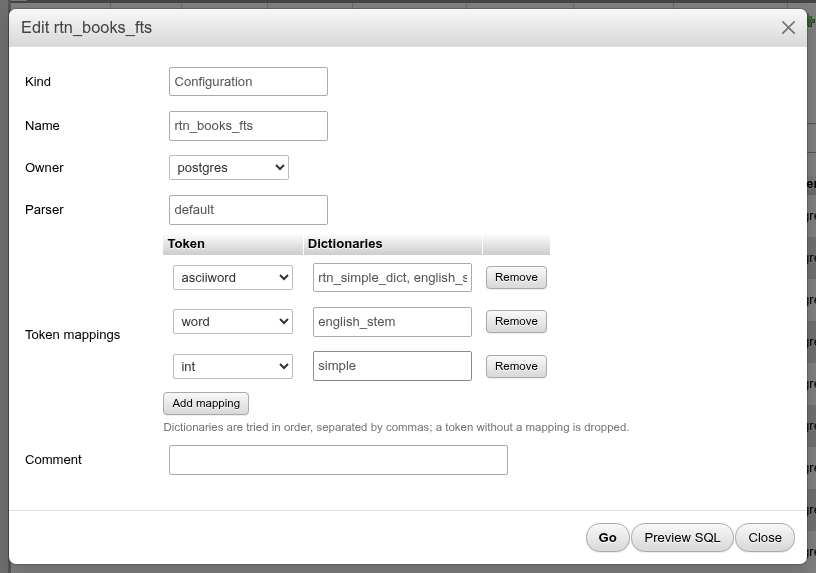
Go turns the changes into ALTER TEXT SEARCH CONFIGURATION statements: ADD MAPPING FOR for new rows, ALTER MAPPING FOR for changed dictionary lists and DROP MAPPING FOR for removed rows:
ALTER TEXT SEARCH CONFIGURATION public.rtn_books_fts
    ALTER MAPPING FOR asciiword
    WITH rtn_simple_dict, simple;

ALTER TEXT SEARCH CONFIGURATION public.rtn_books_fts
    DROP MAPPING FOR word;
The parser of an existing configuration is shown read-only: PostgreSQL cannot change it. Create a new configuration instead.
Dictionaries
A dictionary has a Template (simple, snowball, ispell, synonym, thesaurus, or one of the schema's templates) and Options: Add option adds an Option / Value row. The options depend on the template:
| Template | Common options |
|---|---|
simple | stopwords (a stop word file name, e.g. english), accept (true: stop here; false: pass unknown words to the next dictionary) |
snowball | language (english, german, …), stopwords |
ispell | dictfile, afffile, stopwords |
synonym | synonyms (file name), casesensitive |
thesaurus | dictfile, dictionary (the sub-dictionary) |
CREATE TEXT SEARCH DICTIONARY public.rtn_simple_dict (
    TEMPLATE = simple,
    stopwords = 'english'
);
On an existing dictionary the template is read-only and changed options are sent with ALTER TEXT SEARCH DICTIONARY … (option = 'value').
Dictionary files live on the server
stopwords, synonyms, dictfile and the like name files in the server's $SHAREDIR/tsearch_data directory (english.stop, xx.syn, …), without the extension. Putting a new file there needs access to the server's file system; phpPgAdmin cannot upload it.
Parsers and templates
A Parser is five C functions: START, GETTOKEN, END, LEXTYPES and the optional HEADLINE. A Template is the optional INIT and the LEXIZE function. Each is a list of the functions in the database with a matching signature, for example prsd_start, prsd_nexttoken, prsd_end, prsd_lextype and prsd_headline for a copy of the default parser, or dsimple_init and dsimple_lexize for a copy of the simple template.
CREATE TEXT SEARCH PARSER public.rtn_parser (
    START = prsd_start,
    GETTOKEN = prsd_nexttoken,
    END = prsd_end,
    LEXTYPES = prsd_lextype,
    HEADLINE = prsd_headline);
Superuser only; a function change recreates the object
Creating a parser or template requires a superuser. Name and comment changes run in place. Changing one of the functions cannot be done with ALTER, so the hint says Changing a function drops and recreates the object.: the preview starts with a warning comment, DROP TEXT SEARCH PARSER (or TEMPLATE) and CREATE. The drop fails while a configuration (or dictionary) uses the object. The recreated object keeps its comment.
Writing new parser or template functions means writing C. Most needs are met with a new dictionary or configuration on top of the built-in parser and templates.
Worked example: a configuration for book titles
This builds a configuration that drops English stop words, keeps unknown words as they are, and stems the rest, then tests it on the SQL tab. All objects are scratch objects; drop them at the end.
On Types, click Create new text search object, set Kind to Dictionary, name it
rtn_simple_dict, choose Templatesimple, and add the optionsstopwords=englishandaccept=false. Click Go.Click Create new text search object again. Leave Kind at Configuration, name it
rtn_books_fts, keep Based on: Parser and choosedefault. Click Go.Click Edit on
rtn_books_fts. Add three mappings:asciiword→rtn_simple_dict, english_stemword→english_stemint→simple
Check the statements with Preview SQL, then click Go.
Open the schema's SQL tab and compare it with the built-in
englishconfiguration:sqlSELECT to_tsvector('public.rtn_books_fts', 'The Running dogs ran 42 miles') AS scratch, to_tsvector('english', 'The Running dogs ran 42 miles') AS english;
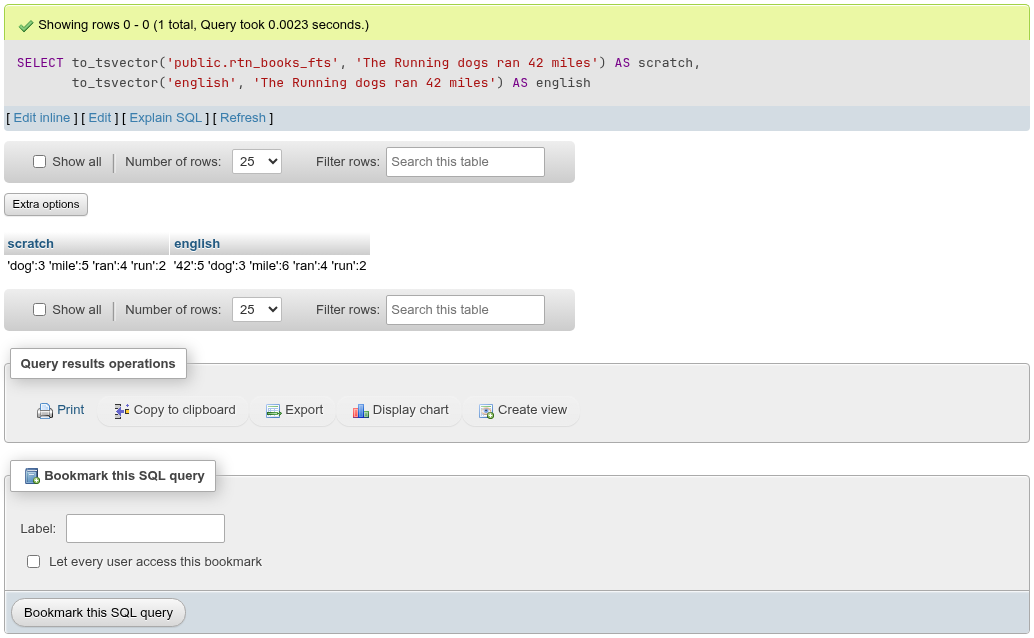
What happened:
Theis in the English stop word list, sortn_simple_dictdropped it.Running,dogs,milesandranare not stop words; withaccept = falsethe dictionary passed them on toenglish_stem, which reduced them torun,dog,mileandran.42vanished from the scratch result. The default parser reports it as auinttoken, notint, and the configuration has no mapping foruint, so the token was discarded. Theenglishconfiguration mapsuintand keeps it. Usets_debug('public.rtn_books_fts', '…')to see each token's type and which dictionary handled it.
- To use the configuration for searching, index the expression with the same configuration name, for example
CREATE INDEX ON books USING gin (to_tsvector('public.rtn_books_fts', title));, and query withto_tsquery('public.rtn_books_fts', 'dogs'). Or set it as the session default:SET default_text_search_config = 'public.rtn_books_fts';. - Clean up: tick both objects in the Full text search list and click Drop. The statements run in list order, configuration first, so no CASCADE is needed.
The demo configuration
The demo database's book_search is a copy of english (CREATE TEXT SEARCH CONFIGURATION public.book_search (COPY = pg_catalog.english)). Open it to see a full set of mappings.