
Replication
The Replication tab at server level (/server/replication) shows the server's part in streaming replication, manages replication slots, and lists and edits the publications and subscriptions of logical replication. The layout is phpMyAdmin's Replication page (a Primary replication and a Replica replication card) with pgAdmin's replication panels and publication and subscription dialogs.
Nothing on this page sets up a standby: a standby is created on its own host with pg_basebackup and primary_conninfo. The page shows how it is going and controls what PostgreSQL lets you control over SQL.
Superuser or pg_read_all_stats
Without pg_read_all_stats (part of pg_monitor) the page notes Without pg_read_all_stats, the details of other roles' replication connections are hidden. and the standbys connected as other roles show no state or positions.
Primary replication
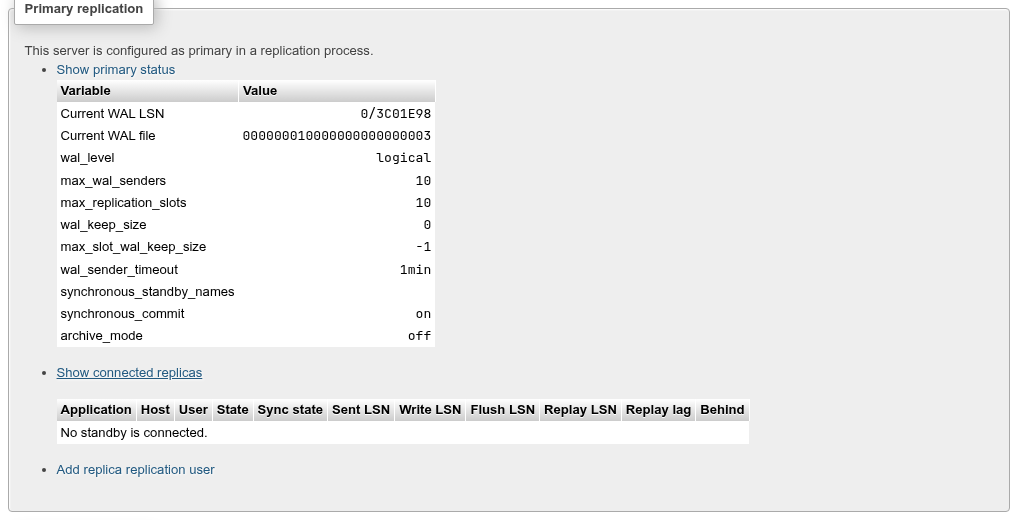
A server counts as configured as a primary when it is not in recovery, wal_level is not minimal and max_wal_senders is above 0, or when a standby is connected. Then the card offers:
- Show primary status: the current WAL position (
pg_current_wal_lsn()) and WAL file, and the settings that matter on a primary:wal_level,max_wal_senders,max_replication_slots,wal_keep_size,max_slot_wal_keep_size,wal_sender_timeout,synchronous_standby_names,synchronous_commit,archive_mode. - Show connected replicas:
pg_stat_replication, one row per standby (or logical subscriber) streaming from this server: Application, Host, User, State, Sync state, the Sent / Write / Flush / Replay LSN, Replay lag and Behind (bytes between the current position and the standby's replay position). No standby is connected. when there are none. - Add replica replication user: opens Add role with
REPLICATIONalready checked, for the role a standby connects as. - Create a named restore point: see below.
When the server is not configured, the card says so and configure opens Variables filtered on wal_level (or max_wal_senders). Both need a restart. On a standby that passes WAL on to others the card says cascading replication.
Create a named restore point
Create a named restore point (on a primary whose wal_level is replica or logical, also when it has no standbys) opens a Restore point name: field. Go asks to confirm SELECT pg_catalog.pg_create_restore_point('before_upgrade'); and then says Restore point "before_upgrade" created at 1/96993008. with the WAL position. PostgreSQL also logs restore point "before_upgrade" created at 1/96993008.
A point-in-time recovery from a base backup and the archived WAL can then stop there with recovery_target_name = 'before_upgrade'. The name is up to 63 bytes; names need not be unique, and a recovery stops at the first one it meets. The function needs a superuser or EXECUTE on it, so the entry is not shown to other roles, nor on a standby, which cannot write WAL.
Replica replication
On a primary this card only says This server is not configured as replica in a replication process. On a standby (pg_is_in_recovery()) with a WAL receiver it offers:
- See replica status table:
pg_stat_wal_receiverand the replay position: WAL receiver status, Primary host and port, Slot, Timeline, Last received LSN, Last replayed LSN, Replay behind receive, Last replayed transaction, WAL replay (Running / Paused), the last message times, Connection and the standby settings. - Control replica: Pause WAL replay / Resume WAL replay, which run
pg_wal_replay_pause()andpg_wal_replay_resume()after asking. Paused, the standby keeps receiving WAL but stops applying it, so queries see a frozen snapshot.
Warnings in red appear when the WAL receiver is not streaming or replay is paused.
WAL replay controls work only on a standby
These functions exist only during recovery. On a primary the card does not offer them, and the endpoint answers WAL replay can only be paused and resumed on a standby. The docs cluster is a primary, so the standby side of this page could not be shown here.
Replication slots
A slot makes the server keep the WAL a consumer still needs, even while it is disconnected.

Columns: Slot name, Type (physical or logical, temporary for a temporary slot), Plugin, Database, Active (with the PID using it), WAL status (reserved, extended, unreserved, lost, with the invalidation reason), Restart LSN, Confirmed flush LSN and Retained WAL (bytes kept because of the slot).
Add a slot

- Type the Slot name: lower-case letters, digits and underscores, up to 63 characters.
- Choose physical or logical.
- physical: Reserve WAL now reserves WAL from the current position at once rather than when a standby first connects (
pg_create_physical_replication_slot(name, true)). - logical: choose the Database…, the output Plugin (
pgoutputby default, the one logical replication uses;test_decodingandwal2jsonare others), and Two-phase to decode prepared transactions (pg_create_logical_replication_slot(name, plugin, false, two_phase)).
- physical: Reserve WAL now reserves WAL from the current position at once rather than when a standby first connects (
- Click Go. The slot is created at once, without a confirmation.
Drop a slot
Drop asks, then runs SELECT pg_catalog.pg_drop_replication_slot('name');. An active slot cannot be dropped; stop its consumer first.
An unused slot fills the disk
A slot nobody consumes keeps every WAL segment from its restart position, until the disk is full or max_slot_wal_keep_size invalidates it. Watch Retained WAL and drop slots you no longer need. Creating slots needs REPLICATION or superuser, and max_replication_slots free.
Logical replication
The Logical replication card chooses the database whose publications and subscriptions are listed: pick it in Database: and click Go (the choice goes in the URL as ?db=). Each list has the usual check-all, Export and Drop bar, a Create new … button, and per row Edit, Export and Drop. Publications and subscriptions also appear in the navigation tree; clicking one there opens its dialog here.
Publications
A publication, in the database that has the data, says which tables' changes are sent.
Columns: Name, Tables (All tables, or the tables and schema.*), Publishes (the operations), Via partition root, Owner, Comment.
Create new publication opens the dialog:
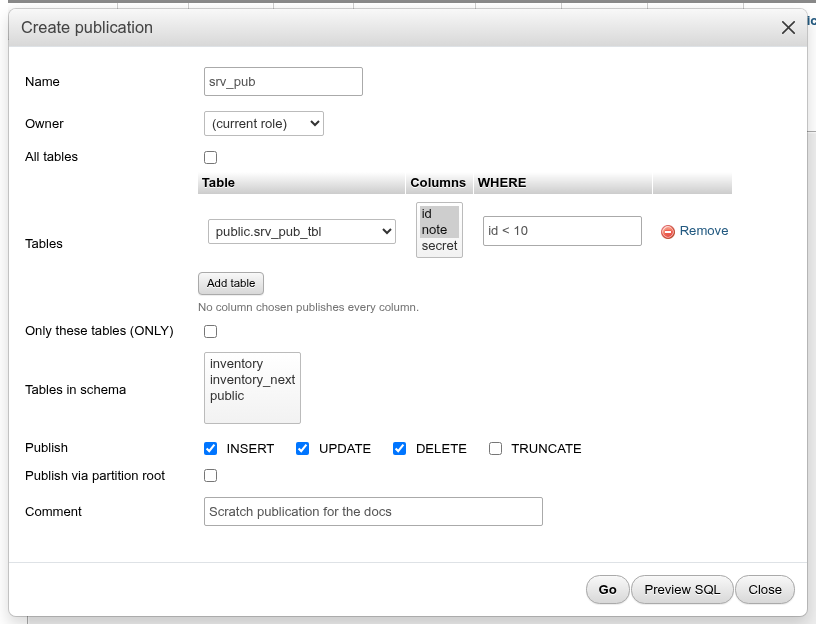
| Field | What it does |
|---|---|
| Name, Owner, Comment | As usual; (current role) owns it by default. |
| All tables | FOR ALL TABLES, including tables created later. Needs a superuser. Cannot be changed after creation (shown as read-only text when editing). |
| Tables | Add table adds a row: the table, and from PostgreSQL 15 its Columns (a column list; none chosen publishes every column) and a WHERE row filter. Remove deletes the row. |
| Only these tables (ONLY) | ONLY: do not include inheritance children. |
| Tables in schema | From PostgreSQL 15, TABLES IN SCHEMA: every table in the chosen schemas, now and later. |
| Publish | Which of INSERT, UPDATE, DELETE, TRUNCATE are sent. |
| Publish via partition root | Send changes of partitions as if made to the partitioned table. |
The dialog above runs:
CREATE PUBLICATION srv_pub
    FOR TABLE public.srv_pub_tbl (id, note) WHERE (id < 10)
    WITH (publish = 'insert, update, delete', publish_via_partition_root = false);

COMMENT ON PUBLICATION srv_pub
    IS 'Scratch publication for the docs';
Editing changes only what differs, for example ALTER PUBLICATION srv_pub SET (publish = 'insert, update, delete, truncate');.
Row filters and UPDATE / DELETE
A table with a row filter or column list that publishes UPDATE or DELETE must have its replica identity columns (normally the primary key) in the column list and use only them in the filter; otherwise PostgreSQL refuses the update or delete on the publisher. Publishing UPDATE / DELETE also needs a replica identity on every table.
Subscriptions
A subscription, in the database that receives the data, connects to a publisher and applies its changes. The target tables must exist already with the same names and compatible columns; logical replication does not copy the schema.
Columns: Name, Enabled, Publisher (host:port/db, superusers only), Publications, Slot, Worker (Running (PID n) or Not running), Received LSN, Last message, Errors (apply / sync) (PostgreSQL 15 and later), Owner, Comment.
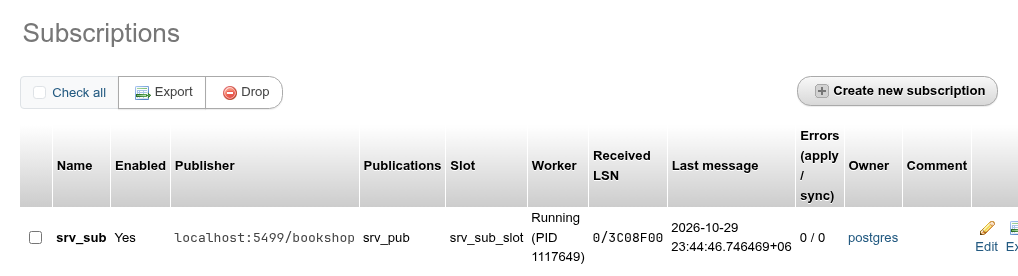
Create new subscription opens the dialog, in four parts:
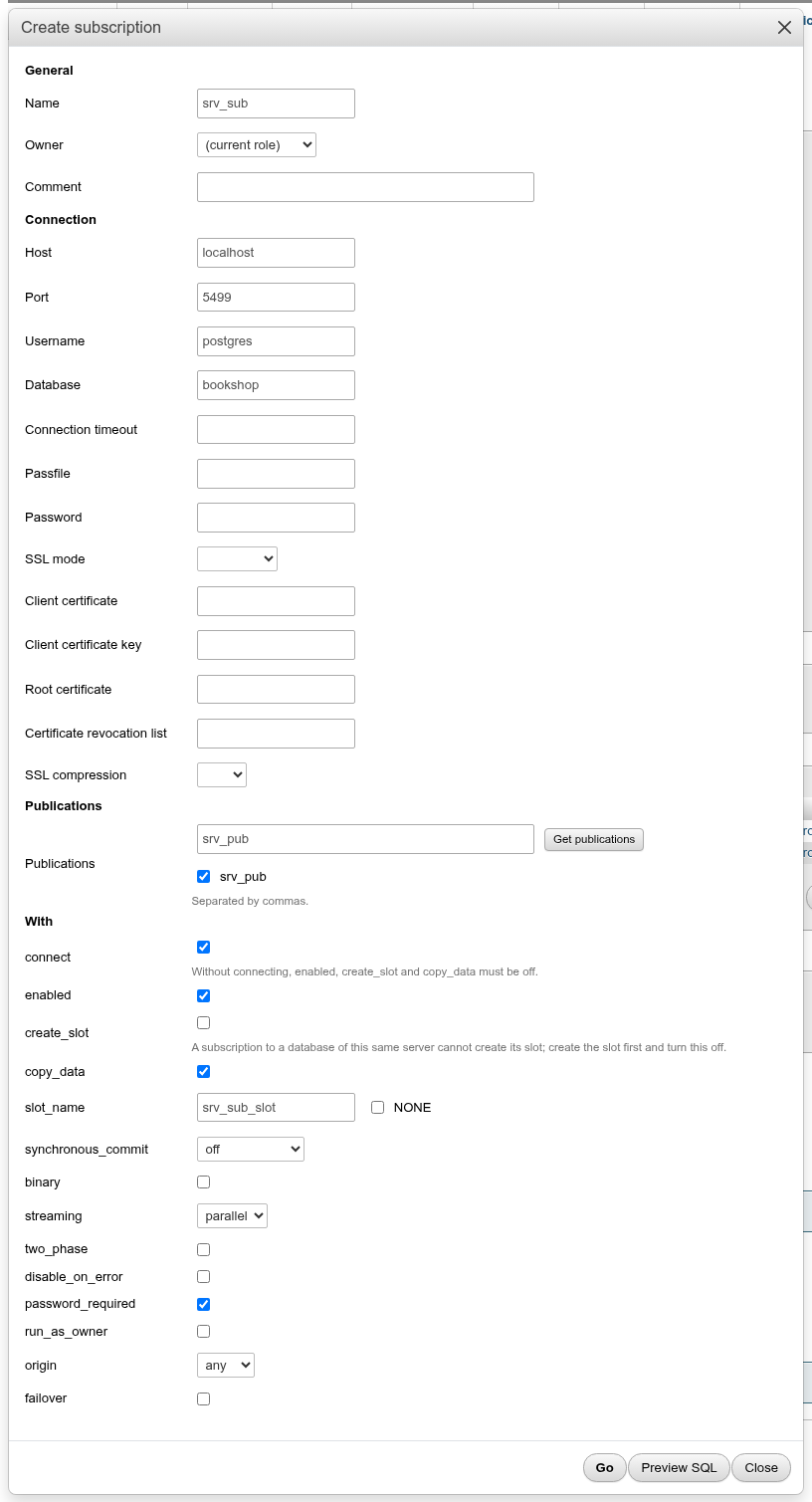
- General: Name, Owner, Comment.
- Connection: Host, Port, Username, Password, Database, Connection timeout, Passfile, SSL mode, the certificate files and SSL compression. They are assembled into the
CONNECTIONstring. The password is never shown again: when you edit, a blank password keeps the current one. - Publications: type the names separated by commas, or click Get publications, which connects to the publisher with the fields above and lists its publications as checkboxes.
- With: the
CREATE SUBSCRIPTIONoptions this server version has:connect,enabled,create_slot,copy_data,slot_name(or NONE),synchronous_commit, from 14binaryandstreaming(parallelby default from 18), from 15two_phaseanddisable_on_error, from 16password_required,run_as_ownerandorigin, from 17failover.connect,create_slotandcopy_dataexist only when creating.
The example above, which subscribes database srv_sub to srv_pub in bookshop on the same server:
CREATE SUBSCRIPTION srv_sub
    CONNECTION 'host=localhost port=5499 user=postgres dbname=bookshop'
    PUBLICATION srv_pub
    WITH (connect = true, enabled = true, copy_data = true, create_slot = false,
          slot_name = 'srv_sub_slot', synchronous_commit = 'off', binary = false,
          streaming = 'parallel', two_phase = false, disable_on_error = false,
          password_required = true, run_as_owner = false, origin = 'any', failover = false);
With copy_data the existing rows that pass the publication's row filter and column list are copied first (here rows 1 and 2 but not 30, and not the secret column); afterwards new rows inserted in bookshop arrive within a second or so.
A subscription to the same server cannot create its slot
When publisher and subscriber are databases of the same cluster, CREATE SUBSCRIPTION with create_slot = true waits forever: creating the slot waits for the subscribing transaction itself to finish. Create a logical slot with the pgoutput plugin in the publishing database first (in Replication slots), turn create_slot off and give that slot's name in slot_name. The dialog's hint says the same. This does not apply to a publisher on another server.
CREATE SUBSCRIPTION runs outside a transaction
CREATE SUBSCRIPTION with create_slot, DROP SUBSCRIPTION with a slot, and ALTER SUBSCRIPTION … REFRESH PUBLICATION cannot run in a transaction block, so phpPgAdmin runs the statements one at a time. If a later one (the comment, the owner) fails, the earlier ones stay done.
Edit changes the options and connection with ALTER SUBSCRIPTION. Unchecking enabled runs ALTER SUBSCRIPTION srv_sub DISABLE; and stops the worker. Refresh publication (only for an enabled subscription) fetches the tables the publications contain now, and Copy data after refresh copies the rows of newly added tables:
ALTER SUBSCRIPTION srv_sub
    REFRESH PUBLICATION WITH (copy_data = false);
Drop runs DROP SUBSCRIPTION, which also connects to the publisher and drops the subscription's slot there. If the publisher cannot be reached, disable the subscription and set its slot to NONE first, then drop it, and drop the slot on the publisher yourself.
Subscriptions need a superuser or pg_create_subscription
Creating a subscription needs a superuser, or from PostgreSQL 16 a member of pg_create_subscription with CREATE on the database. Only superusers can read a subscription's connection string; others see the Publisher column empty and must give the connection in full to change it.
See also
- Roles: the
REPLICATIONattribute. - Variables:
wal_level,max_wal_senders,max_replication_slots. - Status » Processes: walsender and logical replication workers appear with Show background processes.