
Server logs
The Logs pill of the server's Status tab (/server/status/logs) reads the files in PostgreSQL's log directory through SQL, so you can read the server log without shell access to the database host. It is pgAdmin's Logs panel laid out as phpMyAdmin's binary log viewer: a card to pick the file, then the file a page at a time.
Requirements
The page reads what PostgreSQL's logging collector writes:
logging_collector = on, withlog_destinationincludingstderr,csvlogand/orjsonlog. When the collector is off the page says so instead of listing files (PostgreSQL does not write its log to files it can read…); turning it on needs a restart.- Listing the directory uses
pg_ls_logdir(), which needs a superuser or a member ofpg_monitor. - Reading a file uses
pg_read_binary_file(), which needs a superuser,pg_read_server_files, orEXECUTEon that function.
Without these the page shows PostgreSQL's error, for example:

Pick a file
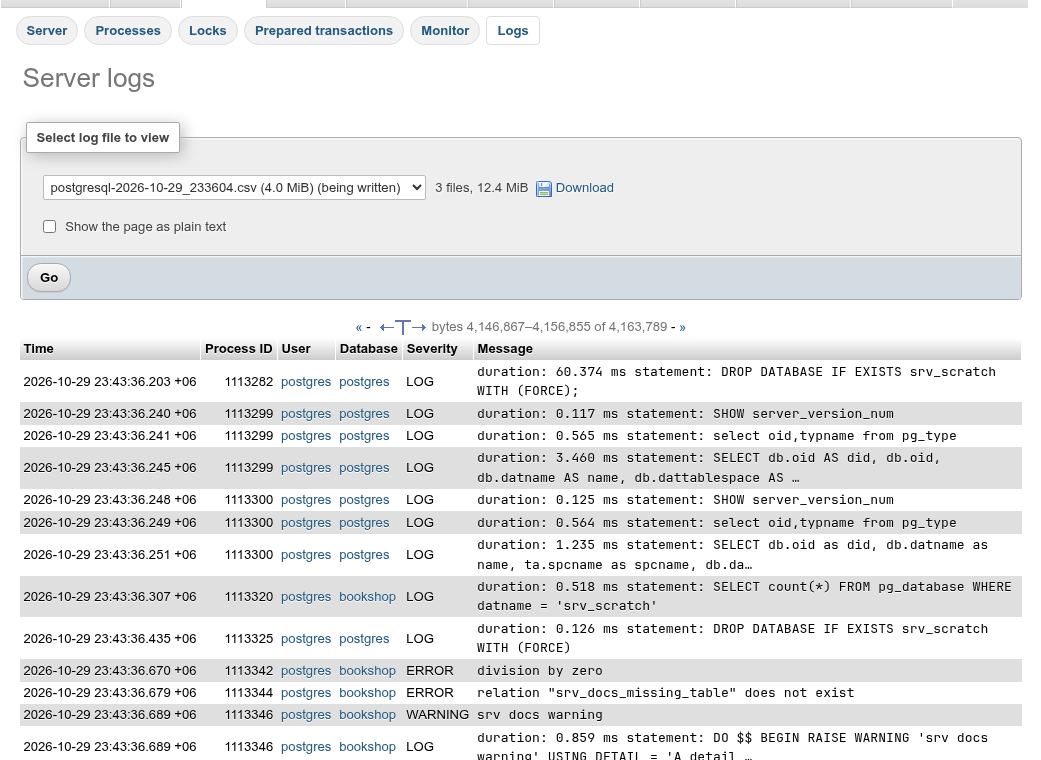
Select log file to view lists every file of the log directory, newest first, with its size; the files the server is writing to now (one per destination, from pg_current_logfile()) are marked (being written). Next to it are the number and total size of the files.
When the page opens it shows the last page of the newest file being written. To read another one:
- Choose the file.
- Check Show the page as plain text if you want the raw text rather than a table.
- Click Go. The file opens on its last page.
The format comes from the file name, as PostgreSQL names them: .csv is csvlog, .json is jsonlog, anything else is read as stderr output.
Reading entries
| Format | Columns |
|---|---|
| csvlog, jsonlog | Time, Process ID, User, Database, Severity, Message |
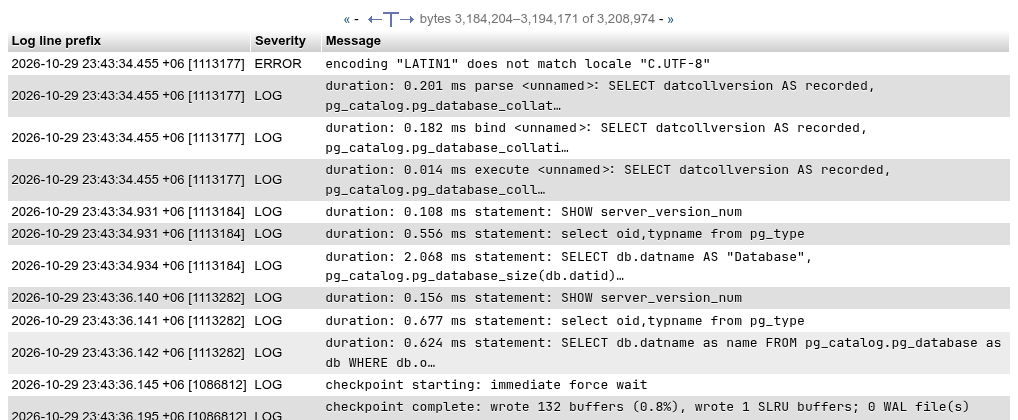
| stderr | Log line prefix, Severity, Message |
In csvlog and jsonlog files the user and database link to the role and the database. In the stderr format the server writes only what log_line_prefix says, so the page shows the whole prefix in one column (with the default %m [%p] , the time and the process ID); a line that continues the entry before (indented with a tab, or a DETAIL:, HINT:, CONTEXT:, STATEMENT: or QUERY: line) is joined to it.
Messages are cut to one line of 100 characters; hover one to see it whole. The icon in the navigation line toggles Show full messages, which shows each message in full with its DETAIL, HINT, CONTEXT and STATEMENT under it:

The stderr reader recognises the severities DEBUG1–DEBUG5, INFO, NOTICE, WARNING, ERROR, LOG, FATAL and PANIC. A line that matches none of them becomes an entry of its own with an empty severity.
Paging
A page is about 10,000 bytes of the file, widened so an entry is never cut in two. The line above the table gives the byte range, for example bytes 2,191,644–2,201,617 of 2,216,706.
- « (Previous) shows the page before; it is missing on the first page.
- » (Next) shows the page after; it is missing on the last page.
A file being written keeps growing
The file opens at the size it had when the list was loaded. Entries written since then are after the end of that page, so » appears even on the "last" page of a busy file. Go does not reload the list (it opens the file at the size listed), so follow » or reload the browser page to reach the newest entries; the sizes in the select are also those of the moment the page loaded.
Busy servers rotate quickly
With log_min_duration_statement = 0 or log_statement = all every query phpPgAdmin itself runs is logged too, and files rotate at log_rotation_size. The entry you are looking for may already be in the previous file of the list.
Plain text
With Show the page as plain text the same page is shown as it is in the file, in a <pre> block, with the same « / » paging:
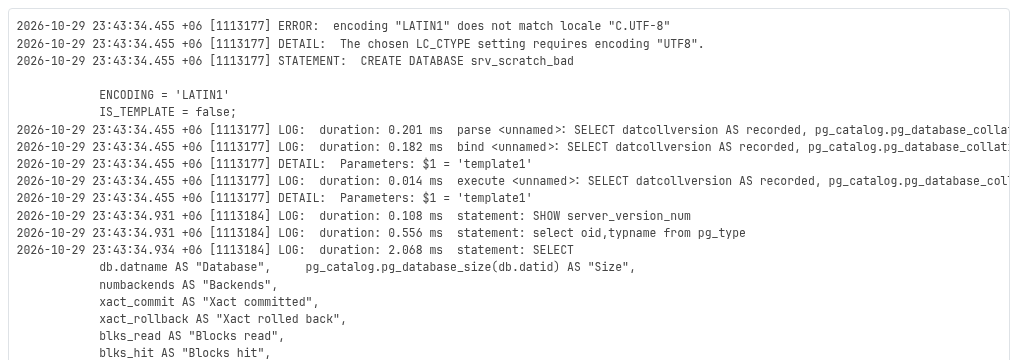
The text is converted from the server encoding to UTF-8; bytes that are not valid become U+FFFD.
Download
Download next to the file select sends the whole selected file as an attachment (text/plain for stderr, text/csv for csvlog, application/x-ndjson for jsonlog), read a megabyte at a time through pg_read_binary_file(). For a file being written you get what it held when the download started.
Only files in the log directory
A file name is looked up in pg_ls_logdir() before it is read, so the page cannot be used to read other files of the data directory; any other name answers There is no log file "…".