
Schema operations
A schema's Operations tab (/db/<database>/schema/<schema>/operations) changes the schema itself: its comment, its name, its owner, dropping it, and maintenance on all of its tables. Reach it from the tab bar inside a schema, or with Operations in the schema's row on the database's Structure tab.
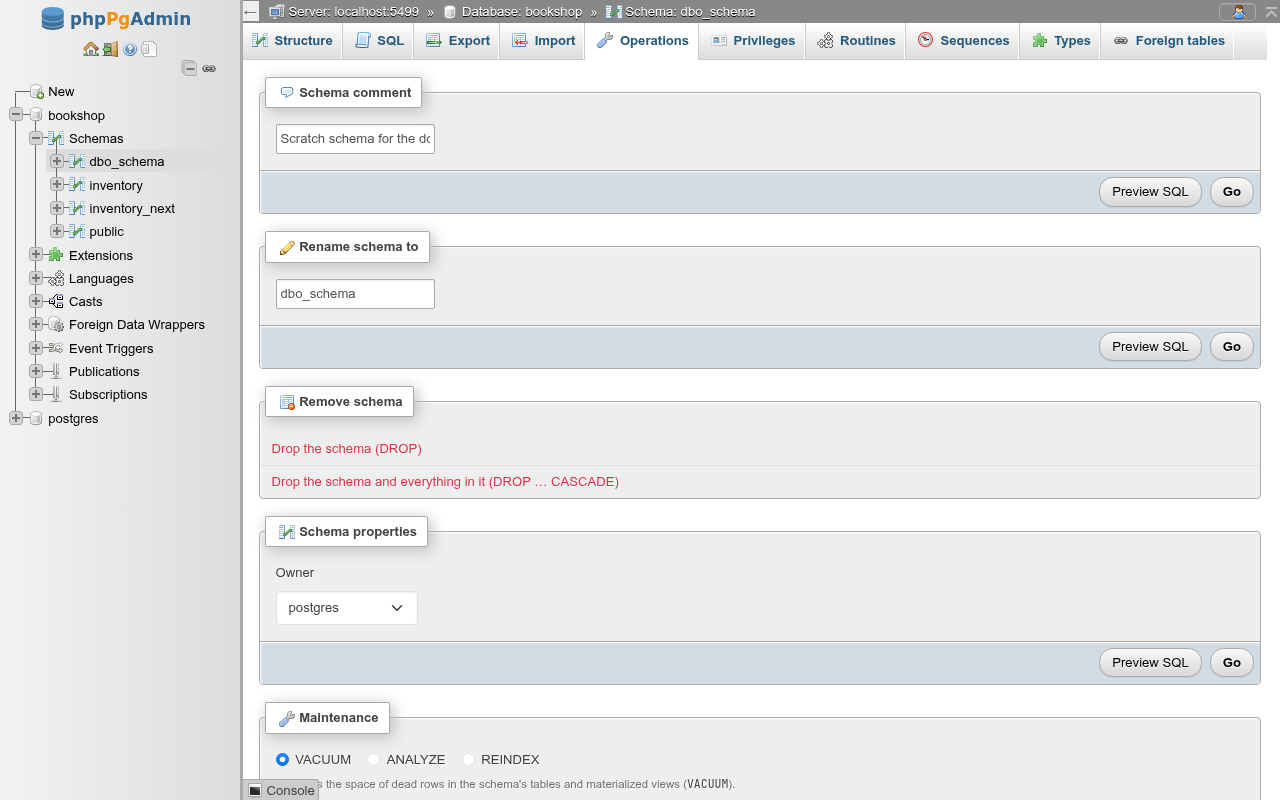
Each form card has Preview SQL, which shows the statements without running them, and Go. Clicking Go with nothing changed says Nothing to change.
Comment
Schema comment sets the description shown in the schema list.
COMMENT ON SCHEMA dbo_schema
    IS 'Renamed scratch schema';
Clear the field and click Go to remove it.
Rename
Rename schema to runs:
ALTER SCHEMA dbo_schema
    RENAME TO dbo_schema_renamed;
The page then moves to the renamed schema's Operations tab and the navigation panel refreshes.
What a rename does not change
Objects inside the schema move with it, but code that names the schema does not: function bodies, search_path settings of roles, databases and functions, and application queries still use the old name. Views and foreign keys are stored by OID and follow the rename. As when creating a schema, names starting with pg_ are refused.
Remove schema
Remove schema has two links, each opening a confirmation dialog with the statement:
| Link | SQL | Works when |
|---|---|---|
| Drop the schema (DROP) | DROP SCHEMA "name"; | The schema is empty |
| Drop the schema and everything in it (DROP … CASCADE) | DROP SCHEMA "name" CASCADE; | Always (if you own it) |
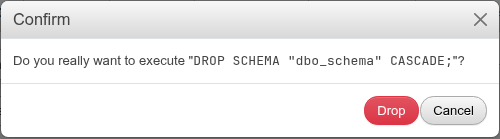
A plain drop of a schema that holds a table fails with cannot drop schema … because other objects depend on it and nothing changes. After a successful drop you land on the database's Structure tab.
DANGER
CASCADE also drops objects outside the schema that depend on what is in it, such as a view in another schema. The public schema has the same links and no extra protection, so read the statement in the dialog before you confirm.
Copy schema to
phpMyAdmin's Copy database to card, for a schema. PostgreSQL has no statement that copies a schema, so phpPgAdmin writes one from the schema diff: every object of the schema (types, domains, sequences, functions, tables with their constraints, indexes, triggers and grants, views…) made again under the new name, with the references to the schema itself pointing at the copy (inventory.warehouses becomes inventory_copy.warehouses; public.books stays as it is).
| Field | What it does |
|---|---|
| new name | The copy's name; a schema of that name must not exist. |
| Structure only | CREATE SCHEMA new AUTHORIZATION <owner> and the objects. |
| Structure and data | The same, with each table's rows: INSERT INTO new.t (…) SELECT … FROM ONLY old.t. |
| Data only | The rows only, into the tables of the same names of a schema that exists already (the new name is then that schema's). |
| Set the sequences' values | phpMyAdmin's Add AUTO_INCREMENT value: setval() of each copied sequence, and of each identity column's sequence, to the original's position, so new rows do not collide. |
| Switch to copied schema | Opens the copy's Structure page afterwards. |
The script runs in this order:
CREATE SCHEMA, then the types, domains, sequences and routines;- the tables without their foreign keys, indexes, triggers, rules and policies (an inheritance parent before its children, a partitioned table with its partitions);
- with data, the rows of each table;
- the views and materialized views, which so hold the copied rows;
- the indexes, then the foreign keys, checked once against all the rows (two tables that reference each other copy too), then the triggers, rules, policies and row level security: an audit trigger on the original does not fire for the copied rows;
- the sequences'
OWNED BY, and with Set the sequences' values their positions.
How the rows are copied:
- by column name, generated columns left to compute,
OVERRIDING SYSTEM VALUEforGENERATED ALWAYSidentity columns; - a column of one of the schema's own types (an enum, a composite, a domain, or an array of one) is cast through
textto the copy's type of the same name; - each table's own rows:
FROM ONLY, so an inheritance parent does not take its children's rows again; a partitioned table'sINSERTtakes all its partitions' rows, which go to the copy's partitions; - an identity column keeps its own sequence (no stray
CREATE SEQUENCEbeside it), moved past the copied values.
Data only writes into tables that already have their constraints and triggers: the rows go in after those of the tables their foreign keys reference, under SET CONSTRAINTS ALL DEFERRED, and the target's triggers fire.
Everything runs in one transaction: an error (a missing extension, a role you may not grant to) leaves nothing behind and shows the server's message. Preview SQL shows the whole script. Extension members are not copied (their extension owns them), and objects outside the schema, such as event triggers, stay as they are. Definitions are read with an empty search_path, so a view of public.items copied from public reads the copy's items, and a reference to an extension's member in the schema (public.citext) keeps naming the original.
Routine bodies are copied as they are
Only real references to the schema are renamed: names, types, defaults, view queries and '…'::regclass literals. String literals (a default of 'see inventory.t docs', a comment) are kept, and so are routine bodies, which PostgreSQL stores as opaque text: a copied function whose body reads inventory.stock still reads the original's table. A routine with its own SET search_path gets the copy's schema there instead of the original's; one without keeps none. Check the copied triggers' functions in particular: an audit function that inserts into inventory.audit_log keeps writing to the original's log.
Schema properties
Schema properties changes the Owner:
ALTER SCHEMA dbo_schema
    OWNER TO bookshop_staff;
Changing a schema's owner does not change the owners of the tables and other objects in it. To hand over everything a role owns, use REASSIGN OWNED BY old_role TO new_role in the SQL editor.
The public schema's owner
Since PostgreSQL 15, public is owned by pg_database_owner, a role that stands for whoever owns the database. The Owner list shows it for public; keep it unless you have a reason to change it.
Privileges and default privileges
The Operations tab does not edit privileges. GRANT USAGE / CREATE on the schema and the default privileges for objects created in it (ALTER DEFAULT PRIVILEGES IN SCHEMA …) are on the schema's Privileges tab, described on the Privileges page.
Maintenance
The Maintenance card runs VACUUM, ANALYZE or REINDEX on every table and materialized view in the schema, as a background process. CLUSTER is offered on the database's card only. See Maintenance for the options.